Nine guardrail layers that are on before you pass a flag
Fast, small, secure, local-first personal AI assistant infrastructure: one Rust binary for tools, memory, channels, providers, and sandboxed autonomy.
At a glance
- What is it?
- ZeptoClaw is a single Rust binary, about 6 MB and starting in 50 ms, that runs a personal AI agent locally with 33 built-in tools, 18 providers, 10 channels and six selectable sandbox runtimes, where prompt injection detection, a secret scanner, a policy engine and a tool approval gate all run by default rather than behind configuration.
- Who is it for?
- It fits someone who wants an agent with real isolation and a small footprint on hardware that is not a workstation, and who cares more about the guardrails being unavoidable than about a large integrations catalogue. Read four things first.
- Can I use it commercially?
- Yes. Apache-2.0 is a permissive licence: you can use, modify and sell software built on it, as long as you keep its copyright and licence notices.
- Is it still maintained?
- Yes. The repository last received commits 23 days ago.
- What is it written in?
- Mainly Rust, according to GitHub's language statistics.
Answers come from the project's GitHub data, last synced on November 22, 2026, and from our analysis. They are not legal advice.
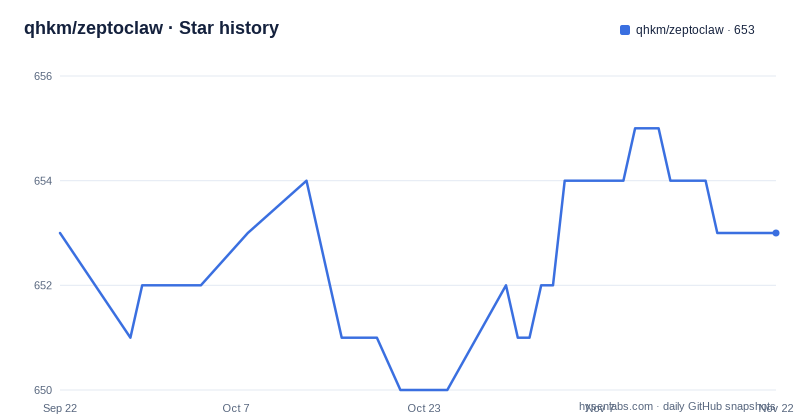
Star history
- qhkm/zeptoclaw653 ★ · +0
| Repository | 2026-09-22 | 2026-11-22 |
|---|---|---|
| qhkm/zeptoclaw | 653 | 653 |
0 Stars in the last 61 days, measured from the daily GitHub snapshot. Compare with other projects
Editorial analysis
33 built-in tools, 18 providers, 10 channels
The scope claim is a count of three surfaces. Tools: 33 built-ins, extendable with plugins, plus memory. Providers: 18, so an agent can be pointed at whichever model you pay for without the configuration shape changing. Channels: 10 built-ins that are described as active, extendable with plugins, which is how it becomes a Telegram, Slack, Discord or webhook gateway rather than only a terminal program.
The form factor is a single Rust binary of roughly 6 MB that starts in 50 milliseconds and uses about 6 MB of RAM. Four install paths are offered, and each one assumes a different starting point:
curl -fsSL https://raw.githubusercontent.com/qhkm/zeptoclaw/main/install.sh | sh
brew install qhkm/tap/zeptoclaw
docker pull ghcr.io/qhkm/zeptoclaw:latest
cargo install zeptoclaw --git https://github.com/qhkm/zeptoclaw
The package manifest is explicit that this is a Rust crate on edition 2021, licensed Apache-2.0, categorised as a command-line utility, with autobins turned off so only the declared binaries are built.
Those numbers matter less as a benchmark than as a design constraint. A binary that small can live on a $10 device, which is the same target PicoClaw set with a Go binary, and that is what makes the sandbox choice per request plausible: spinning a container is cheap when the agent itself costs nothing to start.
The honest trade is catalogue size. Compared against OpenClaw's 100-plus skills, 33 built-ins is a short list, and the plugins directory in the tree is where the gap is meant to be filled.
Sandbox choice is per request, across six runtimes
Isolation is the part with the most choices. Six sandbox runtimes are available: Docker, Apple Container, Landlock, Firejail, Bubblewrap, or native. The selection is described as per request, which is a stronger claim than a per-session sandbox, since each tool invocation can be isolated independently of the last.
The reason for having six is portability. Landlock and Firejail are Linux mechanisms, Bubblewrap is Linux, Docker is everywhere, Apple Container is macOS-only, and native is the escape hatch when nothing else is available. So the choice is a portability decision rather than a security ranking, and an agent that must run on a laptop, a small VPS and a $10 board needs all of them.
The gateway reflects this in its own flags. Running it as a long-lived service is one command, and running the same gateway with full container isolation per request is another, so the security level is a startup decision rather than a per-invocation prompt.
Everything the agent executes is a shell command by definition, which is why the isolation layer is the foundation of the design rather than an add-on.
Injection detection, secret scanning, chain alerting
The security story is nine layers, and the numbers attached to them are specific enough to check against the source.
Prompt injection detection uses an Aho-Corasick multi-pattern matcher with 17 patterns plus 4 regex rules, which is a fast literal matcher rather than a model, so it costs nothing per token. The secret leak scanner runs 22 regex patterns over content before it reaches the model, catching API keys, tokens and credentials. The policy engine has 7 rules covering system file access, crypto key extraction, SQL injection and encoded exploits. The input validator enforces a 100KB limit and checks for null bytes, whitespace ratio and repetition. A shell blocklist uses regexes against reverse shells, rm -rf and privilege escalation. SSRF prevention does DNS pinning, private IP blocking, an IPv6 transition guard and scheme validation. Chain alerting watches for dangerous sequences such as write then execute, or memory then execute. A tool approval gate requires explicit confirmation before dangerous tools run.
The critical design decision is the last line of the table: every layer runs by default, with no flags to remember and no configuration to enable.
That is the design decision that matters. A guardrail nobody turns on is not a guardrail, and most agent frameworks ship these as opt-in.
The threat model is three incidents in a sibling ecosystem
The security section is justified by naming what went wrong elsewhere, and the three incidents are specific.
CVE-2026-25253 is given a CVSS score of 8.8 and described as cross-site WebSocket hijacking leading to remote code execution. ClawHavoc is described as 341 malicious skills with more than 9,000 compromised installations. And 42,000 exposed instances with authentication bypass are cited as the third figure.
All three are attributed to the OpenClaw ecosystem, and all three are claims made by this project rather than independently verified here. That matters for how to read them: they establish the threat model the guardrails are designed against, which is a defensible thing for a competing project to point at, but they are not measurements performed by the authors.
The pattern across the three is worth noticing anyway. Each one is about a trust boundary failing quietly rather than a bug in reasoning: a hijacked session, a skill that was malicious from the start, and an endpoint reachable without authentication. A scanner for secrets, an approval gate for tools and a gate on authentication-adjacent paths all address that shape of failure, which is why the design leans on static matching rather than on asking a model to be careful.
Migration from OpenClaw reads JSON5 and backs up first
Switching from the ecosystem the project positions itself against is a first-class command, not a documented manual process.
Auto-detection looks in three places, ~/.openclaw, ~/.clawdbot and ~/.moldbot, which reflects the renaming that ecosystem has been through. A path can be given explicitly with --from, and --dry-run previews what would move with no files written, which is the option to use first:
zeptoclaw migrate --from /path/to/openclaw
zeptoclaw migrate --dry-run
zeptoclaw migrate --yes
What the command does is bounded and specific: it converts provider API keys, model settings and channel configurations, copies skills into ~/.zeptoclaw/skills/, backs up an existing ZeptoClaw configuration before overwriting it, validates the migrated configuration and reports issues, and lists the features that cannot be ported automatically.
That last behaviour is the one to look for. A migration tool that reports what it could not carry is telling you the compatibility boundary, which is more useful than one that reports success. The parser handles JSON and JSON5, the latter covering comments, trailing commas and unquoted keys, so hand-edited configs from the other ecosystem do not have to be cleaned before import.
Non-interactive runs use --yes to skip the confirmation prompts.
The image installs OpenSSL headers for a TLS stack that skips OpenSSL
The Dockerfile is a two-stage build with both base images pinned by digest, rust:1.98-slim-trixie for the builder and debian:trixie-slim for the runtime, which is the kind of pinning that survives a tag moving underneath you.
The dependency layer is cached properly. Only Cargo.toml and Cargo.lock are copied first, then placeholder source files are created for the main binary, a benchmark binary and a library stub, the dependencies are built and the placeholders are deleted before the real src and benches are copied in. That gives a rebuild on source change that skips the dependency compile, which on a crate of this size is most of the build time.
The inconsistency is in the builder's package list, which installs pkg-config and libssl-dev. The manifest comments say reqwest is used with rustls precisely to avoid an OpenSSL dependency, and rustls needs no OpenSSL headers at all.
So the build stage carries a C library it does not link. The runtime stage is leaner and more considered: ca-certificates, git, gosu and wget, plus a dedicated unprivileged user created with a login shell of /bin/false and a home directory at /data.
The test target installs its own runner first
The Makefile treats the test runner as a tool to be provisioned rather than assumed. The setup target checks whether cargo-nextest is present and, if not, installs it with cargo install cargo-nextest --locked. The test target depends on setup, then runs cargo nextest run followed by cargo test --doc.
Running documentation tests alongside the unit tests is the deliberate part, described as CI parity, so the local command and the pipeline run the same set.
The rest of the surface is conventional but complete. all runs lint, test and build. lint is cargo clippy with warnings denied, so a warning fails the build. fmt-check verifies formatting without rewriting files, and check composes fmt-check, lint and test. size builds a release binary and prints its size and file type, which is how a project that advertises a 6 MB binary keeps itself honest.
There are convenience run targets too, one that sends a test message to the agent, one that starts it interactively and one that starts the gateway. And the deploy targets shell out to a script in landing/ to publish the landing page and docs to Cloudflare Pages, which is a reminder that this repository contains a website as well as a binary.
A pristine copy of the coding tests sits beside the working one
Two directories with nearly the same name sit at the repository root: test-coding/ and test-coding-pristine/. One is the working set, the other is described by its name as an untouched baseline, which is the shape you build when you want to compare an agent's current behaviour against the state it started from.
Alongside them is the rest of the quality apparatus. codecov.yml reports coverage, deny.toml is a cargo-deny configuration for dependency and licence policy, and examples/ contains riscv_smoke.rs, a smoke test targeting RISC-V, which tells you that non-x86 targets are tested rather than assumed.
There is also an editor-independent agent instruction file in AGENTS.md alongside CLAUDE.md and a .kimiignore file, so the repository is set up to be worked on by more than one assistant tool.
One dependency decision is recorded in the manifest rather than left to history. The mqtt feature is temporarily disabled under the advisory RUSTSEC-2026-0049, and the code stays in place behind a feature gate with the unknown-cfg lint downgraded to a warning so the tree still compiles.
State lives under ~/.zeptoclaw, and uninstall removes it with zeptoclaw uninstall --yes, adding --remove-binary to also delete a direct-install binary from ~/.local/bin or /usr/local/bin.
Editorial conclusion
It fits someone who wants an agent with real isolation and a small footprint on hardware that is not a workstation, and who cares more about the guardrails being unavoidable than about a large integrations catalogue. Read four things first. The security claims are all project-reported numbers, including a CVSS score, a count of malicious skills and a count of exposed instances, so treat them as the threat model rather than as an audit. The control panel is a compile-time feature, so a plain install has no panel and no serve command. The container build installs OpenSSL headers even though the HTTP client is described as using rustls, which is wasted work in the image. And the newest release is v0.9.2 from 7 April 2026 while the branch was pushed on 28 September 2026, so pin a commit.
Frequently asked questions
What is zeptoclaw?
It is a personal AI assistant infrastructure written as one Rust binary of roughly 6 MB that starts in 50 milliseconds and uses about 6 MB of RAM. It ships 33 built-in tools, 18 providers, 10 active built-in channels and six selectable sandbox runtimes, and is licensed Apache-2.0.
Which sandbox runtimes does zeptoclaw support?
Six, chosen per request: Docker, Apple Container, Landlock, Firejail, Bubblewrap, or native. The gateway can be started with full container isolation per request using zeptoclaw gateway --containerized. Every security layer runs by default, with no flags to enable them.
How does zeptoclaw detect prompt injection and leaked secrets?
Prompt injection detection is an Aho-Corasick multi-pattern matcher with 17 patterns plus 4 regex rules. A separate secret leak scanner runs 22 regex patterns to catch API keys, tokens and credentials before content reaches the model. A policy engine adds 7 rules and an SSRF layer does DNS pinning, private IP blocking and an IPv6 transition guard.
How do I install zeptoclaw?
Four ways: the curl one-liner from install.sh, Homebrew with brew install qhkm/tap/zeptoclaw, docker pull ghcr.io/qhkm/zeptoclaw:latest, or cargo install zeptoclaw --git https://github.com/qhkm/zeptoclaw. The control panel is a compile-time feature, so zeptoclaw panel and zeptoclaw serve need a build with --features panel.
Can zeptoclaw import an existing OpenClaw setup?
Yes. zeptoclaw migrate auto-detects an installation in ~/.openclaw, ~/.clawdbot or ~/.moldbot, and takes --from for an explicit path, --dry-run to preview without writing and --yes to skip confirmations. It converts provider keys, model settings and channel configs, copies skills to ~/.zeptoclaw/skills/, backs up existing config, validates the result and lists what cannot be ported. JSON and JSON5 files are both parsed.
Official sources
Add this badge to your README
If you maintain this project, the badge below links readers to this analysis and shows its maintenance status from the daily GitHub snapshot. Paste the markdown into your README; add ?metric=license or ?metric=stars to the image URL for a different field.

[](https://hysenlabs.com/projects/qhkm-zeptoclaw)Star history chart for your README
[](https://hysenlabs.com/projects/qhkm-zeptoclaw)Was this useful?