Quary runs a Rust core inside a VSCode extension as WebAssembly
Open-source BI for engineers
At a glance
- What is it?
- Quary is an open source business intelligence tool for engineers: a VSCode extension for the interface, a Rust CLI for the core, and SQL models kept in version control. Its own repository carries four build systems, an empty heading where the supported database list should be, and a Makefile that reaches for npm inside a pnpm workspace.
- Who is it for?
- Quary fits an engineer who already lives in version control and wants SQL models, seeds and tests reviewed like code, on a machine where DuckDB is enough to start. Do not reach for it expecting a finished dashboard product, because dashboards and reports are both marked work in progress while charts are the finished layer.
- Can I use it commercially?
- Yes. Apache-2.0 is a permissive licence: you can use, modify and sell software built on it, as long as you keep its copyright and licence notices.
- Is it still maintained?
- Yes. The repository received new commits within the last day.
- What is it written in?
- Mainly Rust, according to GitHub's language statistics.
Answers come from the project's GitHub data, last synced on November 23, 2026, and from our analysis. They are not legal advice.
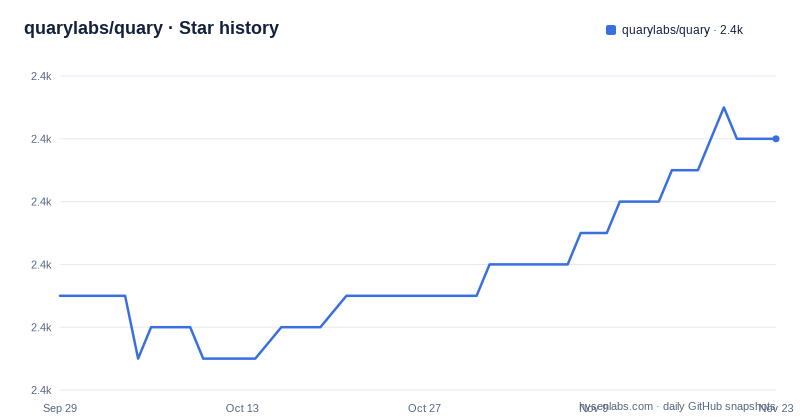
Star history
- quarylabs/quary2,390 ★ · +5
| Repository | 2026-09-29 | 2026-11-23 |
|---|---|---|
| quarylabs/quary | 2.4k | 2.4k |
5 Stars in the last 55 days, measured from the daily GitHub snapshot. Compare with other projects
Editorial analysis
The supported databases heading has nothing under it
The README carries a heading called Supported Databases, and under it there is an empty paragraph element and nothing else. No vendor is named, no list is rendered, and the HTML around it suggests an image or a grid that never made it into the file.
What the documentation does tell you is the shape of a source. The Sources asset type covers external data that feeds Quary: database tables, flat files, or APIs, with DuckDB named in that last case. The demo project the CLI creates is a DuckDB project with sample data, so the path of least resistance runs through an embedded engine rather than a server you have to provision.
The rest of the documentation is at `https://www.quary.dev/docs`, which is where the missing table presumably lives. The consequence for anyone evaluating the project is that the first question, which engines connect, cannot be answered from the repository itself, and the answer you get from the README is DuckDB by example.
The interface is the extension and the core is Rust
Quary is split into two deliverables, and the README names them plainly: a VSCode extension as the interface, and a Rust-based CLI as the core.
The build files show how the two meet. A Makefile target compiles the core for `wasm32-unknown-unknown` in release mode with `RUSTFLAGS='--cfg getrandom_backend="wasm_js"'`, selects the package named `quary-wasm-bindgen`, and then runs `wasm-bindgen` with the web target, writing the output into the extension's source tree under `js/packages/quary-extension/src/rust_wasm`. So the same Rust core that the CLI runs natively is compiled a second time to WebAssembly and loaded inside the editor.
That is a sensible split and it has a cost worth knowing about: there are two artifacts to keep in step. The repository also carries a `rust-toolchain.toml` and a Storybook setup for the extension UI, with a `storybook` script filtered to `quary-extension-ui`.
Five commands take an empty folder to a tested model
The usage section is a single block, and it happens to be a good summary of the tool's shape.
mkdir example # create an empty project folder
cd example
quary init    # initialize DuckDB demo project with sample data
quary compile # validate the project structure and model references without database
quary build   # build and execute the model views/seeds against target database
quary test -s   # run defined tests against target database
`init` writes a demo project, `compile` checks structure and references without touching a database, `build` materialises the views and seeds against the target, and `test -s` runs the tests you defined. The separation between compile and build is the part that matters: a broken model reference surfaces before anything executes.
The asset model is the other half. Sources bring data in, Models transform it with SQL into analysis ready datasets that can be split into atomic pieces, and Charts are written in SQL too. Dashboards and Reports are both marked as work in progress, so the deliverable today is a chart, not a screen.
Three install routes for the CLI and one for the extension
Installation is split by deliverable, and the CLI has three routes.
brew install quarylabs/quary/quaryThat is the Homebrew route. For Linux and Mac there is a script:
curl -fsSL https://raw.githubusercontent.com/quarylabs/quary/main/install.sh | bashBoth of those point at a moving target, since neither names a version. The third route is the releases page, which is the only one where you choose what you get. Nothing in the repository documents a checksum for any of the three, and no Windows route appears in the README at all.
The extension is separate. It installs from the Visual Studio marketplace under the name `Quary.quary-extension`, and the README notes that it depends on the CLI being installed. So the full setup is two installs in a specific order, and installing the extension first leaves you with an interface that has nothing to talk to.
Four build systems share one repository
The root listing shows what it takes to build this thing. There is a Cargo workspace, a pnpm workspace with `pnpm-workspace.yaml` and `pnpm-lock.yaml`, a Bazel setup with `BUILD.bazel`, `MODULE.bazel`, `MODULE.bazel.lock`, `.bazelrc`, `.bazelversion` and `tools.bzl`, and protobuf definitions under `proto/` driven by `buf.gen.yaml` and `buf.work.yaml`.
On top of that sit a Makefile, Storybook for the extension UI, and a set of formatting and linting tools that each cover a different slice: `cargo clippy` and `cargo fmt` for Rust, eslint and prettier for the JavaScript, `sqlfluff` and `sqruff` for the SQL templates, `commitlint` for commit messages, and `buf lint` for the proto files.
The JavaScript side pins its requirements tightly. The root `package.json` requires Node `>=22.0.0 <23.0.0` and pnpm `>=10.0.0`, so a machine on Node 24 is outside the range the project declares, and the `ci` script chains lint, build, test, a Storybook build and a vscode package step in that order.
One SQL directory is fixed by one tool and linted by another
The Makefile has two targets that work on the same pair of directories, `rust/core/src/init` and `rust/core/src/init_duckdb`. One of them runs `sqlfluff fix .` in each. The other runs `sqruff lint .` in each. Fixing with one linter and checking with another is a deliberate choice or an inherited one, and either way it means a contributor needs both tools installed and a mental model of which one owns which complaint.
The two are related. The Cargo workspace lists `sqruff-lib-core`, `sqruff-lib-dialects` and `sqlinference`, all aliased to packages under the name `sqruff` at version 0.34.1, as workspace dependencies. The README then points at SQRUFF as the lab's other project, described as a compact, high-speed SQL linter. So the lint rules for Quary's own SQL templates come from a sibling project that is also a compiled dependency, which is an unusual arrangement for template code rather than application code.
The Rust side declares a floor of `1.86.0` on edition 2021, with `cargo-nextest` as the only dev dependency.
The Makefile bumps the extension with npm inside a pnpm workspace
One target is a small inconsistency. `bump_version_patch` runs `npm version patch --prefix js/packages/quary-extension`, and the JavaScript side of this repository is a pnpm workspace that declares pnpm `>=10.0.0` as its package manager and keeps its lockfile in `pnpm-lock.yaml`.
The proto target shows the cost of four build systems meeting in one place. It deletes `proto/gen`, runs `buf lint`, builds with `buf build` piping through `jq` to read the package name out of the JSON, runs `buf generate`, then symlinks a Cargo manifest out of a hidden `proto/.hacking/` directory, renames the generated `quary.service.v1.rs` to `lib.rs`, formats with cargo, removes and recreates the TypeScript generated directory, copies the output into `js/packages/proto/src/generated/`, and finishes with `pnpm run fmt`. A breaking change check runs separately against the `main` branch with `buf breaking`.
On versions, the manifest and the newest tag agree: the workspace package version is `0.10.1` and v0.10.1 is the latest release, published 2026-01-23, after v0.10.0 in January and v0.9.0 in August 2025. The last push was on 2026-09-14, so the released artifact is eight months behind the branch.
Editorial conclusion
Quary fits an engineer who already lives in version control and wants SQL models, seeds and tests reviewed like code, on a machine where DuckDB is enough to start. Do not reach for it expecting a finished dashboard product, because dashboards and reports are both marked work in progress while charts are the finished layer. Before you commit, check three things: the supported database list, which is an empty heading in the README and lives on the documentation site; whether the curl install route is acceptable to you, since nothing in it is version pinned or checksummed; and the Rust floor, since the workspace asks for 1.86.0 or newer on top of edition 2021.
Frequently asked questions
What is Quary?
An open source business intelligence tool for engineers, delivered as a VSCode extension for the interface and a Rust CLI for the core. It treats sources, models and charts as code, with SQL models that can be tested and reviewed through version control and then deployed back to the database.
How do I install the Quary CLI?
With Homebrew, brew install quarylabs/quary/quary, or on Linux and Mac with curl -fsSL piped into bash from the repository's install.sh. Other builds are on the releases page. The VSCode extension installs separately from the marketplace and depends on the CLI being installed first.
What do quary init, compile, build and test do?
quary init creates a DuckDB demo project with sample data, quary compile validates the project structure and model references without a database, quary build builds and executes the model views and seeds against the target database, and quary test -s runs the defined tests against that database.
Which databases can Quary connect to?
The README has a heading for supported databases with nothing under it, and points to the documentation at quary.dev/docs. What it does say is that a source can be a database table, a flat file, or an API with DuckDB, and the demo project the CLI creates uses DuckDB.
Official sources
Add this badge to your README
If you maintain this project, the badge below links readers to this analysis and shows its maintenance status from the daily GitHub snapshot. Paste the markdown into your README; add ?metric=license or ?metric=stars to the image URL for a different field.

[](https://hysenlabs.com/projects/quarylabs-quary)Star history chart for your README
[](https://hysenlabs.com/projects/quarylabs-quary)Was this useful?