Skills Hub keeps one copy of an Agent Skill and links it into 48 tool directories
A cross-platform desktop app to manage Agent Skills in one place and sync them to multiple AI coding tools’ global skills directories — “Install once, sync everywhere”.
At a glance
- What is it?
- Skills Hub is a Tauri and React desktop app that stores Agent Skills in one central repository at ~/.skillshub and projects them into the skills directories of Claude Code, Codex, Cursor, OpenCode and Antigravity. The link is a symlink or junction where the filesystem allows it, and a plain file copy where it does not, which is the trade-off that matters most before you adopt it.
- Who is it for?
- Skills Hub earns its place if you use three or more AI coding tools with separate skills directories, because an edit in the central repository reaches every linked target at once. Skip it if one tool holds all of your skills, and consider it for a team that wants a portable library through Device Sync.
- Can I use it commercially?
- Yes. MIT is a permissive licence: you can use, modify and sell software built on it, as long as you keep its copyright and licence notices.
- Is it still maintained?
- Yes. The repository last received commits 7 days ago.
- What is it written in?
- Mainly Rust, according to GitHub's language statistics.
Answers come from the project's GitHub data, last synced on October 22, 2026, and from our analysis. They are not legal advice.
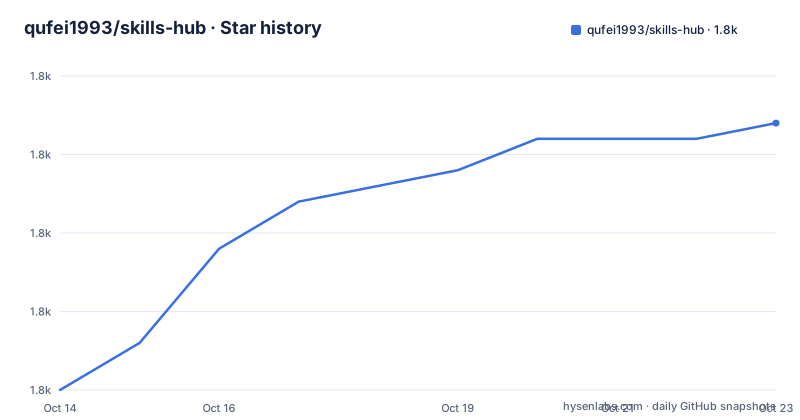
Star history
- qufei1993/skills-hub1,821 ★ · +16
| Repository | 2026-10-14 | 2026-10-22 |
|---|---|---|
| qufei1993/skills-hub | 1.8k | 1.8k |
16 Stars in the last 8 days, measured from the daily GitHub snapshot. Compare with other projects
Editorial analysis
One library, many tool directories, links before copies
Every AI coding tool keeps its own skills directory, and Skills Hub treats that fragmentation as the problem. A skill copied into five tool folders is five files to update, five places to clear out, and five activation states that drift apart. Skills Hub instead keeps a single central repository of skills and projects it into whichever directories your tools read, so Claude Code, Codex, Cursor, OpenCode and Antigravity can share one source of truth. The repository description compresses the goal into four words: install once, sync everywhere.
The link between the central copy and a tool directory is a symlink, and on Windows the same idea is a junction. Where a filesystem refuses the link, the app falls back to copying files. Nothing about the layout changes in that fallback, but the maintenance story does, because two independent files now exist where one linked path used to sit. The central repository itself defaults to ~/.skillshub, so a backup or a wipe that misses that directory takes the whole managed library with it.
Forty-eight adapters, and the N/A split that keeps some tools global only
Skills Hub ships 48 built-in tool adapters, listed as a table of tool key, display name, global skills directory relative to ~, and project skills directory relative to the selected project root. Project scope therefore means a path inside the project you picked, not inside the tool's own config tree. Tools marked N/A have no confirmed project-level skills directory and are supported for global sync only, so a skill you want scoped to a repository cannot land in those tools.
Beyond the built-ins, Management Center creates custom tools with an avatar, one or more skills directories, and an explicit sync mode. That mode is the part worth reading carefully before you add a tool by hand, because it decides whether the app writes into every configured directory of that tool or only some of them. Any tool you add this way is not in the 48, so its directory layout is whatever you typed.
No download step is documented, so the build scripts are the entry point
The README carries no install or download command for end users. It points to two documents only, README.md for English and docs/README.zh.md for Chinese, and leaves acquisition to the reader. The commands that do exist live in package.json, where version 0.10.1 is pinned and the desktop scripts are separate from the web ones:
cd src-tauri && cargo testThat is the Rust half of the gate. The JavaScript half runs a network boundary test that the normal test script deliberately leaves out:
node --test scripts/check-network-boundaries.test.mjsThe exclusion is visible in package.json itself, where the test script lists that file under --exclude. The combined check runs the boundary test first, then lint, then the Vitest suite, then the build, then cargo fmt --check and clippy. A macOS disk image is produced by:
npm run tauri:build -- --bundles dmgWindows and Linux targets sit alongside it as msi, nsis, deb and appimage bundles, and scripts/version.mjs backs the version:set, version:sync and version:check scripts that keep the pinned version honest.
Scheduled updates that keep running after the window closes
Updates apply to Git and local-source skills, and they can run on a system-level schedule that stays alive while the app is closed, which the GitHub and local-source rows of the Updates screen display as checked, updated and failed counts for the most recent run. Failure details are visible rather than folded into a single success indicator, so a repository that stopped resolving shows up as a number you can look at.
Note what the schedule covers. Only skills installed from a Git repository or a local folder participate. A skill that came from a curated list or from online search has no remote to re-pull, and the README does not document a refresh path for those.
Device Sync ships content without device-local paths, targets or credentials
Device Sync connects the library to a GitHub, GitLab or Gitee repository so a portable copy travels between computers. Authorization starts either through your account or through Token or SSH access, then you pick a repository and complete a first sync. Afterwards you can preview changes, sync manually, after startup, at an interval, or at a daily time, and you can inspect history per Skill and resolve real conflicts. What never crosses the wire is the device-local half of your setup: local paths, tool targets and credentials stay on the machine that set them.
The close reading is in .env.example. Two OAuth client IDs, SKILLS_HUB_GITHUB_CLIENT_ID and SKILLS_HUB_GITLAB_CLIENT_ID, are described as public identifiers that must not be real deployment values in the repository. A third variable, SKILLS_HUB_GITEE_AUTH_RELAY_URL, points at a public HTTPS endpoint that the project operates for Gitee's OAuth exchange, and its shipped value is a placeholder you replace with your own relay. That is the practical catch: shipped builds ignore runtime values and embed deployment values at compile time, so a Gitee user who wants the OAuth path has to supply a working relay before the binary is built. Settings also carries a GitHub token field, so token auth remains available for anyone who would rather not build anything.
The recycle bin's 30 days only pay out while the original paths survive
Deleted skills move to a local recycle bin and stay there for 30 days, and the Restoring a Skill brings back its files and saved local configuration when the original locations are still available. That conditional is the whole promise. A skill restored after its central directory was removed, or after a symlink target was deleted by hand, comes back without the local configuration half, and the README does not document a separate way to re-enter that configuration. Storage and cache paths are both Settings entries, so where the bin physically lives is a choice you make before you ever need it.
Discovery scans are a separate switch from sync targets, gated on SKILL.md
Import discovery and sync targeting are two different lists, and the app is careful about the difference. When a discovery banner reports importable skills found in installed tool directories, you review them or open Scan settings. Scan sources persist across restarts and stay reachable from Settings, but turning a directory into a scan source does not make it a sync target, and vice versa.
The gate on what counts as a skill is a single file: only directories containing SKILL.md are listed as importable. A folder of loose Markdown or a differently named manifest is invisible to Migration, so an import that finds nothing is often a naming problem rather than a discovery bug. The same mechanism explains why adding a custom tool without a skills directory that holds SKILL.md files produces an empty scan.
What the documentation leaves out: install, rollback and edit reconciliation
Three gaps are worth naming before you commit a team to this. First, there is no documented install path for end users, which makes a self-built binary the only route the README points at. Second, the README does not document rollback: Device Sync offers per-Skill history and conflict resolution, and the recycle bin covers deletion for 30 days, but neither is described as an undo for a bad automatic update run. Third, with the copy fallback active there are two files per tool directory and no documented rule for which one wins when a file is edited inside a tool folder directly.
For contrast, the alternative approach is to keep each tool's directory as the source of truth and manage it with shell scripts or a dotfiles repo, which gives version control but leaves the drift between tools entirely to you. Skills Hub takes the opposite position, one central repository plus links, and buys automatic multi-target updates at the cost of a dependency on link support and on its own conflict rules. Repository maintenance looked active through 2026-09-20, the date of the last push, with v0.10.1 dated 2026-09-13.
Editorial conclusion
Skills Hub earns its place if you use three or more AI coding tools with separate skills directories, because an edit in the central repository reaches every linked target at once. Skip it if one tool holds all of your skills, and consider it for a team that wants a portable library through Device Sync. Verify three things first: whether your filesystem accepts links or quietly falls back to copying, whether the tools you need sit in the 48 built-in adapters or need a custom entry with a hand-typed skills directory, and which OAuth values your own build must supply, since shipping builds embed them at compile time.
Frequently asked questions
Where does Skills Hub store skills on my machine?
Skills Hub keeps skills in one central repository that defaults to ~/.skillshub, then syncs them to each tool's global or project-level skills directory. You choose tags, scope and target tools before installation.
How many AI coding tools does Skills Hub support?
48 built-in tool adapters ship with the app, and Management Center adds custom skills directories for anything missing. Tools marked N/A have no confirmed project-level directory and work for global sync only.
What happens to a skill I delete in Skills Hub?
It stays in a local recycle bin for 30 days, and restoring it returns the files and the saved local configuration as long as the original locations still exist.
Can I sync my skill library between two computers?
Device Sync connects to a GitHub, GitLab or Gitee repository after you authorize an account or configure Token or SSH access. You can then preview changes and sync manually, after startup, at an interval, or at a daily time.
Official sources
Where developers are discussing it
Posts on Hacker News, dev.to and Lobsters that link to this repository, found by our scan of those communities. 1 in the last 30 days; newest first.
- Show HN: Skills Hub, a desktop app for managing AI agent skillsHacker News · Oct 12, 2026 · 10 points · 1 comments
Add this badge to your README
If you maintain this project, the badge below links readers to this analysis and shows its maintenance status from the daily GitHub snapshot. Paste the markdown into your README; add ?metric=license or ?metric=stars to the image URL for a different field.

[](https://hysenlabs.com/projects/qufei1993-skills-hub)Star history chart for your README
[](https://hysenlabs.com/projects/qufei1993-skills-hub)