sherif: a zero-config linter for the monorepo, not the file
Opinionated, zero-config linter for TypeScript & JavaScript monorepos
At a glance
- What is it?
- sherif is a Rust command line tool that inspects a whole JavaScript or TypeScript monorepo and reports the inconsistencies that per-package linting cannot see, such as a dependency pinned to different versions in different packages. It needs no node_modules, works with any package manager, and can autofix most of what it finds.
- Who is it for?
- Adopt sherif if you run a JavaScript or TypeScript monorepo and want one command to catch version drift, empty dependency fields and unsynchronised related packages, and pin the version you run in CI. Do not adopt it as a code style linter, since it does not check the code, and do not enable autofix in a pipeline that runs against a lockfile you cannot regenerate.
- Can I use it commercially?
- Yes. MIT is a permissive licence: you can use, modify and sell software built on it, as long as you keep its copyright and licence notices.
- Is it still maintained?
- Yes. The repository last received commits 126 days ago.
- What is it written in?
- Mainly JavaScript, according to GitHub's language statistics.
Answers come from the project's GitHub data, last synced on November 7, 2026, and from our analysis. They are not legal advice.
Star history
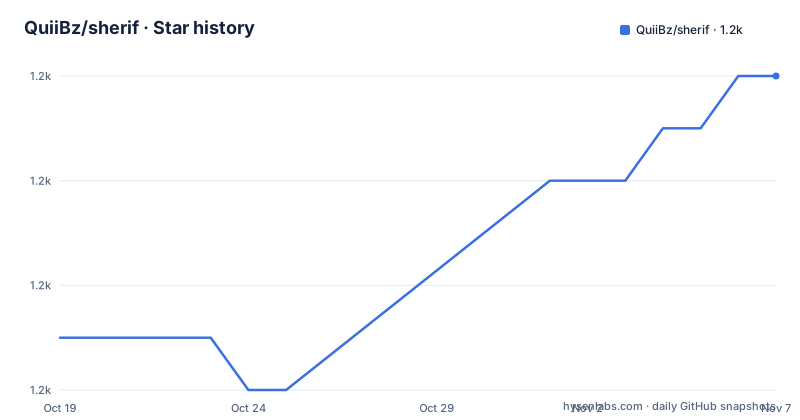
- QuiiBz/sherif1,198 ★ · +5
| Repository | 2026-10-19 | 2026-11-07 |
|---|---|---|
| QuiiBz/sherif | 1.2k | 1.2k |
5 Stars in the last 19 days, measured from the daily GitHub snapshot. Compare with other projects
Editorial analysis
The problems a file-level linter cannot see
Sherif is an opinionated, zero-config linter for TypeScript and JavaScript monorepos, and it runs fast in any monorepo and enforces rules to provide a better, standardised developer experience.
The word monorepo does the work here. The problems sherif looks for are not the kind a linter finds by reading one file. They are properties of the workspace as a whole. A dependency added to one package and pinned to a different version in another is invisible to any tool that reads a single package.json. An empty dependencies object left behind after a removal is invisible too. Two related packages in the same file drifting apart in version is the same class of problem.
That is a category of bug that is easy to create and annoying to find. It shows up as a bug that only reproduces in one package, or as a build that works locally and fails when the lockfile is regenerated, and the cost of chasing it is measured in hours rather than minutes.
The rules are opinionated, which is the point. A tool that reports only certain things and is quiet about the rest can be run on every pull request without a suppression file that grows by the month.
Rust, and no install step
The three feature lines in the README are short and each one removes an objection.
It works with PNPM, Bun, NPM and Yarn, so it does not ask you to change your package manager. It is zero-config, in the sense that it just works and prevents regressions, with no configuration file to write and no rule set to select. And it is fast, because it does not need node_modules installed, being written in Rust.
That last point is the technical centre of the design. A JavaScript tool that analyses a JavaScript workspace usually has to run inside that workspace's own dependency tree, which means the dependency tree has to be installed, which means the tool cannot be run on a repository that has just been cloned, and which means the linter itself has version conflicts with the code it is linting. A Rust binary that reads package.json files as data has none of those problems, and the cost is that it can only see what is written in the manifests, not what is in the lockfile or in the resolved tree.
That trade is visible in the rules. sherif knows which dependency version each package declares and compares those declarations. It does not know what the package manager actually resolved. For the class of problem sherif targets, which is declared inconsistency, that is enough.
Running it, and the one instruction about versions
You run sherif in the root of the monorepo, and it lists the issues it found. The README gives one invocation per package manager:
# PNPM
pnpm dlx sherif@latest
# Bun
bunx sherif@latest
# NPM
npx sherif@latest
# Yarn
yarn dlx sherif@latest
By default, any error causes sherif to exit with a code of 1, which is what makes it usable as a CI gate.
The important instruction comes next. The recommendation is to run sherif in CI once all errors are fixed, and to run it by specifying a version instead of latest. The stated reason is to prevent regressions, with the example being adding a library to a package but forgetting to update the version in the other packages of the monorepo.
That example is the whole point of the tool, and it also explains why the version instruction matters. A linter that catches the problem is only useful if it is present when the problem is introduced. Running latest means the behaviour can change under you, and a rule set that expands silently turns a green pipeline red on a commit that changed nothing but a dependency. Pinning the version is the difference between a check and a coin toss.
The other two exit-code options are worth knowing. If you only have warnings or no issues at all, sherif exits with 0, and the --fail-on-warnings option changes that so that any issue at all produces a failure.
The GitHub Action, and the script it looks for
There is a first-party GitHub Action, and it has a small piece of behaviour that is worth understanding before you wire it in. When using the action, it searches for a sherif script in the root package.json and uses the same arguments automatically, to avoid repeating them twice. You can override that behaviour with the args parameter.
So the shape of the recommended setup is a script in the root package.json that runs sherif, and an action that finds it. The workflow in the README is short:
name: Sherif
on:
  pull_request:
jobs:
  check:
    name: Run Sherif
    runs-on: ubuntu-22.04
    steps:
      - uses: actions/checkout@v4
      - uses: QuiiBz/sherif@v1
        # Optionally, you can specify a version and arguments to run Sherif with:
        # with:
          # version: 'v1.13.0'
          # args: '--ignore-rule root-package-manager-field'
The commented options are the two that matter in practice, pinning the action to a version and passing arguments, including how to ignore a rule the repository has decided not to follow.
The alternative in the same section is to skip the action and use npx directly, with setup-node and node-version 24, and the README shows that variant as well. The action repository in the tree holds the TypeScript source for it, and the package.json builds it with ncc into the action directory, which is the standard way to ship a JavaScript GitHub Action that runs without an install step.
Autofix, the lockfile, and why CI does not fix
Most issues can be fixed automatically with the --fix flag, or -f. Sherif will then automatically run your package manager's install command to update the lockfile, and the --no-install flag stops it doing that.
That last point is the one to understand. A fix that changes a manifest without regenerating the lockfile leaves the repository in a state where the declared versions and the resolved versions disagree, and a fix that regenerates the lockfile touches a file with a large diff and a merge conflict risk. The flag lets you choose.
The bigger rule is that autofix is disabled in CI environments, when $CI is set. That is a sensible default for a tool whose fix mutates manifests and lockfiles, and it means the CI run is a check rather than a mutation. The README's advice is to fix the errors locally first, then turn the check on in CI.
One rule needs its own handling. The multiple-dependency-versions rule, when fixed, asks you to select which version to use for each dependency that appears at several versions across the monorepo. In a non-interactive environment that prompt is a problem, and the --select flag, or -s, selects automatically, either the highest or the lowest version of every dependency:
sherif --fix --select highestThe rules, and the escape hatches
Three rules are documented in detail, and they are the clearest statement of what sherif thinks a monorepo should look like.
empty-dependencies says that package.json files should not have empty dependencies fields. multiple-dependency-versions says a given dependency should use the same version across the monorepo. unsync-similar-dependencies says similar dependencies in a given package.json should use the same version, with the example that if you use both react and react-dom in the same package.json, the rule enforces that they use the same version.
The list of detected similar dependencies is long and it is the most practically useful part of the documentation, because it tells you which families sherif treats as linked. It includes react and react-dom, the eslint-config-next and @next family, the @trpc family, and a very long list of @storybook packages.
Every rule has an escape hatch, and the granularity is good. A rule can be ignored by name with --ignore-rule or -r. A package can be ignored by path or name with --ignore-package or -p, and the path form accepts a glob, so all the packages under ./integrations/* can be excluded in one argument. A single dependency can be excluded from the version rule with --ignore-dependency, or -i, with either a name and version such as [email protected], or a name to exclude all versions, or a pattern such as @next/*.
That granularity is what makes an opinionated tool adoptable. A rule you cannot silence is a rule you will end up disabling the whole tool for.
Where sherif is the wrong tool
The first wrong-tool case is a project that is not a monorepo. Every rule here is about a workspace, and in a single-package repository most of them have nothing to find, so the tool is a no-op that you still have to install and keep current.
The second is a team that wants code style checking. sherif does not read your source. It reads manifests, and it enforces consistency across packages, which is a different job from the one ESLint, Biome or a formatter does, and it does not replace any of them.
The third is a monorepo that deliberately uses different versions. Some ecosystems, particularly where a package is used at a pinned major version to avoid a breaking change, or where a package is vendored deliberately, have legitimate version divergence. The escape hatches exist for this, but a repository with dozens of such cases ends up with a long ignore list, and at that point a tool that reports a clean sheet only because everything is suppressed is not buying you much.
There is also a limit worth naming. Because sherif reads manifests and not the resolved tree, it cannot see a version that was overridden in the lockfile, or a peer dependency conflict that the manifest itself does not express. It will tell you the manifests disagree. It will not tell you the install is broken.
Editorial conclusion
Adopt sherif if you run a JavaScript or TypeScript monorepo and want one command to catch version drift, empty dependency fields and unsynchronised related packages, and pin the version you run in CI. Do not adopt it as a code style linter, since it does not check the code, and do not enable autofix in a pipeline that runs against a lockfile you cannot regenerate. Before you turn it on in CI, fix the existing errors, read the rule list, and use the ignore flags for the exceptions your monorepo genuinely has, because an ignored rule is cheaper to maintain than a false positive everyone learns to ignore.
Frequently asked questions
What is sherif and what does it check?
An opinionated, zero-config linter for TypeScript and JavaScript monorepos, written in Rust. Its rules include empty-dependencies, multiple-dependency-versions, where a dependency should use the same version across the monorepo, and unsync-similar-dependencies, where related packages such as react and react-dom should share a version in the same package.json.
How do I run sherif?
Run it in the root of your monorepo, using pnpm dlx sherif@latest, bunx sherif@latest, npx sherif@latest or yarn dlx sherif@latest depending on your package manager. The README recommends pinning a version rather than using latest, especially in CI, to prevent regressions from new rules.
Can sherif fix the problems it finds?
Yes, most issues can be fixed with the --fix flag, which also runs your package manager's install command to update the lockfile unless you pass --no-install. Autofix is disabled automatically in CI environments when $CI is set, and the --select flag chooses the highest or lowest version automatically for the multiple-dependency-versions rule.
How do I ignore a sherif rule or a package?
Use --ignore-rule or -r with a rule name, --ignore-package or -p with a package path or name including globs such as ./integrations/*, and --ignore-dependency or -i with a name, a name and version such as [email protected], or a pattern such as @next/*.
What licence is sherif released under?
MIT, in both the Cargo.toml manifest and the package.json. The current version is 1.13.0, released on 2026-07-04, and the last push was on the same day. The tool is also distributed as a GitHub Action, QuiiBz/sherif@v1.
Official sources
Add this badge to your README
If you maintain this project, the badge below links readers to this analysis and shows its maintenance status from the daily GitHub snapshot. Paste the markdown into your README; add ?metric=license or ?metric=stars to the image URL for a different field.

[](https://hysenlabs.com/projects/quiibz-sherif)Star history chart for your README
[](https://hysenlabs.com/projects/quiibz-sherif)Was this useful?