Tentacle Monster Roleplay ESP32: a camera bridge, a haptic device and a prompt to read twice
An ESP32 roleplay scenario: as a player who just finished a battle, mana and stamina spent, you walk into a seemingly abandoned cabin to sort out your gear and recover, unaware that a tentacle monster lurking in the shadows controls a device on you and watches your movements, expressions, clothing and surroundings...
At a glance
- What is it?
- A Windows Node bridge that keeps the newest phone camera frame in a file an AI script host can read, plus an ESP32-S3 device that delivers bounded physical feedback. The engineering is small and legible; the prompt that drives it asks a model to narrate a live scene from a camera running inside someone's home, and that is where the consent questions sit.
- Who is it for?
- Read this repository as a hardware integration exercise with a roleplay prompt attached, not as a product. The bridge, the batch lifecycle, the serial bridge and the bounded feedback commands are all straightforward and readable, and the project is explicit that camera frames, logs and certificate keys stay out of git.
- Can I use it commercially?
- Check first. The repository uses a licence we do not classify automatically, so read its LICENSE file before any commercial use.
- Is it still maintained?
- Yes. The repository last received commits 102 days ago.
- What is it written in?
- Mainly HTML, according to GitHub's language statistics.
Answers come from the project's GitHub data, last synced on November 25, 2026, and from our analysis. They are not legal advice.
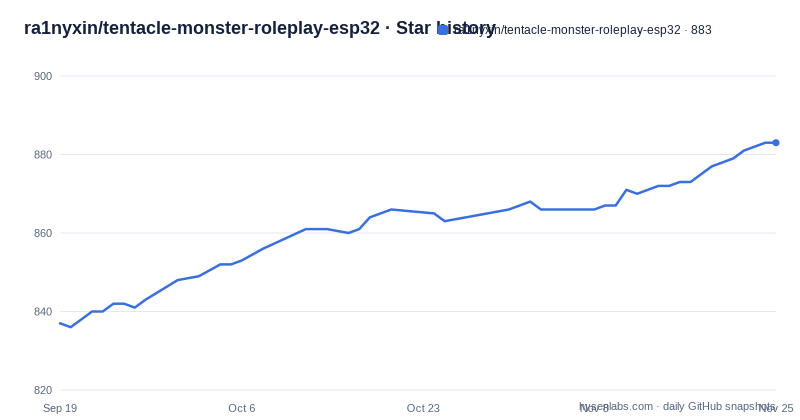
Star history
- ra1nyxin/tentacle-monster-roleplay-esp32883 ★ · +46
| Repository | 2026-09-19 | 2026-11-25 |
|---|---|---|
| ra1nyxin/tentacle-monster-roleplay-esp32 | 837 | 883 |
46 Stars in the last 67 days, measured from the daily GitHub snapshot. Compare with other projects
Editorial analysis
The contract between camera and model is two files
The whole data path is deliberately dull, which is what makes it easy to reason about.
An iPhone Safari page captures frames and uploads them over HTTPS to the machine. A Node service listening on port 7777 accepts them, continuously overwrites the newest frame as `latest.jpg`, and writes the frame metadata to `latest.json`. That pair of files is the entire interface between the camera and whatever is acting as the script host.
So the model does not receive a stream. It reads a file that is being replaced underneath it. The camera page also has a preview of exactly what will be written, which is a good design choice: you can see the crop and the mirror settings before the model sees anything.
The capture settings live in the page. You pick the front or rear camera, set the interval between uploads and the resolution being sent, and there is a settings page for mirroring, rotation, brightness, contrast, shadows, highlights, sharpening and a draggable crop frame. Lowering the send resolution is the documented way to reduce the processing load on the phone.
One behaviour is worth knowing: the adjustments only apply to the current page. Reloading resets them, and nothing is written to browser storage or into the frame metadata.
Port 7777 with a self-signed certificate and no login
Starting the bridge is a double-click on a batch file:
start.batThe script checks whether the certificate and key files exist, and if they do not, calls a PowerShell helper to generate a local self-signed certificate. It then starts the Node server in the background and prints the LAN address for the phone, something like `https://your-lan-ip:7777/`.
The certificate is generated at runtime rather than shipped, which is the right call, and the OpenSSL configuration it produces is written next to it and listed among the files that must stay out of version control. The first time Safari opens the page it will warn about the certificate, and the documentation tells you to continue.
Here is the flaw. There is no authentication on that page. Nothing in the startup sequence creates a token, and the server is listening on a LAN address rather than loopback. Any device on the same network that can reach port 7777 can open the page and download the frames. The project's own privacy note acknowledges the substance of the problem, saying that the generated image may still contain private pictures and that the file, the metadata and the local logs should not be published. That note is about not committing files to git. It does not address a neighbour on the same wifi.
For a tool that continuously photographs a room, that is the first thing to fix.
Three batch files wrap the service lifecycle
The rest of the Windows-side tooling is three scripts you double-click, and each one answers a question you would otherwise answer with a task manager.
`start.bat` brings the bridge up as described, generating the certificate if needed and printing the address for the phone. `stop.bat` shuts it down, preferring to read the process id file and kill that process; if the id file is missing it falls back to finding the Node process listening on port 7777 and stopping that. `status.bat` is the diagnostic one, and it reports four things: whether the port is listening, whether a phone client is connected, the frame count, update time, camera direction and resolution from the metadata file, and whether the image file exists with its last modification time.
That last script is the one the documentation tells you to run when the model claims it cannot see a new frame, which is the correct first move. The failure this project is most likely to have is a phone that stopped uploading, and a status screen that distinguishes no connection from a stale frame saves an hour of blaming the prompt.
The batch approach does mean this is Windows-only in practice, which the requirements state plainly alongside Node.js, PowerShell, a runnable `openssl.exe` and an iPhone on the same network.
The feedback device speaks eight short commands over a local port
The optional half of the project is an ESP32-S3 board that turns AI decisions into physical output. It is reached through a PowerShell script that bridges a local TCP port to the serial line, and the bridge listens on loopback by default on port 25363 with a 115200 baud serial connection.
The command vocabulary is small: a ping, a status query, a scan, a services query, a set command taking a level from 0 to 100, a hit command taking a damage value, and a stop. A Python command line client sends those over the socket.
py .\vibration-control.py --ping
py .\vibration-control.py --status
py .\vibration-control.py --set 20
py .\vibration-control.py --hit 3
py .\vibration-control.py --stop
The distinction between set and hit matters. Set applies a level directly and holds it. Hit sends a single event and lets the device firmware decide what that maps to, which keeps the behaviour on the device rather than in the model prompt.
The bridge is started with an execution policy bypass flag, which is normal for running a local script but worth naming: that flag is only acceptable because you have read the script. A bridge with no authentication on its port is the second unauthenticated surface in this project.
Random waves have duration and intensity caps, and stop on exit
There is a second script for continuous feedback, and its parameter list is the clearest statement of the project's own safety intent.
py .\random-wave.py --duration 60 --min 5 --max 35Duration is the number of seconds to run, min and max are the intensity bounds, and two further parameters set the shortest and longest wait between changes. A batch file requests an early stop, and the script sends a stop command as it exits, so an interrupted run does not leave the device in whatever state it was in.
The guidance attached to both feedback scripts is consistent: set an upper bound on duration and on intensity for any automatic feedback, and prefer bounded commands over open-ended ones. The random mode exists so that a model can ask for texture rather than a single event, and the caps are what make that safe to hand to something making the decisions.
So the project does contain a safety model, and it is a reasonable one. What it does not contain is any notion of a stop that the person wearing the device controls, which is the gap the next section is about.
Firmware is flashed with the ESP-IDF and the port is hardcoded in the docs
The board side is a normal ESP-IDF project under a firmware directory, and the flashing sequence is the standard one: set the target to the chip family, build, then flash and monitor on a serial port.
idf.py set-target esp32s3
idf.py build
idf.py -p COM3 flash monitor
The documentation notes that the port is an example and should be changed to match your board, with a more detailed README inside the firmware directory. In practice that means every user edits the same command, which is fine for a single-board hobby project and exactly the kind of hardcoded value that breaks a setup script later.
What is notable is the order of operations. The firmware has to be flashed before the Windows bridge is started, so the setup is firmware first, bridge second, and the two live in different toolchains. That is the real cost of this project: it is not the code, it is that getting from zero to a working device touches the ESP-IDF, a PowerShell serial bridge, a Node service, a self-signed certificate and a phone browser in that order.
The package manifest reflects how little software is involved: one script that starts the server, CommonJS, marked private, and no dependencies at all.
The host prompt narrates a live scene from your camera, read it twice
The prompt is the part of this project that deserves a careful reading rather than a quick summary, and it is delivered as a copy-paste text block.
The recommended setup asks the model first to read the repository readme, the sample scenario, the feedback tutorial and the firmware readme, and to get familiar with the batch, PowerShell and Python scripts. Then it is assigned a role as the scenario host, with instructions that every image and camera feed should be read as in-game rendered scenery, that descriptions of the player must use game vocabulary rather than leaving the fictional frame, and that the interaction is live rather than turn-based, so the model should re-read the newest frame immediately after starting a background feedback command.
One instruction in that block tells the model how to re-describe physical features of the person in the camera as fictional equipment effects instead of describing the body. Combined with a camera that runs continuously inside a private home and a model instructed to narrate what it sees, that is the centre of the project and it should be read by whoever runs it rather than skimmed.
The consent gap is concrete. Nothing in the repository asks the person in frame whether they agree to being described this way, nothing stops the upload except the stop button in the page, and the only stated bounds are on device intensity and duration. A camera that is always on, a narrator with no memory of refusing, and a physical device attached to the person are three things that each need a stop signal of their own.
The rest of the repository is ordinary: no tests, a single npm script, an agent instructions file, no releases, a last push in August, and a licence that permits non-commercial use only.
Editorial conclusion
Read this repository as a hardware integration exercise with a roleplay prompt attached, not as a product. The bridge, the batch lifecycle, the serial bridge and the bounded feedback commands are all straightforward and readable, and the project is explicit that camera frames, logs and certificate keys stay out of git. Before running anything like it, decide where a continuously running camera in a private home is pointing and who else can reach port 7777, because the page has no login, and treat the in-fiction narration instructions as a prompt to review rather than as a feature description.
Frequently asked questions
What does tentacle-monster-roleplay-esp32 actually do?
It pipes an iPhone camera feed into a local Node bridge on port 7777 that keeps the newest frame in latest.jpg and its metadata in latest.json, lets an AI script host read those files, and optionally sends bounded commands to an ESP32-S3 device through a PowerShell serial bridge.
What do I need to run tentacle-monster-roleplay-esp32?
Windows 10 or newer, Node.js, PowerShell and OpenSSL runnable as openshell.exe from the command line, plus an iPhone on the same network. The ESP32-S3 board is optional, and no npm dependencies are required.
How is the HTTPS certificate for the camera page created?
start.bat checks whether the key and certificate files exist and, when they do not, calls a PowerShell helper to generate a self-signed certificate with OpenSSL. It then starts the server and prints the LAN address for Safari, which will warn about the certificate once.
How do I control the ESP32-S3 feedback device?
Flash the firmware with the ESP-IDF, start the PowerShell bridge with your serial port, then use the Python client with ping, status, set, hit or stop. The bridge also accepts ping, status, scan, services, set, hit and stop on its local TCP port.
Are the camera frames private in this project?
They can be. latest.jpg is whatever the phone camera saw, the project warns against committing it along with the metadata and logs, and the local page has no login, so anything on the same network that can reach port 7777 can fetch the frames.
Official sources
Add this badge to your README
If you maintain this project, the badge below links readers to this analysis and shows its maintenance status from the daily GitHub snapshot. Paste the markdown into your README; add ?metric=license or ?metric=stars to the image URL for a different field.

[](https://hysenlabs.com/projects/ra1nyxin-tentacle-monster-roleplay-esp32)Star history chart for your README
[](https://hysenlabs.com/projects/ra1nyxin-tentacle-monster-roleplay-esp32)Was this useful?