Second Brain on Cloudflare: one self-hosted memory Worker for every MCP client
One memory layer, every AI tool. Store anything once — recall it in Claude, ChatGPT, Cursor, or any MCP client. Self-hosted on Cloudflare's free tier.
At a glance
- What is it?
- Second Brain is an MIT-licensed TypeScript project that runs a memory service as a Cloudflare Worker in your own account, so Claude, ChatGPT, Cursor and other MCP clients share one store. This article covers how it is built, how you install it, and where its current limits sit.
- Who is it for?
- Use Second Brain if you move between several AI tools and want one memory you host in your own Cloudflare account. Skip the team features if you need more than one shared team, because version 3.0.0 supports exactly one per brain.
- Can I use it commercially?
- Yes. MIT is a permissive licence: you can use, modify and sell software built on it, as long as you keep its copyright and licence notices.
- Is it still maintained?
- Yes. The repository last received commits 5 days ago.
- What is it written in?
- Mainly TypeScript, according to GitHub's language statistics.
Answers come from the project's GitHub data, last synced on November 15, 2026, and from our analysis. They are not legal advice.
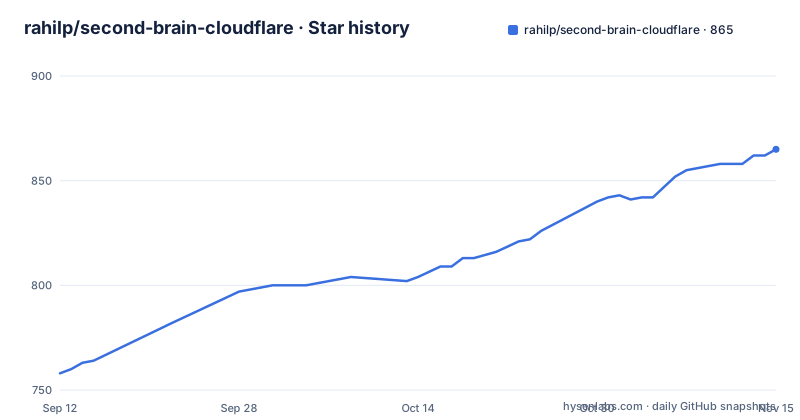
Star history
- rahilp/second-brain-cloudflare865 ★ · +107
| Repository | 2026-09-12 | 2026-11-15 |
|---|---|---|
| rahilp/second-brain-cloudflare | 758 | 865 |
107 Stars in the last 64 days, measured from the daily GitHub snapshot. Compare with other projects
Editorial analysis
One Worker backed by D1, Vectorize, Workers AI and KV
Second Brain is not a desktop database with plugins. It is a Cloudflare Worker, and every app and AI client reaches it over REST or the Model Context Protocol. Behind the Worker sit four Cloudflare services: D1 for records, Vectorize for embeddings, Workers AI for models, and KV.
The flow has three steps. On capture you save a decision, preference, project update, note or source from any connected client. On organize, the Worker classifies the memory, checks for duplicates and contradictions, creates relationships and indexes it for semantic search. On recall you ask in natural language, and it retrieves relevant memories, follows useful connections and returns source-backed context to the tool you are using.
Because every client talks to the same Worker, the project's pitch is that there is nothing to copy or synchronise between apps. The memories, vectors, credentials and application resources live in your Cloudflare account, so the operator of the service is you, with everything that implies for billing and upkeep.
Recall by meaning degrades gracefully, but the embeddings favour English
Recall is semantic: a question finds the right memory even when you used different words when saving it. The vector index is created with 384 dimensions and the cosine metric, as the `vectors:create` script shows.
wrangler vectorize create second-brain-vectors --dimensions=384 --metric=cosineTwo behaviours matter in practice. If Vectorize is unavailable, captures and keyword recall keep working, so your memories stay usable while semantic indexing is restored. And the shipped embedding models read English best. If you keep notes in another language, the desktop app's Settings can switch a brain to a multilingual reading. Without that switch, expect weaker semantic matches for non-English text.
The project also added a full-text index that ranks matches by relevance instead of scanning every memory. It is meant to find exact names, ticket numbers, versions and phrases in any language, including in old memories. New installs use it immediately, existing brains build it over nightly runs, and no client needs updating. The practical consequence is that an upgraded brain does not get the faster exact search on day one.
Three ways to install, and only two desktop platforms
The easiest path is the desktop app. It builds your Second Brain and connects your AI tools in about two minutes, with no terminal or Cloudflare setup required. The download is offered for Mac or Windows. No Linux installer is mentioned, so a Linux user takes one of the other routes.
The second path is a Deploy to Cloudflare link that points at the repository, which creates the Worker from the source. The third is manual, using the Wrangler commands defined as scripts in `package.json`. Creating the database and applying the schema look like this:
wrangler d1 create second-brain-db
wrangler d1 execute second-brain-db --remote --file=db/schema.sql
The desktop app has its own release stream, tagged with an `installer-v` prefix: installer-v3.7.0 on 26 September 2026, installer-v4.0.0 on 3 October and installer-v4.0.1 on 14 October. Three installer builds in under three weeks means the app changes quickly, and the version numbers do not match the Worker's own version.
The `package.json` also has a `predeploy` guard script and release scripts for worker, app and tag, which suggests the maintainers gate deployments rather than pushing from a laptop by hand.
Team Edition is one shared team per brain in v3.0.0
Team Edition adds a Personal workspace for each person that nobody else can read, plus a Shared layer visible to the team. Memories are private by default and enter the Shared layer only when someone deliberately shares them. Sharing moves one canonical memory rather than copying it, the author stays visible, and only the author or an admin can edit, delete or un-share it.
| Layer | Who can read it | Who can edit or delete it | | --- | --- | --- | | Personal | Only you | Only you | | Shared | Everyone on the team | The author or an admin |
Admins manage members, access, capture defaults and integrations without gaining access to anyone's personal workspace. Memories from v2 become the owner's private memories on upgrade, and nothing is exposed to a team automatically.
The limit is stated in the v3.0.0 scope note: each brain has one shared team. The API and MCP layer already carry optional `team` parameters and a `list_teams` tool so multi-team support can arrive without breaking changes, but the dashboard and admin flows do not create or switch between multiple teams. If you run several departments out of one brain, you cannot separate them yet. In the API, CLI and MCP tools the Shared layer is the workspace value `company`.
The memory tools go beyond remember and recall
The tool table shows a memory model with history, not a plain note store. `remember` can record when a fact became or stopped being true, and `recall` can ask what was true as of a past date. `update` replaces a memory, `append` adds a timestamped update, and `history` reads a memory's recorded changes with the text before each one.
Deletion is reversible: `forget` moves a memory to the trash, and `undo` reverses the most recent change or restores one from the trash. `set_status` marks a memory `canonical`, `draft` or `deprecated`, which lets you tell the retrieval layer which version to trust. `link`, `unlink` and `connections` manage explicit relationships between memories.
There are also planning tools. `brief` shows due items, open commitments, stale memories and pending insights, `resolve` settles one tracked task, date, insight or stale fact, and `digest` reads the latest existing automatic summary for a project or tag. `get_prompt_capsule` returns a deterministic core or project context projection for a gateway-controlled prompt prefix. The listed table continues past `share`, so there are more tools than are named here.
Capture surfaces and push reminders depend on how you work
Input is wide. Besides MCP clients, the project lists a CLI, a browser extension, Obsidian, Notion, calendars, email, iOS Shortcuts and the web dashboard. Claude, ChatGPT, Cursor and Codex are the named clients, and the repository contains `.codex/`, `.cursor/` and `.mcp.json` entries alongside an `integrations/` folder and an `AI_Instructions/` folder.
Memories can carry dates. You can review overdue and upcoming commitments, and the installed PWA can proactively push a reminder when something becomes due. That means reminders need the dashboard installed as a PWA on the device where you want the notification, not just a Worker deployed somewhere.
The dashboard lets you browse, edit, append, connect, share, export or permanently remove any memory. Automatic classification, duplicate detection, relationships, time-aware ranking and optional weekly insights run on the Worker. The weekly insights are optional, so a brain left on defaults does not necessarily produce them.
Cost, ownership and project health
The repository describes itself as self-hosted on Cloudflare's free tier, and the search explanation says the full-text index keeps the free plan comfortable as a brain grows. The project gives no memory counts or request volumes for that tier, so check Cloudflare's current free-plan limits for D1, Vectorize, Workers AI and KV against your own usage before assuming the bill is zero.
The code is MIT-licensed TypeScript. The root `package.json` is marked private at version 1.0.0, which means the server is deployed from the repository, not installed as a published npm package. Tests run with `vitest`, and there are separate evaluation scripts for recall quality, local models and scale guards, which is unusual for a personal tool and shows attention to retrieval quality.
The repository is not archived and its last push was on 30 October 2026. A brain is only as safe as the Cloudflare account that hosts it, so protect that account, and note that the project's privacy claim is about where data lives, which is your account, not about any guarantee beyond that.
Editorial conclusion
Use Second Brain if you move between several AI tools and want one memory you host in your own Cloudflare account. Skip the team features if you need more than one shared team, because version 3.0.0 supports exactly one per brain. Before relying on it for non-English notes, check the embedding setting in the desktop app, since the shipped models read English best.
Frequently asked questions
Is Second Brain AI free?
The project is MIT licensed and is described as self-hosted on Cloudflare's free tier. You run it in your own Cloudflare account, so what you pay depends on your usage of that account.
What is a second brain for AI in Second Brain Cloudflare?
It is one persistent memory system that Claude, ChatGPT, Cursor and other MCP clients all read and write. It runs as a Cloudflare Worker in your account and retrieves context by meaning.
Is Second Brain worth it for using several AI tools?
It targets people who repeat the same projects and preferences in every app. Every client talks to one Worker, so nothing needs to be synchronised between them, and you host it yourself.
Official sources
Add this badge to your README
If you maintain this project, the badge below links readers to this analysis and shows its maintenance status from the daily GitHub snapshot. Paste the markdown into your README; add ?metric=license or ?metric=stars to the image URL for a different field.

[](https://hysenlabs.com/projects/rahilp-second-brain-cloudflare)Star history chart for your README
[](https://hysenlabs.com/projects/rahilp-second-brain-cloudflare)Was this useful?