Solid Cache: a Rails cache store that lives in your database
A database-backed ActiveSupport::Cache::Store
At a glance
- What is it?
- Solid Cache is a database-backed ActiveSupport::Cache::Store that lets a Rails application keep a much larger cache than Redis or Memcached would allow, on the argument that SSD access times make a large disk cache preferable to a small memory cache. It is MIT licensed, the default cache store in new Rails 8 applications, and the last push was on 2026-10-10.
- Who is it for?
- Solid Cache fits a Rails application that has outgrown a single Redis instance or that wants one fewer service to operate, and it fits a team already comfortable with its database's backup, replication and connection limits. It does not fit a low-latency application whose hot cache reads must be in memory, since every read becomes a database query.
- Can I use it commercially?
- Yes. MIT is a permissive licence: you can use, modify and sell software built on it, as long as you keep its copyright and licence notices.
- Is it still maintained?
- Yes. The repository last received commits 29 days ago.
- What is it written in?
- Mainly Ruby, according to GitHub's language statistics.
Answers come from the project's GitHub data, last synced on November 7, 2026, and from our analysis. They are not legal advice.
Star history
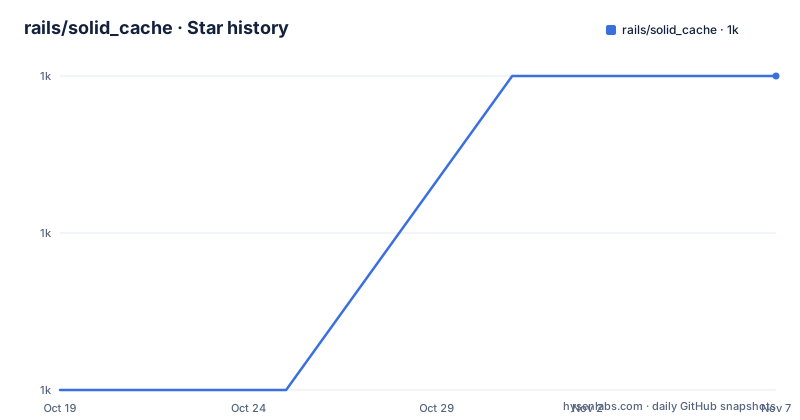
- rails/solid_cache1,040 ★ · +2
| Repository | 2026-10-19 | 2026-11-07 |
|---|---|---|
| rails/solid_cache | 1k | 1k |
2 Stars in the last 19 days, measured from the daily GitHub snapshot. Compare with other projects
Editorial analysis
The argument is that a big disk cache beats a small memory cache
Solid Cache is a database-backed Active Support cache store, and the reason it exists is stated in one long sentence that is worth reading for the reasoning rather than the conclusion.
It lets you keep a much larger cache than is typically possible with traditional memory-only Redis or Memcached stores, and this is thanks to the speed of modern SSD drives, which make the access-time penalty of using disk rather than RAM insignificant for most caching purposes. The summary offered is that you are now usually better off keeping a huge cache on disk rather than a small cache in memory.
That is a genuinely different position from the usual caching advice, which is to keep the cache small, hot and in memory and to treat a cache hit as close to free. The counter-argument is that a small memory cache evicts constantly, so a large fraction of requests miss, and a miss is the expensive case. A cache that is big enough to hold everything converts most misses into hits even if each hit costs more.
The operational consequence of that argument is what makes the project interesting. If the cache is large and it lives in your database, then you are not running Redis, you are not running Memcached, and you have one fewer service to operate, one fewer thing to monitor and one fewer thing to keep in sync with your primary data. The trade is that the cache now competes with the application for the database's connections, its write throughput and its storage.
It is a Rails project, from the rails organisation, and it is MIT licensed with the licence file named `MIT-LICENSE` at the root.
It is the default in Rails 8, and the installer handles the schema
Solid Cache is configured by default in new Rails 8 applications, so the majority path is that you already have it. The manual path is for earlier versions and is two commands.
bundle add solid_cache
bin/rails solid_cache:install
The installer configures Solid Cache as the production cache store and creates `config/cache.yml`. It also creates the schema in the format your application uses, and the readme is precise about which file appears in which case. If your application uses `config.active_record.schema_format = :ruby`, which is the default, the installer creates `db/cache_schema.rb`. If it uses `:sql`, the installer creates `db/cache_structure.sql` with the appropriate SQL for your database adapter, for PostgreSQL, MySQL or SQLite.
That split matters in practice, because the cache schema is a separate schema in a separate location from the application's own, and it has to be migrated separately.
After that you configure the cache database in `config/database.yml`, and the readme gives both the SQLite and the MySQL, PostgreSQL and Trilogy forms. The SQLite version adds a second database entry with its own file and its own `migrations_paths`:
production:
  primary:
    <<: *default
    database: storage/production.sqlite3
  cache:
    <<: *default
    database: storage/production_cache.sqlite3
    migrations_paths: db/cache_migrate
The MySQL, PostgreSQL and Trilogy version anchors the primary configuration and inherits from it for the cache, so the credentials are written once.
The final step is to run `db:prepare` in production so the cache database is created and the schema is loaded. The separate `migrations_paths` of `db/cache_migrate` is what keeps the cache schema out of the application's own migration path.
Three ways to name the database, and what happens when you name none
The connection configuration has three options and a default, and the default is the one with a consequence worth understanding.
You can set one of `database`, `databases` and `connects_to` in the config file, and they are used to configure the cache databases in `SolidCache::Record#connects_to`.
If `connects_to` is set, it is passed directly. Setting `database` is shorthand for a single database, `database: :cache_db` being equivalent to a `connects_to` with a `database` key of `writing: :cache_db`. And `databases` configures multiple shards, `databases: [cache_db, cache_db2]` being equivalent to a `connects_to` with a `shards` hash.
The default is the one to pay attention to. If none of them are set, Solid Cache uses the `ActiveRecord::Base` connection pool, and this means that cache reads and writes will be part of any wrapping database transaction.
That is a substantive behavioural difference, not a performance footnote. If your application wraps a request in a transaction and then writes to the cache, the cache write becomes part of that transaction and is rolled back with it. If the cache write is outside the transaction, it commits independently. Which one you want depends on whether a rolled-back request should leave a cache entry behind, and the answer is not always the same. A cache entry written inside a transaction that later rolls back is a stale entry that survives a failure.
For most applications, using a separate database is the better answer, and that is why the installer and the `database.yml` example both go to the trouble of setting one up. The engine option `connects_to` also overrides whatever is in `config/solid_cache.yml`, and it is described as required for sharding and for using a separate cache database from the main app.
The `cluster` and `clusters` options are marked deprecated in the option list, with `clusters` ignored if `cluster` is set, and the `shards` option being the current way to configure multiple databases.
Expiry is a counter and a background thread, and size is estimated
The expiry mechanism is a nice piece of engineering, and the readme describes it step by step.
Solid Cache tracks writes to the cache, and for every write it increments a counter by one. Once the counter reaches 50 percent of the `expiry_batch_size`, it adds a task to run on a background thread.
That task then checks whether the `max_entries` or `max_size` values have been exceeded. The current entries are estimated by subtracting the max and min IDs from the `SolidCache::Entry` table, and the current size is estimated by sampling the entry `byte_size` columns. If the limit has been exceeded, it deletes `expiry_batch_size` entries, and if not, it deletes up to the expiry batch size of expired entries.
Two things follow from that description. The size limit is an estimate from a sample, not an exact total, and the number of samples is configurable through `size_estimate_samples`, defaulting to 1000, with a smaller sample being faster and less accurate. And the entry count is inferred from the ID range rather than counted, which is cheap but assumes the IDs are allocated densely, so it is an upper bound on the number of live entries rather than the number.
The expiry work itself is configurable in three ways. `expiry_method` selects `thread` or `job` and defaults to `thread`, so by default the expiry runs in a background thread in the application process rather than as a queued job. `expiry_queue` names the queue that expiry jobs are added to when the method is `job`, defaulting to `default`. And `expiry_batch_size` sets the batch size used when deleting old records, defaulting to 100.
The `thread` default is the interesting choice for a Rails application. It means the cache is self-contained and needs no separate worker for expiry, which is a large part of the appeal of a database-backed cache. It also means every application process runs an expiry thread, so with several processes or several hosts, each one is independently deleting entries, and the coordination between them is the atomic delete rather than a lock.
Options that go beyond the standard cache store, including encryption
Solid Cache supports the standard `ActiveSupport::Cache::Store` options and adds a set of its own, and the list is worth reading because several of them are not about caching at all.
The most operationally important is `error_handler`, a Proc to call to handle any transient database errors that are raised, defaulting to logging errors as warnings. Since the cache is now a database client, it can fail the way a database fails, and this option is how you decide what that means for the request. The default of logging a warning and continuing is the sensible one for a cache.
`max_age` sets the maximum age of entries in the cache, defaulting to `2.weeks.to_i`, and it can be set to `nil` but this is not recommended unless using `max_entries` to limit the size of the cache. That warning is well placed, because an unbounded cache with no expiry and no size limit is a disk filler.
`max_entries` and `max_size` are the two limits, defaulting to `nil` meaning no limit, and the `max_size` value is what the size estimate is checked against.
`active_record_instrumentation` controls whether the cache's queries are instrumented, defaulting to `true`, which means the cache's own queries show up in your Rails instrumentation and you can see them next to your application's queries.
`clear_with` chooses `:truncate` or `:delete` for clearing the cache, defaulting to `truncate` except when `Rails.env.test?` in which case it is `delete`. The reason is obvious once stated: truncate is fast but cannot run inside a transaction on some adapters, and in the test environment you often want the cache writes to be transactional.
`max_key_bytesize` is the maximum size of a normalized key in bytes, defaulting to 1024, which is a database-level limit rather than a cache policy, since the key is a column.
The engine options add five more. `executor` is the Rails executor used to wrap asynchronous operations, defaulting to the app executor. `size_estimate_samples` is the sample count used to estimate size. And `encrypted` decides whether cache values should be encrypted, with `encryption_context_properties` for custom encryption context properties.
The repository, and how the test matrix covers the databases
The top-level listing shows a Rails engine with a substantial test infrastructure.
There is `app/` for the Rails application code, `lib/` for the library part, `bin/` for the executables including the installer, `test/` for the tests, and `gemfiles/` with an `Appraisals` file, which is the standard Appraisal gem for testing a gem against a matrix of dependency versions, in this case the database adapters.
The `docker-compose.yml` is the clearest evidence of the test matrix, and it is short:
services:
  postgres:
    image: postgres:17
    ports: [ "127.0.0.1:55432:5432" ]
  mysql:
    image: mysql:9
    ports: [ "127.0.0.1:33060:3306" ]
Two databases, both recent major versions, published on non-standard host ports so they can run alongside a local PostgreSQL or MySQL. The compose file is what the test suite runs against, which means the gem is tested against the databases it supports rather than only against SQLite.
The rest of the tooling is the standard Rails gem setup. There is a `Gemfile` and `Gemfile.lock`, a `solid_cache.gemspec`, a `Rakefile`, a `.rubocop.yml` for the style rules, a `CHANGELOG`-adjacent practice visible in the release history, and a `upgrading_to_version_0.4.x.md` file documenting a past upgrade, which is a good sign for a gem that has changed its schema at least once.
The release history is a steady 1.0.x line: v1.0.8 on 2025-10-09, v1.0.9 on 2025-11-07 and v1.0.10 on 2025-11-08, with the last push on 2026-10-10. A 1.0 line with a gem this close to Rails core is being maintained.
One point about the maintenance status that is worth being precise about. The project is MIT licensed and it is a rails organisation project, and it is configured by default in new Rails 8 applications, which is a level of institutional backing that a random gem does not have. That is the strongest argument for it, and it is an argument about the project's place in the ecosystem rather than about any individual feature.
Editorial conclusion
Solid Cache fits a Rails application that has outgrown a single Redis instance or that wants one fewer service to operate, and it fits a team already comfortable with its database's backup, replication and connection limits. It does not fit a low-latency application whose hot cache reads must be in memory, since every read becomes a database query. Before you switch, read the sharding section and the `connects_to` options, because the default falls back to the `ActiveRecord::Base` connection pool, which means cache reads and writes become part of any wrapping database transaction, and check the `max_size` accounting, which is an estimate from a sample of entries rather than an exact figure.
Frequently asked questions
How do I install Solid Cache in a Rails application?
Run `bundle add solid_cache` and then `bin/rails solid_cache:install`, which configures it as the production cache store and creates `config/cache.yml`. If your schema format is `:ruby` the installer creates `db/cache_schema.rb`, and if it is `:sql` it creates `db/cache_structure.sql` for your adapter. Then add the cache database to `config/database.yml` and run `db:prepare` in production.
Where does Solid Cache store its data by default?
If none of `database`, `databases` or `connects_to` is set in the config file, Solid Cache uses the `ActiveRecord::Base` connection pool, which means cache reads and writes become part of any wrapping database transaction. Setting `database` or `databases` connects it to separate cache databases instead.
How does Solid Cache expire old entries?
It counts writes, and once the counter reaches 50 percent of the `expiry_batch_size` it queues a background task that checks the `max_entries` and `max_size` limits and then deletes a batch. The size is estimated by sampling `byte_size` columns across `size_estimate_samples` entries, defaulting to 1000.
Can Solid Cache encrypt cached values?
Yes, the `encrypted` engine option decides whether cache values should be encrypted, and `encryption_context_properties` allows custom encryption context properties. The engine options are set in your Rails configuration, for example with `config.solid_cache.size_estimate_samples = 1000`.
Official sources
Add this badge to your README
If you maintain this project, the badge below links readers to this analysis and shows its maintenance status from the daily GitHub snapshot. Paste the markdown into your README; add ?metric=license or ?metric=stars to the image URL for a different field.

[](https://hysenlabs.com/projects/rails-solid-cache)Star history chart for your README
[](https://hysenlabs.com/projects/rails-solid-cache)Was this useful?