obsidian-agent-client: nine agent presets, and the terminal access that comes with them
Bring AI agents into Obsidian via Agent Client Protocol (ACP), such as Claude Code, Codex and Gemini CLI.
At a glance
- What is it?
- RAIT-09/obsidian-agent-client puts coding agents inside Obsidian over the Agent Client Protocol that Zed authored, with nine presets and custom entries for anything else that speaks it. Its own security section is the clearest statement of what that costs: the plugin launches your agents as child processes and they keep the system access they have in a terminal.
- Who is it for?
- This plugin fits someone who already keeps notes in Obsidian and runs a coding agent in a terminal, and who wants the agent to read and edit notes in place rather than through pasted excerpts. It does not fit a vault you cannot risk, and the plugin does not pretend otherwise, which is the reason to read its security section before anything else.
- Can I use it commercially?
- Yes. Apache-2.0 is a permissive licence: you can use, modify and sell software built on it, as long as you keep its copyright and licence notices.
- Is it still maintained?
- Yes. The repository last received commits 5 days ago.
- What is it written in?
- Mainly TypeScript, according to GitHub's language statistics.
Answers come from the project's GitHub data, last synced on November 22, 2026, and from our analysis. They are not legal advice.
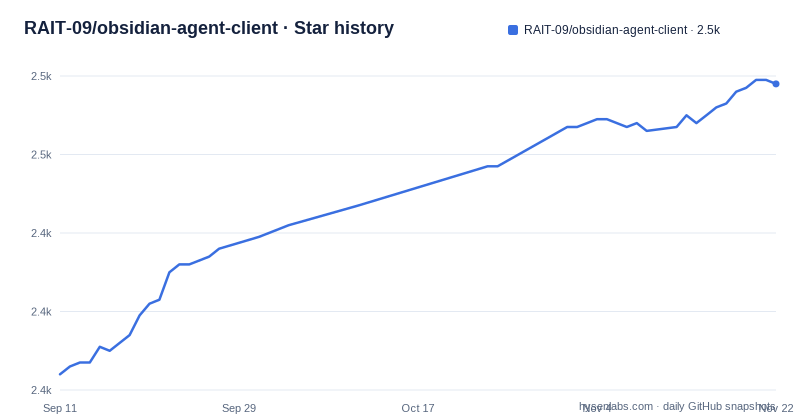
Star history
- RAIT-09/obsidian-agent-client2,478 ★ · +74
| Repository | 2026-09-11 | 2026-11-22 |
|---|---|---|
| RAIT-09/obsidian-agent-client | 2.4k | 2.5k |
74 Stars in the last 72 days, measured from the daily GitHub snapshot. Compare with other projects
Editorial analysis
Nine presets over a protocol Zed wrote
The plugin's whole approach is that it does not implement agents. It implements the Agent Client Protocol, which the readme credits to Zed, and speaks it to whatever agent is installed locally. The preset list is nine entries: Claude Code, Codex, Gemini CLI, Mistral Vibe, OpenCode, Kiro, Hermes Agent, Pi and Grok Build. Anything else that speaks the protocol can be added as a custom entry, and the readme is explicit that this needs no plugin update, which is the right way round for a protocol that will still be growing. That design also explains the capability claims that sound inflated until you notice where they come from. MCP servers, agent skills, slash commands and permission prompts are listed as working out of the box, and the reason given is that agents use the servers and skills they already have and there is nothing to configure in the plugin. The runtime dependency list confirms it: one package for the protocol SDK sits alongside editor state and view packages, a virtualised list helper, a diff library, the two React packages, a version comparison library and a schema validator.
The security section says the agent has your terminal's access
This is the paragraph to read first, and it is unusually direct. The plugin is desktop only. It launches your locally installed agents as child processes and lets them run terminal commands, and the readme says that is the core of what it does rather than burying it. Two mitigations follow. The filesystem is only probed read-only, and only by the auto-detect button, so finding your agent's binary does not walk your disk. And all note reading and writing goes through the vault API rather than through the agent touching files behind Obsidian's back. Then the sentence that should govern your decision: the agents themselves have the same full system access they would have in a terminal. The plugin's contribution is not reducing that, it is showing you every request. Credentials are kept in Obsidian's keychain rather than as plain text, and the readme is specific about egress, naming your messages, the notes you mention and your attachments as what leaves the machine for your agent's provider.
Permission prompts in a banner, and word level diffs for edits
Two features carry the review burden, and both are about seeing rather than controlling. Every agent action that needs approval raises a prompt you accept or reject from a banner or with a keyboard shortcut, and there is one switch that skips all of it, named auto-allow permissions, which the readme marks as off by default and ties to understanding the implications. Auto-allow is the only real trust decision in the plugin, because everything else is designed to be reviewed one action at a time. The second is visible edits: when the agent writes to a note, the change appears in the chat as a word level diff rather than as a silent modification, so you can see exactly what changed without leaving the conversation. Around those sit smaller affordances that matter in practice, including a context usage indicator in the input toolbar, switching modes, models and configuration mid session, pasting or dragging images and files into the chat, and agents running commands with their output live in the conversation.
The session manager is what makes side by side usable
The headline feature is running several agents at once, and the readme treats the Session Manager as the reason that works rather than the feature itself. Agents can run in sidebar tabs, in editor tabs or in floating windows, each with its own session and its own model, so two of them can be on different models without interfering. A prompt can be broadcast to all of them at once, or focus can be cycled with a hotkey. The manager then lists every open conversation across all three surfaces plus any chat embedded in a note, with live status icons, and one of those statuses is a session waiting for permission, which is exactly the state you would otherwise lose track of when four windows are open. The second headline is working outside the vault: a new chat in a directory points the agent at any folder, where it picks up that folder's own context files and project configuration, while mentions still reach your notes.
Three install steps, or three files
The supported route is short: open the community plugins browser in settings, search for the plugin by name, install, enable. Then you install and authenticate an agent following that agent's own setup guide, and the readme links a guide for each of the nine presets plus a page on custom agents. You check the agent's path in the plugin's settings, where auto-detect is described as usually finding it, and then open the robot icon in the ribbon. Two other routes exist for people who need them. A pre-release route installs a separate plugin for beta versions, adds this repository by URL and enables it, which is how you see a build before it reaches the community listing. The manual route is the most revealing: it asks you to download exactly three files, the compiled script, the manifest and the stylesheet, and drop them into the plugin folder in your vault. Three files tells you the published artefact is a bundle, not a source tree, and that is consistent with the build configuration.
An empty author field, a floating Obsidian dependency, and a pinned old bundler
The manifest has the sort of details that only matter to someone about to maintain it. The keywords array is empty and the author field is an empty string, in a plugin published to a public listing, which is a small missed opportunity for discovery. The Obsidian type package is requested as a versionless latest tag in the development dependencies, so a fresh install can pick up an API the plugin has not been tested against. The bundler is pinned by contrast, to an exact older release, while almost everything else floats with a caret. The Node type definitions are two major versions behind the rest of the toolchain, which suggests those types are only there for editor comfort rather than for the build. Two TypeScript configurations exist, one for the build and one for linting, and the version script runs a helper and then stages the plugin manifest and the versions file, so the version lives in three places and is kept in step by a script. Development is two commands, and the production build adds a type check in front of the bundler:
npm install
npm run dev
Three assistant instruction files, and a directory named after Zed
The repository root explains part of its own culture. There are three instruction files for coding assistants, one general, one for one vendor and one for another, plus a directory for one of those assistants' configuration and, sitting beside it, a directory named after the editor whose team authored the protocol. So a plugin whose subject is connecting agents to a note-taking app is itself configured for three assistants and keeps editor-specific settings. Around that sit the ordinary artefacts of a maintained plugin: an architecture document, a contributing guide, a notice file beside the licence, an ESLint configuration including a plugin written for this kind of Obsidian plugin, a VitePress documentation site with its own dev, build and preview scripts, and a test setup. The readme also carries a Japanese translation and a funding link, which is the full complement for a plugin of this size.
Editorial conclusion
This plugin fits someone who already keeps notes in Obsidian and runs a coding agent in a terminal, and who wants the agent to read and edit notes in place rather than through pasted excerpts. It does not fit a vault you cannot risk, and the plugin does not pretend otherwise, which is the reason to read its security section before anything else. Before you install it, check four things. Which agent you will point it at and where that agent's path is, since auto-detection is described as usually right rather than always right. Whether you will leave auto-allow permissions off, because it is the one switch that removes the per-action review the rest of the design is built around. What leaves your machine, which is your messages, the notes you mention and your attachments, sent to whichever provider your agent uses. And which build you take, since the community plugin listing and the pre-release route are different artifacts from the same repository.
Frequently asked questions
What does the obsidian-agent-client plugin do?
It runs coding agents such as Claude Code, Codex and Gemini CLI inside Obsidian over the Agent Client Protocol, so you can mention notes with an @ and let the agent read and edit them in your vault instead of pasting excerpts. Nine agents ship as presets and anything else that speaks the protocol can be added as a custom entry.
Is the obsidian-agent-client plugin safe for my notes?
The plugin launches your locally installed agents as child processes and lets them run terminal commands, and the readme states that those agents keep the full system access they have in a terminal. Note reading and writing go through Obsidian's vault API, credentials are kept in the keychain, and every permission request is surfaced so you can approve or reject it unless you switch auto-allow on.
How do I install obsidian-agent-client?
From Obsidian settings, open the community plugins browser, search for Agent Client, install and enable it. For pre-releases you can add the repository through a separate beta plugin, or you can download the compiled script, the manifest and the stylesheet from the releases and place them in the plugin folder in your vault.
Can I run several agents at once in Obsidian with this plugin?
Yes. Agents can run in sidebar tabs, editor tabs or floating windows, each with its own session and model, and a prompt can be broadcast to all of them or focus cycled with a hotkey. A session manager lists every open conversation with live status, including one waiting for permission.
Official sources
Add this badge to your README
If you maintain this project, the badge below links readers to this analysis and shows its maintenance status from the daily GitHub snapshot. Paste the markdown into your README; add ?metric=license or ?metric=stars to the image URL for a different field.

[](https://hysenlabs.com/projects/rait-09-obsidian-agent-client)Star history chart for your README
[](https://hysenlabs.com/projects/rait-09-obsidian-agent-client)Was this useful?