OpenRig: running Claude Code and Codex as one team under tmux
Multi-agent harness that runs Claude Code and Codex together as one system
At a glance
- What is it?
- OpenRig is a harness that wraps coding agents so a YAML file describes a team of seats, an owner and a checker, and one rig up command boots them. It is also unusually candid about what it writes to your machine, including provider hooks, workspace trust records and files in your home directory.
- Who is it for?
- Adopt OpenRig if you already run more than one coding agent session and want stable addresses for them, because the value is in persistence and routing rather than in any new model capability: seats keep their identity, tasks go to a named destination, and a shared dashboard shows runtime, model, context and state for each. Do not adopt it if you want one agent with a bigger context window, or if you cannot accept a tool that writes trust settings and executable hooks.
- Can I use it commercially?
- Yes. Apache-2.0 is a permissive licence: you can use, modify and sell software built on it, as long as you keep its copyright and licence notices.
- Is it still maintained?
- Yes. The repository received new commits within the last day.
- What is it written in?
- Mainly TypeScript, according to GitHub's language statistics.
Answers come from the project's GitHub data, last synced on October 22, 2026, and from our analysis. They are not legal advice.
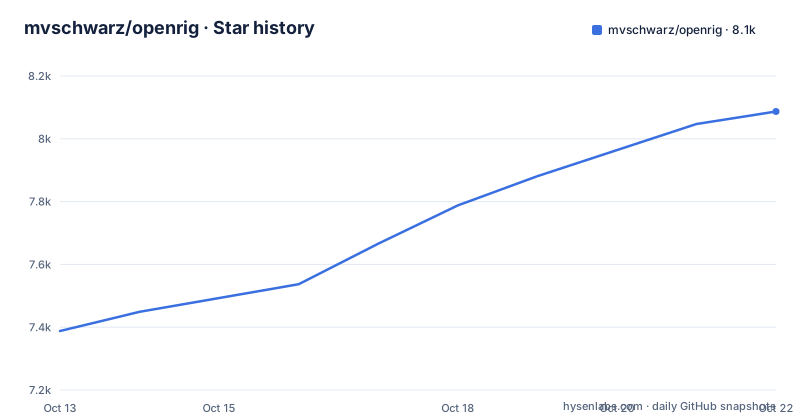
Star history
- mvschwarz/openrig8,087 ★ · +699
| Repository | 2026-10-13 | 2026-10-22 |
|---|---|---|
| mvschwarz/openrig | 7.4k | 8.1k |
699 Stars in the last 9 days, measured from the daily GitHub snapshot. Compare with other projects
Editorial analysis
A harness wraps a model, a rig wraps your harnesses
The design is stated in two sentences at the top of the README: a harness wraps a model, and a rig wraps your harnesses. Claude Code and Codex are the harnesses, and a rig is a named, persistent arrangement of them.
What that buys you is addressability. Instead of a pile of terminal sessions you cannot name, you have seats with names, in a rig with a name, and a task queue addressed to a seat. The README frames the outcome as talking to a lead agent about the result you want, with specialists coordinated across teams and items brought back that need your attention.
The team is declared, not discovered. A YAML file defines it, and the repository ships a worked example under demo/ with rig.yaml, an agents/ directory and a culture.md, plus scripts to run it. That matters for evaluation: you can read the definition of a team before you run one.
The stated ambition is continuity. Start from a repository and one useful change, and the promise is that the team's work and context stay at the same addresses afterwards, so the second change starts where the first one ended rather than from a fresh terminal.
The published package is @openrig/cli, the repository is a private workspace root at version 0.5.17, and the licence is Apache 2.0.
From install to a running rig
The prerequisites are explicit: Node.js 20, 22 or 24, tmux, and macOS or Linux. On an Apple silicon Mac you need Node.js 22, which the README links to a known compatibility limitation note, and native Windows is not supported yet while WSL2 has not been tested.
Installation is a global npm install, followed by a dry run so you can read the plan before anything is written:
npm install -g @openrig/cli
rig setup --dry-run
The dry run matters because rig setup does more than install: it attempts to fetch missing tools, writes a block into ~/.tmux.conf for mouse support and scrollback, and on macOS can install cmux and enable its automation socket control in ~/.config/cmux/settings.json. A --full flag adds workstation tools.
Then check that the underlying tools work, before you involve an agent:
tmux -V
codex --version
codex login status
From your repository, inspect the plan for the rig before launching it:
cd /path/to/your/repository
rig up first-project --cwd . --plan
rig up first-project --cwd .
rig tui --shared
Readiness is a separate check from launching, and the README treats it that way:
rig ps --nodes --rig first-projectwhich reports per-node state so you can clear an authentication, trust or permission prompt before assigning any work.
Sending a task is not creating a task
The single most important behavioural detail in the README is a sentence that reads like a warning: sending a message does not itself create a queue item, the owner records the task.
Work is therefore addressed by you and recorded by the agent. The example gives a lead seat one bounded outcome and asks it to do several things, including delegating verification:
rig send dev-owner@first-project 'Implement <one useful change>. Track the task in the queue and return its ID. Keep it local, verify the behavior, ask dev-check@first-project to check the exact candidate, and record the result and how I can try it.'Two seats appear in that one command line. dev-owner implements, and dev-check checks the exact candidate rather than a general summary, which is the pattern that makes a multi-agent setup worth its cost: the reviewer is a separate seat with its own context, not the implementer grading itself.
Queue inspection is a separate call with an explicit destination and limit:
rig queue list --destination dev-owner@first-project --limit 1000The limit of 1000 hints that queues are expected to grow, and the destination filter means the same queue is per-seat. Since the owner records the task, an empty queue after a successful send means the owner did not comply, not that the message was lost.
The recommended loop is then to read the artifact and the review of that candidate, and return to the same owner for the next change, which is how context stays with one seat instead of being spread across a chat history.
The dashboard, detachment and why closing a terminal is not stopping the team
OpenRig draws a distinction between operational support and the shared view. The kernel provides separate operational support and the shared dashboard, and the TUI is the place where that difference becomes visible.
rig tui --shared returns to the shared dashboard, while plain rig tui opens an independent view. Detaching is Ctrl-b then d, and rig tui --shared comes back to that same dashboard. The screens, per the README's own description of the recording, move from the rig as a graph to a table of seats with runtime, model, context and state, and then to a single seat in detail.
That third view is the one that matters for trust. When an agent has consumed most of its context window, or has been running longer than expected, the dashboard is where you see it before it becomes a stalled seat nobody is watching.
The instruction about terminals is the part worth internalising: closing a viewing terminal does not mean you should relaunch the team. Seats are tmux sessions with their own identity, so a closed viewer is a viewing problem. Relaunching instead of reattaching produces duplicate work, which in a rig with an owner and a checker is exactly the failure the queue was designed to make visible.
The README also names external terminal providers in the flow, mentioning Herdr and cmux terminals in the guided first-use path, and rig setup checks both native harnesses and cmux as part of its plan.
What OpenRig writes on your machine, in its own table
This is the section to read before the first launch, and the README puts it in the open rather than in the docs site. It warns that launching a rig writes provider hooks and workspace trust settings, and asks you to read it and back up the relevant files first.
The table lists changes by moment. The npm installation step installs the CLI, bundled components and dependencies under your npm prefix, and the postinstall checks the Node.js version and that the SQLite module loads, but it does not run daemon or provider setup. With Bun, the global directory differs and Bun may block the postinstall script, in which case that Node.js and SQLite check does not run at install time, which is why the README also tells you to install Node.js 22.
rig setup is where the filesystem changes concentrate: ~/.tmux.conf, and on macOS cmux plus its automation socket setting. Daemon startup is heavier. It creates or updates instance state under OPENRIG_HOME, normally ~/.openrig, including a database and managed plugin resources, seeds the openrig-skills discovery skill into ~/.claude/skills and ~/.agents/skills subject to existing version ownership, and, with runtime.codex.hooks_enabled on by default, writes Codex hook configuration and trust records before any rig launches.
Two details in the launch row are worth pausing on. Managed startup pre-trusts the workspace, meaning the workspace is treated as trusted before you have looked at it. And the explicit permission row says the built-in bootstrap does not add rig command allow rules, so you are expected to ask your agent to apply a scope you chose, with existing rules left in place.
The README adds a versioning caveat that applies to all of this: the table follows the source revision, so check rig --version when using a published package, since repository guidance can be ahead of what is on npm.
Monorepo shape and the checks behind each cut
The repository is an npm workspace root with four packages: packages/daemon, packages/ui, packages/cli and packages/tui. The root package is private and versioned 0.5.17, engines node ^20 || ^22 || ^24, and it uses vitest at the root alongside node:test scripts.
The test setup is unusual enough to be interesting. test:repo builds the daemon and then runs a chain of script-level checks: node:test over scripts/*.test.mjs, a documentation guard, a skills mirror check and a context pack generation check. test:workspaces then runs the per-package tests for the daemon, cli and tui, with the ui package tested separately by test:ui.
Three of those checks are about repository consistency rather than behaviour: the docs guard, the mirror-skills check, and generate-context-packs --check. That is what a project which seeds skill folders into a user's home directory needs, because the risk it is managing is drift between what the repository says and what gets installed.
There is also a gating layer. gate:substance runs a substance gate script and gate runs a lane gate script, which reads like a quality bar rather than a test. Alongside lint, which typechecks all four packages with tsc --noEmit after building the daemon, and formatting handled through pre-commit, this is a project with a deliberately heavy contribution gate.
The top level also carries spike/, .evidence/, context7.json and a skills/ directory, plus a demo/ with run.sh, run-proof.sh and its own scripts. A run-proof script is a useful convention: it means claims in the README are meant to be verifiable by re-running something.
Where OpenRig is the wrong tool
The cost case is the clearest objection. Every seat is a separate agent process with its own context, and a rig with an owner and a checker needs at least two. If your work is one task at a time on one repository, this multiplies cost and latency to buy you isolation you do not need.
The second boundary is portability. macOS and Linux with tmux, Node 20, 22 or 24, Apple silicon pinned to Node 22, no native Windows and untested WSL2. A team on Windows without WSL2 is not served by this project.
The third is trust. Writing Codex hooks, trust records and pre-trusting a workspace is a large footprint for a development convenience tool, and the pre-trust behaviour in particular means the first launch grants something before you have inspected it. That is defensible for a tool you install deliberately and unacceptable in an environment with change-control requirements, and no configuration in the README retracts it.
The fourth is queue discipline. The owner records the task, so progress reporting depends on an agent choosing to comply with an instruction inside a prompt. If a seat ignores the request to record its task, your queue view becomes wrong rather than empty, and you have to reconcile that by hand.
The fifth is maturity. The version is 0.5.x, and recent release titles read like a changelog of small corrections, from Bun install support and a choice of Claude instruction file to first-use recovery and Pi fixes. That is normal for a fast-moving tool, and it means the README in the repository may describe behaviour that the published package does not have yet.
Editorial conclusion
Adopt OpenRig if you already run more than one coding agent session and want stable addresses for them, because the value is in persistence and routing rather than in any new model capability: seats keep their identity, tasks go to a named destination, and a shared dashboard shows runtime, model, context and state for each. Do not adopt it if you want one agent with a bigger context window, or if you cannot accept a tool that writes trust settings and executable hooks. Verify four things before the first launch. Read the table of what changes on your machine, since rig setup writes a block into ~/.tmux.conf, may install cmux and enable its automation socket on macOS, seeds skill folders into ~/.claude/skills and ~/.agents/skills, and writes Codex hook configuration and trust records before any rig even launches. Run rig setup --dry-run first, which prints the plan without applying it. Check your platform, because it needs Node.js 20, 22 or 24 plus tmux on macOS or Linux, Apple silicon Macs need Node 22, and native Windows is not supported with WSL2 untested. And confirm permissions are what you want, since the built-in bootstrap deliberately does not add rig command allow rules and expects you to ask your agent to apply a scope. Start with rig setup --dry-run, then rig up with --plan.
Frequently asked questions
What do I need to run OpenRig?
Node.js 20, 22 or 24 and tmux, on macOS or Linux. Apple silicon Macs require Node.js 22, native Windows is not supported yet, and WSL2 has not been tested. Codex must also be authenticated.
How do I start a rig in OpenRig?
From your repository, run rig up first-project --cwd . --plan to inspect the plan, then rig up first-project --cwd . to launch, and rig tui --shared for the dashboard. Use rig ps --nodes --rig first-project to check readiness.
Does sending a message to an OpenRig seat create a queue item?
No. The README states that sending a message does not itself create a queue item; the owner records the task. Use rig queue list with a destination and a limit to read what the seat actually recorded.
What files does OpenRig create on my machine?
rig setup writes a block into ~/.tmux.conf and on macOS can install cmux and enable its automation socket. Daemon startup creates state under OPENRIG_HOME, normally ~/.openrig, seeds skills into ~/.claude/skills and ~/.agents/skills, and writes Codex hook configuration and trust records. Managed startup also pre-trusts the workspace.
Can I install OpenRig with Bun instead of npm?
Yes, with bun add -g @openrig/cli, but OpenRig still runs on Node.js so you should install Node.js 22 as well. Bun may block the postinstall script, in which case the Node.js version and SQLite module checks do not run at install time.
Official sources
Where developers are discussing it
Posts on Hacker News, dev.to and Lobsters that link to this repository, found by our scan of those communities. 1 in the last 30 days; newest first.
- OpenRig: Multi-Agent HarnessHacker News · Sep 28, 2026 · 2 points · 0 comments
Add this badge to your README
If you maintain this project, the badge below links readers to this analysis and shows its maintenance status from the daily GitHub snapshot. Paste the markdown into your README; add ?metric=license or ?metric=stars to the image URL for a different field.

[](https://hysenlabs.com/projects/mvschwarz-openrig)Star history chart for your README
[](https://hysenlabs.com/projects/mvschwarz-openrig)