whosthere: ARP cache discovery, YAML precedence, and where the scan reaches
Local Area Network discovery tool with an interactive Terminal User Interface (TUI) written in Go. Discover, explore, and understand your LAN in an intuitive way. Knock Knock.. who's there? 🚪
At a glance
- What is it?
- Whosthere is a Go terminal UI that finds devices on the local network using mDNS, SSDP and an ARP cache read that needs no elevated privileges. Its configuration layer is unusually well specified for a small tool, and its scope is a config choice rather than a technical boundary, which is worth reading before pointing it at a subnet.
- Who is it for?
- Use whosthere when you want to see what is answering on a network you are responsible for, and read it as a user-space sweeper rather than a managed scanner. Three things to check before you point it anywhere.
- Can I use it commercially?
- Yes. Apache-2.0 is a permissive licence: you can use, modify and sell software built on it, as long as you keep its copyright and licence notices.
- Is it still maintained?
- Yes. The repository last received commits 3 days ago.
- What is it written in?
- Mainly Go, according to GitHub's language statistics.
Answers come from the project's GitHub data, last synced on November 23, 2026, and from our analysis. They are not legal advice.
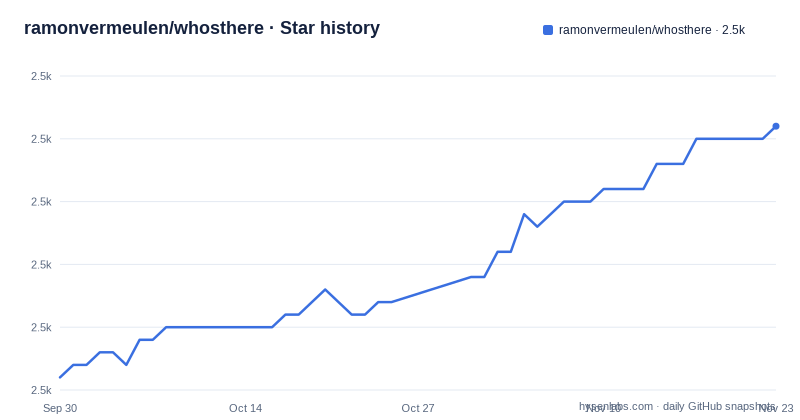
Star history
- ramonvermeulen/whosthere2,476 ★ · +20
| Repository | 2026-09-30 | 2026-11-23 |
|---|---|---|
| ramonvermeulen/whosthere | 2.5k | 2.5k |
20 Stars in the last 54 days, measured from the daily GitHub snapshot. Compare with other projects
Editorial analysis
Discovery fills the ARP cache instead of reading raw packets
The sweeper works by making ordinary TCP and UDP connection attempts across the subnet, which causes the operating system to resolve each address, and then reading the ARP cache to see what answered. The page is explicit about why: this technique populates the ARP cache without requiring elevated privileges, and the tool runs entirely in user space. Alongside it, an mDNS scanner and an SSDP scanner run concurrently.
Two consequences follow from the design. Devices that answer neither a connection attempt nor a discovery broadcast are invisible, so an empty part of the list means no answer, not no device. And the cache being read belongs to the operating system rather than to the tool, so what shows up includes entries left behind by everything else on the machine. Neither the sweep duration nor how it decides to stop is stated on the page, which sends you to `whosthere --help` for the flags.
A single character decides whether a variable is read at all
There are two environment schemes and they differ by a single character. The general table defines `WHOSTHERE_CONFIG`, `WHOSTHERE_LOG` and the conventional `NO_COLOR`. The mapping layer for YAML options uses the same prefix with the character doubled, which the page points out in parentheses, separates nested keys with two of them joined, and treats case-insensitively. So `WHOSTHERE__SPLASH__ENABLED=false` equals `splash.enabled: false`, `WHOSTHERE__SPLASH__DELAY=2s` sets the splash delay, `WHOSTHERE__SCAN_INTERVAL=30s` sets the interval, and `WHOSTHERE__TARGET_SUBNETS` takes a comma separated list of CIDRs.
The page does not say what happens to a variable written with only one of the two, which is the failure mode this naming invites. Above the schemes sits the precedence list: command line flags first, then environment variables, then the YAML file, then the defaults in `DefaultConfig()`.
target_subnets replaces the interface subnet rather than adding to it
The example configuration is where the scope rules live:
all_interfaces: falseThe commented options around it carry the meaning. `network_interface` picks a specific interface and otherwise uses the OS default. `all_interfaces` shows devices from every interface and keeps them when you switch, with a warning attached: if two interfaces share a subnet, for example both on 192.168.1.x, devices may be merged, because they are identified by IP address. And `target_subnets` takes IPv4 CIDRs to sweep, with the operative sentence being that when it is set, the sweeper skips the auto-detected interface subnet unless that subnet is also listed there.
So listing a remote range silently drops your own range unless you list it too. The example itself ends mid-list, at `target_subnets: ["10.0.0.0/24",`, with the closing bracket and the remaining entries absent.
A port scan is one keypress away and the permission note is one sentence
The integrated port scanner is optional, and the feature list says to only scan devices with permission. The key bindings table shows how it starts: `p` in the details view runs a port scan on the selected device. Everything else in that table is navigation, copy and theme switching, `y` copies the IP of the selected device, `Y` copies its MAC, `CTRL+t` toggles the theme selector, `CTRL+i` the interface selector.
What the configuration layer does not offer is any counterpart for that scanner: no allowlist of hosts, no rate or port restriction, no dry-run switch, no confirmation step in the key table. The sweep itself is bounded by the interface subnet unless `target_subnets` says otherwise, but the port scan acts on a device you have already selected from the list, which means the boundary is the list you see rather than a rule the tool enforces.
The same restraint applies to the ARP read: it needs no privileges precisely because it relies on normal connection attempts, which is also why it sees what the machine already knows.
Four package managers, one Go install, and a default make target that installs
The page offers five ways in:
brew install whosthere
nix profile install nixpkgs#whosthere
yay -S whosthere-bin
go install github.com/ramonvermeulen/whosthere@latest
The Arch package carries a `-bin` suffix while the Homebrew and Nix names do not, and the page does not say what that difference means. Building from source is `git clone`, `cd whosthere`, then `make build`; prebuilt binaries are on the releases page.
What the page does not flag is the Makefile's first target. `all` depends on `dev-deps`, which runs `go mod tidy`, `pipx install mdformat`, `pipx inject mdformat mdformat-gfm`, `go install github.com/shurcooL/markdownfmt@latest`, `brew install goreleaser`, `brew install golangci-lint` and `brew upgrade golangci-lint`. A bare `make` in a fresh clone therefore tries to install tools on your machine, including a Homebrew upgrade, under a target that carries the comment TODO: add cross-platform deps support.
A build with no tags present reports itself as dev
Version information is stamped at link time. The Makefile derives it from `git describe --tags --always --dirty`, strips a leading v, and falls back to `dev` when git cannot answer, with the commit falling back to `unknown` and the build date taken from `date -u`. Those three values are pushed into `main.versionStr`, `main.commitStr` and `main.dateStr` with `-ldflags`, alongside `-s -w` to strip symbols.
The practical effect is that a binary you build yourself from a shallow clone, or from a copy without tags, identifies itself as dev and gives you nothing to check it against. The release path is a different one: `.goreleaser.yaml` sits at the root and the `release-clean` target runs `goreleaser release --snapshot --clean`, which the comment above it describes as testing a release locally without pushing anything. `make install` goes its own way with `go install -v ./...`.
Tests run with `-race`, a 120 second timeout and ten in parallel, and the lint step is `golangci-lint run` plus `mdformat --check .`.
go.mod pins a patch level Go version and names no SSDP library
The manifest declares `go 1.27.1`, a patch-pinned toolchain floor rather than a minor one, and the build runs with `CGO_ENABLED=0`. Its direct requirements name the pieces of the tool: `hashicorp/mdns` for mDNS, `rivo/tview` and `gdamore/tcell/v2` for the terminal interface, `spf13/cobra` for the command tree, `goccy/go-yaml` for configuration, `dece2183/go-clipboard` for the copy keys, `go.etcd.io/bbolt` for storage behind the alias import and export commands, plus `golang.org/x/net`, `x/sys` and `x/term`.
No dependency in that list carries SSDP in its name, so the SSDP scanner is not served by a named library the way mDNS is, and the page does not say how it is implemented. Two other structural notes: the tree holds both `internal/` and `pkg/`, which in Go separates private from importable code, and the page never says whether the tool is meant to be imported as a library. There is also a `scripts/` directory and a `.golangci.yaml` for the lint configuration.
Editorial conclusion
Use whosthere when you want to see what is answering on a network you are responsible for, and read it as a user-space sweeper rather than a managed scanner. Three things to check before you point it anywhere. First, scope: target_subnets does not add to the interface subnet, it replaces it, and the port scanner runs on whichever device is selected in the list, so the permission note in the feature list is the only guidance the page gives. Second, the config layer, where a doubled prefix character decides whether a variable is read at all. Third, how you got the binary, because a local build with no tags present reports itself as dev and tells you nothing about the commit. The five install routes work, but only `make build` avoids the default make target, which installs Homebrew and Python tools on your machine.
Frequently asked questions
Does whosthere need root or elevated privileges?
No. It runs entirely in user space. The sweeper makes ordinary TCP and UDP connection attempts so the operating system fills its own ARP cache, and the tool reads that cache, which is why no elevated privileges are required.
Where does whosthere look for its YAML configuration file?
It uses the first one it finds: the path given by the --config flag or by WHOSTHERE_CONFIG, then $XDG_CONFIG_HOME/whosthere/config.yaml if that variable is set, then ~/.config/whosthere/config.yaml as the default location.
How do I set whosthere options through environment variables?
By doubling the underscore character in the prefix, and separating nested keys the same way. Names are case-insensitive, so WHOSTHERE__SPLASH__ENABLED=false and WHOSTHERE__SCAN_INTERVAL=30s match splash.enabled and scan_interval in the file.
Which key starts a port scan in the whosthere TUI?
p, while the details view is open, runs a port scan on the selected device. Other keys are navigation and copying, with y copying the IP, Y the MAC, CTRL+t the theme selector and CTRL+i the interface selector.
Official sources
Add this badge to your README
If you maintain this project, the badge below links readers to this analysis and shows its maintenance status from the daily GitHub snapshot. Paste the markdown into your README; add ?metric=license or ?metric=stars to the image URL for a different field.

[](https://hysenlabs.com/projects/ramonvermeulen-whosthere)Star history chart for your README
[](https://hysenlabs.com/projects/ramonvermeulen-whosthere)Was this useful?