Folding Cell: two child views, a 2x height rule, and undocumented edges
GitHub describes it as :octocat: 📃 FoldingCell is a material design expanding content cell inspired by folding paper material made by @Ramotion. The repository metadata lists Java as its primary language. The metadata lists the MIT license. This article stays within the project description and details documented in the GitHub repository README.
At a glance
- What is it?
- Ramotion's FoldingCell expands a second child layout with a paper-folding animation, and it only works inside a narrow band of layout constraints. What the view enforces is precise, and what it does when you break those constraints is not written down anywhere.
- Who is it for?
- Use FoldingCell when a static screen needs one expanding row and you are willing to pin 1.2.3, a version with no tag behind it and no push since 2022-09-21. Skip it for a RecyclerView you cannot test by hand, or when the cell itself needs a fixed dp height, or when you need upstream work on newer platform versions.
- Can I use it commercially?
- Yes. MIT is a permissive licence: you can use, modify and sell software built on it, as long as you keep its copyright and licence notices.
- Is it still maintained?
- Probably not. The repository last received commits 49 months ago, on September 21, 2022.
- What is it written in?
- Mainly Java, according to GitHub's language statistics.
Answers come from the project's GitHub data, last synced on October 23, 2026, and from our analysis. They are not legal advice.
Star history
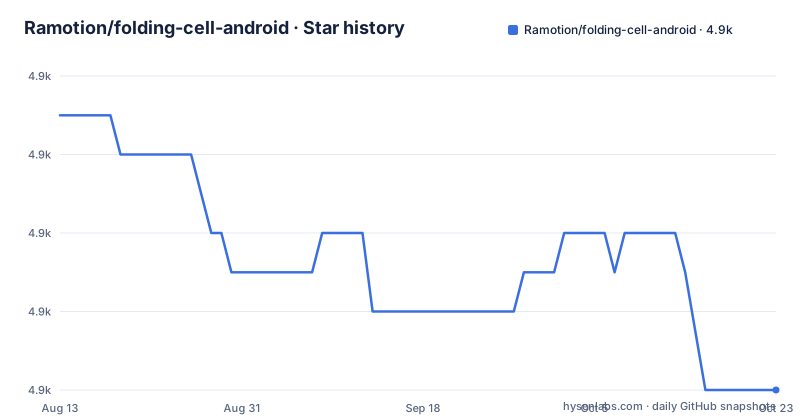
- Ramotion/folding-cell-android4,874 ★ · -7
| Repository | 2026-08-13 | 2026-10-23 |
|---|---|---|
| Ramotion/folding-cell-android | 4.9k | 4.9k |
-7 Stars in the last 71 days, measured from the daily GitHub snapshot. Compare with other projects
Editorial analysis
Two child views, and the content view has to start hidden
The FoldingCell view takes exactly two children, and the order decides which state you see first. The first child is the content view, the layout for the unfolded state. The second child is the title view, the layout for the folded state. Each of those layouts can hold any number of its own children at whatever complexity you need. One requirement is easy to miss: the content view must be hidden in XML with `android:visibility="gone"`. The README does not explain what a still visible content view does to the animation, so treat the attribute as required rather than as a hint. A cell with no children yet compiles fine:
<com.ramotion.foldingcell.FoldingCell
    xmlns:android="http://schemas.android.com/apk/res/android"
    android:id="@+id/folding_cell"
    android:layout_width="match_parent"
    android:layout_height="wrap_content">
</com.ramotion.foldingcell.FoldingCell>
Toggling it is a click listener in your activity, and every tap calls `fc.toggle(false)` on the cached cell reference:
@Override
protected void onCreate(Bundle savedInstanceState) {
    super.onCreate(savedInstanceState);
    setContentView(R.layout.activity_main);

    // get our folding cell
    final FoldingCell fc = (FoldingCell) findViewById(R.id.folding_cell);

    // attach click listener to folding cell
    fc.setOnClickListener(new View.OnClickListener() {
        @Override
        public void onClick(View v) {
            fc.toggle(false);
        }
    });
}Content view height must be at least twice the title view height
Two size constraints travel with those children. The content view height must be at least 2x times greater than the title view height, and both of those layouts must declare `android:layout_height="wrap_content"`. If a screen needs an exact height in `dp`, set height on the child elements inside your own content view or title view layout instead of on the FoldingCell root. The ratio is stated as a requirement on your layout, not as a condition the view measures for itself: nothing is documented about what a content view barely taller than its title view produces, and nothing reports a violated ratio at runtime. So a cell that is technically two children and technically wrap_content can still animate badly, with no log line and no exception to point at. Keep the content view at least double the title view and measure both on the shortest screen you support before you call the screen done.
clipChildren and clipToPadding on the root, both required
Two attributes on the root element decide whether the fold renders correctly, and both are mandatory:
android:clipChildren="false"
android:clipToPadding="false"
They belong on the Folding Cell element itself, and the instruction is written as root element(s), so the same pair is what a wrapping layout has to carry. The sample folder for the full example sets them on the cell, not on the activity root. No screenshot or description of a wrong value comes with either attribute, which means the only way to know they are set right is to look at the cell on each screen that reuses it. Both attributes are cheap to add and impossible to notice when missing, so put them in the layout template rather than in each screen.
additionalFlipsCount of 0 means auto choose, not none
Cell settings arrive as a set of four. Two are plain values: animation time and back side color. The third is additional flips count, defined as the number of flips to run after the first, main flip, and its default value of `0` means the library auto chooses. That default is the part worth internalizing, because writing zero does not buy a single clean fold, it hands the decision back to the view. The fourth setting is camera height, and it controls the level, meaning depth, of the 3d effect. All four are namespaced attributes, so the layout needs `xmlns:folding-cell="http://schemas.android.com/apk/res-auto"` declared before any of them resolve:
folding-cell:animationDuration="1000"
folding-cell:backSideColor="@color/bgBackSideColor"
folding-cell:additionalFlipsCount="2"
folding-cell:cameraHeight="30"
The back side color is what shows during the fold, so a mismatch with your palette is visible mid animation rather than at rest.
initialize takes camera height before animation time
The same four settings can be applied from code through two overloads of `initialize`, and the argument order is not the same in both:
// get our folding cell
final FoldingCell fc = (FoldingCell) findViewById(R.id.folding_cell);
// set custom parameters
fc.initialize(1000, Color.DKGRAY, 2);
// or with camera height parameter
fc.initialize(30, 1000, Color.DKGRAY, 2);
The three argument call takes animation time, back side color and additional flips count. The four argument call puts camera height first, so the same sample values read 30, 1000, Color.DKGRAY, 2 with 30 as the camera height. Because the leading parameter is a duration in one overload and a depth in the other, a call copied between the two forms compiles and quietly animates at the wrong speed. Read the parameter names, not just the numbers, and keep one calling convention in a screen.
Getting 1.2.3 in through Gradle, SBT, Maven, or a raw AAR
The stated requirements are Android 4.0 IceCreamSandwich (API level 14) or greater, and your favorite IDE. Version 1.2.3 is the version named in every build snippet, and there are four routes to the classpath: download the package and add it to your project, or declare the coordinate in Gradle, SBT or Maven. The group is `com.ramotion.foldingcell`, the artifact is `folding-cell`, the version is `1.2.3`, and those three values are identical in all three build tools.
Gradle:
'com.ramotion.foldingcell:folding-cell:1.2.3'SBT:
libraryDependencies += "com.ramotion.foldingcell" % "folding-cell" % "1.2.3"Maven:
<dependency>
	<groupId>com.ramotion.foldingcell</groupId>
	<artifactId>folding-cell</artifactId>
	<version>1.2.3</version>
</dependency>
The manual route is the archive at `https://repo1.maven.org/maven2/com/ramotion/foldingcell/folding-cell/1.2.3/folding-cell-1.2.3.aar`, dropped onto the classpath. Nothing documents a version catalog entry, a jitpack coordinate or a Compose wrapper, so a modern Gradle or Compose project still consumes 1.2.3 as a plain Android view.
Last push 2022-09-21, with no releases to diff
Two facts about the state of the project decide whether it fits your team. The last push in this repository is dated 2022-09-21, and there are no GitHub releases, so 1.2.3 is the newest confirmed version and there is no changelog to read when a dependency conflict shows up in a build. Pin the coordinate and budget for owning that copy yourself, including any change you need to the fold behaviour.
The second fact is the silence. The 2x height ratio, the two root attributes and the auto chosen additional flips count are all written down, while the interesting failure cases are not: nothing explains how the cell behaves when a row view is reused after recycling inside a list, what happens when a content view is shorter than twice its title view, or what the boolean in `fc.toggle(false)` selects. The repository ships `folding-cell-listview-example/`, `folding-cell-simple-example/` and the `folding-cell/` module itself, so those directories are where the answers have to come from. Run the list example first if your screen is a table.
Editorial conclusion
Use FoldingCell when a static screen needs one expanding row and you are willing to pin 1.2.3, a version with no tag behind it and no push since 2022-09-21. Skip it for a RecyclerView you cannot test by hand, or when the cell itself needs a fixed dp height, or when you need upstream work on newer platform versions. Before you commit, build folding-cell-listview-example, watch a recycled row open and close, then decide who owns the copy if 1.2.3 ever conflicts with your build.
Frequently asked questions
What does FoldingCell need in its layout before the fold animation runs?
Exactly two child views, with the content view first and hidden using `android:visibility="gone"`. Both child layouts use `android:layout_height="wrap_content"`, the content view height must be at least 2x times greater than the title view height, and the root needs `android:clipChildren="false"` with `android:clipToPadding="false"`.
Which version of com.ramotion.foldingcell should a Gradle build declare?
1.2.3, written as `com.ramotion.foldingcell:folding-cell:1.2.3`. The project has no GitHub releases, so there is no newer tagged build to move to and no changelog to read between versions.
What does additionalFlipsCount="0" do in a FoldingCell?
0 is the default value and it means auto choose. The attribute is the count of flips to be executed after the first, main flip, so zero is not a request for no extra flips and does not give you a plain single fold.
How is the 3d depth of the fold controlled in FoldingCell?
With the camera height setting, which controls the level, or depth, of the 3d effect. In XML it is `folding-cell:cameraHeight="30"` behind a `res-auto` namespace, and from code it is the first argument of the four argument `initialize` call, ahead of animation time, back side color and additional flips count.
What Android version does folding-cell-android require?
Android 4.0 IceCreamSandwich, API level 14, or greater, plus your favorite IDE. It is a Java view class added to an XML layout, so there is no separate setup step beyond adding the dependency or the archive to the classpath.
Official sources
Add this badge to your README
If you maintain this project, the badge below links readers to this analysis and shows its maintenance status from the daily GitHub snapshot. Paste the markdown into your README; add ?metric=license or ?metric=stars to the image URL for a different field.

[](https://hysenlabs.com/projects/ramotion-folding-cell-android)Star history chart for your README
[](https://hysenlabs.com/projects/ramotion-folding-cell-android)Was this useful?