cute_headers: nine single-file C libraries for games
Collection of cross-platform one-file C/C++ libraries with no dependencies, primarily used for games
At a glance
- What is it?
- Randy Gaul's collection of dependency-free headers covering 2D collision, UDP reliability, Tiled maps, PNG atlases, a sprite batcher, a mixer and a TLS client. Copy one file, add one define.
- Who is it for?
- What makes this repository worth knowing about is the integration cost. A single file with one define is the lowest friction way to add a working collision or PNG loader to a C project, and the README makes its case on exactly that basis rather than on features.
- Can I use it commercially?
- Check first. The repository uses a licence we do not classify automatically, so read its LICENSE file before any commercial use.
- Is it still maintained?
- Yes. The repository last received commits 79 days ago.
- What is it written in?
- Mainly C, according to GitHub's language statistics.
Answers come from the project's GitHub data, last synced on October 22, 2026, and from our analysis. They are not legal advice.
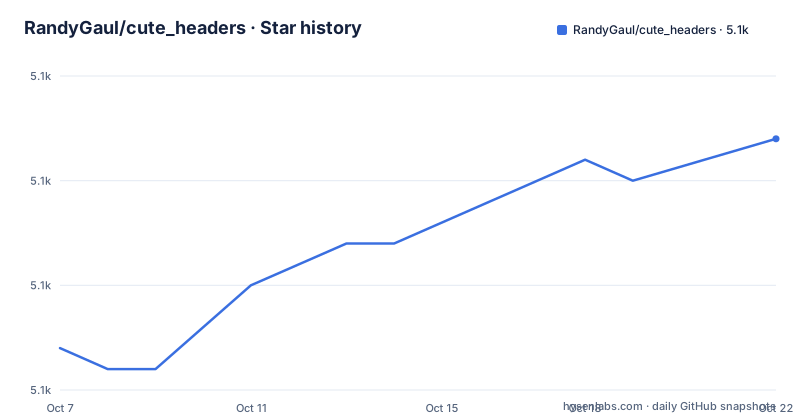
Star history
- RandyGaul/cute_headers5,092 ★ · +10
| Repository | 2026-10-07 | 2026-10-22 |
|---|---|---|
| RandyGaul/cute_headers | 5.1k | 5.1k |
10 Stars in the last 15 days, measured from the daily GitHub snapshot. Compare with other projects
Editorial analysis
Nine libraries, one file each, no build system changes
The repository is nine headers at the root and nothing else you have to think about: `cute_aseprite.h`, `cute_c2.h`, `cute_net.h`, `cute_png.h`, `cute_sound.h`, `cute_spritebatch.h`, `cute_sync.h`, `cute_tiled.h` and `cute_tls.h`. GitHub reports the language as C, the default branch as `master`, 5071 stars, 311 forks and 28 open issues, with the last push on 2026-08-05. The repository is not archived.
The README's how-to-use section is three sentences long. These headers do not have dependencies and are intended to be included directly into your source, each one documents its own specifics at the top of the file, and each has an implementation symbol you define in exactly one translation unit. There is no package manager entry, no submodule to vendor, no CMake target to wire in.
For comparison, reaching for the same functionality through a package manager means adding a dependency, resolving transitive versions, and modifying a build file that other people also maintain. The author's stated reason is blunt: build scripts are a pain in the ass, and these single-file libraries can be integrated into any project without modifying a single build script.
The one-define integration, in full
The README explains the whole scheme with a block that is worth reading twice, because it is the answer to most objections before they are raised:
// Do this ONCE in a .c/.cpp file
#define LIBNAME_IMPLEMENTATION
#include "libname.h"

// Everywhere else, just include like a typical header
#include "libname.h"
What that produces is described in the README as a header plus C file combo, one time. The implementation is physically present in the header, wrapped so the preprocessor discards it everywhere except the translation unit where you set the symbol. Everywhere else the header behaves like an ordinary declaration-only include.
The FAQ pushes back on the two objections that always come up. The first is why implementation code lives in a header at all: the answer given is that handling or sending the file is easy, no zip archives, just copy and paste a single file, and no build script edits. The second is compile times, where the README is unusually specific about mechanics.
On compile times it argues that the stigma comes from inlined code and template bloat, since every translation unit has to churn through the header and place inline versions of functions, and the linker then has to coalesce translation units and delete duplicated symbols single-threaded. A well constructed single-file header, it says, avoids templates, uses inline sparingly, and funnels implementation into one translation unit through that define.
What each header actually does
The README table is the only catalogue, and the descriptions are specific enough to be worth reading rather than skimming. `cute_c2.h` at version 1.10 does 2D collision detection on primitives, boolean results or manifold generation, shape cast and sweep tests, and raycasts. `cute_net.h` at 1.03 is a networking library for games with an optional reliability layer over UDP and a security scheme built in, which is a rarer combination than it sounds.
`cute_tiled.h` at 1.07 is a loader for Tiled maps exported to JSON, described as very efficient. `cute_aseprite.h` at 1.04 parses .ase and .aseprite files into a compact struct collection, which matters if you author art in Aseprite. `cute_sound.h` at 3.0 loads, plays and loops WAV and OGG in mono or stereo with a custom mixer, panning, music and crossfade support, and it is the oldest library here at version 3.0 against 1.x for everything else.
`cute_png.h` at 1.06 loads and saves PNG, compiles texture atlases, includes a DEFLATE compliant decompressor and an LZ77 compressor. `cute_spritebatch.h` at 1.08 is a runtime 2D sprite batcher that builds atlases in memory on the fly, so you skip precompiled on-disk atlases entirely. `cute_sync.h` at 1.02 is a set of synchronization primitives including a read/write lock and a threadpool task system. `cute_tls.h` at 1.02 opens TLS connections over TCP for HTTPS requests, and it is the only one listed as C, C++ and Objective-C.
Examples that double as documentation
The tree contains six example directories and one test directory: `examples_cute_c2/`, `examples_cute_gl_and_tiled_and_spritebatch/`, `examples_cute_net/`, `examples_cute_png/`, `examples_cute_spritebatch/`, `examples_cute_tls/` and `test_cute_tiled/`. The README points at them directly and calls the example folders particularly useful for figuring out how to use a particular header.
One directory name carries more information than the others. `examples_cute_gl_and_tiled_and_spritebatch/` is a combined example putting three headers together, which is the case a table of independent libraries cannot show: a Tiled map loaded at run time, an atlas built in memory, and batched rendering through it. If you are evaluating whether these compose, that folder answers the question faster than reading any header.
Coverage is uneven, and honestly so. Six of nine libraries have example directories, while `cute_sound.h`, `cute_sync.h` and `cute_aseprite.h` have none in this repository, so for those three the top-of-file documentation inside the header is all there is. A reader who wants working `cute_sync` code should expect to read source.
There are no releases published for this repository, and the version numbers live in the README table and in each file rather than in tags. That is consistent with how the libraries are consumed: you copy a file, so a release tag has nothing to point at.
Licensing, deprecations and the wider cute ecosystem
Two documentation details are worth surfacing because they are easy to miss. First, licensing. The README says each library contains license information at the end of the file, with a choice between public domain and zlib. GitHub, meanwhile, reports no license value for the repository and the only license file at the root is a single `LICENSE`. Those are two different statements and they are not necessarily in conflict, since a per-file public domain dedication cannot be expressed as one repository-wide license. What follows from it practically is that the terms you accept are the ones printed in the file you copy, so read the tail of that file rather than assuming the repository's `LICENSE` covers it.
Second, deprecations. The README says some of the unpopular or not so useful headers became deprecated and now live in a separate `cute_headers_deprecated` repository. So an absence here is not always a gap in coverage.
The higher-level answer is also given. When asked about higher level libraries, the README calls these headers rather low-level, says they solve specific problems, and points at Cute Framework, a 2D game creation framework built largely on top of them. That is the intended upgrade path if the individual headers are not enough.
On references, the author nominates STB and RJM as good header libraries and says Mattias Gustavsson's collection is his favorite, which is a reasonable shortlist if you want to compare what a well made single-file library looks like before committing to this particular set.
Editorial conclusion
What makes this repository worth knowing about is the integration cost. A single file with one define is the lowest friction way to add a working collision or PNG loader to a C project, and the README makes its case on exactly that basis rather than on features. The judgement call is authorship: these are one person's libraries, GitHub reports no license value for the repository, and each file carries its own public domain or zlib terms at the bottom, so read the tail of the file you are about to vendor. Copy `cute_c2.h` into a scratch project and define the implementation symbol once to see whether the style suits you before building a dependency around it.
Frequently asked questions
How do you use a single-file C library like these?
Define the library's implementation symbol once in a single .c or .cpp file immediately before including the header, and include it normally everywhere else. The README describes the result as a header plus C file combo, and says this is the only integration step required.
Do single-file headers slow down compilation?
The README argues they should not, because a well constructed one avoids templates, uses inline sparingly, and confines implementation to one translation unit. It attributes the usual complaint to inlined code and template bloat that every translation unit must process before the linker coalesces symbols.
What license applies to the cute_headers libraries?
The README states that each library contains license information at the end of the file, with a choice between public domain and zlib, while GitHub reports no license value for the repository. The terms that apply are the ones in the individual file you copy.
What is cute_c2 used for?
It provides 2D collision detection routines on primitives at version 1.10, with boolean results or manifold generation, shape cast and sweep tests, and raycasts. Examples for it live in the examples_cute_c2 directory in the repository.
Why is a header I have seen before missing from this repository?
The README says some of the unpopular or less useful headers were deprecated and moved to a separate cute_headers_deprecated repository, so a missing header does not always mean it was never here.
Is there a higher level alternative to these headers?
The README calls these libraries rather low-level and solves specific problems, then recommends Cute Framework, a 2D game creation framework built largely on top of these low-level headers, as the place to go for higher level game tooling.
Official sources
Add this badge to your README
If you maintain this project, the badge below links readers to this analysis and shows its maintenance status from the daily GitHub snapshot. Paste the markdown into your README; add ?metric=license or ?metric=stars to the image URL for a different field.

[](https://hysenlabs.com/projects/randygaul-cute-headers)Star history chart for your README
[](https://hysenlabs.com/projects/randygaul-cute-headers)