Raspberry Pi Imager collects telemetry by default, including your locale name
The home of Raspberry Pi Imager, a user-friendly tool for creating bootable media for Raspberry Pi devices.
At a glance
- What is it?
- The imaging utility that writes boot media for single board computers, whose readme itemises exactly eight fields it sends, stores them as daily counters on a hosted key value store, and admits that its one week log retention is the hosting platform's minimum rather than its own. The release tooling builds three processor architectures and expects a configuration file you have to copy first.
- Who is it for?
- Raspberry Pi Imager is the tool for the job if you are writing boot media for one of these boards, and the readme is candid about telemetry in a way most consumer utilities are not. Three things to know.
- Can I use it commercially?
- Check first. The repository uses a licence we do not classify automatically, so read its LICENSE file before any commercial use.
- Is it still maintained?
- Yes. The repository last received commits 2 days ago.
- What is it written in?
- Mainly C++, according to GitHub's language statistics.
Answers come from the project's GitHub data, last synced on November 15, 2026, and from our analysis. They are not legal advice.
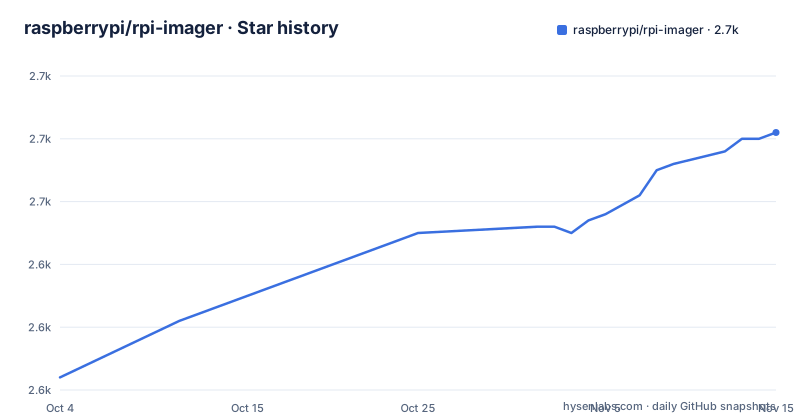
Star history
- raspberrypi/rpi-imager2,661 ★ · +39
| Repository | 2026-10-04 | 2026-11-15 |
|---|---|---|
| raspberrypi/rpi-imager | 2.6k | 2.7k |
39 Stars in the last 42 days, measured from the daily GitHub snapshot. Compare with other projects
Editorial analysis
Eight fields go by default, and one of them is your locale
The telemetry section is the most detailed part of this readme, and it starts by saying collection is on unless you turn it off.
Raspberry Pi Imager collects anonymous metrics (telemetry) by default.The justification given is ordinary and reasonable: understanding which application versions are in use and which images and operating systems are popular, in order to prioritise the work. The fields are then listed one per line. Four are about the selection you made in the application: the URL of the operating system, its category, its observed name, and the version of the application. One says whether the application is being used on the desktop or as part of the network installer. Three describe the host: its operating system version, its architecture, and its locale name, with the locale given as a regional variant example. One more, the revision of the computer the installer is running on, is collected only in the network installer case.
So the identifying field in an otherwise innocuous list is the locale, and it goes in the general case rather than only in the network installer case. There is no argument in the readme that the locale is needed for the stated purpose, which makes it the one item on the list a reader might reasonably query. How to turn it off is described at the end, through three steps in the application's own options screen.
The one week log retention is the platform's minimum, not the project's
This is the most honest paragraph in the document, because it discloses a limit the project does not control. The readme says the last fifteen hundred requests to the service are logged for one week before expiring, and gives the reason: that week is the minimum log retention period of the hosting platform. So the architecture is a small web service that keeps an incrementing counter per operating system URL, per name and per category, per day. What it does not do is keep an application log for a week; the log is whatever the hosting platform's request logging retains, which is capped at the last fifteen hundred requests and cannot be shortened below the platform's floor. The readme states that floor as the reason the week figure is what it is, and links the platform's own documentation for it. That is the right way to write this: rather than claiming a retention window, it explains why the window is what it is and points at the party who sets it.
The consequence for a reader is worth stating plainly. The counters are aggregate and carry no personal data, which is true and is why the statistics are published. The request logs behind them are a different artefact, held in a different region, on someone else's retention schedule.
What the counter is, and where the aggregate view lives
The storage description is short enough to state exactly, which is a good sign about the rest of the section. The service keeps a sorted set per operating system URL, per operating system name and per category, per day. The sorted set is the data structure that gives you a running count with an ordering, which is what you need for a download count over time and nothing more. The readme says explicitly that no personal data is associated with those counts, and that the only query the design supports is how many downloads there were over time.
That last constraint is doing real work. A sorted set keyed by image URL cannot answer questions about who downloaded, only how often, so the aggregate claim follows from the data structure rather than from a policy promise. The published view is a separate site, and the readme is careful to say that because the data is stored in aggregate form, only aggregate data is available to any viewer. Everything about this section is designed so that the honest answer to a privacy question is structural. The one thing that is not part of the structure is the request log described above.
A custom repository flag is an image supply chain decision
There is a command line flag that changes where the application gets its images from.
If the application is started with "--repo [your own URL]" it will use a custom image repository.The readme then suggests making a second launcher shortcut with that parameter, so you can keep the official one and your own side by side. The mechanism is trivial: the repository is a URL, and the application fetches from whatever URL it is given. That is genuinely useful for anyone who needs to flash a locally built image, and it is also a supply chain decision, because an image repository is executable content in effect. Once the repository is yours, the images are yours, and the selection list the application shows you comes from there.
The readme does not raise that second reading, and it does not need to. What it does establish is that the repository is a URL rather than a fixed catalogue, which is the fact a reader needs in order to make the decision themselves.
Three release architectures, and a configuration file to copy first
The build tooling is on the page, in the form of a make target list.
.PHONY: release release-status release-source release-arm64 release-amd64 release-armhf release-repo release-appimages-%Three architectures are built for the binary packages, and the default list is set in the repository target.
RELEASE_ARCHES="$${RELEASE_ARCHES:-amd64 arm64 armhf}" ./debian/release.sh repoSo sixty-four bit x86, sixty-four bit ARM, and thirty-two bit ARM, with the variable overridable from the environment. The thirty-two bit entry is the one that matters most for this particular project, since the machines being imaged are the ones with it. There is also a pattern rule that builds AppImages per architecture, a status target, a source target, and a top level release target that depends on the repository step. The header comment says the release is rootless and that the chroots are created automatically, and the first instruction is to copy a configuration file from an example before any of it works, which is the kind of detail that belongs at the top of a build file and usually does not.
Installation covers the device and three desktops
The install section is two lines.
sudo apt update && sudo apt install rpi-imagerThe first is for the device's own operating system, through the package manager. The second points at a downloads page for three desktop platforms, and the page is the vendor's own software page rather than a repository. Everything else about using the application is delegated to separate documentation, with a link and no summary, and building from source is delegated to a contributing guide.
The gap between what the readme promises to install and what the project builds is worth naming. The binary packages are produced for three architectures and the desktop artefact is an AppImage, which is a self-contained format that runs on distributions the readme never mentions. So the supported set is wider than the documented set, and the documentation is the narrower of the two. There is also a separate, documented release pipeline described in its own file as a rootless multi-architecture chroot build producing AppImages and Debian packages, which is the third layer of build documentation after the contributing guide and a build file.
Four version segments, a candidate stage, and an unstated licence
The release naming is worth decoding because it is not plain semantic versioning. The newest tag has four numeric segments, which means the project reserves a fourth position for something that is not a patch, and the sequence behind it shows the shape: a candidate tag with a release-candidate suffix in July, the two-part release a few weeks later, and the four-part hotfix three days after that. Three releases inside six weeks. That is a fast cadence for an application that most people install once, and it is consistent with an image list that changes independently of the application.
The licence is the loose end. The hosting metadata for the repository records nothing the service could classify, and the repository carries a licence text file at its root with a lower case name, while the readme itself says nothing about terms at all. That combination is common enough to be unremarkable in isolation, and it is the kind of detail that matters if you are redistributing the application rather than downloading it.
Editorial conclusion
Raspberry Pi Imager is the tool for the job if you are writing boot media for one of these boards, and the readme is candid about telemetry in a way most consumer utilities are not. Three things to know. Collection is on by default and one of the eight fields is your locale name, which no stated purpose requires, so turn it off in the options screen if that matters to you. The counters are aggregate by design, but the request logs behind them are retained on the hosting platform's schedule rather than the project's. And a repository flag lets you point the application at any image source you like, which is a supply chain decision the readme leaves entirely to you.
Frequently asked questions
What does Raspberry Pi Imager collect by default?
Anonymous metrics, on by default. The listed fields are the URL, category and observed name of the selected operating system, the application version, whether it is running on the desktop or as part of the network installer, the host operating system version, the host architecture, and the host locale name. The computer's revision is added only in the network installer case.
How do I turn telemetry off in Raspberry Pi Imager?
Through the application's own options screen: open the application options, untoggle the switch for enabling anonymous statistics collection, and save. The readme documents no command line or configuration file switch for it.
How long does Raspberry Pi Imager keep its telemetry request logs?
The last fifteen hundred requests are kept for a week, and the readme says that week is the minimum retention of the hosting platform rather than a setting the project chooses. The aggregate counters themselves hold no personal data and are published in aggregate form only.
Can Raspberry Pi Imager flash images from somewhere other than the official list?
Yes. Started with a repository flag it uses a custom image repository, and the readme suggests making a second launcher shortcut with that parameter so the official list is still available alongside your own.
How do I build Raspberry Pi Imager packages?
Through make targets in the repository root, after copying a configuration file from its example. The default architecture list covers sixty-four bit x86, sixty-four bit ARM and thirty-two bit ARM, and there is a pattern rule for building the self-contained desktop artefact per architecture; the pipeline is described as rootless with chroots created automatically.
Official sources
Add this badge to your README
If you maintain this project, the badge below links readers to this analysis and shows its maintenance status from the daily GitHub snapshot. Paste the markdown into your README; add ?metric=license or ?metric=stars to the image URL for a different field.

[](https://hysenlabs.com/projects/raspberrypi-rpi-imager)Star history chart for your README
[](https://hysenlabs.com/projects/raspberrypi-rpi-imager)Was this useful?