Rayfish gives every peer a name like alice.gaming.ray, and two installs that collide
P2P mesh VPN powered by iroh
At a glance
- What is it?
- An experimental pre-1.0 mesh VPN written in Rust on top of iroh, where devices get addresses derived from their cryptographic identity and reach each other through Magic DNS. Its two macOS install modes fight over the same machine, and Windows has no daemonless mode at all.
- Who is it for?
- Rayfish is a reasonable thing to try on a second machine, a LAN, or a weekend project, and a poor choice for anything you cannot rebuild: the project states outright that it is experimental, pre-1.0 and unaudited. Decide between the macOS app and the standalone daemon before installing either, because the app silently stops an existing daemon, and on Windows expect a LocalSystem service that outlives its window.
- Can I use it commercially?
- Yes, with conditions. MPL-2.0 is a weak copyleft licence: you can use it inside commercial and closed-source software, but if you distribute changes to its own files, you must publish those changes under the same licence.
- Is it still maintained?
- Yes. The repository received new commits within the last day.
- What is it written in?
- Mainly Rust, according to GitHub's language statistics.
Answers come from the project's GitHub data, last synced on November 14, 2026, and from our analysis. They are not legal advice.
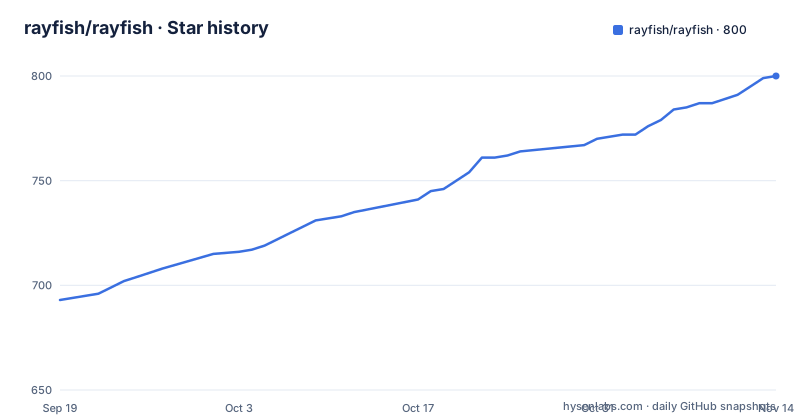
Star history
- rayfish/rayfish800 ★ · +107
| Repository | 2026-09-19 | 2026-11-14 |
|---|---|---|
| rayfish/rayfish | 693 | 800 |
107 Stars in the last 56 days, measured from the daily GitHub snapshot. Compare with other projects
Editorial analysis
The project tells you not to trust it with anything critical
That sentence sits in the first screen of text, above the feature list: Rayfish is experimental, pre-1.0 software and has not had an independent security audit, so do not rely on it for critical systems yet. The package version is 0.5.6, built on edition 2024 with rust-version 1.91, and the licence is MPL-2.0. The release list shows v0.5.5 on 2026-09-29 and v0.5.6 on 2026-10-01, two patch versions two days apart on a project that has not reached 1.0. The same list puts a nightly entry first, dated 2026-06-25 and identified by a short build hash, which makes it three months older than the two version tags under it. Around that disclaimer sits a fairly serious security surface: a SECURITY.md, a documentation page numbered 26 for the security model, closed networks with single-use invitation codes, live approval, reusable fleet keys and member removal, and a claim that each device enforces its own firewall rules. None of that substitutes for the audit that has not happened.
No control server, but peers still fall back to somebody's relay
The headline advantage is architectural. There is no account, no policy server and no coordination service to run, because peers find each other through a distributed hash table, and each device takes a stable IPv6 address derived from its cryptographic identity rather than from a central allocator. Direct connections are the goal, with iroh handling NAT traversal and hole punching. What the feature list calls encrypted relay fallback is where the argument gets thin, because the relay is somebody's machine in the path and the README says nothing about who operates one, how a peer obtains it, or whether a device can refuse relay traffic and stay direct-only. Exit nodes are listed in the same breath as direct file sharing, multi-device identity and declarative network provisioning, which widens the same question: a node that forwards other people's traffic needs to be identified in a system whose selling point is that addresses come from cryptographic identity. The docs cover security and configuration on their own pages; this gap is about what the short README leaves unsaid.
On macOS the app and the daemon cannot both own the machine
macOS gets two incompatible installations, and the project is blunt about it: choose one. The desktop app does not run the standalone daemon. Its core lives inside Apple's Network Extension, and both the app window and the `ray` command bundled with it are clients of that extension, so approving the network extension is the whole setup step. The standalone macOS binary does the opposite: it installs a root launchd daemon, it has no native desktop app, and according to the Cargo features it keeps a browser GUI rather than the native user-session interface the bundled CLI uses. The collision is the interesting part. Installing the app over an existing standalone setup imports that setup and stops the old daemon, so the second install quietly removes the first one's service. Apple Silicon and Intel builds are both published as a signed and notarized DMG. A machine where you thought you had one install may have two histories, and the newest install wins.
Windows runs the VPN in a LocalSystem service, and ARM64 pipes a script into an elevated shell
There is no daemonless mode on Windows. The MSI installs a LocalSystem service that owns the Wintun adapter and keeps the VPN up; the desktop window, the tray icon and `ray.exe` are all clients of that service, and closing the window only moves the app into the tray without stopping the service or disconnecting. In other words the tunnel survives the GUI by design. The x64 installer is a plain download, while ARM64 users are pointed at an elevated PowerShell terminal running `irm https://rayfish.xyz/install.ps1 | iex`, which downloads and executes a script with administrator rights in one line. The Linux and macOS path has the same shape: `curl -fsSL https://rayfish.xyz/install.sh | sh` followed by `sudo ray up`, where the script installs both the CLI and a background service on either platform. Neither route shows you what it will write, and the docs page for setup, updates and source builds is a link away rather than an inspection step.
The justfile's build recipe is the Android one
A developer running `just build` on a Mac is not doing what the name suggests. The recipe is declared as build depending on apk, so it runs `cargo -q build` and then the whole mobile chain: build the ray-mobile crate, run the UniFFI bindgen to regenerate Kotlin bindings from the debug cdylib, run a formatting script for that generated code, and assemble a debug APK with Gradle. The recipe's own note says it needs cargo-ndk, the Android Rust targets and a JDK 17 on PATH, with JAVA_HOME set if the java on PATH is not version 17, and it echoes the resulting APK path at the end. Cross builds are kept in their own target/cross directory, with the reason written out: the Ubuntu 22.04 cross image cannot execute build scripts compiled on a modern host, so sharing one target directory breaks on a glibc mismatch. The file also accepts two names for one recipe, since sibling repos in the tree call it android. The macos recipe refuses to run off Darwin and demands XcodeGen.
One package and one workspace, with the desktop surface gated by a feature
The repository root is simultaneously the rayfish package and the workspace root, and the binary is `ray` built from src/main.rs. The workspace members are ray-proto, which holds the shared IPC wire protocol, plus ray-mobile, ray-apple and ray-windows, so the Apple, Windows and Android shells live in the same tree as the core rather than in separate repositories. The `ray` target is marked required-features desktop, and desktop is a default feature, so an Android library build passes --no-default-features and skips the binary entirely instead of failing on desktop-only code. The comment naming that desktop surface lists the TUN device, the embedded SSH server, 1Password backup and self-replace update. Release builds strip symbols, which the file credits for taking the Android shared library from hundreds of megabytes to tens, and it deliberately leaves panic unset because UniFFI's generated bindings need unwinding. Publishing is disabled in the release metadata. One inconsistency is worth noting: the package homepage points at the GitHub repository while the project site is rayfish.xyz.
Two features live only in a comment, and both build files stop mid-line
Reading the package manifest next to the feature list, two entries do not line up. 1Password backup and self-replace update appear in the Cargo comment describing the desktop-only surface and nowhere in the README, which instead advertises exit nodes, direct file sharing, multi-device identity and declarative network provisioning. So the update story a reader is given is Sparkle-style and manual, while the manifest says the daemon can replace itself. The same applies to the visible ends of both build files. The manifest text stops inside a comment about the desktop-only surface, after the words the embedded mesh SSH se, so the rest of that list is not written down where a reader can see it. The justfile stops inside the macos recipe, at a diagnostic string that ends with Install Homebrew, in the middle of the command it was about to suggest. Truncated files are ordinary in a monorepo, but both of these cut points land inside the lines that describe what the build does, which is exactly where a reader looks first.
The address is a name, so the network label becomes part of it
Naming is where this project is most opinionated. A peer is reached at something like `alice.gaming.ray`, which folds the member, the network and a fixed suffix into one string, and the address behind it is a stable IPv6 value derived from the device's cryptographic identity. The quick start shows the whole lifecycle:
ray create --name gaming
ray invite gaming

# On the other device:
ray join <invite-code>
and then the two commands you would actually use afterwards:
ping alice.gaming.ray
ray status
Networks are closed by default, invitation codes are single-use, and a peer can instead request approval from the network coordinator. Because the network name is baked into the hostname, two networks called gaming produce addresses that differ only in the member and host parts, which is convenient until you operate both at once. Access control is local: each device enforces its own firewall rules, and mesh SSH can be offered keyless without replacing the host SSH server. A client can also stay out of the routing business entirely, since the feature list includes exit nodes rather than requiring every peer to forward traffic.
Editorial conclusion
Rayfish is a reasonable thing to try on a second machine, a LAN, or a weekend project, and a poor choice for anything you cannot rebuild: the project states outright that it is experimental, pre-1.0 and unaudited. Decide between the macOS app and the standalone daemon before installing either, because the app silently stops an existing daemon, and on Windows expect a LocalSystem service that outlives its window. Read the security model page and treat the relay fallback as an open question the README does not answer. If 1Password backup and self-update only exist as code comments, wait for the audit before they sit between you and a machine you care about.
Frequently asked questions
Is Rayfish safe to rely on for critical systems?
The project says not to. Its own text calls Rayfish experimental, pre-1.0 software that has not had an independent security audit, and tells readers not to rely on it for critical systems yet. The current package version is 0.5.6 under MPL-2.0.
Does Rayfish need an account or a control server?
No. Peers discover each other through a DHT, so there is no account, policy server or coordination service, and each device takes a stable IPv6 address from its cryptographic identity. When a direct path is not available, traffic goes over encrypted relays instead.
How do I install Rayfish on Linux or macOS from the command line?
Run curl -fsSL https://rayfish.xyz/install.sh | sh and then sudo ray up. The script installs the CLI and the background service on both Linux and macOS, and binaries plus checksums are published on the releases page.
Can the Rayfish macOS app run together with the standalone ray daemon?
No, the project says to choose one. The app runs the core inside Apple's Network Extension and its bundled ray command talks to that extension, while the standalone macOS binary installs a root launchd daemon with no desktop app. Installing the app over an existing standalone setup stops the old daemon.
Which platforms does Rayfish support?
Linux, macOS, Windows, Android and FreeBSD, at different maturity levels. The ray CLI and daemon are gated behind the desktop feature, which is on by default and switched off for the Android library build, so that target does not exist there.
Official sources
Add this badge to your README
If you maintain this project, the badge below links readers to this analysis and shows its maintenance status from the daily GitHub snapshot. Paste the markdown into your README; add ?metric=license or ?metric=stars to the image URL for a different field.

[](https://hysenlabs.com/projects/rayfish-rayfish)Star history chart for your README
[](https://hysenlabs.com/projects/rayfish-rayfish)Was this useful?