The clone command points at another repository, and the version says 0.1.0
Production-grade multi-agent orchestration platform - JSON-defined agents, multi-tier memory, and built-in observability. Battle-tested on 200+ enterprise AI agents. Now fully open-sourced (prod at https://kiwiq.ai).
At a glance
- What is it?
- KiwiQ is the open-sourced interior of a commercial multi-agent platform: workflows defined as Python and JSON graph schemas, compiled to LangGraph and orchestrated by Prefect, over four databases and an event bus. Its own quick start clones a different repository than the one you are reading, and its package metadata is versioned 0.1.0.
- Who is it for?
- Use it if you want an agent workflow engine whose graph schemas you can hold in version control rather than in a visual builder, and plan for the infrastructure rather than the code, because a working development environment is six datastores, an event bus and an orchestrator before your first workflow runs. Three things to check before you start.
- Can I use it commercially?
- Yes. Apache-2.0 is a permissive licence: you can use, modify and sell software built on it, as long as you keep its copyright and licence notices.
- Is it still maintained?
- Activity is slowing. The repository last received commits 7 months ago.
- What is it written in?
- Mainly Python, according to GitHub's language statistics.
Answers come from the project's GitHub data, last synced on November 15, 2026, and from our analysis. They are not legal advice.
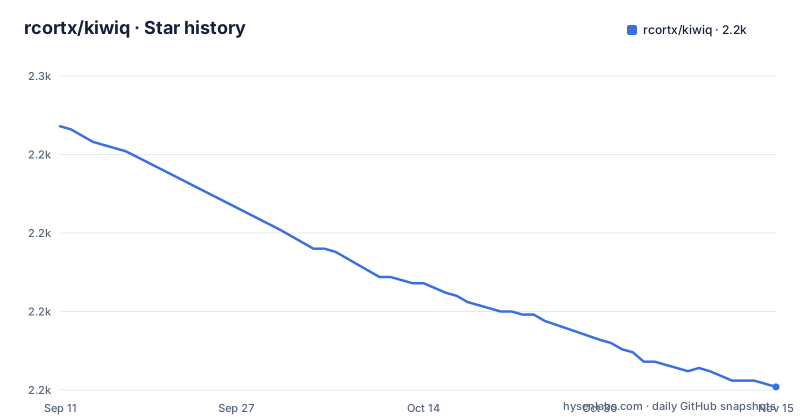
Star history
- rcortx/kiwiq2,151 ★ · -83
| Repository | 2026-09-11 | 2026-11-15 |
|---|---|---|
| rcortx/kiwiq | 2.2k | 2.2k |
-83 Stars in the last 65 days, measured from the daily GitHub snapshot. Compare with other projects
Editorial analysis
The quick start clones a different repository than the one you are reading
The install instructions begin with a clone of a repository whose name and owner do not match the page you are on:
git clone https://github.com/kiwiq-ai/kiwiq-oss.git
cd kiwiq-oss
poetry install
The project itself lives under a different owner with a shorter name, and the package metadata names it a third way, giving the distribution the name of the company rather than the repository. Add the company page it credits, the hosted product, and the fact that this tree is the open-sourced version of that product, and one codebase has four identities across a single page. That is normal for a commercial platform opened up after the fact, and it is still the first thing to verify, because a reader who follows the command literally ends up somewhere other than where they are reading. The rest of the quick start is coherent once you are in the right tree: copy the sample environment file, fill in keys and credentials, then bring the development stack up with a single compose command.
Production-grade, battle-tested, and version 0.1.0
The summary describes a production-grade platform that has been battle-tested on more than two hundred enterprise agents, and that claim is attributed to the page rather than measured on it. The package metadata tells a different story about maturity: the version is 0.1.0, and the distribution is marked as not being a package at all, with a commented-out line above it where the package list would go. There is no GitHub release to read a version from either, so the metadata is the only version-bearing document, and the default branch's last commit is dated April 13, 2026. The Python requirement has the same split. A badge on the page points at a specific 3.12.0 download and the prerequisites ask for Python 3.12, while the metadata allows anything from 3.12 up to but not including 3.14, which quietly includes 3.13. None of that makes the platform less capable; it does mean the version a reader is evaluating is a first tagged number attached to a codebase that came out of a running service.
Four databases and an event bus, and the diagram shows half of them
The memory tier is the design decision that shapes everything else, because it is four separate stores rather than one: PostgreSQL for relational state and workflow checkpoints, MongoDB for versioned documents, a vector database for retrieval, and Redis for caching. Add the RabbitMQ event bus and the Prefect server and you have the six services plus two daemons listed in the development environment, each with its own port and its own port-forwarded dashboard: the API and its documentation on 8000, PostgreSQL on 5432, MongoDB on 27017, Redis on 6379, RabbitMQ with a management UI on 5672 and 15672, the vector store on 8080, the orchestrator dashboard on 4201, and a separate UI for inspecting Redis on 8001. The architecture diagram on the page shows the API talking to three of them, RabbitMQ, Prefect and Redis, with PostgreSQL, MongoDB and the vector store absent. The production compose file then moves the two relational stores out to managed services and leaves the rest containerised.
Running without Docker binds every interface with reload turned on
There is a documented path for running the services directly on a host, and it is three commands:
# Set Python path
export PYTHONPATH=$(pwd):$(pwd)/services

# Start FastAPI server
poetry run uvicorn kiwi_app.main:app --host 0.0.0.0 --port 8000 --reload

# Start Prefect worker (separate terminal)
poetry run python services/workflow_service/services/worker.py
The binding is the part to notice. Zero-dot-zero-dot-zero-dot-zero is every interface, and automatic reload is for development, so a copy-paste of this block on a machine with a public address exposes an API with JWT authentication, role-based access and a billing integration on it, reloading as files change. The repository also carries a gunicorn configuration file at the top level, which is the other server, and neither file nor page explains when to prefer one over the other. The same section reminds you that five datastores have to be running already, which is the honest version of what the compose file was doing for you.
The sample environment file ships the author's own doubts
The configuration template is more revealing than the documentation around it. Every credential is a literal placeholder string, including the database user, the database password, the message queue user and the cache password, so an unedited file produces a stack whose passwords are written in the template. Alongside them sit two comments in the first person. One, next to the orchestrator's API address, reads as a note that it somehow does not work. Another is a to-do item about handling orchestrator logging and its directory correctly for both the server and the worker. Further down, results persistence is turned off with a comment pointing at the orchestrator's own storage directory as the default location, and anonymous access is enabled on the vector store, with a query default limit of twenty-five. Three database names are composed into one connection variable, and a comment says the setup script creates them if they are missing, so the first run has to be run as the account that can create databases.
Test and code generation libraries sit in the production dependency list
The dependency block is long, and a few entries are in the wrong place to be convenient. The test framework and its asynchronous plugin are listed among the runtime dependencies rather than in a development group, so every deployment installs them. So is a code generator for data models, which is a build-time tool, and a document converter carrying its own extras for office documents, spreadsheets and PDFs, which is an ingestion dependency. A schema library appears with a non-GPL formats extra, which is a deliberate choice to avoid a licensed transitive dependency and worth knowing if you audit the tree. Then there is the authentication surface: a session-signing library, a JSON web token library, a single-sign-on library, and two password hashing libraries side by side, plus a payment library. Five ways to authenticate a caller, in a stack whose quick start asks for one secret key generated with a command.
The sandboxed code runner is a top-level directory you can read
One feature deserves its own section because of where it lives. Sandboxed code execution is listed as a capability: run user-defined Python safely within workflows, and code execution is also named among the reusable node types. The corresponding implementation is a directory at the top of the repository named for untrusted code, which is an honest name and also an invitation to go and read exactly how the boundary is drawn. Nothing on the page describes the boundary. That matters because a workflow node that executes arbitrary Python is the one place in the platform where a mistake in someone else's workflow definition becomes code execution on your infrastructure, and the surrounding features, billing, customer data and scraping, make that infrastructure worth protecting. Two other directories at the top level are operational scripts committed into the tree, a standalone test client and a setup script for a specific cloud provider.
Editorial conclusion
Use it if you want an agent workflow engine whose graph schemas you can hold in version control rather than in a visual builder, and plan for the infrastructure rather than the code, because a working development environment is six datastores, an event bus and an orchestrator before your first workflow runs. Three things to check before you start. The clone command on the page names a different repository than the one hosting it, so verify which tree you are actually installing. The sample environment file ships placeholder credentials and enables anonymous access on the vector store, so change both before anything else is reachable. And the sandboxed code execution feature is a directory you can read rather than a guarantee, so decide what the code node is allowed to reach before you let a workflow call it.
Frequently asked questions
What is KiwiQ?
An open-source multi-agent orchestration platform where workflows are defined as Python or JSON graph schemas, compiled to LangGraph and executed through Prefect. It ships 24 or more reusable node types and 27 or more ready-made workflow definitions, pauses for human review with real-time streaming, and keeps state across four databases.
How do I install KiwiQ from source?
You need Python 3.12, Poetry and Docker with Compose. The page's commands are `git clone https://github.com/kiwiq-ai/kiwiq-oss.git`, `cd kiwiq-oss`, `poetry install`, then `cp .env.sample .env`, fill in the keys and credentials, and run `docker compose -f docker-compose-dev.yml up --build`. Note that the clone URL names a different repository than the one hosting the instructions.
What services does the KiwiQ development environment start?
The API on 8000 with documentation at `/docs`, PostgreSQL on 5432, MongoDB on 27017, Redis on 6379, RabbitMQ on 5672 with a management UI on 15672, the vector store on 8080, the orchestrator dashboard on 4201, and a separate Redis inspection UI on 8001. The production compose file moves the two relational databases to managed services and adds a reverse proxy with certificate handling.
What is untrusted_code_runner in KiwiQ?
It is the directory holding the sandboxed code execution feature, which the page describes as running user-defined Python safely within workflows, with code execution listed among the reusable node types. The page does not describe how the sandbox boundary is enforced, so it is worth reading before enabling the node.
Official sources
Add this badge to your README
If you maintain this project, the badge below links readers to this analysis and shows its maintenance status from the daily GitHub snapshot. Paste the markdown into your README; add ?metric=license or ?metric=stars to the image URL for a different field.

[](https://hysenlabs.com/projects/rcortx-kiwiq)Star history chart for your README
[](https://hysenlabs.com/projects/rcortx-kiwiq)Was this useful?