RDFLib's release list still contains a deleted release and a stale stable label
RDFLib is a Python library for working with RDF, a simple yet powerful language for representing information.
At a glance
- What is it?
- The pure-Python RDF library, at an alpha for the next minor version, with two runtime dependencies of which one disappears on newer Python, six console scripts, seven optional extras and an example directory that includes a Berkeley DB store and a script named for auditing fetches. The documentation around it has drifted in three specific, checkable ways.
- Who is it for?
- Use this if you want RDF and SPARQL in pure Python with no database server, because that is exactly what it is and the two-dependency core is a genuine achievement rather than a marketing line. Three things to know.
- Can I use it commercially?
- Yes. BSD-3-Clause is a permissive licence: you can use, modify and sell software built on it, as long as you keep its copyright and licence notices.
- Is it still maintained?
- Yes. The repository last received commits 4 days ago.
- What is it written in?
- Mainly Python, according to GitHub's language statistics.
Answers come from the project's GitHub data, last synced on November 15, 2026, and from our analysis. They are not legal advice.
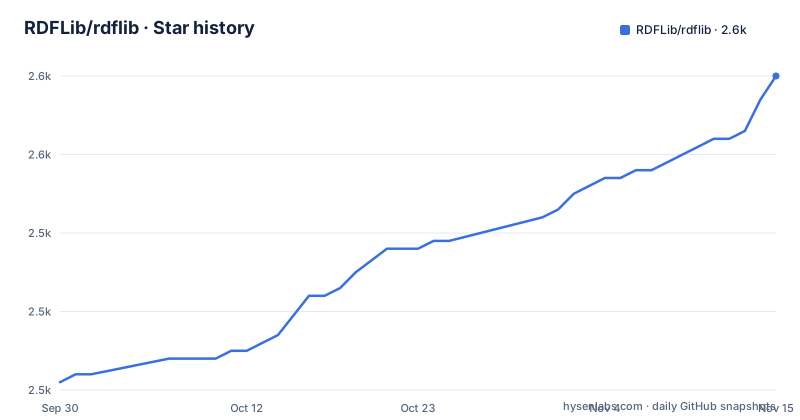
Star history
- RDFLib/rdflib2,560 ★ · +39
| Repository | 2026-09-30 | 2026-11-15 |
|---|---|---|
| RDFLib/rdflib | 2.5k | 2.6k |
39 Stars in the last 46 days, measured from the daily GitHub snapshot. Compare with other projects
Editorial analysis
The manifest is a 7.7 alpha and the newest tag is 7.6.0
The repository manifest declares version 7.7.0a0, which is an alpha of a minor version that has not been released. The newest release on record is 7.6.0 from February 2026, preceded by 7.5.0 in November 2025 and 7.4.0 in October 2025. So installing from the package index gets you 7.6.0, and cloning gets you the development state of 7.7. That gap is normal for a project that versions from the manifest, and the README is explicit about which branch carries which kind of work: the default branch is the current major release development branch for backwards-compatible fixes and features, and a second branch is the next major release development branch. For a contributor that distinction decides whether your change belongs in a patch or in the following major, and for a user it decides whether the code you read is what you would get from an install.
The release list holds a deleted release and a stale stable label
The versions section of the page is written as a hand-maintained list going back to the 5.x line, and it has three separate inaccuracies that are easy to confirm. First, one line exists purely to say that a release was deleted, which is an unusual thing to keep in a changelog and tells you a tag was removed at some point. Second, a line describes one release as possibly the last of its major, and then five more releases of that major follow below it, so the note was never removed. Third, an older release is labelled the current stable release while two later releases sit above it. None of this matters to the library, and all of it matters to anyone who reads the page instead of the release index. The project also publishes a per-release citation identifier and carries a machine-readable citation file at the root, so the authoritative record exists; it just is not on the page.
Two runtime dependencies, and one of them vanishes on newer Python
For a library implementing RDF parsing, serialisation, a query language and its update form, the dependency list is startlingly short:
isodate>=0.7.2,<1.0.0; python_version < '3.11'
pyparsing>=3.1.0,<4
Two entries, one parser combinator library with an upper bound and one date library with both bounds, and the date library carries an environment marker that installs it only below a particular Python minor version. So on a current interpreter you get one dependency, and on an older one you get two. That is the right way to express it, since the standard library gained the relevant functionality later, and it means the dependency surface differs by interpreter rather than growing with the feature list. Everything else the library can do is implemented in the package itself or reached through an extra, which is why the interesting decisions in this project live in the extras rather than in the requirements.
Installing the library puts six executables on your path
The manifest declares six console scripts in one package: a pipeline tool that converts between serialisations, a table-to-RDF converter, two graph-to-dot renderers, a graph-isomorphism checker, and a query runner. That is the shape of a mature library rather than a tidy one: the tools have accreted over the project's history and they now ship to every consumer, whether or not you want them. It is worth checking before installing into an environment where something else already claims one of those names, because the collision would surface as a broken script in someone else's project rather than as an error at install time. The tree does not present these as optional extras, and the README's installation section does not mention them at all, which means a reader learns about them only by reading the manifest.
Seven extras, two of them identical, and the page shows five
The optional dependencies are where the storage backends and alternative parsers live, and there are seven of them: a Berkeley DB store, a networkx integration, an HTML parser, an XML backend, a fast JSON serialiser, and two remote-store clients. The two remote-store clients declare exactly the same requirement, an HTTP client with a narrow range, which makes sense because both are clients for triple stores rather than local formats, and the release notes confirm the pairing by listing an RDF4J store integration and client in one release and a GraphDB client in the next. The discrepancy worth noting is with the documentation. The README's install line shows five extras in its example, omitting the two remote-store ones, so a reader following it exactly gets an installation without either remote backend.
The development container does nothing on purpose
The repository ships a container setup with two services that look like duplicates and are not. One is a development container whose default command prints a message saying to override the command if this is not what you want, then sleeps in a loop waiting for shutdown. Its purpose is to be a running container that an editor connects to, not to do work. The other service runs the same image with the same bind mount but redirects every cache directory to a named volume instead of into the checked-out tree, so repeated test runs do not leave cache directories in your working copy. Both redirect five caches by hand: the generic cache location, the type-checker cache, the test-runner working directory, the test cache directory passed through an environment option, and the pre-commit home. That is a meticulous devcontainer, and the only oddity is the sleep loop, which will look like a hung container to anyone who runs it without knowing.
Examples include a store broker helper and a script named for auditing fetches
The example directory has more than twenty-five files and it is the best index of what the library can actually do. There are separate examples for querying and for updates, for a remote store, for a disk-backed store, for transitive closure over a graph, for slices, for datasets, for custom datatypes, for a custom query function, for conjunctive graphs, for JSON-LD serialisation, for the RDF patch format in both directions, and for smushing, which is the operation for merging RDF datasets, with a matching data file. Two names are worth pausing on. One example is called for fetching through a custom opener with auditing, and another for fetching with that opener, which suggests the project treats remote fetching as something you instrument rather than something you just call. At the repository root there is also a shell script for running against a Fuseki instance, which is the project's own SPARQL server, and that is the third way to get data in besides a local graph and a remote store.
Editorial conclusion
Use this if you want RDF and SPARQL in pure Python with no database server, because that is exactly what it is and the two-dependency core is a genuine achievement rather than a marketing line. Three things to know. The install gives you six executables as well as the library, so check they do not collide with anything already on your path before adding it to a production environment. The optional extras are where the interesting backends live, including a disk store and two remote store clients, and the README's example line lists only some of them. And if you are upgrading across a major version, read the branch policy first, because the default branch is for backwards-compatible work and the next major lives on a different one.
Frequently asked questions
What is rdflib?
It is a BSD-licensed pure-Python package for working with RDF, the linked-data language, and it calls itself a simple yet powerful language for representing information. It ships parsers and serialisers for the main RDF syntaxes including RDF/XML, N-Triples, N-Quads, Turtle, TriX, TriG, JSON-LD and HexTuples, a graph interface over pluggable stores, and a SPARQL 1.1 implementation for queries and updates.
How do I install rdflib?
The stable release installs from the package index with a single pip command, or manually from the index page. Optional backends install as extras, and the README's example line names five of them: a Berkeley DB store, networkx, an HTML parser, an XML backend and a fast JSON serialiser, though two further remote-store extras are declared in the manifest and not shown. Developers can install from the git repository or, from a clone, use a single sync command or an editable install.
How do I use rdflib?
The main data object is a graph, a Python collection of subject, predicate and object triples, created by importing the graph class, constructing one and parsing a document. Common namespaces are bundled and imported from a namespace module, you read values with a value lookup, you add triples with an add call, and you can bind prefixes to shorten URIs before serialising. The repository also carries a long examples directory and hosted documentation built from the code.
What are the alternatives to rdflib?
The repository does not name alternatives or compare itself to other graph libraries. What it does name is its own surrounding ecosystem, seven sibling projects covering a remote query wrapper, an ontology documentation tool, an RDFa distiller, a microdata extractor, a shapes validator, and an implementation of a reasoning profile that expands a graph. That last one is the closest thing to a different approach mentioned anywhere on the page.
Official sources
Add this badge to your README
If you maintain this project, the badge below links readers to this analysis and shows its maintenance status from the daily GitHub snapshot. Paste the markdown into your README; add ?metric=license or ?metric=stars to the image URL for a different field.

[](https://hysenlabs.com/projects/rdflib-rdflib)Star history chart for your README
[](https://hysenlabs.com/projects/rdflib-rdflib)Was this useful?