vue-realworld-example-app: the theme comes from a submodule and the test suite is someone else's
An exemplary real-world application built with Vue.js, Vuex, axios and different other technologies. This is a good example to discover Vue for beginners.
At a glance
- What is it?
- This is a Vue 3 implementation of the RealWorld spec, built with Pinia, Vue Router 5 and Vite, and it uses Bun rather than npm. Its CSS theme is imported from the spec repository through a git submodule so it stays in step with the e2e selectors, and the Playwright suite that grades it is vendored from the same place rather than written here.
- Who is it for?
- Use this app if you want a Vue 3 codebase that is checked against a shared conformance suite rather than a tutorial that only looks like a real application. Clone with submodules, because the theme and the tests both come from there and a plain clone gives you neither.
- Can I use it commercially?
- Yes. MIT is a permissive licence: you can use, modify and sell software built on it, as long as you keep its copyright and licence notices.
- Is it still maintained?
- Yes. The repository last received commits 13 days ago.
- What is it written in?
- Mainly Vue, according to GitHub's language statistics.
Answers come from the project's GitHub data, last synced on November 15, 2026, and from our analysis. They are not legal advice.
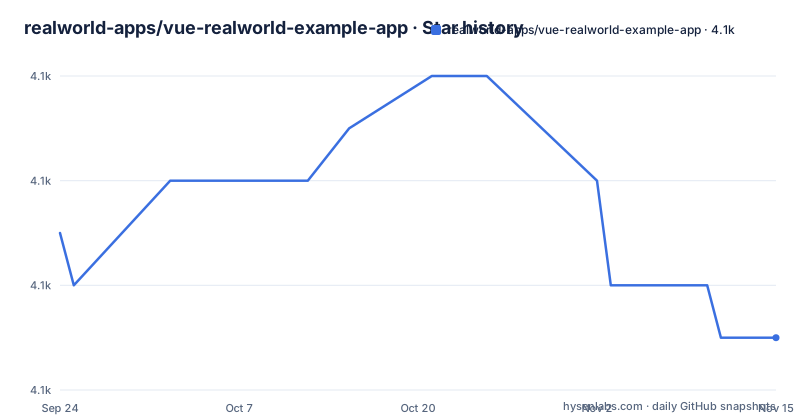
Star history
- realworld-apps/vue-realworld-example-app4,071 ★ · -2
| Repository | 2026-09-24 | 2026-11-15 |
|---|---|---|
| realworld-apps/vue-realworld-example-app | 4.1k | 4.1k |
-2 Stars in the last 52 days, measured from the daily GitHub snapshot. Compare with other projects
Editorial analysis
The CSS theme is imported from a git submodule, not from this repository
The visual styling is not in this repository. The app imports the shared Conduit Minimal CSS from the RealWorld specification, and it does so from inside the `realworld` submodule, referenced as `realworld/assets/theme/styles.css` and imported in `src/main.js`.
The reason given is not aesthetic, it is contractual. The theme stays in sync with the templates and with the e2e selectors contract, so a class name the shared Playwright suite looks for is the same class name the stylesheet defines. If the CSS were copied into this repository, the two would drift.
That decision has a cost at clone time, which is why the getting started block leads with `git clone --recurse-submodules` rather than a plain clone. The `.gitmodules` file in the root and the `realworld` entry in the tree are the two visible ends of it, and the same block offers `git submodule update --init` for a clone that already exists.
So this application depends on another repository at build time, in two separate ways: the stylesheet and the test suite.
The test suite is vendored from RealWorld and grades the app against the spec
The tests are not written here. The application is exercised by the official RealWorld Playwright end-to-end suite, vendored as the same `realworld` submodule, and the readme describes the codebase as backed by that shared suite.
The setup is two commands, with a note attached to the first.
bunx playwright install --with-deps chromium
bun run test
The browser install step is marked first time only. The second command is `playwright test`, and the manifest reveals more of the shape than the readme does: there is a `test:e2e` script that runs the suite with `--grep-invert @security`, and a `test:e2e:security` script that runs it with `--grep @security`. So the suite carries a tag that partitions security cases out of the default run, which is why the default `test` script is neither one nor the other.
Playwright boots the Vite dev server itself, according to the readme, with the configuration in `playwright.config.ts`. That means the tests do not assume you have a server already running, and also that the same port the dev server uses in development is the one the suite expects.
Bun replaces npm, and the scripts assume you have it
Every command in the readme is a Bun command. Installation is `bun install`, the dev server is `bun run serve` for hot reload at localhost:8080, and the production path is `bun run build` followed by `bun run preview`. Testing uses `bunx playwright install` for the browser and `bun run test` for the suite. Linting and formatting are `bun run lint` and `bun run format`.
So there is no npm or yarn path in the documentation at all, and the repository records a `bun.lock` rather than a package-lock or a pnpm lockfile. For an example application whose purpose is to be read, that is a deliberate narrowing: there is one documented path rather than several equivalent ones.
It also means the scripts in the manifest are plain, with no package runner prefix baked in. `serve` is `vite`, `build` is `vite build`, `preview` is `vite preview`, `lint` is `eslint src`, `format` is `prettier --write "src/**/*.{js,vue}"` and `test` is `playwright test`. Anything that can run a script can run these.
The default port being 8080 rather than Vite's usual 5173 is one more sign the configuration has been set deliberately rather than left at defaults.
The API host is one environment variable with a public default
The backend defaults to `https://api.realworld.show/api`, and pointing the app at any other spec-compliant RealWorld backend is done with `VITE_API_URL`.
VITE_API_URL=http://localhost:8000/api bun run serveThe variable can also live in an `.env.local` file, which is the Vite convention and means the override survives across runs without being retyped.
The default being a public deployment rather than localhost means a fresh clone talks to somebody else's server the moment you run it. That is convenient for a demo and it is also the thing to be deliberate about, because the app is doing authentication, so the credentials you type at startup go to that host.
The HTTP layer is described as a thin `fetch` wrapper instead of axios, in `src/common/api.service.js`. That is a departure from the original RealWorld Vue example, which used axios, and the manifest confirms it by not listing axios as a dependency at all.
Markdown is rendered through marked and then sanitised through DOMPurify
Article bodies in the RealWorld spec are markdown, so the app needs a renderer and a sanitiser. It has both, and the readme names them together: marked for rendering and DOMPurify for safe rendering.
That pairing is the standard arrangement, and the dependency versions in the manifest are current enough to be worth noting. `marked` is at `^18.0.5` and `dompurify` at `^3.4.9`. Rendering user-supplied markdown into a page without sanitising it is a stored cross-site scripting hole, so having both is a requirement rather than a nicety, and the security-tagged Playwright tests are the half of the suite that would catch a regression in it.
Dates are handled separately by `date-fns` at `^4.4.0`, which replaced the moment-style date handling common in older Vue examples. The whole runtime dependency list is short: vue, vue-router, pinia, marked, dompurify, date-fns. No component library, no CSS framework, no state management beyond Pinia, and the theme comes from the submodule.
Lint and format are configured not to argue with each other
The readme is unusually explicit that its two code quality tools are complementary rather than competing. `bun run lint` runs ESLint with eslint-plugin-vue, and the readme claims this catches Vue-specific errors including in templates. `bun run format` runs Prettier for code style.
The reasoning given is that Prettier only formats, while eslint-plugin-vue is currently the only linter that understands Vue single file component templates. The specific failure that motivates the plugin is template errors, which a JavaScript linter cannot see.
The conflict that follows from having both is handled by configuration rather than convention. `eslint-config-prettier` disables the stylistic ESLint rules so the two do not fight, and the readme says so explicitly. The configuration is `eslint.config.mjs` in the root, flat config format, and the format script is scoped to `src/**/*.{js,vue}` while the lint script is scoped to `src`. There is also a `format:check` script running the same glob with `--check`, which is what continuous integration would use, plus a `.prettierrc` and an `.editorconfig`.
The Vue 2 version is a frozen reference and its support path is commercial
There is a section about where the Vue 2 implementation went, and it is more specific than a deprecation notice usually is.
The original lives at `realworld-apps/vue-2-realworld-example-app` and is described as a frozen reference. Vue 2 reached end of life on 31 December 2023, and the repository is kept for studying patterns and comparing frameworks rather than as a base for new projects.
Then the recommendation for anyone who cannot migrate yet. If your company maintains a Vue 2 application, the section points at notes about HeroDevs Never-Ending Support, and describes that option as officially endorsed by the Vue team.
That is a paid commercial support path, and saying so plainly is more useful than pretending a migration is always available. It also explains why this repository is Vue 3 only: the split is not about which version is newer, it is about which one has a supported future.
The manifest describes the app as TodoMVC for the RealWorld spec
The package name is `realworld-vue`, the version is `0.1.0`, and the description field reads TodoMVC for the RealWorld.
That is the project's own summary of itself, and it is accurate about the design intent. The RealWorld spec defines one application, a Medium clone, and every implementation of it is the same app. So the exercise is not to build something new but to build the same thing twice and compare the stacks, which is why the readme credits CodebaseShow for the same app built with other stacks.
The version being `0.1.0` for a codebase described as exemplary is worth noting rather than reading as immaturity. It reflects that the artifact is a reference implementation rather than a released library, and nothing in this repository depends on that version number.
The credit section names Emmanuel Vilsbol as the original creator and the gothinkster repository contributors, which dates this implementation to the era when the RealWorld examples were first written. Everything in the stack list above is newer than that origin: Vue Router 5, Vite, Bun, and the Vitest-era tool numbering of the dev dependencies.
Editorial conclusion
Use this app if you want a Vue 3 codebase that is checked against a shared conformance suite rather than a tutorial that only looks like a real application. Clone with submodules, because the theme and the tests both come from there and a plain clone gives you neither. Run the e2e suite before you copy any of its patterns, since the suite is what makes the example exemplary rather than merely complete. And if you maintain a Vue 2 codebase, read the Vue 2 repository's notes on HeroDevs Never-Ending Support before planning that migration, because Vue 2 reached end of life on 31 December 2023.
Frequently asked questions
how do I run the vue RealWorld example app
Clone with `git clone --recurse-submodules https://github.com/realworld-apps/vue-realworld-example-app` so the `realworld` submodule comes with it, then run `bun install` and `bun run serve`, which serves with hot reload at http://localhost:8080. In an existing clone, run `git submodule update --init` instead of cloning again.
what stack does vue-realworld-example-app use
Vue 3 with the Composition API and `<script setup>`, Pinia for state, Vue Router 5 for routing, and Vite through `@vitejs/plugin-vue` for the dev server and builds. Bun is the package manager and script runner, markdown is rendered with marked and sanitised with DOMPurify, dates use date-fns, and the API layer is a thin fetch wrapper in `src/common/api.service.js` rather than axios.
how do I point vue-realworld-example-app at my own backend
Set the `VITE_API_URL` environment variable, either in the shell or in an `.env.local` file. The default backend is `https://api.realworld.show/api`, and any spec-compliant RealWorld backend works, for example `VITE_API_URL=http://localhost:8000/api bun run serve`.
Official sources
Add this badge to your README
If you maintain this project, the badge below links readers to this analysis and shows its maintenance status from the daily GitHub snapshot. Paste the markdown into your README; add ?metric=license or ?metric=stars to the image URL for a different field.

[](https://hysenlabs.com/projects/realworld-apps-vue-realworld-example-app)Star history chart for your README
[](https://hysenlabs.com/projects/realworld-apps-vue-realworld-example-app)Was this useful?