kanagawa.nvim: three themes, a hex palette and one manual compile step
NeoVim dark colorscheme inspired by the colors of the famous painting by Katsushika Hokusai.
At a glance
- What is it?
- kanagawa.nvim is a dark Neovim colorscheme in Lua with three variants, a two layer color system where literal hex palette entries feed semantically named theme roles, and an opt-in byte code cache that has to be regenerated by hand after every config edit.
- Who is it for?
- Take kanagawa.nvim if you want a dark theme whose colors are editable as data rather than as highlight groups, and keep the defaults unless you need transparent floats, a gutterless line number column or a dark popup menu, since each of those needs a config block. Leave compile off unless you are willing to run :KanagawaCompile after every change to your config, and set laststatus and cmdheight before setup because the theme reads their values at that point.
- Can I use it commercially?
- Yes. MIT is a permissive licence: you can use, modify and sell software built on it, as long as you keep its copyright and licence notices.
- Is it still maintained?
- Activity is slowing. The repository last received commits 6 months ago.
- What is it written in?
- Mainly Lua, according to GitHub's language statistics.
Answers come from the project's GitHub data, last synced on November 15, 2026, and from our analysis. They are not legal advice.
Star history
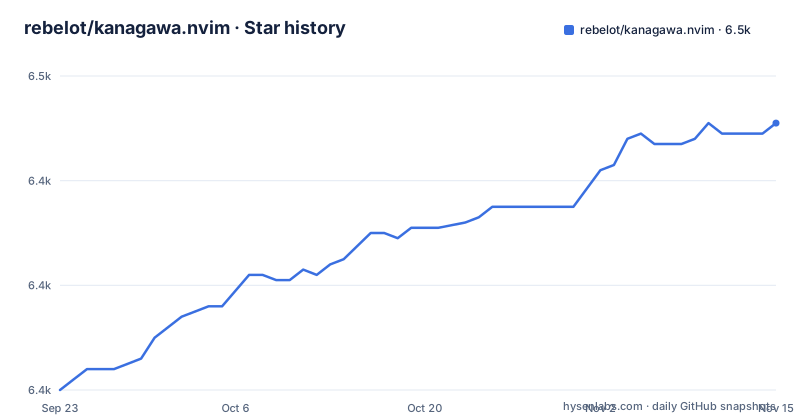
- rebelot/kanagawa.nvim6,451 ★ · +51
| Repository | 2026-09-23 | 2026-11-15 |
|---|---|---|
| rebelot/kanagawa.nvim | 6.4k | 6.5k |
51 Stars in the last 53 days, measured from the daily GitHub snapshot. Compare with other projects
Editorial analysis
Byte code caching is opt-in and goes stale on every edit
The feature list promises compilation to lua byte code for what it calls super fast startup times, and the switch that controls it is called compile and defaults to false. Turning it on introduces a bookkeeping obligation, because the README's first note says that whenever you make changes to your config you must run the :KanagawaCompile command. The note spells out the sequence: modify your config, restart nvim, run that command. Skip it and the colorscheme keeps serving the previously generated version, so a palette edit can appear to do nothing on the next launch with no error to explain why. The value is a cache, so the safe default of false is not a lack of confidence in the feature, it is an acknowledgment that regeneration is manual.
Undercurl rendering is on by default and rests on the terminal
Undercurl is enabled in the default options, undercurl = true, and the requirements section asks for neovim latest, truecolor terminal support and, as an optional item, undercurl terminal support. The logic behind that split is visible in the option list: the snake and wave textures under words depend on how the terminal draws them, while the truecolor requirement is separate and non-negotiable for a palette expressed in hex. Accessibility is also addressed in one line: a badge links to the WCAG 2.1 contrast minimum page, which is a claim about the contrast ratio of the palette rather than a per group audit.
setup reads laststatus and cmdheight, so option order matters
The second note is an ordering constraint rather than a value to change. It says Kanagawa adjusts to the value of some options and that 'laststatus' and 'cmdheight' must be set before calling setup. Those two editor options change how much room the status line and the command line take, so set them first. The documented escape hatch is not calling setup at all: the text says there is no need to call setup if you are ok with the defaults, which makes the option list a reference rather than a required step. Installing and loading takes one line each:
use "rebelot/kanagawa.nvim"colorscheme kanagawaFrom Lua the same thing is vim.cmd("colorscheme kanagawa"). A minimal configuration that keeps compilation disabled is:
require('kanagawa').setup({
    compile = false,
    transparent = false,
    dimInactive = false,
    terminalColors = true,
})
vim.cmd("colorscheme kanagawa")
So transparent, dimInactive and terminalColors are the three that change how the editor looks outside the buffer: the first suppresses the background color, the second dims the inactive window per the hl-NormalNC entry, and the third sets the terminal palette.
Three variants, and a background option that can outvote your choice
Kanagawa comes in three variants: wave, described as the default heart warming theme, dragon for late night sessions, and lotus for when you are out in the open. Selection is possible three ways, which is where the friction sits. You can set config.theme to the desired theme, you can change the value of vim.o.background, and any change to that option selects the theme mapped by config.background, so a background switch made by something else in your config can replace a theme you set deliberately. The third route loads a variant directly, either with vim.cmd("colorscheme kanagawa-wave") and its dragon and lotus equivalents, or with require("kanagawa").load("wave"), which is the form to use when the plain name is not enough.
Palette entries are literal hex while theme entries are roles
The customization model has two layers and they are edited differently. Palette colors are defined directly as RGB hex strings under arbitrary names that recall the actual color. Theme colors are named and grouped semantically by their function. A palette defines all available colors, a theme maps those palette colors onto theme colors, and one palette color may be assigned to several theme colors. Both layers are changed through config.colors: the palette block changes every usage of those colors, as in setting sumiInk0 to "#000000" or fujiWhite to "#FFFFFF", while the theme block changes specific usages for a certain theme or for all of them, as in the wave variant setting ui.float.bg to "none" or the dragon variant setting syn.parameter to "yellow". Every palette color name is written out in lua/kanagawa/colors.lua and its per theme usage in lua/kanagawa/themes.lua.
overrides is a function, so plugin groups track the active theme
Plugin and built in element tweaks go through config.overrides, which takes the resolved colors table and returns highlight groups. The supported keywords are the same as the {val} parameter of nvim_set_hl, and the reference for groups is :help highlight. Because the function receives colors, a group can either hard code a palette entry, for example String with fg = colors.palette.carpYellow and italic = true, or reference a theme role such as colors.theme.syn.type, which then updates when you switch theme. Several worked examples ship with it: ui.bg_gutter set to "none" under the all key clears the LineNr and SignColumn backgrounds, a Telescope block recolours the prompt, results and preview borders, and a Pmenu block darkens the completion popup, with blend = vim.o.pumblend mentioned as the way to make that popup transparent.
A Lua plugin directory with a Python script at the root
The repository is small enough to read in one sitting, and its ten entries explain how little it does. There is lua/ at the root, which is why the one line package manager install works with no plugin directory, plus colors/, extras/ and assets/ directories, a screenshot.png, a [email protected], a LICENSE, a .gitignore and palette.py. A Python script sitting at the top level of a Lua colorscheme is the unusual entry here. The default branch is master rather than main, and the project publishes no GitHub releases at all, so there is no version to pin.
What the documentation never pins down
Several things a new user will ask about are simply absent. neovim latest is the only version requirement, with no minimum release number and no list of the features the theme relies on, so there is no way to tell from the documentation which editor version introduced the API it uses. The three variants are named and described in a sentence each.
Editorial conclusion
Take kanagawa.nvim if you want a dark theme whose colors are editable as data rather than as highlight groups, and keep the defaults unless you need transparent floats, a gutterless line number column or a dark popup menu, since each of those needs a config block. Leave compile off unless you are willing to run :KanagawaCompile after every change to your config, and set laststatus and cmdheight before setup because the theme reads their values at that point. Check that your terminal reports truecolor first, and note the newest commit is dated 2026-05-10 with no tagged release to pin against.
Frequently asked questions
What are the best Neovim themes?
The documentation does not rank themes, including its own. It offers three variants: wave as the default heart warming theme, dragon for late night sessions and lotus for when you are out in the open. It claims extensive TreeSitter highlighting support and support for many popular plugins, and links a WCAG contrast minimum badge.
What colors are in the Kanagawa theme color palette?
Two layers. Palette colors are RGB hex strings with names that recall the actual color, listed in lua/kanagawa/colors.lua, such as sumiInk0 and fujiWhite. Theme colors are named by function in lua/kanagawa/themes.lua, and one palette color can fill several theme roles, so config.colors edits either layer separately.
how to install kanagawa nvim
The installation section says to download it with your favorite package manager and shows use "rebelot/kanagawa.nvim", then load it with colorscheme kanagawa or vim.cmd("colorscheme kanagawa"). Requirements listed are the latest neovim, truecolor terminal support, and undercurl terminal support as optional.
Official sources
Add this badge to your README
If you maintain this project, the badge below links readers to this analysis and shows its maintenance status from the daily GitHub snapshot. Paste the markdown into your README; add ?metric=license or ?metric=stars to the image URL for a different field.

[](https://hysenlabs.com/projects/rebelot-kanagawa-nvim)Star history chart for your README
[](https://hysenlabs.com/projects/rebelot-kanagawa-nvim)Was this useful?