Reference-LAPACK/lapack: Build and Integration Guide
LAPACK development repository
At a glance
- What is it?
- Reference-LAPACK/lapack is a Fortran numerical linear algebra library with Fortran, CBLAS, LAPACKE, testing, Make, and CMake components. It suits applications that need established dense linear algebra routines, but build configuration and BLAS selection materially affect the result.
- Who is it for?
- Adopt Reference-LAPACK/lapack when you need its established Fortran routines, C interfaces, and testing distribution, especially if the target already has a suitable BLAS implementation. Do not assume the bundled reference BLAS is the fastest choice for your machine.
- Can I use it commercially?
- Check first. The repository uses a licence we do not classify automatically, so read its LICENSE file before any commercial use.
- Is it still maintained?
- Yes. The repository last received commits 1 day ago.
- What is it written in?
- Mainly Fortran, according to GitHub's language statistics.
Answers come from the project's GitHub data, last synced on November 7, 2026, and from our analysis. They are not legal advice.
Star history
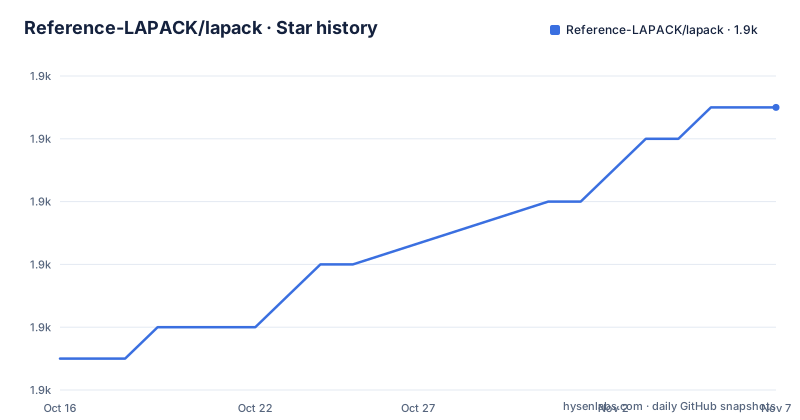
- Reference-LAPACK/lapack1,919 ★ · +8
| Repository | 2026-10-16 | 2026-11-07 |
|---|---|---|
| Reference-LAPACK/lapack | 1.9k | 1.9k |
8 Stars in the last 22 days, measured from the daily GitHub snapshot. Compare with other projects
Editorial analysis
The dense linear algebra scope of Reference-LAPACK/lapack
Reference-LAPACK/lapack addresses numerical linear algebra operations that commonly appear in scientific and engineering software. Its repository topics identify linear equations, matrix factorization, eigenvalues and eigenvectors, singular values, and SVD among its areas of concern. The README describes the project as a library of Fortran subroutines for commonly occurring numerical linear algebra problems.
The distribution is broader than a collection of Fortran source files. It includes the LAPACK implementation, testing programs, a reference implementation of Level 1, 2, and 3 BLAS, CBLAS as a C interface to BLAS, and LAPACKE as a Standard C API for LAPACK. This makes the repository relevant to Fortran callers as well as C-based applications that need access to the routines.
LAPACK is intended for numerical computation rather than general-purpose application logic. The README does not present a higher-level numerical container format, sparse matrix workflow, or general-purpose linear algebra package managed through pip. The pyproject.toml also states that the repository is not a Python package. Although Python tooling is configured there for repository scripts such as lapack_testing.py, installing this repository with a Python package manager would misunderstand its structure.
How LAPACK routines depend on the BLAS layer
The repository separates LAPACK source from BLAS, with SRC/ holding LAPACK code and BLAS/ holding the reference Basic Linear Algebra Subprograms. The Makefile reflects that division through targets such as lapacklib, which invokes make in SRC, and blaslib, which invokes make in BLAS. The distribution therefore separates the higher-level LAPACK routines from the lower-level operations on vectors and matrices.
This dependency is the central integration issue. The README says that the bundled BLAS is intended for use only when no other implementation is already available on the machine. It also states directly that LAPACK efficiency depends very much on BLAS efficiency. In practical terms, replacing or configuring the BLAS implementation can affect execution speed without changing the LAPACK API being called.
For C consumers, CBLAS provides a C interface to BLAS, while LAPACKE wraps LAPACK through a Standard C language API. The LAPACKE directory is therefore a distinct interface layer rather than an alternative numerical implementation. The repository also contains test targets and a matrix-generation library under TESTING/MATGEN. This structure gives build maintainers several pieces to produce and validate instead of treating LAPACK as a single source file.
The README does not claim that one BLAS is correct for every processor, compiler, or operating system. It also does not provide a performance table or a universal tuning recipe. That absence matters. Selecting a faster BLAS is a platform-specific integration task, not something that can be justified from the README alone.
Building Reference-LAPACK/lapack with CMake under a local prefix
The README documents CMake as an installation path and notes that it can simplify installation on Windows. Its example installs the library under $HOME/.local/lapack/. Run these commands from a build directory created beside the repository source. The configure command records the requested installation prefix, and the build command builds and installs the library.
mkdir build
cd build
cmake -DCMAKE_INSTALL_PREFIX=$HOME/.local/lapack ..
cmake --build . -j --target install
This is a short installation tutorial rather than an API example because the README does not include a complete LAPACK or LAPACKE call. After installation, the next concrete validation step available in the documentation is the LAPACK test suite. A successful build command alone should not be treated as confirmation that numerical results, interface components, or the selected build configuration work as intended.
The top-level CMakeLists.txt and files under CMAKE/ show that CMake is part of the repository rather than an external wrapper described only in prose. The installation prefix remains caller-controlled through CMAKE_INSTALL_PREFIX. The README does not state which exact library filenames, compiler runtime, or transitive dependencies the installed tree contains, so those details must be checked against the generated build configuration rather than assumed.
Configuring the traditional make build
For a make-based build, the README requires configuration in make.inc. The repository provides make.inc.example for a Linux machine using GNU compilers, while INSTALL/ contains additional platform-specific make.inc examples. The top-level Makefile immediately includes make.inc, so this configuration is part of starting the documented make path.
The top-level all target combines lapack_install, lib, blas_testing, and lapack_testing. That target is broader than simply compiling the library. Other targets expose individual components, including lapacklib, blaslib, cblaslib, and lapackelib. The lib target combines lapacklib and tmglib, with tmglib building the testing matrix generator.
A first build should therefore begin from one of the supplied make.inc examples rather than an invented local configuration. The README does not provide the contents of a universal make.inc because compiler names, flags, and platform details belong in that file. The README also recommends running the test suite after compilation and directs users to LAPACK Working Note 41 for complete installation and testing information.
The repository includes additional make.inc files under INSTALL/, but the README does not enumerate all supported platforms. Choosing one of those examples is safer than copying flags between unrelated systems. Any local modifications should be checked against the compiler and BLAS implementation actually linked into the resulting library.
Testing scope and the limits of the documented quick start
Reference-LAPACK/lapack includes a test suite, and the README explicitly recommends running it after compilation. The repository layout adds more detail: TESTING/ contains the testing area, TESTING/MATGEN supplies matrix generation used by the Makefile, and lapack_testing.py configures Python tooling for repository testing and CI helpers. These are development and validation components, not evidence that the project is a Python distribution.
The README does not give a complete command sequence for invoking an individual LAPACK or LAPACKE routine after installation. It does not show argument preparation, workspace queries, error handling, or linking instructions for a sample program. Creating such an example would require assumptions about the target language, BLAS linkage, and caller conventions that are not documented there.
This is a genuine limitation for a quick-start article, although it reflects the nature of a low-level library distribution. LAPACK does not behave like an application with one start command. A caller must choose the appropriate routine, organize matrix storage, satisfy the language interface, and link the required libraries. The README points to the Users' Guide and FAQ for this deeper usage information.
There is another operational boundary. The Makefile includes separate CBLAS and LAPACKE targets, but not every target builds every interface automatically. A project intending to call LAPACKE should verify that its selected build includes that component rather than assuming installation of the core Fortran library proves C availability.
Maintenance, upgrade work, and modified BSD obligations
The repository is not archived, and its last push was on 2026-10-11. Its recent release history includes v3.12.0 on 2023-11-24 and v3.12.1 on 2025-01-08. These dates describe repository and release activity, but they do not remove the integration work associated with compiler flags, BLAS selection, C or Fortran linkage, and regression testing.
The README identifies the software license as a modified BSD license and provides a LICENSE file link. It says the package may be included in commercial software and asks for proper credit, with the LAPACK Users' Guide given as an example. This is a statement of the project's terms, not legal advice.
The project also asks that modified routines be renamed and that changes be commented. According to the README, a person who modifies a routine takes responsibility for supporting it. Teams maintaining local LAPACK patches should therefore track those changes separately from upstream updates. The README does not document a compatibility policy, a stable ABI guarantee, or a formal migration procedure between releases, so the release notes, test results, and project documentation should be checked for each upgrade.
The README directs users to netlib's known problems and release notes and to the GitHub issue tracker. Those are the relevant places to verify compiler errors, documented defects, and release-specific changes before moving an existing integration to another LAPACK version.
Editorial conclusion
Adopt Reference-LAPACK/lapack when you need its established Fortran routines, C interfaces, and testing distribution, especially if the target already has a suitable BLAS implementation. Do not assume the bundled reference BLAS is the fastest choice for your machine. Before integration, verify the compiler and build settings in make.inc, confirm that the linked BLAS matches the target platform, and run the project test suite after compilation.
Frequently asked questions
How do I install Reference-LAPACK/lapack?
The README documents installation with make after configuring make.inc, or with CMake. Its CMake example creates a build directory, configures an installation prefix, and builds the install target.
Does Reference-LAPACK/lapack provide C and Fortran interfaces?
The core library consists of Fortran subroutines. The distribution also includes CBLAS as a C interface to BLAS and LAPACKE as a Standard C language API for LAPACK.
Can I use the bundled BLAS for production performance?
The README describes the bundled Level 1, 2, and 3 BLAS as a reference implementation intended for use when no other implementation is available. It also states that LAPACK efficiency depends very much on BLAS efficiency, so production users should account for their platform when choosing BLAS.
Official sources
Add this badge to your README
If you maintain this project, the badge below links readers to this analysis and shows its maintenance status from the daily GitHub snapshot. Paste the markdown into your README; add ?metric=license or ?metric=stars to the image URL for a different field.

[](https://hysenlabs.com/projects/reference-lapack-lapack)Star history chart for your README
[](https://hysenlabs.com/projects/reference-lapack-lapack)Was this useful?