Reloops: creative review with version stacks, where the AI defaults to a mock
Creative assets. Search. Collaborate. Review. Share. Automate.
At a glance
- What is it?
- A self-hosted workspace for reviewing campaign assets, with timestamped comments, version comparison, approvals and locked client share links. The AI metadata feature that leads the pitch ships pointed at a mock provider, and the compose file mounts the Docker socket into the container.
- Who is it for?
- Reloops fits a small agency or in-house creative team that wants a place to review assets with real version history and hand clients a link, and that is comfortable running Supabase locally. Leave it if you need a vendor under a support contract, since the project has exactly one release and it is a first version, and leave it if you cannot accept a container that holds the Docker socket.
- Can I use it commercially?
- Yes, with strict conditions. AGPL-3.0 is a network copyleft licence: if people use a modified version over a network, for example as a hosted service, you must offer them its source code under the same licence.
- Is it still maintained?
- Yes. The repository last received commits 1 day ago.
- What is it written in?
- Mainly TypeScript, according to GitHub's language statistics.
Answers come from the project's GitHub data, last synced on October 22, 2026, and from our analysis. They are not legal advice.
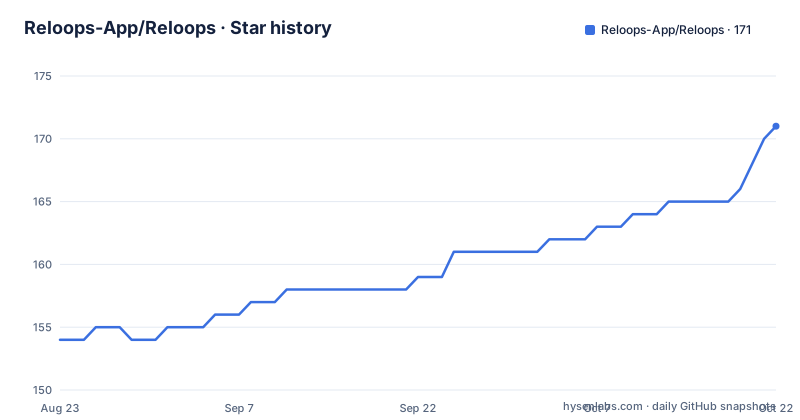
Star history
- Reloops-App/Reloops171 ★ · +17
| Repository | 2026-08-23 | 2026-10-22 |
|---|---|---|
| Reloops-App/Reloops | 154 | 171 |
17 Stars in the last 60 days, measured from the daily GitHub snapshot. Compare with other projects
Editorial analysis
The AI metadata feature defaults to a mock provider
The headline is an open-source creative workspace with AI metadata, semantic search and agent-ready APIs built in. The configuration tells you what that means on a fresh install.
The provider setting defaults to a mock, and the model name beside it defaults to a specific small model that will not be called. The environment example file carries a comment saying to add an API key and switch the provider for real AI metadata. So on a default install the description and tag generation produces nothing derived from your assets.
The rest of the machinery is real and is worth separating from that. There is a separate worker process for asset intelligence, polled on an interval, with lease and concurrency settings, and per-stage timeouts for the model call, for the video processing step and for the media probe. There is a script to requeue jobs, and video analysis is bounded to a small number of frames at a reduced width, which is the kind of limit that tells you the design assumed a queue rather than a synchronous request.
So the pipeline exists and is tuned, and the model call is switched off. That is a defensible default for an open-source project that does not want to spend your money on its demo, and it is also the first thing to change before you judge whether the feature works.
The compose file mounts the Docker socket, which is worth reading twice
The container configuration is not a hardened one, and the reason is structural rather than careless.
The compose service uses host networking rather than a bridge network. It mounts the Docker socket from the host into the container. And it mounts the working directory itself, with a named volume layered on top of part of it.
The Docker socket mount is the one that deserves a second look. A container with access to the Docker socket can create privileged containers on the host, which is close to root on the machine in the general case. For a development setup where you are already running everything locally and trusting the code you just cloned, that is a reasonable trade for the convenience of the container being able to start its own database. For a deployment where the socket is mounted because it was convenient, it is a finding rather than a detail.
Host networking has a similar character. It removes network isolation between the service and the host, and it means the port the application binds is the host's port directly, which is also why the environment configuration uses loopback addresses throughout rather than service names.
None of this is hidden, and there is a separate compose file for the asset intelligence worker. But a reader evaluating a self-hosted tool should look at the compose file before the feature list.
Version stacks are the actual model, and comments attach to a cut
The organising idea is that an asset is a stack of versions, and that the review conversation belongs to a version rather than to a file.
The documentation is explicit that comments stay attached to the right cut when you compare two versions side by side, and that the next pass is uploaded from the same review flow. That is the difference between a version-aware tool and a folder with a timestamp, and it is the part that determines whether the comment thread is still readable a month later.
Status is a first-class field throughout, with assets moving from needs review to approved, and search covers status, people, dates, formats, tags, metadata, generated descriptions, version stacks and OCR-ready text. Safe-zone previews for video and social cuts and exportable markers are also part of the video review surface, which is a concession to the fact that a lot of social creative fails because of a misplaced safe area rather than because of a bad edit.
External reviewers are handled by letting them identify themselves and comment on shared assets without joining the workspace. That solves a specific and common problem: a client who needs to approve one cut and should not end up with an account, a seat and a notification stream in your internal tool.
Share links carry an expiry, and permissions are set per link
Sharing is where a review tool either stays useful or becomes a leak, so the controls are described in some detail.
A share link can be locked, and the lock carries an expiration, a download permission, a comment permission, and collection-level access rules. Those are four separate decisions, which is the right number: whether a link is revocable, whether the recipient can take the original, whether they can respond, and which subset of the collection it exposes.
Collections are the other half. A selection of assets can be turned into a presentation with search, download access and creator context, aimed at a client or stakeholder who should be able to browse and take things without seeing the working directory.
That separation between an internal workspace and an external collection is the reason to run your own copy rather than use a shared drive. The permission model is per link, so a link sent to one client in one campaign does not have to imply anything about another.
Agents are invited into the review thread, with scoped keys
The agent integration is the most distinctive claim, and the documentation is more specific about it than the marketing framing suggests.
Review work can be assigned to a human or to an agent, and the requirement is that the full decision thread stays on the asset, with the agent replying beside the team rather than in a separate channel. That is a real design constraint rather than a slogan: it means an agent's output has to live in the same record a human reads, which is the difference between an agent being useful in a review process and being a separate tool you consult.
The access model is scoped API keys, and the documentation names the intended consumers as several model providers, two automation platforms, a video generation service, and custom agents, plus a separate document for one specific agent client.
The feature list also mentions a screenshot service key for captured web pages, which is how web page captures enter the library alongside uploaded files.
What is not described is the permission granularity of those keys. Whether a key can be limited to a single project, a single collection, or read-only is the question to ask before handing one to an agent that runs on a schedule.
One release, a version-zero licence, and a named competitor list
Three facts frame how much weight to put on any of this.
First, maturity. There is one release, a version zero point one, tagged two days before the last push, and its title is that you can share projects with clients. So the share feature is the newest thing in the project and the thing the README spends most of its space on.
Second, licence. The repository declares the copyleft licence with the or-later suffix, which is a network copyleft: a company running this as a service and modifying it would owe its source to users of that service. For an internal team that is irrelevant. For an agency that wants to run a client portal on it and keep the modifications, it is the decision that matters, and it is the same trade the Open Source Initiative made about the Affero licence.
Third, the competitive table. The documentation names what it is a replacement for: three enterprise digital asset management products, four general-purpose storage and database tools, three video review products, three approval workflow products, and a row for automation platforms. Being specific about that is more useful than a vague positioning claim, because each row implies a category the tool is competing in rather than a feature it has.
The run configuration is a Node container on a slim Debian base, with the Supabase command line tools installed at a pinned version, the web application on one local port and the database stack on another.
Editorial conclusion
Reloops fits a small agency or in-house creative team that wants a place to review assets with real version history and hand clients a link, and that is comfortable running Supabase locally. Leave it if you need a vendor under a support contract, since the project has exactly one release and it is a first version, and leave it if you cannot accept a container that holds the Docker socket. Verify first whether the AI metadata is doing anything, because out of the box the provider is set to a mock and the model name is a placeholder, so descriptions and tags are not being generated until you supply a key and switch the provider.
Frequently asked questions
What is the Reloops creative workspace?
A self-hosted workspace for organising campaign assets, collecting timestamped and pinned feedback, comparing versions, approving or requesting changes, and sharing client-ready collections through locked links. It runs on Supabase with a React front end and is licensed AGPL-3.0-or-later.
Does Reloops generate AI descriptions out of the box?
No. The asset intelligence provider defaults to a mock and the model name is a placeholder, so nothing derived from your assets is generated on a default install. You need to add an API key and set the provider to a real one for the feature to do anything.
How do external reviewers comment without an account?
Through guest feedback: an external reviewer can identify themselves, view shared assets and leave comments without joining the workspace. Share links carry separate controls for expiration, download permission and comment permission, plus collection-level access rules.
Can AI agents take part in a Reloops review?
Yes. Review work can be assigned to a human or an agent, and the full decision thread stays on the asset with the agent replying beside the team. Agents and automation tools act through scoped API keys, with the documentation naming several model providers and automation platforms as intended consumers.
What licence is Reloops released under?
AGPL-3.0-or-later, which is a network copyleft licence. For internal use that is not a constraint, but an agency running it as a client-facing service and modifying it would owe its source to users of that service.
What does Reloops replace?
The documentation names the categories: enterprise digital asset management products, general-purpose storage and database tools, video review products, approval workflow products, and automation platforms, with a row for internal asset tools. Each row is about the category the tool competes in rather than a feature it has.
Official sources
Add this badge to your README
If you maintain this project, the badge below links readers to this analysis and shows its maintenance status from the daily GitHub snapshot. Paste the markdown into your README; add ?metric=license or ?metric=stars to the image URL for a different field.

[](https://hysenlabs.com/projects/reloops-app-reloops)Star history chart for your README
[](https://hysenlabs.com/projects/reloops-app-reloops)