biliLive-tools: one application for recording a stream and processing what comes out
直播一站式处理工具,支持直播录制&视频处理&弹幕处理&录播姬自动上传
At a glance
- What is it?
- biliLive-tools bundles live recording from six platforms, three recording engines, webhook automation for the common recorder tools, danmaku capture, burning, conversion and upload into a single desktop application. The stated reason it exists is that the alternative is four programs and a wiki page of command line flags.
- Who is it for?
- biliLive-tools fits a streamer or a small studio that records regularly, that wants the danmaku kept alongside the video, and that would rather click through one application than wire a recorder to a converter to an uploader.
- Can I use it commercially?
- Yes, with conditions. GPL-3.0 is a copyleft licence: if you distribute software that includes it, you must release that software's source code under the same licence. Running it internally without distributing it does not trigger that obligation.
- Is it still maintained?
- Yes. The repository last received commits 8 days ago.
- What is it written in?
- Mainly TypeScript, according to GitHub's language statistics.
Answers come from the project's GitHub data, last synced on November 7, 2026, and from our analysis. They are not legal advice.
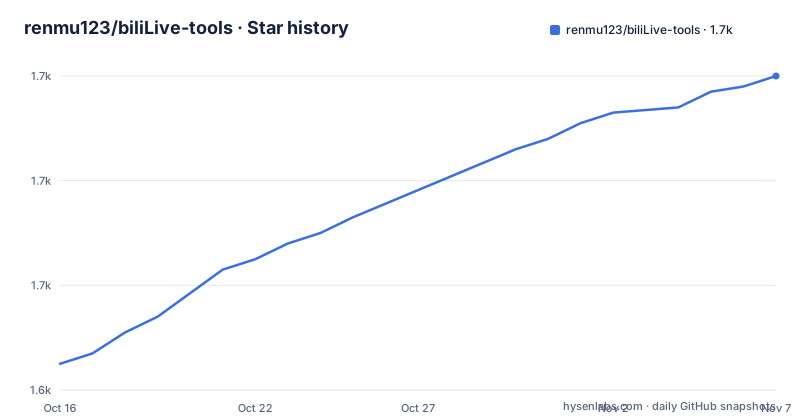
Star history
- renmu123/biliLive-tools1,700 ★ · +55
| Repository | 2026-10-16 | 2026-11-07 |
|---|---|---|
| renmu123/biliLive-tools | 1.6k | 1.7k |
55 Stars in the last 22 days, measured from the daily GitHub snapshot. Compare with other projects
Editorial analysis
The problem is fragmentation, not features
The README explains the motivation in a way that is more useful than a feature list, because it names the actual problem.
The original intent was to solve the fragmentation of the recording tools. To process a single recording that includes danmaku completely, you often have to combine several programs, some of which are command line only, which makes the tooling harder to use. The stated goal of the software is to be ready to use out of the box, experience first, with the default configuration satisfying most people's needs while still allowing personalisation.
That framing explains the shape of the whole project. It is not a library and it is not a command line tool, it is a desktop application that a streamer opens, and the feature list is the list of things they would otherwise have to do by hand.
The features are broad. There is recording from Douyu, Huya, Bilibili, Douyin, Xiaohongshu and TikTok, with several recording engines, including FFmpeg, mesio and the BililiveRecorder, and support for recording danmaku alongside the video with more advanced options. There is webhook automation from several platforms, so a recorder can hand off its files automatically. There is automatic processing of the recorded files, burning the danmaku into the video, uploading to Bilibili, and syncing to a cloud drive. There is file-watching automation that works for any recording platform, not only the ones with a webhook. And there is a batch of media operations: compression, transcoding, merging and FLV file repair.
The project is written in TypeScript, the default branch is `master`, the last push was on 2026-10-15, and the recent releases are 4.0.0 from 2026-10-15, 3.22.2 from 2026-10-03 and 3.22.1 from 2026-09-21. The licence is GPLv3, the documentation site is `docs.irenmu.com`, and the author asks users who publish with the tool to credit the repository, because, as the README puts it, the software does no data tracking and the author would like a rough idea of who is using it.
Six platforms, three recording engines
The recording matrix is the part of the feature list that needs unpacking, because the two axes are different things.
The platforms are Douyu, Huya, Bilibili, Douyin, Xiaohongshu and TikTok. Each of those is a separate service with its own stream protocol, its own danmaku protocol and its own idea of what a room is, so each one is a piece of the tool that has to be maintained against a service that changes when it wants to.
The recording engines are a different axis: FFmpeg, mesio and the BililiveRecorder, which is a separate open source project the README credits. So a recording is a platform and an engine, and the tool offers combinations. That matters in practice, because the engines differ in how they handle disconnection, in how they name files, and in what they write alongside the video, and the tool is the layer that reconciles them so the rest of the pipeline does not have to care.
The danmaku capture is the third piece, and it is the one that makes this project more than a recorder. Danmaku, the scrolling comments, are the substance of a Chinese live stream, and keeping them means keeping the timing of every comment relative to the video. That is why the tool records them and why the later stages can burn them back in, and it is also why the recording options are described as advanced rather than as a checkbox.
The other download features, pulling recordings from Douyu, Huya, Bilibili and Kuaishou, sit alongside the live recording because the same users need both. A streamer who wants to clip a highlight from yesterday's stream and a streamer who wants to record tonight are the same person, and the tool is the natural place for both jobs to live.
The webhook path is how the pipeline becomes automatic
Automation is where the tool earns its keep, and there are two ways into it, with a third for everything else.
The first is webhooks. The tool supports the webhook of BililiveRecorder, of blrec, of DDTV and of oneliverec, so a recording tool that is already running can tell the processing tool that a recording has finished. The result is that the recording file is picked up, the danmaku is burned in, the file is uploaded to Bilibili and it is synced to a cloud drive, without a person being present.
The second is file watching. The tool supports automation based on file listening for any recording platform, which is the general answer for the case where the recorder does not have a webhook, or where the recorder is one the tool does not know about. A directory is watched, and a file appearing in it triggers the same pipeline.
That combination is why the project describes itself as a one-stop tool. The user does not have to care which recorder produced the file, and does not have to know whether that recorder has a webhook, because the same downstream chain runs either way.
The danmaku conversion is the other interesting piece of automation. There is a modern graphical interface for converting XML danmaku files to ASS, built on DanmakuFactory, which is another open source project the README credits, and there is support for rough video editing using the danmaku and the high energy markers, so the moments worth clipping can be found from the comment stream rather than by watching the video.
The remaining automated features are notifications of several types, the automatic download and re-upload workflow for the Chinese platforms, and the recording-oriented video slicing, with LLM based music cover separation and lyric recognition, which is the one feature in the list that needs a model behind it.
A pnpm workspace that builds an app, a web UI and a CLI
The repository is a monorepo, and the root `package.json` shows how the pieces fit together.
The root package is `@biliLive-tools/root` at version 4.0.0, and the scripts are all filtered through pnpm. `build:app` builds the desktop application, `build:webui` builds the web interface, `build:cli` builds a command line binary, and `build:app:no-ffmpeg` builds the application without bundling ffmpeg, which matters for the deployments where the user supplies their own build of it.
All four depend on `build:base`, and the base step has an order to it. It builds the types package, a package called douyin-danma-listener and the shared package first, and only then builds the HTTP package and the rest of the `@bililive-tools` packages in parallel. That is the dependency graph of a pipeline written as packages: the danmaku listener and the shared types have to exist before anything that uses them can be built.
The rest of the root scripts are ordinary. The `preinstall` script runs `npx only-allow pnpm`, which refuses an npm install outright, a pattern that has become standard in pnpm workspaces because the lockfile only makes sense for one package manager. There is an `install:bin` script that runs a node script from `scripts/`, a `github-ci-pnpm-update` script for keeping the lockfile current in automation, `test` running `vitest run`, and `format` running prettier over the tree.
The dependency list is short and tells you what the application itself does rather than what it orchestrates: axios for HTTP, fs-extra for the file system, jszip for archives, lodash-es, a Bilibili websocket client in `tiny-bilibili-ws` and uuid. Everything heavy, the recording, the encoding, the uploading, is in the external tools and the ffmpeg binary, not in the JavaScript.
The repository also carries a `vitest.workspace.js` for the test workspace, a `patches/` directory for patched dependencies, a `skills/` directory, an `AGENTS.md`, a `TODO.md` and a `docker/` directory, and the web interface lives in a separate repository, `biliLive-webui`, which the README says exists so that GitHub Actions can build it automatically.
Distribution, documentation and the contribution rule
The way the software reaches users is worth a short section, because it says something about the audience.
The client can be downloaded directly from the releases page, or from a Quark netdisk link that the README gives as an alternative, and the installation guide is on the documentation site at `docs.irenmu.com/guide/installation.html`. The presence of a netdisk mirror next to the releases is a regional and network reality rather than a technical choice, and it is a useful signal about who the users are.
The documentation is a separate site rather than a directory of Markdown files, and the README links a series of tutorials on Bilibili as well, which is the video equivalent of a getting started guide. The change history is in the `CHANGELOG.md` in the repository, and there is a separate web interface repository, so the project spans three places: the application, the web interface, and the documentation.
The contribution rule is short and specific. Before opening a pull request, open an issue first, to avoid duplication or a pull request that is not accepted. For a project with this many platform integrations, that is a sensible rule, because the same problem tends to be reported several times and because a pull request against the wrong platform integration can be a large amount of work that nobody needs.
The credits list at the end of the README names the projects the tool builds on: DanmakuFactory for the danmaku work, biliup-rs for the upload path, BililiveRecorder for recording, the author's own biliAPI project for the Bilibili interface, and LiveAutoRecord. So the tool is best understood as an integration layer and a user interface over a set of existing pieces, which is also what a reader deciding whether to adopt it should want to know.
Where biliLive-tools is the wrong tool
Three limits are worth naming, and the middle one is the reason the project is shaped the way it is.
The first is that it is a desktop application, not a service. The build targets are an app, a web interface and a CLI, and the web interface is a separate project, so a team that wants a headless pipeline on a server is assembling something the project does not ship, and the pieces it orchestrates are all usable on their own.
The second is the fragility of the platform side, and it is inherent rather than a defect. Recording from a platform means implementing that platform's current protocol, and a service is free to change it without notice, so the recording half of the tool is the half that will need maintenance, while the media processing half, which is ffmpeg and DanmakuFactory, is stable. A user whose recording breaks after a platform update is looking at the nature of the tool rather than a bug in it.
The third is the licence and the size. GPLv3 is a reasonable licence for a tool like this, and it is worth noting for anyone who wants to embed the recording pipeline in a closed source product. The size is the practical issue: the tool is a large application with a monorepo behind it, and a user who only needs to convert XML danmaku to ASS does not need the rest of it.
The alternative is to use the pieces separately, which is what the credits list makes possible. DanmakuFactory for the danmaku conversion, BililiveRecorder or LiveAutoRecord for recording, biliup-rs for uploading. The difference in approach is that this project is an integrated product with a consistent interface and a default configuration that suits most people, and the alternative is a set of command line tools that a technical user can script together. The trade is convenience against flexibility, and for a streamer who wants the convenience the integration is the argument, and for a pipeline that needs to fit an existing system the separate tools are.
Editorial conclusion
biliLive-tools fits a streamer or a small studio that records regularly, that wants the danmaku kept alongside the video, and that would rather click through one application than wire a recorder to a converter to an uploader. It is the wrong choice for a server-side pipeline, because the project is built as a desktop application with a separate web interface project, and it is the wrong choice for a team that only needs one of the pieces, since the tools it integrates are all separate open source projects that can be used on their own. Before adopting it, check the release notes for the 4.0 line, because the version jumped from the 3.22 series to 4.0.0 in October 2026, and remember that the platform integrations depend on the behaviour of services that change without notice, so the recording side is the part most likely to need fixing.
Frequently asked questions
What does biliLive-tools actually do?
It is an all-in-one live streaming tool that records from Douyu, Huya, Bilibili, Douyin, Xiaohongshu and TikTok, records the danmaku alongside the video, and then handles the processing: burning the danmaku in, uploading to Bilibili, syncing to a cloud drive, plus batch compression, transcoding, merging and FLV repair.
Which recording engines and webhooks does biliLive-tools support?
The recording engines are FFmpeg, mesio and BililiveRecorder, and the webhook automation covers BililiveRecorder, blrec, DDTV and oneliverec. For any other recording platform there is file-watching automation, so a file appearing in a watched directory triggers the same pipeline.
How do I install biliLive-tools?
Download the client from the GitHub releases page or from the Quark netdisk link in the README, and follow the installation guide at docs.irenmu.com/guide/installation.html. The web interface is a separate project, renmu123/biliLive-webui, which is built automatically by GitHub Actions.
How is the biliLive-tools project built and tested?
It is a pnpm workspace, since the root package has a preinstall script that runs only-allow pnpm. The build targets are build:app, build:webui, build:cli and build:app:no-ffmpeg, each of which depends on build:base, and the test suite runs with vitest run through a vitest workspace file.
Official sources
Add this badge to your README
If you maintain this project, the badge below links readers to this analysis and shows its maintenance status from the daily GitHub snapshot. Paste the markdown into your README; add ?metric=license or ?metric=stars to the image URL for a different field.

[](https://hysenlabs.com/projects/renmu123-bililive-tools)Star history chart for your README
[](https://hysenlabs.com/projects/renmu123-bililive-tools)Was this useful?