Rerun: the viewer is a separate binary, and alpha releases do not follow semver
Visualize, query, and stream to train on multimodal robotics data.
At a glance
- What is it?
- Rerun is a Rust data layer for multimodal robotics recordings, with a viewer and SDKs in Python, Rust and C++. The install carries a system dependency, the status page says to expect breaking changes, and the alpha version numbers are pinned exactly for a reason.
- Who is it for?
- Rerun suits teams already logging synchronized camera, lidar and state data who want to scrub an episode and then query the same recording with SQL. It does not suit a pipeline that needs a stable API across releases, because the project states that breaking changes are expected, or one that renders many small entities or multi-million point clouds, which it names as slow.
- Can I use it commercially?
- Yes. Apache-2.0 is a permissive licence: you can use, modify and sell software built on it, as long as you keep its copyright and licence notices.
- Is it still maintained?
- Yes. The repository received new commits within the last day.
- What is it written in?
- Mainly Rust, according to GitHub's language statistics.
Answers come from the project's GitHub data, last synced on November 14, 2026, and from our analysis. They are not legal advice.
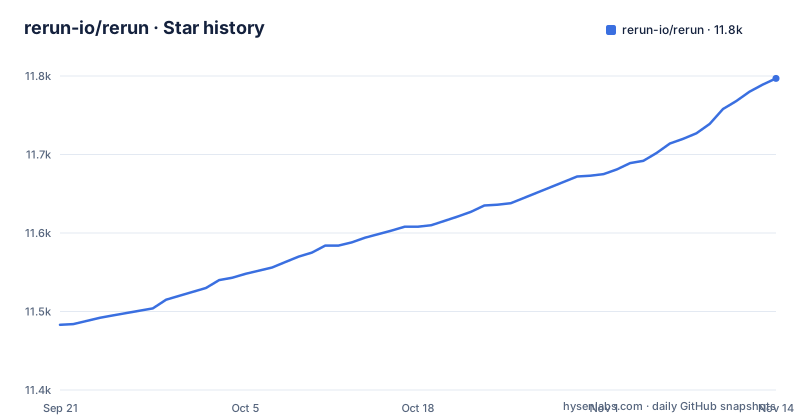
Star history
- rerun-io/rerun11,797 ★ · +314
| Repository | 2026-09-21 | 2026-11-14 |
|---|---|---|
| rerun-io/rerun | 11.5k | 11.8k |
314 Stars in the last 54 days, measured from the daily GitHub snapshot. Compare with other projects
Editorial analysis
The viewer rides along with pip install rerun-sdk and nothing else
One command gets you a working viewer, and it is the Python one:
pip install rerun-sdkThe getting started list gives `cargo add rerun` for Rust and points Python users at either pip or the conda-forge feedstock. What changes between them is the viewer. Only the Python SDK ships the `rerun` binary inside the wheel, and the README is explicit that C++ and Rust always rely on a separate install.
That second install is a program, not a library call:
cargo install rerun-cli --locked --features nasmOnce it finishes, `rerun --help` in any terminal is the check that the binary is on your path. Skip this step and you cannot stream log data over the network or load .rrd files, which the README says need the binary.
rr.init names the recording, then rr.spawn, rr.save or rr.connect_grpc picks the destination
Logging starts with `rr.init`, which names the recording, and the very next call decides where the bytes go. The short example in the README shows all three destinations at once, two of them commented out:
import rerun as rr  # pip install rerun-sdk

rr.init("rerun_example_app")

rr.spawn()  # Spawn a child process with a viewer and connect
# rr.save("recording.rrd")  # Stream all logs to disk
# rr.connect_grpc()  # Connect to a remote viewer

# Associate subsequent data with 42 on the “frame” timeline
rr.set_time("frame", sequence=42)

# Log colored 3D points to the entity at `path/to/points`
rr.log("path/to/points", rr.Points3D(positions, colors=colors))
…
`rr.spawn()` launches a child process with a viewer attached, `rr.save("recording.rrd")` streams everything to a file on disk, and `rr.connect_grpc()` reaches a viewer on another machine. The commented lines are there so you can see the alternatives without leaving the snippet.
`rr.set_time("frame", sequence=42)` deserves the second read. Data is not stamped with one wall clock. It is attached to a named timeline, `frame` here, and to a position on that timeline, so a lidar scan and a camera feed sampled at different rates share a recording without one overwriting the other. `rr.log` then names an entity path and its payload, which is what lets the viewer scrub an episode and the query layer read the same rows.
MCAP, rrd and LeRobot all land in the same columnar store
The project's own framing is a data layer, not a viewer: log, query, visualize and stream to training, on shared columnar storage built for multimodal data. The Rust core keeps data in column chunks arranged for multi-rate physical recordings rather than for row oriented tables.
Ingestion is where this saves you work. Robot logs, human-data rigs, simulation and web video are named as sources, and the file formats named beside them are MCAP, rrd and LeRobot. LeRobot is named in the list of formats.
Query is where the column layout pays off. The same recording the viewer renders can be pulled with dataframes or with SQL, including intermediate and derived rows, and it streams into training with no export job. The scope consequence is worth stating plainly: this is a store with a query surface first, and the GUI is one client of it. If all you need is a plot of one array, you are paying for a database and a renderer to get it.
Entity count and point cloud size are the two limits the project names
The status section is candid about where Rerun falls over, and it names two. The viewer slows down when there are too many entities, tracked as issue 7115. Multi-million point clouds can be slow, tracked as issue 1136.
Entity count is the limit a perception pipeline meets first. Publishing one entity per detected object multiplies the entity tree by the number of detections per frame, and the viewer slows down, which is exactly where you go to find the frame where detection went wrong. If your debugging loop means scrubbing a long sequence, that limit decides whether the tool shortens the hunt or whether you go back to dumping per-frame images.
Point cloud size is the familiar ceiling, and it is a property of a single entity rather than of the tree. Downsampling therefore belongs in your pipeline, before `rr.log`, rather than in the viewer.
Expect breaking changes, and pin alpha releases exactly
The status text is short and unambiguous: the project is in active development, features are still to come, the API is still evolving, and readers should expect breaking changes.
The version numbers back that up rather than contradicting it. A comment in Cargo.toml says that alpha releases must use an exact version pin, because the project treats alpha releases as incompatible while semver does not, so `0.3.0-alpha.0` must never silently become `0.3.0-alpha.4`. The workspace sits at `0.42.0-alpha.1+dev`, ahead of the released 0.41.0 dated 2026-10-28, with 0.40.0 on 2026-10-21 and 0.39.0 on 2026-10-12 behind it.
For a consumer this is concrete. Inside the alpha series you cannot read `0.42` as a compatible range. Pin the full version including the alpha suffix, the way the workspace pins its own crates. Building from source also has a floor: edition 2024 and rust-version 1.98 in Cargo.toml.
pyproject.toml says 0.28.0-alpha.1+dev while Cargo.toml says 0.39.0-alpha.1+dev
The root pyproject.toml is not the manifest of the published Python package. It declares `name = "rerun-workspace"`, `requires-python = ">=3.11,<3.13"`, and workspace members rerun_py, rerun_notebook and examples. The version string inside it, `0.28.0-alpha.1+dev`, is stale next to `0.42.0-alpha.1+dev` in Cargo.toml.
So the number in that file tells you nothing about the build you installed. When you pin rerun-sdk for a deployment, read the version from the installed distribution or from the release tag, not from this file.
The same file is where the Python build is wired. Pixi handles build tools through pixi.toml while uv handles runtime dependencies in a `.venv`, and the header comments show the two being used through:
pixi run py-build    # Uses maturin to build rerun-sdk into .venv
pixi run uv run …  # Runs Python scripts using .venv
Building from source is a separate chore by design. The dev dependency group leaves rerun-sdk and rerun-notebook out on purpose, because they are slow to build in a clean environment, and a fixup package points the `rerun` CLI of editable installs at `target/debug/rerun`. Ruff and mypy are pinned to exact versions in that same group, while maturin only has a minimum version.
The nasm feature is a system dependency hiding inside a Cargo flag
`cargo install rerun-cli --locked --features nasm` requests something that is not self contained. The note under it says the `nasm` feature requires the nasm CLI to be installed and available in your path, and that you can skip enabling it at the cost of inferior video decoding performance.
That is a build time dependency outside Cargo. The choice is explicit: take the faster decode path and carry a system prerequisite, or take the slower one and keep the build hermetic. For a viewer meant to play robot video next to point clouds, that tradeoff is not a corner case.
The `--locked` flag in the same command is the other half of the install story. The workspace `include` array pulls `../../Cargo.lock` plus `LICENSE-APACHE` and `LICENSE-MIT` into the published crate, with a comment saying it is there so users can pass `--locked` to `cargo install rerun-cli`. Without those files in the crate, a locked install of the CLI could not be reproducible at all.
rerun_js, run_wasm and rerun_notebook sit in the tree, but getting started names three languages
The getting started list covers C++, Python and Rust, one line each, and the repository root carries directories for more surfaces than that: rerun_cpp/, rerun_js/, rerun_py/ and rerun_notebook/, next to the crates/ workspace for the Rust core.
For Python, C++ and Rust you get both an SDK install line and a statement about the viewer, since only Python bundles it. For the JavaScript and notebook directories there is no line in that list, and the viewer section of the README covers only `pip install rerun-sdk` and `cargo install rerun-cli`. A notebook target therefore has no install line in that list, which is a fair thing to know before you commit to it.
Coding agents get their own door. The repository ships skills for them, installed with a CLI:
npx skills add rerun-io/rerunThe skill files live in `skills/` if you would rather read them, and AGENTS.md and CLAUDE.md sit at the root beside them.
Editorial conclusion
Rerun suits teams already logging synchronized camera, lidar and state data who want to scrub an episode and then query the same recording with SQL. It does not suit a pipeline that needs a stable API across releases, because the project states that breaking changes are expected, or one that renders many small entities or multi-million point clouds, which it names as slow. Verify two things first: whether `cargo install rerun-cli` needs the nasm CLI on your build hosts, and whether the version you pin resolves to the release tag you read.
Frequently asked questions
What is rerun.io?
It is the project behind Rerun, a data layer for physical AI that logs, queries, visualizes and streams multimodal robotics data on shared columnar storage. The core is written in Rust, with SDKs for Python, Rust and C++, and the viewer is the component that renders a recording.
How do I use rerun.io?
Install the SDK with `pip install rerun-sdk` or `cargo add rerun`, then call `rr.init`, pick a destination such as `rr.spawn()` or `rr.save("recording.rrd")`, and log entities with `rr.log`. The getting started list links a separate page for each of C++, Python and Rust.
How do I install rerun?
For Python, `pip install rerun-sdk`, which also bundles the viewer binary. C++ and Rust need the `rerun` binary installed separately with `cargo install rerun-cli --locked --features nasm`, and the nasm CLI has to be on your path for that feature. After either route, `rerun --help` confirms the viewer is available.
Is Rerun open source?
Yes. The repository carries both LICENSE-MIT and LICENSE-APACHE, and the Cargo workspace declares `license = "MIT OR Apache-2.0"`, so either license is available to you. Pick the one your own dependency tree already uses.
Official sources
Add this badge to your README
If you maintain this project, the badge below links readers to this analysis and shows its maintenance status from the daily GitHub snapshot. Paste the markdown into your README; add ?metric=license or ?metric=stars to the image URL for a different field.

[](https://hysenlabs.com/projects/rerun-io-rerun)Star history chart for your README
[](https://hysenlabs.com/projects/rerun-io-rerun)Was this useful?