OPC Skills: ten agent skills, three dependencies and two install paths
Agent Skills for Solopreneurs
At a glance
- What is it?
- OPC Skills is a collection of 10 folder-based agent skills aimed at solo founders, indie hackers and one-person companies, installed either through the Claude Code plugin marketplace or one `npx skills add` command. The instruction text is usable as it stands, while dependency resolution, credential setup and version pinning are barely documented.
- Who is it for?
- OPC Skills fits a solo founder who wants demand research, registrar pricing and image assets inside one agent session, and the marketplace route delivers three of them in two commands. It does not suit unattended runs: three skills depend on other skills, two reach external services through twitterapi.io and Gemini that the README never configures, and nothing pins a version.
- Can I use it commercially?
- Yes. Apache-2.0 is a permissive licence: you can use, modify and sell software built on it, as long as you keep its copyright and licence notices.
- Is it still maintained?
- Yes. The repository last received commits 1 day ago.
- What is it written in?
- Mainly Python, according to GitHub's language statistics.
Answers come from the project's GitHub data, last synced on November 7, 2026, and from our analysis. They are not legal advice.
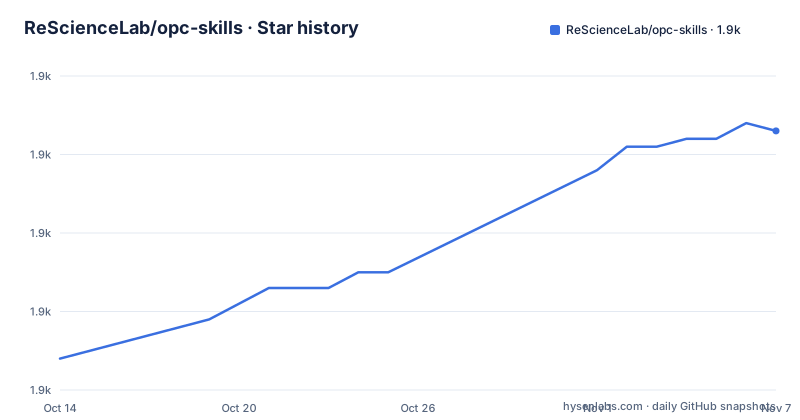
Star history
- ReScienceLab/opc-skills1,893 ★ · +29
| Repository | 2026-10-14 | 2026-11-07 |
|---|---|---|
| ReScienceLab/opc-skills | 1.9k | 1.9k |
29 Stars in the last 24 days, measured from the daily GitHub snapshot. Compare with other projects
Editorial analysis
Ten folder-based skills, each with one SKILL.md file
An OPC skill is a directory, not a package. Each one is a folder of instructions, scripts and resources that an agent loads dynamically when a task calls for it, made self-contained by a SKILL.md file holding instructions and metadata. Nothing is compiled and nothing lands in a package index, so what you install is a directory of text plus whatever helper scripts sit inside it. The Agent Skills standard published at agentskills.io describes that layout, which is why one folder can be carried between tools rather than bound to a single vendor.
The repository root shows how little scaffolding this needs. Beside README.md there are `skills/`, `skills.json`, `template/`, `scripts/`, `skill-logos/` and `website/`, plus agent-specific directories including `.claude-plugin/`, `.factory/`, `.agents/` and `.hal/`. Python is the declared primary language, and that code sits under `scripts/` rather than inside the skill folders. A layout that thin is an advantage for one person running their own agent: every prompt a skill will send can be read before it runs, and edited in place afterwards.
Two install paths, plugin marketplace and npx skills add
Both documented routes deliver the same folders. They differ in what they can target and in how much they tell you.
The Claude Code route runs inside the agent's own slash commands. The first line registers this repository as a marketplace source, the second installs a single skill with the @opc-skills suffix appended, and the third is the one worth running before anything else:
/plugin marketplace add ReScienceLab/opc-skills
/plugin install requesthunt@opc-skills
/plugin marketplace list opc-skills
That listing matters more than the example does. The quick start names three skills, requesthunt, domain-hunter and seo-geo, while the table of included skills at the top of the repository carries 10 rows. Running the list command is how you see the other seven without guessing folder names.
The second route runs in a terminal through Node, and one flag narrows it three different ways:
npx skills add ReScienceLab/opc-skills
npx skills add ReScienceLab/opc-skills --skill reddit
npx skills add ReScienceLab/opc-skills -a droid
With no flag you take every skill at once. Adding `--skill reddit` takes one, and `-a droid` sends it to Factory Droid rather than the default target. What the README does not document is where the installer writes those folders, or what happens when a copy already exists, so look before you overwrite a skill you have edited by hand.
Three skills depend on other skills, not on other packages
Dependencies here are expressed as skill-to-skill requirements, and there are three of them.
`domain-hunter`, the skill that finds domains, compares registrar prices and turns up promo codes, is listed as requiring `twitter` and `reddit`. `logo-creator` and `banner-creator` both require `nanobanana`, the image generation skill, so one missing Gemini credential takes down two creative skills rather than one. Installing a parent without its children leaves a folder whose instructions point at tools that were never placed on disk. The documented fix is a single command with a repeated flag:
npx skills add ReScienceLab/opc-skills --skill reddit --skill twitter --skill domain-hunterNote that the dependency graph is directional and shallow: domain-hunter reaches two leaves, while logo-creator and banner-creator share one leaf that both image skills need. Nothing in the collection depends on a Python package, a system binary or a database.
The silence is on the failure side. No error text is given for a missing dependency, no minimum version between parent and child, and no way to pin a skill to a commit. When a parent skill breaks, the only clue is whatever your agent prints while it tries to open a child folder that is not there.
Every skill reaches a different external service
The bundled skills are not interchangeable filters over one data source. Each is wired to something specific:
- `seo-geo` handles SEO and GEO for AI search engines, naming ChatGPT, Perplexity and Google - `requesthunt` researches user demand from Reddit, X and GitHub - `reddit` uses the public JSON API, while `twitter` goes through twitterapi.io - `producthunt` searches posts, topics, users and collections - `domain-hunter` finds domains, compares registrar prices and discovers promo codes - `nanobanana` generates images with Gemini 3 Pro Image - `logo-creator` and `banner-creator` build on that output, cropping, removing backgrounds and exporting SVG - `archive` writes session learnings and debugging solutions into indexed markdown
`archive` is the outlier and the cheapest thing to try first, since it touches no outside service at all. The image pair sits at the opposite end of that range.
Two gaps follow from the list. The README names twitterapi.io and Gemini 3 Pro Image as the services behind two skills but documents no key file, no environment variable and no setup step, so there is nothing to copy into a shell before the first run. And `producthunt` lists what it searches without naming the endpoint it calls, which leaves an implementer reading its SKILL.md to find out.
Sixteen agents claimed, twelve agents named
Compatibility is the weakest number in the project. One line states the skills work with 16+ AI coding agents via `npx skills add`, and the list beneath it names 12: Claude Code, Cursor, Factory Droid, Windsurf, OpenCode, Codex, GitHub Copilot, Gemini CLI, Goose, Kilo Code, Roo Code and Trae, then trails off with 'And more...'. A separate line in the install section says the command works with Claude Code, Cursor, Windsurf, Droid, and 12+ other AI tools, which only reaches the same total if at least 12 of the remainder go unnamed.
Where the missing rows live matters more than the count. The full compatibility table is not kept in this repository: the README links out to the add-skill project for it, so the installer that runs `npx skills add` is not part of OPC Skills. This collection is a payload for someone else's tool, and its own front page never states which of the sixteen targets have been tried.
Three channels cover the rest, each pointing somewhere other than the repository: a browser on skills.sh, guides on opc.dev, and DeepWiki for reading the code before you install anything. The root also carries a `website/` directory and per-agent packaging folders such as `.factory/` and `.hal/`, none of which the README explains.
Badges, metadata and contribution guidance
Parts of the front page disagree with each other, which is worth settling before you rely on any of them. The badge row links a licence shield labelled MIT, while the licence field on GitHub reads Apache-2.0, and nothing on the page explains the difference. The last push to the default branch main was on 2026-09-19. The current README continues with DeepWiki, skill creation, contribution and licence sections; verify the version you are viewing when comparing documentation.
Two root directories are left undefined for the same reason. `skills.json` sits beside `skills/`; the README points to `template/` as the starting structure for creating a skill. Neither matters much if you install through the marketplace, because the installer reads the repository for you. Both matter if you fork the collection: inspect the index format and use the documented template as a starting point.
Treat the front page as a directory listing rather than as documentation. What it states consistently is the skill table, the two install commands and the dependency lines, and those three parts hold together.
Keeping one SKILL.md folder in your own repository instead
The nearest alternative is not another collection but no collection. A skill is one folder holding a SKILL.md file, so you can keep a single folder inside a project you already maintain, edit the instructions until they match your own process, and point your agent at that path. You lose ten ready-made descriptions and the dependency handling. In exchange you get a diff you can review and a skill that survives any marketplace.
The second alternative is the standard rather than this payload. `npx skills add` comes from a separate add-skill project whose compatibility list this README links, so the same installer takes other repositories laid out the way agentskills.io describes. For a task that is yours alone, a one-folder skill you wrote is often faster than a general one you configure.
OPC Skills earns its place on breadth of instruction text rather than on code you cannot replace. Ten descriptions spanning demand research, domain pricing, AI search visibility, social search and asset generation is a lot of prompt writing to skip, and the marketplace route hands over three of them in two commands. Where it falls short is everything around that text, since dependency resolution, credential setup and version pinning are documented thinly or not at all.
Editorial conclusion
OPC Skills fits a solo founder who wants demand research, registrar pricing and image assets inside one agent session, and the marketplace route delivers three of them in two commands. It does not suit unattended runs: three skills depend on other skills, two reach external services through twitterapi.io and Gemini that the README never configures, and nothing pins a version. Before copying any skill into client work, settle the licensing conflict named above and run /plugin marketplace list opc-skills to confirm the real skill list.
Frequently asked questions
How do I install one skill from opc-skills instead of all ten?
Pass the skill folder name to `--skill`, for example `npx skills add ReScienceLab/opc-skills --skill reddit`, or use `/plugin marketplace list opc-skills` from Claude Code to see the full set before choosing.
Which opc-skills need other skills installed first?
Three of them do. `domain-hunter` requires `twitter` and `reddit`, and both `logo-creator` and `banner-creator` require `nanobanana`. The README shows them installed together in one command with repeated flags.
Do the skills in opc-skills need API keys?
Two clearly reach external services: `twitter` goes through twitterapi.io and `nanobanana` generates images with Gemini 3 Pro Image. The README names both services but documents no key file, environment variable or setup step, so check each SKILL.md before relying on them.
Which AI coding agents can run opc-skills?
The README names twelve: Claude Code, Cursor, Factory Droid, Windsurf, OpenCode, Codex, GitHub Copilot, Gemini CLI, Goose, Kilo Code, Roo Code and Trae, and gives the overall count as 16+. The remaining rows live in the linked add-skill project rather than in this repository.
Is opc-skills MIT licensed or Apache-2.0?
The licence field on GitHub reads Apache-2.0 while the badge in the README is labelled MIT, and the front page does not explain the conflict. Read the LICENSE file in the repository root before you copy a skill into client work.
Official sources
Add this badge to your README
If you maintain this project, the badge below links readers to this analysis and shows its maintenance status from the daily GitHub snapshot. Paste the markdown into your README; add ?metric=license or ?metric=stars to the image URL for a different field.

[](https://hysenlabs.com/projects/resciencelab-opc-skills)Star history chart for your README
[](https://hysenlabs.com/projects/resciencelab-opc-skills)Was this useful?