A model-metadata TUI that runs your package manager, installed under the name models
TUI and CLI for browsing AI models, benchmarks, coding agents, and statuses for AI providers.
At a glance
- What is it?
- A Rust terminal UI and CLI that aggregates model catalogues, four benchmark feeds, twelve-plus coding agents and twenty-two provider status pages into one browsable interface. The aggregation work is real, and the project is unusually honest about its install paths. Two things deserve a close look: the agents tab shells out to whatever package manager it detects, and three package managers claim the extremely generic name models.
- Who is it for?
- Use this if you want one screen for model prices, context windows, benchmark scores and coding-agent versions, since the multi-source aggregation and the filter set are the real value. Do not let the in-app agent updater run unattended on a machine where package-manager commands matter, since the update command is derived from installation detection rather than chosen by you.
- Can I use it commercially?
- Yes. MIT is a permissive licence: you can use, modify and sell software built on it, as long as you keep its copyright and licence notices.
- Is it still maintained?
- Yes. The repository received new commits within the last day.
- What is it written in?
- Mainly Rust, according to GitHub's language statistics.
Answers come from the project's GitHub data, last synced on November 15, 2026, and from our analysis. They are not legal advice.
Star history
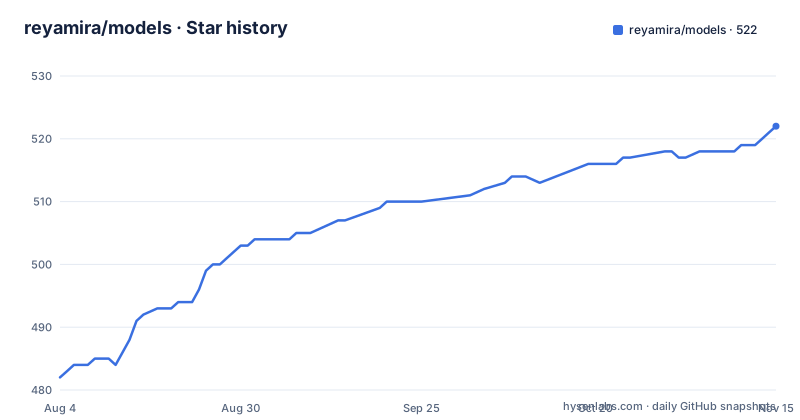
- reyamira/models522 ★ · +40
| Repository | 2026-08-04 | 2026-11-15 |
|---|---|---|
| reyamira/models | 482 | 522 |
40 Stars in the last 103 days, measured from the daily GitHub snapshot. Compare with other projects
Editorial analysis
The crate is modelsdev, the binary is models, and three package managers claim the generic name
One tool, several names, and the shortest of them is the most dangerous.
The Cargo package is named modelsdev and the documentation tells you to install it with a Cargo command using that name. The binary it produces is named models. The default run target is also set to models, with a comment explaining that it exists because the crate declares more than one binary and bare Cargo would otherwise be ambiguous.
Then the package managers. The Homebrew formula is called models. The Scoop manifest lives under an extras bucket as models. The Arch package is models-bin. The Nix route uses the repository name.
So a user typing a brew command gets the word models, with no hint about which of the many projects using that word they are installing. That is a real hazard rather than a stylistic complaint, because the same word names at least three separate things in this project: the crate, the binary, and the top-level command. A model-metadata browser called models is also exactly what someone would expect to find when they type it.
The Cargo name is the one that got it right. modelsdev is specific, matches the upstream data source the catalogue comes from, and will not collide.
One more naming note worth having: a top related search for this project is the name of the upstream aggregator. So somebody looking for the data source itself may find the tool instead, which is a reasonable outcome as long as you know which one you opened.
A metadata browser that runs your package manager
The agents tab is not a read-only view, and this is the part to understand before using it.
The tab tracks a catalogue of twelve-plus coding assistants with automatic version detection, GitHub release tracking and formatted changelogs. It also updates them. One key updates the selected agent, a capital-lettered variant updates every agent that has an update available, and a third cancels an update in flight.
The important detail is where the command comes from. The documentation says the update command is derived from how each tool was actually installed, and it lists the possibilities: a JavaScript package manager or runtime installer, Homebrew, two Python tool installers, and system package managers including the Arch one, Debian's and Fedora's.
So the tool decides which package manager to invoke by detecting how a given agent was installed, and then runs it. That is a much larger capability than a model browser needs, and it is the reason to think carefully about the keypresses.
Two things sharpen the concern. Agents can be added from inside the interface by supplying a name and an owner-and-repository pair, and the addition is fetched immediately without editing any config. So the identifier that decides what gets updated is partly data the user typed. Combine that with the all-agents update key and a mistyped repository becomes an update aimed somewhere unintended.
There is a mitigation, and it is the right one. For updaters that need a prompt or elevated privileges, there is an interactive suspend-and-run mode that hands the terminal over rather than trying to automate a privileged package manager. That is the correct behaviour for a sudo-gated update.
What is not documented is how installation detection works, and what happens when it cannot tell. An agent installed outside every manager on that list has no correct command, and the tool has to guess or decline.
Four benchmark feeds are plotted against each other on shared axes
The benchmarks tab aggregates roughly a thousand entries from four independent sources, with a switcher between them, in-app refresh, and a compare mode offering head-to-head tables, scatter plots and radar charts.
The four sources are named: an independent analysis site, an AI research institute's benchmark effort, an arena site, and a statistics aggregator.
Here is the issue. Each of those publishes its own metrics, on its own methodology, with its own definition of what it is measuring. The tab presents quality indexes, Elo ratings, speed and pricing from all four, and the compare mode draws a scatter plot of them. A scatter plot with two sources on the same axes is a visual assertion that the two numbers are comparable.
Nothing in the visible documentation says they are. There is no statement about which metrics are shared between sources, whether an Elo from one is the same quantity as an Elo from another, or whether a source normalises its scale. The switcher preserves your state, which is helpful for comparing your own view, but it does not address whether the underlying numbers mean the same thing.
The read this deserves is that the visualisation is the claim. The same caution applies to the filter set, which lets you filter by creator, region, type, whether a model reasons, and whether its weights are open or closed. Filtering across four sources by those dimensions implies each source populates each dimension for each model, and the README does not say what happens when one does not.
The comparator column, which cycles a field average, a peer average and a rank, is a nice touch and leans on the same assumption: computing a peer group requires knowing which models count as peers, across sources with different model sets.
Every count is a tilde and nothing carries a data-as-of date
The headline figures are the ones a reader quotes, so it is worth noting how they are qualified.
Roughly four thousand models across more than eighty-five providers. Roughly a thousand benchmark entries across four sources. Twelve-plus coding agents. Twenty-two provider statuses across seven status page platforms.
Every one carries an approximation marker or a floor. None is exact, and none is dated.
That matters more than it might seem, because the data is designed to change while you use it. There is in-app refresh for benchmarks, for the model catalogue, and for agent repository data, all without restarting. There is a workflow whose badge sits at the top of the README with a name that indicates it updates benchmarks automatically. And the refresh capability is advertised as a feature.
So the intended usage is a live view of data that refreshes on a schedule and on demand, and there is no as-of timestamp anywhere in the documentation or mentioned as a field in the interface.
If you screenshot the interface, or quote a price, or note that a model is present or absent, the vintage of that claim is unknown. A model removed from an upstream catalogue looks identical to a model that was never listed. A benchmark score revised by its publisher looks identical to one that never moved. Both are the kind of thing you would want to be able to date later.
The filtering and sorting options make this worse rather than better. Being able to sort by name, by date, by cost or by context window implies the tool knows those dimensions are comparable across the catalogue, and being able to filter by region or open-weights status implies it has normalised them.
The crate has no library target, so its schema is shared only with itself
The build configuration is unusually well commented, and one comment describes the whole design.
The crate declares two binaries. The first is the terminal interface and the command-line tool. The second is a data pipeline transform, declared as not built by default, with a comment saying that is so that installing from Cargo skips it. It is gated behind a feature and built with an explicit flag.
That feature enables exactly one optional dependency, a CSV library. So the pipeline's data format costs nothing for someone who just wants the browser. That is a considered choice.
Then the comment that matters: the two binaries share the version-two schema through a path-attribute module include, because the crate has no library target.
So this is a binary-only crate. There is nothing for another Rust project to depend on. The transform that converts four upstream benchmark feeds into the internal schema, and the schema definition itself, are both unreachable from outside the package.
That is fine if the tool is only a tool. It stops being fine if you want to do anything else with the aggregated data, because the aggregation is the interesting part and the output format is not a published interface. If you wanted to load the same normalised benchmark data into a script of your own, your options are the raw upstream feeds, or parsing what the command-line interface prints.
The same absence explains the default-run setting. With two binaries and no library, a bare Cargo run has no single answer, so the manifest names the one you probably want.
Three CLI namespace shapes, one of which is models status status
Four feature areas are exposed on the command line, and they are not organised consistently.
The model commands are namespaced under the tool name: list, show, search, providers.
The benchmark commands are also namespaced under the tool name, with a further level for the two operations.
The status commands take the same shape, three levels deep.
The agent commands are not namespaced under the tool at all. They are top-level, in a different verb namespace entirely, which means four commands beginning with a word that is not the program name.
Within the status group the shape gets stranger. There are three subcommands: one that lists providers, one that shows one provider, and one whose own name is the same word as its parent namespace. So the command to get overall health is the tool name, the word status, then the word status again.
That is a small thing that a person types once and then remembers. It is not a bug and it will not break anything. But it is the kind of detail that tells you the command surface grew by accretion rather than by design, and it is in the same table as a namespace inconsistency that affects four commands.
Elsewhere the interface design is tighter. Key bindings are named per feature and described consistently, including a glossary behind a single key in the models tab and a matching one for benchmarks, a column picker persisted per data source in a configuration file, and a launch-tab setting so the interface opens where you left off rather than always on the first tab.
The newest release has no changelog entry
The README carries four dated feature sections, covering versions 0.14.0, 0.13.0, 0.12.1 and 0.12.0. The newest release is 0.14.1.
So the current release is undocumented in the README, and the sections stop one release short.
The release cadence around that gap is worth noting too. Version 0.13.0 and version 0.14.0 were published nine and a half hours apart, which is a minor version bump landing the same evening as the minor bump before it. Then version 0.14.1 came fifty-seven days later.
A patch release with no visible entry could be a fix, a packaging change or a data refresh. Given that the project ships a committed data directory and a workflow that regenerates benchmark data on a schedule, a patch release that is only a data update is a plausible reading, and it is also exactly the kind of change where a reader most wants to know what moved.
The release notes themselves are bare version numbers with no body, so the release list gives you when and not what.
The maintenance picture is otherwise healthy and should be stated plainly. The last push was seven days before this article, the branch is current, and the project has shipped four minor or patch versions since early July.
Eight install routes, three documentation locations, and a toolchain pinned outside Cargo
A few closing observations about how the project is distributed and documented.
Installation has more routes than most projects of this size, and two of them carry the generic name. The Homebrew and Cargo commands are:
brew install modelscargo install modelsdevThe Nix pair is a run and a profile install, the Windows route is a Scoop manifest under an extras bucket, the Arch route is a binary package, and prebuilt binaries plus Debian and RPM packages are on the releases page. That is eight artifacts.
The Nix section is the one that states a limitation rather than hiding it: the flake is available directly from GitHub tags and branches, and is not currently published to the community flake index or to the main Nix package set. So the Nix route works, but you are consuming an unpublished flake, and a later feature section records that this path changed recently, from compiling locally to downloading prebuilt binaries from a public binary cache.
Documentation lives in three places. The README points at a wiki roughly eight times across its feature sections and install methods. A documentation directory sits in the repository. And a website directory sits alongside it, with the project's homepage being a hosted site. For a project whose CLI surface is documented in a table, having the reference spread across three locations means the one you are reading is probably not the current one.
The toolchain is pinned through a version-manager configuration file rather than the usual Rust toolchain file. That works for anyone who uses that tool manager and silently does nothing for anyone who does not, which means the Rust version your contributors build against is not enforced by the repository for everyone.
One point in the project's favour is worth recording: it has a security policy, a code of conduct, a contribution guide, a test directory, a committed lockfile for Cargo and another for Nix, and a correctly capitalised agent-instruction file at the root.
Editorial conclusion
Use this if you want one screen for model prices, context windows, benchmark scores and coding-agent versions, since the multi-source aggregation and the filter set are the real value. Do not let the in-app agent updater run unattended on a machine where package-manager commands matter, since the update command is derived from installation detection rather than chosen by you. Verify first whether the four benchmark sources measure the same thing, because the compare view plots them on shared axes and nothing in the documentation says they are commensurable.
Frequently asked questions
What does the models TUI actually aggregate?
Four different things. A model catalogue of roughly four thousand models across more than eighty-five providers taken from one upstream aggregator. Roughly a thousand benchmark entries drawn from four independent sources with a switcher between them. A catalogue of twelve-plus coding assistants with version detection and release tracking. And live health monitoring for twenty-two providers across seven status page platforms.
Can the models tool update my coding agents for me?
Yes. The agents tab updates a selected agent, updates every agent with an available update, or cancels an update in flight, and the update command is derived from how each tool was installed, covering JavaScript package managers, Homebrew, two Python installers and system package managers. For updaters that need a prompt or elevated privileges there is an interactive mode that suspends the interface and hands over the terminal.
How do I install the models tool?
Eight routes are documented: a Homebrew formula, a Cargo install using the crate name modelsdev, Nix with a run or profile command, a Scoop manifest under an extras bucket, an Arch package called models-bin, plus prebuilt binaries and Debian and RPM packages on the releases page. Note the binary is named models while the crate is modelsdev, and the Nix flake is available from GitHub but is not published to a community flake index or the main package set.
Can I use the models benchmark data in my own script?
Not through the crate. The package declares two binaries and no library target, so there is nothing for another project to depend on, and the internal schema the two binaries share is included between them rather than published. The command-line interface can print data, or you can consume the four upstream feeds directly.
Are the four benchmark sources in the models tool comparable?
The documentation does not say so. Each source publishes its own metrics on its own methodology, and the tab presents quality indexes, Elo ratings, speed and pricing from all four with a compare mode that draws scatter plots and radar charts on shared axes. Nothing states which metrics are shared between sources or whether the scales are normalised, so the visualisation asserts comparability that the documentation does not establish.
Official sources
Add this badge to your README
If you maintain this project, the badge below links readers to this analysis and shows its maintenance status from the daily GitHub snapshot. Paste the markdown into your README; add ?metric=license or ?metric=stars to the image URL for a different field.

[](https://hysenlabs.com/projects/reyamira-models)Star history chart for your README
[](https://hysenlabs.com/projects/reyamira-models)Was this useful?