Meetily: a local meeting transcriber whose privacy line depends on which summary provider you pick
Privacy first, AI meeting assistant with 4x faster Parakeet/Whisper live transcription, speaker diarization, and Ollama summarization built on Rust. 100% local processing. no cloud required. Meetily (Meetly Ai - is the #1 Self-hosted, Open-source Ai meeting note taker for macOS & Windows. Understand How to write meeting minutes.
At a glance
- What is it?
- Meetily records, transcribes and summarizes meetings on your own machine with Whisper or Parakeet and a local model by default. This review covers what stays on the device, the hardware each installer expects, the Linux source build, and which features sit in the paid PRO edition.
- Who is it for?
- Meetily suits people on Windows or Apple Silicon Macs who want meeting audio and transcripts kept on their own machine and are fine running Ollama for summaries. It is a poor fit if you need speaker identification, PDF or DOCX export or integrations without paying for PRO, or if you run Linux and do not want to build from source.
- Can I use it commercially?
- Yes. MIT is a permissive licence: you can use, modify and sell software built on it, as long as you keep its copyright and licence notices.
- Is it still maintained?
- Yes. The repository received new commits within the last day.
- What is it written in?
- Mainly Rust, according to GitHub's language statistics.
Answers come from the project's GitHub data, last synced on November 13, 2026, and from our analysis. They are not legal advice.
Star history
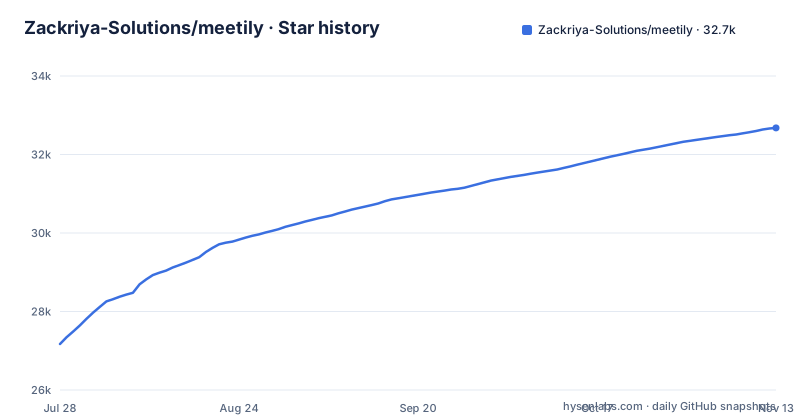
- Zackriya-Solutions/meetily32,677 ★ · +5,505
| Repository | 2026-07-28 | 2026-11-13 |
|---|---|---|
| Zackriya-Solutions/meetily | 27.2k | 32.7k |
5,505 Stars in the last 108 days, measured from the daily GitHub snapshot. Compare with other projects
Editorial analysis
Audio stays on the device, transcript text does not have to
Meetily captures a meeting, transcribes it in real time and generates a summary with a local model by default. Audio and transcription never leave your device, and transcription models, recordings and transcripts are all stored locally.
The privacy boundary moves when you change the summary provider. Meetily supports Ollama as the local option, which is the recommended one, plus Claude, Groq, OpenRouter, OpenAI, or your own OpenAI compatible endpoint. If you pick a cloud provider, only the transcript text is sent to it, but that text is the substance of the meeting.
This matters because the feature list also says no data ever leaves your computer. That statement holds only while summaries run on Ollama or on an endpoint you host. For a legal, healthcare or defense setting, the audio staying local is not enough; whoever reviews the setup has to check the summary provider in the settings, because one changed dropdown sends every transcript to a third party.
Whisper or Parakeet, and a beta path to re-transcribe old recordings
Transcription runs on the device with either Whisper or Parakeet models, with no cloud required, and the live transcript appears while the meeting is still going. The project description advertises Parakeet and Whisper live transcription, speaker diarization and Ollama summarization, all built on Rust.
A second route is marked Beta: Import and Enhance. Import takes existing audio files and generates transcripts from them. Enhance re-transcribes a meeting you already recorded with a different model or a different language, and both are processed locally. That gives you a way to fix a transcript that came out poorly, for example when the first pass used the wrong language, without recording again.
The Beta label is the caveat. Import and Enhance came from a community contribution by Jeremi Joslin and was later improved by Vishnu P S and Mohammed Safvan. Treat its output as something to check against the original audio before you rely on it for minutes that other people will read.
The Windows installer requires AVX2 and leaves CUDA to source builds
On Windows the install is two steps: download the latest `x64-setup.exe` from the releases page and run it. The packaged installer uses a Vulkan enabled Whisper build.
That build sets a hardware floor. It requires an AVX2 capable x64 CPU. AVX-512 is not required, so recent consumer processors without it are fine, but an older x64 machine without AVX2 is outside what the packaged installer supports. ARM based Windows machines are not covered either, since the installer is x64 only.
GPU acceleration on Windows follows the Vulkan path in the packaged build. CUDA acceleration is not part of the installer at all: it requires a source build configured with a compatible NVIDIA CUDA toolchain. If you bought an NVIDIA card expecting CUDA transcription out of the box, you will be compiling Meetily yourself, which means setting up the Rust and frontend toolchains as well as CUDA.
The Mac build is an aarch64 disk image
The macOS install uses a disk image named `meetily_0.4.1_aarch64.dmg` from the latest release. You open the downloaded file, drag Meetily into the Applications folder and launch it from there.
The native apps are listed as Windows and macOS (Apple Silicon). The aarch64 suffix on the file name matches that: the packaged Mac build targets Apple Silicon. An Intel Mac owner has no packaged build named on the install page and is left with the source build route that Linux users take.
The file name also carries the version. Version 0.4.1 was released on 2026-09-12, after v0.4.0 on 2026-06-05 and v0.3.0 on 2026-03-03. When a newer release ships, the DMG name changes with it, so follow the latest release link rather than a bookmarked file. Official builds are only published on meetily.ai and on github.com/Zackriya-Solutions/meetily/releases, and anything offered elsewhere under the Meetily name is not an official build.
Linux users compile it from the frontend directory
There is no packaged Linux app. Linux users build from source, with two guides in the repository: docs/building_in_linux.md for Linux specifics and docs/BUILDING.md for general build instructions. The short version starts in the frontend directory:
git clone https://github.com/Zackriya-Solutions/meetily
cd meetily/frontend
pnpm install --frozen-lockfile
./build-gpu.sh
The recipe assumes pnpm is already installed, and `--frozen-lockfile` makes the install fail rather than silently update dependencies when the lockfile does not match package.json. The build itself goes through `build-gpu.sh`, so the quick start is aimed at a GPU build. The Rust side also needs a toolchain: the Cargo workspace declares `rust-version = "1.77"` and edition 2021, so an older Rust compiler will refuse to build it. Expect to read the Linux guide for anything the four lines do not cover, such as system packages, because the quick start does not list them.
Speaker identification and exports sit in the paid PRO edition
Meetily is open source and free to use, but there is a second edition. Meetily PRO targets users who need speaker identification, API, MCP and other integrations, advanced exports, custom summary workflows and team features. Concretely, PRO adds speaker identification (who said what), custom summary templates, PDF and DOCX export, and MCP, CLI and webhook integrations. A launch coupon, LAUNCH20, gives 20 percent off until the next Community Edition release.
The consequence is a gap between the repository description and the free app. The description advertises speaker diarization, while the PRO offer lists speaker identification as something PRO adds. If attributing statements to named people is the reason you want meeting minutes, test the Community Edition on one of your own recordings before committing, and budget for PRO if the free build does not label speakers the way you need. The same applies to exporting minutes as PDF or DOCX for colleagues.
A Rust workspace around a desktop shell and a llama helper
The primary language is Rust, and the root Cargo.toml defines a workspace with two members: `frontend/src-tauri`, the desktop application, and `llama-helper`. Shared dependencies inherited by both include anyhow, serde with the derive feature, serde_json, and tokio 1.32.0 with the full feature set. The resolver is set to version 2.
Alongside the Rust code, the repository has `backend/`, `docs/`, `scripts/` and `frontend/` directories, a `.gitmodules` file, which means a plain clone may need submodules initialized before a build, plus a PRIVACY_POLICY.md and a CLAUDE.md. The code is MIT licensed.
The project is not archived and the last push landed on 2026-10-30, with three releases across 2026. For a tool that will sit in on confidential meetings, that cadence matters less than the release source: install only from the official locations, and read PRIVACY_POLICY.md in the repository before rolling it out to a team.
Editorial conclusion
Meetily suits people on Windows or Apple Silicon Macs who want meeting audio and transcripts kept on their own machine and are fine running Ollama for summaries. It is a poor fit if you need speaker identification, PDF or DOCX export or integrations without paying for PRO, or if you run Linux and do not want to build from source. Before relying on it for sensitive meetings, confirm which summary provider is configured, since a cloud provider receives the transcript text, and download only from meetily.ai or the GitHub releases page.
Frequently asked questions
Is Meetily free?
The Community Edition is open source, MIT licensed and free to use. Meetily PRO is a separate paid edition that adds speaker identification, custom summary templates, PDF and DOCX export, and MCP, CLI and webhook integrations.
What is Meetily?
Meetily is a privacy first AI meeting assistant that captures meetings, transcribes them in real time with Whisper or Parakeet, and summarizes them with a local model by default, running on your own machine.
How do you install Meetily?
On Windows, download and run the latest x64-setup.exe from the GitHub releases page; it needs an AVX2 capable x64 CPU. On macOS, open meetily_0.4.1_aarch64.dmg and drag Meetily to Applications. On Linux, build from source using the guides in the repository.
Is Meetily open source?
Yes. The Zackriya-Solutions/meetily repository is published under the MIT license, and Linux users build it from that source.
Is Meetily safe?
Audio and transcription stay on your device, and only transcript text goes out if you choose a cloud summary provider instead of local Ollama. Official builds are published only on meetily.ai and the GitHub releases page.
Official sources
Add this badge to your README
If you maintain this project, the badge below links readers to this analysis and shows its maintenance status from the daily GitHub snapshot. Paste the markdown into your README; add ?metric=license or ?metric=stars to the image URL for a different field.

[](https://hysenlabs.com/projects/zackriya-solutions-meetily)Star history chart for your README
[](https://hysenlabs.com/projects/zackriya-solutions-meetily)Was this useful?