Keeper.sh tracks deletions with a mapping row that outlives the event
Calendar sync tool & universal calendar MCP server. Aggregate, sync and control calendars on Google, Outlook, Office 365, iCloud, CalDAV or ICS.
At a glance
- What is it?
- Keeper.sh pulls events from Google, Outlook, iCloud, Fastmail, CalDAV and plain iCal or ICS links, pushes them into one or more destination calendars, and exposes the whole thing over a REST API and an MCP server. The interesting parts are the ones the page explains in its own words: deletion is deferred to a later pass through a mapping row that outlives the event, the free and Pro push intervals differ, and the local dev environment asks you to install a self-signed root certificate into your operating system's trust store.
- Who is it for?
- This is a serious implementation of a problem most calendar sync tools handle loosely, and the two design decisions that matter most to an evaluator are both stated plainly: deferred deletion through persistent mappings, and a cleanup sweep that only touches events the tool created. Two things to settle before running it yourself.
- Can I use it commercially?
- Yes, with strict conditions. AGPL-3.0 is a network copyleft licence: if people use a modified version over a network, for example as a hosted service, you must offer them its source code under the same licence.
- Is it still maintained?
- Yes. The repository last received commits 8 days ago.
- What is it written in?
- Mainly TypeScript, according to GitHub's language statistics.
Answers come from the project's GitHub data, last synced on October 21, 2026, and from our analysis. They are not legal advice.
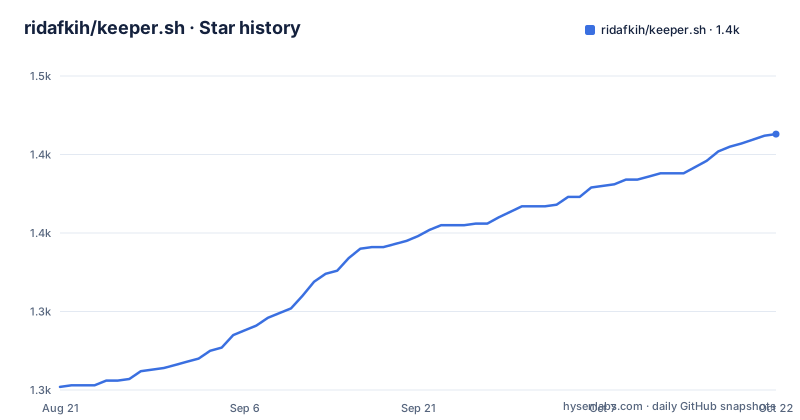
Star history
- ridafkih/keeper.sh1,412 ★ · +160
| Repository | 2026-08-21 | 2026-10-21 |
|---|---|---|
| ridafkih/keeper.sh | 1.3k | 1.4k |
160 Stars in the last 61 days, measured from the daily GitHub snapshot. Compare with other projects
Editorial analysis
Self-hosting includes every Pro feature, but the push interval is defined by plan
The commercial framing is unusually direct for an AGPL project. The page recommends the hosted version at keeper.sh, and says self-hosting is a first-class path where every Pro feature is included, that this is not a trial, and that it costs upkeep instead of the five dollars a month. The hosted version is described as the same code minus the server, the domain, the upgrades, the backups and the Google and Microsoft sign-in apps you would otherwise register yourself. Then the scheduling section reintroduces the plan boundary. Ingestion pulls from your sources into Keeper.sh's own database once a minute regardless of plan, but pushing to destinations is what the refresh interval in the pricing table refers to, and the cron service enqueues a job per destination every minute for Pro and every thirty minutes for free. A self-hosted install has no plan, so which of those two intervals applies to it is the one thing the page leaves open.
A mapping row outlives the event, so a source deletion lands on a later pass
The page names the two failures that motivated the project: events deleted at the source that stayed on the destination forever, and no way to read the code handling the calendar. The origin story is equally specific, since the answer to why this exists is that the author works across three calendars, one for a business, one for a job and one personal, and meetings kept landing on top of each other. The syncing engine is described as three rules. If there is a local event with no corresponding source to destination mapping, it is pushed to the destination. If a mapping exists but the source ID is no longer present at the source, the event is deleted from the destination. If events carry markers saying Keeper.sh created them but no local tracking row exists, they are removed, and that last case is kept only for backwards compatibility. The mechanism that makes the second rule reliable is that a deletion is tracked by a mapping row which outlives the event it pointed at, so the remote copy is still removed on a later pass rather than being stranded. The cleanup sweep is scoped as well, touching only events Keeper.sh created and never an event you made yourself.
Keeper.sh marks its own events with a UID suffix, or a category on Outlook
The cleanup sweep depends on knowing which remote events belong to the tool, and there are two ways that is recorded. On platforms with custom UIDs, the remote UID gets a `@keeper.sh` suffix. On a platform like Outlook that does not support custom UIDs, the event is filed under a `"keeper.sh"` category instead. That second path is the weaker of the two, because the marker is a user visible category rather than an identifier the sync engine owns, and it is the path that has to survive a user renaming or recategorising an event. The same page pairs this with per-source privacy controls, which strip event names, descriptions and locations and replace the title with a `{{calendar_name}}` or `{{event_name}}` template, so what is pushed to a destination can be an empty shell carrying only a marker. The engine itself is described as event content agnostic, which is what lets the same sync path carry both full events and stripped ones. Two other entries in the feature list depend on how that shell is handled at the far end: a combined iCal feed that any calendar app can subscribe to, and easy-to-purge remote events for the case where a whole run has to be undone at the destination.
Google and Outlook are fetched incrementally, everything else is diffed
The two halves of the system run on separate schedules and use different strategies. Ingestion pulls once a minute regardless of plan, and for Google and Outlook it asks the provider for what changed since the last run, using the provider's own sync token and delta link respectively. CalDAV, iCloud and Fastmail are refetched in full and diffed against the event state already stored, and iCal or ICS links are refetched and diffed against the last stored snapshot. Pushing is polling as well: a cron service enqueues one job per destination onto a Redis-backed queue, and a worker service reconciles the destination calendar. The page is explicit that this is polling on their side rather than provider push notifications, so nothing needs to reach your instance from the outside. Manual triggering exists through `POST /api/v1/sync` or `trigger_sync` over MCP, which clears the ingest backoff and enqueues the push half, though the paragraph describing that ends mid-sentence. The agent-facing surface is the reason a lot of this exists: beyond the sync engine there is a REST API under `/api/v1` authenticated with API tokens, an MCP server for AI agent calendar access, and the same trigger callable from either.
The dev environment installs a ten-year root CA into the system trust store
Local development runs behind HTTPS at `https://keeper.localhost`, using a Caddy reverse proxy with automatic TLS, and the `.localhost` name resolves to `127.0.0.1` on its own, so no hosts file entry is needed. That works because you generate and trust your own root first:
mkdir -p .pki
openssl req -x509 -new -nodes \
  -newkey ec -pkeyopt ec_paramgen_curve:prime256v1 \
  -keyout .pki/root.key -out .pki/root.crt \
  -days 3650 -subj "/CN=Keeper.sh CA"
On macOS that certificate goes into the system keychain:
sudo security add-trusted-cert -d -r trustRoot \
  -k /Library/Keychains/System.keychain .pki/root.crt
and on Linux it is copied into the CA directory and picked up by `update-ca-certificates`. Both halves are visible in the compose file: the Caddy container mounts `.pki/root.crt` and `.pki/root.key` read-only into its own PKI directory. So the certificate is valid for ten years, the private key sits in the working tree, and trusting it is a machine-wide change that has to be undone by hand later.
bun dev force-recreates the Docker containers on every run
The root package is a private workspace with `[email protected]` as its package manager and three workspace globs, `packages/*`, `applications/*` and `services/*`, orchestrated through turbo. The dev script is the part worth knowing before you type it:
bun devIt runs `turbo run dev dev:root`, and `dev:root` is `docker compose up --force-recreate`. So the documented way to start development tears down and recreates the Postgres, Redis and Caddy containers every time, which is why the architecture table lists them with local ports 5432 and 6379 and the application services behind the proxy. The same file wires `test`, `lint` and `types` through turbo as well, with `knip` available as an `unused` script for dead code, `oxlint` configured through `.oxlintrc.json`, and `lefthook.yml` for git hooks. Beside the three workspace globs the root also holds `deploy/`, `docker/`, `infra`, `scripts/`, `Caddyfile`, `bun.lock`, `SECURITY.md` and `NOTICE`, and the manifest is marked private with its license field reading `AGPL-3.0-only`. The page says nothing about the root-level `server.json`, the `plugins/` and `.cursor-plugin/` directories, or the `.gitmodules` entry.
The compose file publishes Postgres and Redis on host ports with default credentials
This is the development compose file, and its defaults are development defaults, but they are also the defaults in the repository anyone cloning will run. Postgres 17 takes its user, password and database name from environment variables that all fall back to `postgres`, publishes `5432:5432` and keeps its data in a named volume. Redis 7 has no authentication at all in the file and publishes `6379:6379`. The architecture table spells the connection string out in full, `postgresql://postgres:postgres@localhost:5432/postgres` and `redis://localhost:6379`, so the values are documented rather than implied. Caddy takes 80 and 443 in both TCP and UDP, and the compose project name is pinned to `keeper` alongside explicit `container_name` values on each service. The Caddy service also carries an `extra_hosts` entry mapping `host.docker.internal` to the host gateway, and mounts the repository's own `Caddyfile` read-only into the container alongside the root certificate and key. For a development machine that is fine; for a self-hosted install the same file wants a real password and ports that are not on every interface.
Editorial conclusion
This is a serious implementation of a problem most calendar sync tools handle loosely, and the two design decisions that matter most to an evaluator are both stated plainly: deferred deletion through persistent mappings, and a cleanup sweep that only touches events the tool created. Two things to settle before running it yourself. The push cadence is defined by plan, every minute for Pro and every thirty for free, while the same page says every Pro feature is included when self-hosting, so a self-hosted install has no stated interval. And the local dev setup adds a ten-year self-signed root to your machine's trust store, key included on disk in the working tree, which is a normal convenience for HTTPS development and a real piece of machine state to remember and clean up. The hosted path at five dollars a month exists precisely to avoid the server, the domain, the backups and the OAuth apps you would otherwise register.
Frequently asked questions
How does keeper.sh decide to delete an event from a destination calendar?
When a mapping row exists for an event but the source ID is no longer present at the source, the event is deleted from the destination. Deletions are tracked by a mapping row that outlives the event it pointed at, so a removal still lands on a later pass, and the cleanup sweep only touches events Keeper.sh created.
Does keeper.sh need inbound connections from Google or Outlook?
No. The page says this is polling on their side rather than provider push notifications, so nothing needs to reach your instance from the outside. Google and Outlook are fetched incrementally using the provider sync token and delta link, while CalDAV, iCloud, Fastmail and iCal or ICS links are refetched and diffed.
Can an iCal or ICS link be used as a destination in keeper.sh?
No, those links are pull-only. Google Calendar, Outlook, iCloud, Fastmail and CalDAV are the first-class integrations, and each of them works as a source or as a destination.
What does self-hosting keeper.sh cost compared with the hosted version?
The page states that every Pro feature is included when self-hosting, that this is not a trial, and that it costs upkeep instead of the five dollars a month. The hosted version supplies the server, the domain, upgrades, backups, and the Google and Microsoft sign-in apps you would otherwise register yourself.
How is the keeper.sh development environment set up over HTTPS?
You install dependencies with bun install, generate a local root certificate authority into .pki with openssl, trust it in the system keychain on macOS or through update-ca-certificates on Linux, then run bun dev, which starts Postgres, Redis, Caddy and the local services. Bun v1.3.11 or newer and Docker with Compose are the prerequisites.
Official sources
Add this badge to your README
If you maintain this project, the badge below links readers to this analysis and shows its maintenance status from the daily GitHub snapshot. Paste the markdown into your README; add ?metric=license or ?metric=stars to the image URL for a different field.

[](https://hysenlabs.com/projects/ridafkih-keeper-sh)Star history chart for your README
[](https://hysenlabs.com/projects/ridafkih-keeper-sh)