rill: curl piped into sh, and a .PHONE typo where .PHONY should be
The fastest business intelligence tool for humans and agents.
At a glance
- What is it?
- Rill is a business intelligence tool where a dashboard is a YAML file over an OLAP engine, and everything a user touches is a version controlled text file. Read closely, the same page that sells sub-second queries also installs itself with a pipe from a domain and hides commands from its own generated documentation.
- Who is it for?
- Rill suits a team that wants its dashboards in version control next to the code that produces the data, and that is comfortable reviewing the diff of a YAML file when a number moves. It does not suit someone who wants a read-only view of a warehouse with no files to maintain, since the semantic layer is the product and the files are the interface.
- Can I use it commercially?
- Yes. Apache-2.0 is a permissive licence: you can use, modify and sell software built on it, as long as you keep its copyright and licence notices.
- Is it still maintained?
- Yes. The repository received new commits within the last day.
- What is it written in?
- Mainly Go, according to GitHub's language statistics.
Answers come from the project's GitHub data, last synced on November 15, 2026, and from our analysis. They are not legal advice.
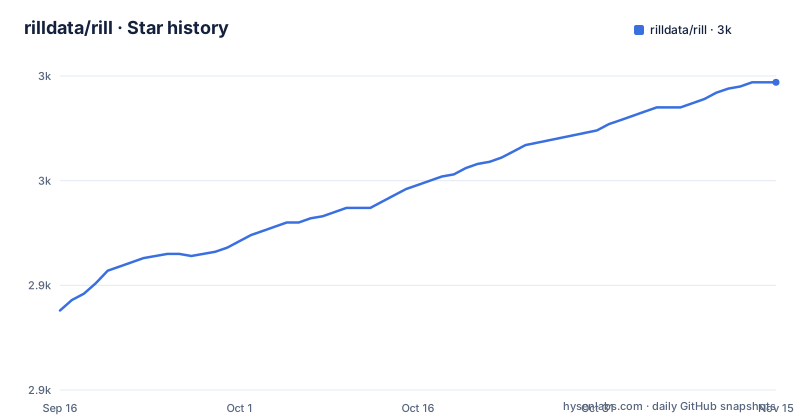
Star history
- rilldata/rill2,997 ★ · +109
| Repository | 2026-09-16 | 2026-11-15 |
|---|---|---|
| rilldata/rill | 2.9k | 3k |
109 Stars in the last 60 days, measured from the daily GitHub snapshot. Compare with other projects
Editorial analysis
The documented install is a shell script piped straight into sh
The Get Started block is two lines and the first one executes remote code as your shell:
curl https://rill.sh | sh        # install
rill start my-project            # create a project and open the UI
There is no checksum, no version selector and no local copy of what is about to run, which is the same trade every installer of this shape makes. What makes it worth reading rather than skimming is that Rill is not the only place this pattern appears. The install is described as the fastest way in, the repository ships an Apache-2.0 licence, and there is a Dockerfile in the tree that copies a prebuilt binary into /usr/local/bin, so an alternative exists and is not documented in the quick start. The second line also tells you something about the tool's shape before you have read anything else: my-project is a project that does not exist yet, and the command both creates it and opens the user interface.
rill start creates a project and rill init scaffolds one, which is the confusing part
The two entry points overlap. `rill start my-project` is documented as creating a project and opening the UI. `rill init` is documented as scaffolding a project interactively, and the transcript it prints ends by telling you to start the project you just created:
➜ rill init
? Project name my-rill-project
? OLAP engine duckdb
? Agent instructions claude

Created a new Rill project at ~/my-rill-project
Added Claude instructions in .claude and .mcp.json

Success! Run the following command to start the project:

  rill start my-rill-project
So the project name is asked for by both, and after init you still have to run start to get a UI. The prompt set is also where the agent integration is chosen rather than configured later: answering claude writes instructions into .claude and .mcp.json. A reader who starts with the one-line command gets a default project without ever being asked which OLAP engine or which agent, which is faster and is also the path that leaves those two decisions implicit.
The dashboard takes every dimension and every measure with a wildcard
The dashboard file is four fields and two of them are quoted asterisks:
type: explore

display_name: "Events Dashboard"
metrics_view: events_metrics

dimensions: "*"
measures: "*"
That is the whole curation step. Nothing on the dashboard names a dimension, so every dimension and every measure defined in the metrics view appears, and adding a measure to the metrics file makes it visible without touching the dashboard. That is the intended behaviour of a semantic layer and it is also the failure mode: a metric someone adds for a one-off question becomes a column on the shared dashboard, and removing it is a separate change to a second file. The metrics view it points at is where the real definitions live, including the one dimension whose name and column differ, `device` mapped to `device_type`, which is exactly the case a semantic layer exists to handle.
The worked example reads a parquet file from the vendor's own bucket
Step one of the walkthrough is a four line model file, and its third line is the interesting one:
type: model
connector: duckdb
materialize: true

sql: |
  select * from read_parquet('gs://rilldata-public/auction_data.parquet')
Two things are established here. `materialize: true` means the result is stored rather than computed as a view, which is what makes incremental ingestion and data profiling possible later. And the source is a hardcoded path into a Google Cloud Storage bucket named rilldata-public, holding a file called auction_data.parquet. So the example that every new user copies reads a file the project controls, over the network, with no credential step shown. Nothing on the page says whether that bucket is a demo fixture or a maintained dataset, and nothing says what happens to the walkthrough when it is unreachable. The metrics built on top of it inherit the dependency: total_events is count(*) and revenue is sum(price * quantity).
The Makefile declares one target with .PHONE instead of .PHONY
The build file has six targets and five of them are declared correctly. The all target is .PHONY: all. Then come .PHONY: cli, .PHONY: cli.prepare, .PHONY: coverage.go and .PHONY: docs.generate. The sixth is written `.PHONE: cli-only`, and that directive does nothing, so the cli-only target is not phony:
.PHONE: cli-only
cli-only:
	go run scripts/embed_duckdb_ext/main.go
	go build -tags databricks_kernel -o rill cli/main.go
In practice that means a file or directory named cli-only in the working tree would satisfy the target and the recipe would not run. The recipe itself is also revealing about the build. It compiles a single file, cli/main.go, into a binary called rill, with the tag databricks_kernel enabled, which is the switch that pulls in the Databricks SQL driver you can see in the module requirements. The full cli target is the heavier path: it depends on cli.prepare, which runs npm install and npm run build, deletes cli/pkg/web/embed/dist, recreates it, and copies web-local/build into it before the Go compile. Building the CLI therefore runs a full web build first.
The generated CLI reference is written with a substituted version string
One Makefile target is longer than it needs to be and the reason is in its comments. Generating docs first removes docs/docs/reference/cli and docs/docs/reference/project-files, then moves your own ~/.rill/config.yaml out of the way so that user-defined defaults do not leak into the output. The next step sets a fixed version: RILL_DOCS_GENERATE=true go run -ldflags="-X main.Version=1.0.0" ./cli docs generate-cli. The comment above it says it sets main.Version to a fixed tag to simulate a production build, where certain commands are hidden. So the published reference is generated from a binary that reports itself as 1.0.0 while the releases are at 0.90.x, and the difference is not cosmetic: commands visible in a development build are hidden in a production one, and the reference is written from the production side. A third comment explains why the real tag is not used, since it would go stale on the next release.
The container is an untagged ubuntu, chmod 777, with the Google Cloud CLI baked in
The Dockerfile opens with a syntax directive for an experimental builder feature and then builds FROM ubuntu with no tag at all, so the base image floats. It installs ca-certificates, git, curl and gnupg, then adds the Google Cloud SDK apt repository, verifies its key with gpg, and installs google-cloud-cli together with the google-cloud-cli-gke-gcloud-auth-plugin. So a general purpose analytics image ships a specific cloud provider's command line. The binary is copied to /usr/local/bin and then made world writable with chmod 777, before a non-root user is created with uid 1001 and switched to. DuckDB extensions are installed at build time by running rill runtime install-duckdb-extensions as that user, so the extension set is baked into the image layer rather than fetched on first run. The entrypoint is rill and the default command is start.
.claude/, .cursor/ and skills-lock.json ship inside an Apache-2.0 repository
The top level of the tree is where this project states its priorities most clearly. Alongside the expected Go and web entries, runtime/, cli/, admin/, proto/, docs/, four web workspaces named web-admin, web-common, web-integration and web-local, and the usual .github and .golangci.yml, there are .claude/ and .cursor/ directories and a file called skills-lock.json. The root package.json is named @rilldata/dev, is private, is pinned at version 0.0.0 and declares those five directories as npm workspaces, so the web side is a SvelteKit monorepo sharing one lockfile. That lockfile, plus the eslint flat config, a prettier config and a syncpack dependency for version consistency, is a conventional modern web setup. The agent directories and the skills lockfile are not. They say the repository version-controls the configuration that coding agents read when they work on it, which is consistent with a project whose pitch is that agents can author projects and dashboards end to end.
Editorial conclusion
Rill suits a team that wants its dashboards in version control next to the code that produces the data, and that is comfortable reviewing the diff of a YAML file when a number moves. It does not suit someone who wants a read-only view of a warehouse with no files to maintain, since the semantic layer is the product and the files are the interface. Before you commit, read the install line rather than pasting it blind, since the documented path pipes a shell script from a domain into sh. Pin the version, because the release line is still 0.90.x and three of the last releases landed within a day of each other. And if you plan to generate the CLI reference yourself, know that the Makefile does it with a substituted version string so the output deliberately does not match your build.
Frequently asked questions
How do I install Rill?
The documented install is one line: curl https://rill.sh piped into sh. After that, rill start my-project creates a project and opens the UI, and rill init is the interactive alternative that also asks which OLAP engine and which agent instructions you want.
What is Rill and where do dashboards live?
Rill is a business intelligence tool for humans and agents, backed by OLAP engines like ClickHouse and DuckDB. Models, metrics and dashboards are all defined in code: a dashboard is a YAML file with a type of explore, a display_name and a metrics_view reference, and metrics are a metrics_view YAML with dimensions and measures.
Do I need to bring my own ClickHouse or DuckDB to use Rill?
No. Managed ClickHouse or DuckDB are included, and the page also lists external engines you can connect instead: ClickHouse Cloud, Druid, Pinot and MotherDuck. Separately, connectors cover S3, GCS, databases and 20 or more sources.
How does Rill connect to Claude or other AI agents?
Through an MCP server that connects AI agents directly to your semantic layer, and through conversational BI for asking questions in natural language. On the authoring side, running rill init and answering claude to the agent instructions prompt writes instructions into .claude and .mcp.json in the new project.
What does rill deploy do in Rill?
It pushes to Rill Cloud. Deployments are described as git-backed and versioned, and the page also mentions connecting a repository for automatic CI/CD. After deploying, the metrics view is immediately queryable on Rill Cloud.
Official sources
Add this badge to your README
If you maintain this project, the badge below links readers to this analysis and shows its maintenance status from the daily GitHub snapshot. Paste the markdown into your README; add ?metric=license or ?metric=stars to the image URL for a different field.

[](https://hysenlabs.com/projects/rilldata-rill)Star history chart for your README
[](https://hysenlabs.com/projects/rilldata-rill)Was this useful?