BOOM: a Chisel RV64 core that only exists once Chipyard instantiates it
SonicBOOM: The Berkeley Out-of-Order Machine
At a glance
- What is it?
- BOOM is the Berkeley out-of-order RV64 core written in Chisel, kept as generator source rather than as a runnable project. A core appears only when the Chipyard SoC generator instantiates it, and the repository's own Makefile does nothing but lint Scala.
- Who is it for?
- BOOM belongs to a research group that plans to edit the pipeline and measure what changes, and it does not belong to anyone expecting a core that builds itself.
- Can I use it commercially?
- Yes. BSD-3-Clause is a permissive licence: you can use, modify and sell software built on it, as long as you keep its copyright and licence notices.
- Is it still maintained?
- Yes. The repository last received commits 16 days ago.
- What is it written in?
- Mainly Scala, according to GitHub's language statistics.
Answers come from the project's GitHub data, last synced on October 24, 2026, and from our analysis. They are not legal advice.
Star history
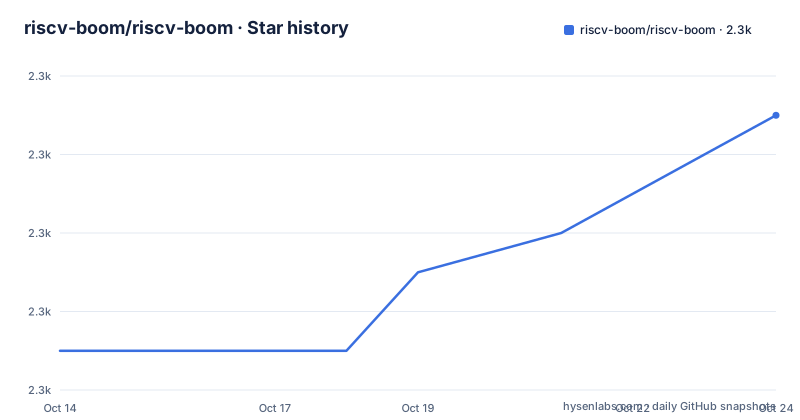
- riscv-boom/riscv-boom2,267 ★ · +6
| Repository | 2026-10-14 | 2026-10-24 |
|---|---|---|
| riscv-boom/riscv-boom | 2.3k | 2.3k |
6 Stars in the last 10 days, measured from the daily GitHub snapshot. Compare with other projects
Editorial analysis
A core you cannot instantiate without the Chipyard generator
BOOM is a parameterizable RV64 out-of-order core written in Chisel, and what sits in this repository is generator source, not a processor you can run. The README warns about this in blunt words: the repository is not self-running, and the Chipyard SoC generator is what instantiates a BOOM core. That narrows the audience on purpose. The core comes from the Berkeley Architecture Research group, and the stated focus is a high performance, synthesizable and parameterizable core for architecture research, which is a different goal from handing someone a finished processor.
The dependency is pinned rather than left loose. A `CHIPYARD.hash` file in the top level directory holds the Chipyard commit that works with this checkout, and the reason given is easy to miss because it is not the one you would expect: the file is mainly for CI purposes, since Chipyard should follow the correct version of rocket-chip. Most users are told to do the opposite of pinning anything, clone Chipyard separately, follow the default Chipyard instructions, and leave `.hash` to the integration jobs.
Its default branch is `master` and the primary language is Scala, so what you are reading is Chisel source. Nothing in the root turns those sources into a core on its own.
Nine checkmarks, one score, and no configuration numbers
The feature table does the work of a whole specification, and it is eleven rows long. It names the ISA, then runs a list of checkmarks for synthesizable, FPGA, parameterized, IEEE 754 floating point, atomics, caches, virtual memory, boots Linux and runs SPEC, and closes with a CoreMark figure. Nine of those rows are capability claims with no configuration attached anywhere in the file.
That is where a researcher will look for numbers the table does not carry. There is no cache size, no branch predictor, no reorder buffer depth, no issue width, no physical address width and no core count, so each checkmark says the design can do a thing without saying what shape of the thing you get. The parameterization the table advertises lives inside `src/`, which the top level listing does not expand, so no knob is visible from the root.
One measured number stands out: 6.2 CoreMarks/MHz, attributed to the current microarchitecture and described as performance competitive with commercial high-performance out-of-order cores. No clock, no configuration and no benchmark harness travel with that figure, and SPEC appears as a table row carrying no score at all.
The prose says RV64GC and the table says RV64GCB
Read the ISA line twice and you get two answers. The prose calls BOOM an open source RV64GC RISC-V core, while the ISA row of the table reads RISC-V (RV64GCB). The table's string carries one extra letter, and nothing at the top level settles which of the two an elaborated build actually emits.
For an architecture project this is the sort of detail that quietly costs a week. An ISA string is what a boot image, a test plan and a hand written test program get written against, and the same table claims the core boots Linux and runs SPEC, which is precisely where the two strings stop being interchangeable. Take the prose as the contract and an instruction set you test for may not be there. Take the table and you may write tests for an extension the prose never promised.
Nothing in the root resolves it. `build.sbt`, `build.sc` and the directories beside them are build plumbing rather than configuration you can read, so the question is answered only by generating the design and inspecting what comes out.
The root Makefile has one target, and it lints
The root Makefile is the entire build entry point, and it does one thing, lint Scala.
SBT		?= sbt
#SBT_FLAGS	?= -Dsbt.log.noformat=true

.PHONY: checkstyle


checkstyle:
	$(SBT) $(SBT_FLAGS) scalastyle test:scalastyle
sbt comes from a ?= assignment, so an sbt already on your path wins unless you override it. The `SBT_FLAGS` line above is commented out, which leaves the variable undefined and expanding to nothing in the command, and because no assignment survives in the file, a `SBT_FLAGS` you export in your own shell still reaches make as a default. The target runs scalastyle twice, once across main sources and once across test sources, checked against `scalastyle-config.xml` from the top level.
There is no test target, no simulation target and no elaboration target here, which reads as consistent with the not-a-self-running warning rather than as an oversight. Linting is the one activity a generator repository can perform without a SoC wrapped around it. Two build descriptions also sit side by side, `build.sbt` for sbt and `build.sc` for Mill, while this Makefile drives only the first.
The FPGA path ends at FireSim on AWS F1
BOOM is primarily ASIC-optimized, and the FPGA story is routed through other people's tooling. The README says it is also usable on FPGAs and then names the path: Chipyard provides infrastructure and documentation for deploying BOOM on AWS F1 FPGAs through FireSim. AWS F1 is the only board named in the file, and FireSim is the only tool named besides Chipyard and Chisel.
A reader holding any other board has no documented route, and the root holds no board files, no constraints file and no obvious place to put one. Leaving two files aside, the top level listing reads like this:
.circleci/
.github/
.gitignore
CHIPYARD.hash
CONTRIB_AND_STYLE.md
Makefile
README.md
TODO.md
build.sbtbuild.sc
docs/
project/
src/
scalastyle-config.xml
util/Deployment on F1 is presented as a Chipyard flow rather than as a bitstream recipe for your own board, so the FPGA checkmark in the table and the ASIC-optimized sentence describe one design from two directions and leave the practical gap to Chipyard's documentation.
Reuse terms sit in two root files, citation terms in the README
Reuse terms get no summary anywhere in the checkout. The licence is BSD-3-Clause, and the root carries both `LICENSE` and `LICENSE.SiFive`, so the exact grant you depend on lives in a file you have to open yourself, and no page in the tree explains which sources `LICENSE.SiFive` is meant to cover.
Academic users inherit a separate obligation. The README asks that published work using BOOMv3 cite the paper, and it supplies a BibTeX entry for it: SonicBOOM: The 3rd Generation Berkeley Out-of-Order Machine by Zhao, Korpan, Gonzalez and Asanovic, from the Fourth Workshop on Computer Architecture Research with RISC-V, May 2020. That entry is the citation target, and a group that publishes a modified core inherits the request along with the fork.
Contributor expectations are pushed into `CONTRIB_AND_STYLE.md`, and `TODO.md` sits beside it as the only roadmap-shaped file at the root. Upgrade cost is therefore mostly editorial: a fork that changes pipeline parameters still has to keep style checks green and still points at the same paper.
Tagged versions stop in 2020 while pushes continue
Read the dates and the shape of the project changes. The newest tag is v3.0.0 from 2020-06-01, the two before it are 2.2.2 from 2019-08-11 and 2.2.3 from 2020-01-24, and the last push was on 2026-09-11.
Six years of commits with no new tag leaves no published point in that stretch for a downstream user to pin a build against, and the tag names show a rename as well as a version bump: 2.2.2 and 2.2.3 are labelled BOOMv2, while 3.0.0 carries BOOMv3 and the SonicBOOM name. The repository description still reads SonicBOOM: The Berkeley Out-of-Order Machine, while the title line inside the README says The Berkeley Out-of-Order RISC-V Processor.
The README's own disclaimer calls BOOM work-in-progress, which fits a research generator better than a fixed point would. It does not list what changed in those six years, and no change summary appears anywhere in the checkout, so the distance between the newest tag and that push has to be read out of the source itself.
The design spec lives on a website, not in the checkout
The README is short, and it says where the rest of the documentation sits. It points at boom-core.org for the most up to date information, listing mailing lists, documentation, a design spec. and publications as what that site carries. The repository itself contributes a mailing list hosted on groups.google.com and a CircleCI badge at the top of the page, matched by `.circleci/` and `.github/` in the root.
What the checkout gives you is a generator, a style configuration, a pinned Chipyard hash and a TODO, while the specification you need in order to reason about the microarchitecture lives on a website outside the repository. That division is ordinary for a research core. It also carries a cost: nothing in the tree records the parameter values behind the documented CoreMark figure, and the design spec. on the site cannot be checked against the source you cloned without reading both.
Repository topics name berkeley, boom, chisel, riscv, riscv-boom, rocket-chip, rtl and scala, which is the clearest statement of where this code sits. It is a Chisel generator that expects rocket-chip's world around it, and it becomes hardware only when a Chipyard SoC instantiates it.
Editorial conclusion
BOOM belongs to a research group that plans to edit the pipeline and measure what changes, and it does not belong to anyone expecting a core that builds itself. Take it through Chipyard rather than from this checkout, treat the Chipyard hash as a CI detail, and settle two things before the first experiment: which ISA string an elaborated build emits, since the prose and the feature table disagree, and whether the design spec. on boom-core.org still matches the parameters you mean to change in a fork.
Frequently asked questions
Can I build and run BOOM directly from the riscv-boom repository?
No. The repository is described as not self-running, and a BOOM core is instantiated through the Chipyard SoC generator. Most users are told to clone Chipyard separately and follow the default Chipyard instructions.
What RISC-V ISA does BOOM implement?
The prose calls it an RV64GC core, while the feature table lists the ISA as RISC-V (RV64GCB). The two strings differ by one letter, and nothing at the top level settles which one an elaborated build emits.
How do I run the BOOM tests or style checks?
Only style checking is available inside the repository. The Makefile's only target runs sbt with `scalastyle` and `test:scalastyle` against `scalastyle-config.xml`, and there is no test, simulation or elaboration target.
Which Chipyard commit works with this BOOM checkout?
The working commit is pinned in the `CHIPYARD.hash` file in the top level directory. The README explains that this file is mainly for CI purposes, since Chipyard should follow the correct version of rocket-chip, and that most users can ignore it.
Can I deploy BOOM on an FPGA?
BOOM is primarily ASIC-optimized, and the named FPGA route runs through Chipyard and FireSim on AWS F1 boards. No other board and no bitstream build procedure appear in the repository documentation.
What performance does the README claim for BOOMv3?
6.2 CoreMarks/MHz, described as performance competitive with commercial high-performance out-of-order cores. No clock, configuration or benchmark harness is attached to that figure, and SPEC appears only as a feature-table row without a score.
Official sources
Add this badge to your README
If you maintain this project, the badge below links readers to this analysis and shows its maintenance status from the daily GitHub snapshot. Paste the markdown into your README; add ?metric=license or ?metric=stars to the image URL for a different field.

[](https://hysenlabs.com/projects/riscv-boom-riscv-boom)Star history chart for your README
[](https://hysenlabs.com/projects/riscv-boom-riscv-boom)Was this useful?