River: job kinds, per-queue worker caps and a Postgres transaction boundary
Fast and reliable background jobs in Go
At a glance
- What is it?
- River is a Go job queue that lives in the same Postgres or SQLite database as your application data, so enqueueing commits or rolls back with the change that caused it. Version v0.51.0 was released on 2026-11-01 and the module requires Go 1.26.0 with a pinned toolchain.
- Who is it for?
- River fits Go services that already run Postgres and want job enqueueing inside the same transaction as the business change, with queues for isolation and a Web UI for inspection. Do not reach for it when the job store has to be something other than Postgres or SQLite.
- Can I use it commercially?
- Yes, with conditions. MPL-2.0 is a weak copyleft licence: you can use it inside commercial and closed-source software, but if you distribute changes to its own files, you must publish those changes under the same licence.
- Is it still maintained?
- Yes. The repository last received commits 1 day ago.
- What is it written in?
- Mainly Go, according to GitHub's language statistics.
Answers come from the project's GitHub data, last synced on November 13, 2026, and from our analysis. They are not legal advice.
Star history
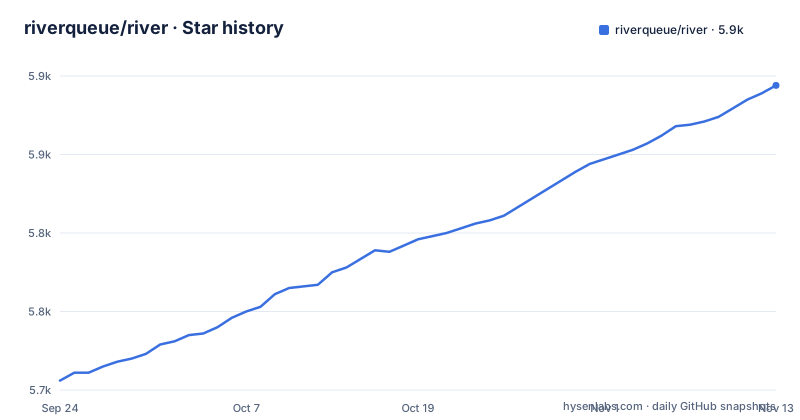
- riverqueue/river5,894 ★ · +188
| Repository | 2026-09-24 | 2026-11-13 |
|---|---|---|
| riverqueue/river | 5.7k | 5.9k |
188 Stars in the last 50 days, measured from the daily GitHub snapshot. Compare with other projects
Editorial analysis
AddWorker panics on a duplicate registration, so kind strings have to be unique
A job is a pair of structs: one implementing JobArgs and one implementing Worker. The args struct carries json annotations that define how the job is serialized to and from the database, plus a Kind method returning a stable string that uniquely identifies the job.
type SortArgs struct {
    // Strings is a slice of strings to sort.
    Strings []string `json:"strings"`
}

func (SortArgs) Kind() string { return "sort" }
Registration happens at start up so River knows how to assign a job to a worker, and the failure mode is loud:
workers := river.NewWorkers()
// AddWorker panics if the worker is already registered or invalid:
river.AddWorker(workers, &SortWorker{})
The worker itself embeds WorkerDefaults to satisfy the rest of the interface and exposes a Work function that dictates how the job runs. That is the whole contract; anything else you need, error handling, cancellation or snoozing, happens inside Work. Workers can be omitted from the client config, but including the bundle lets River check that inserted job kinds have a worker that can run them, which turns a missing registration into a detected error instead of a job nobody picks up.
InsertTx makes job visibility wait for your commit
River's design centre is that jobs are enqueued in the same transaction as the application change that needs them, using the same database. The guarantee is stated in three parts: jobs are guaranteed to be enqueued if their transaction commits, they are removed if the transaction rolls back, and they are not visible for work until commit.
_, err = riverClient.InsertTx(ctx, tx, SortArgs{
    Strings: []string{
        "whale", "tiger", "bear",
    },
}, nil)

if err != nil {
    panic(err)
}
The nil at the end is insert options, and complete code sits in the InsertAndWork example. There is also a second client shape, the insert-only client, which inserts jobs but does not work them and therefore does not need to be started or stopped at all. That is the shape for a service that only produces work, and it is the cheapest way to adopt River without running a worker.
SoftStopTimeout is the only thing standing between shutdown and a cancelled job
Shutdown is done by cancelling the context you passed to Start. Workers stop fetching new work, active jobs are allowed to finish, and jobs still running after SoftStopTimeout elapses get cancelled, so that timeout is the knob that decides whether a deploy interrupts work in progress.
riverClient, err := river.NewClient(riverpgxv5.New(dbPool), &river.Config{
    SoftStopTimeout: 10 * time.Second,
    ...
})
if err != nil {
    panic(err)
}

signalCtx, stop := signal.NotifyContext(ctx, syscall.SIGINT, syscall.SIGTERM)
defer stop()

// Stop fetching new work and wait for active jobs to finish. Cancel jobs after
// SoftStopTimeout elapses.
if err := riverClient.Start(signalCtx); err != nil {
    panic(err)
}

<-riverClient.Stopped()
The blocking read on Stopped is what turns a signal into an orderly exit, and an explicit riverClient.Stop(ctx) is the alternative when a context deadline is easier to reason about than a signal handler.
MaxWorkers is a per-queue ceiling set in the client config map
Queues are configured on the client as a map from queue name to queue config, and the worker limit lives there rather than in a global setting. One queue named default with up to 100 worker goroutines at a time:
riverClient, err := river.NewClient(riverpgxv5.New(dbPool), &river.Config{
    Queues: map[string]river.QueueConfig{
        river.QueueDefault: {MaxWorkers: 100},
    },
    Workers: workers,
})
if err != nil {
    panic(err)
}

// Run the client inline. All executed jobs will inherit from ctx:
if err := riverClient.Start(ctx); err != nil {
    panic(err)
}
The client is constructed from a database pool, a driver and the config struct, so the driver choice and the pool are both yours. Multiple queues exist to guarantee throughput and worker availability and to isolate components from each other, which is the argument for splitting slow work onto its own queue rather than raising the cap everywhere.
The Makefile drops and rebuilds a local river_dev database before anything runs
The development commands live in the Makefile. The default goal is help, and the first target anyone reaches for rebuilds the databases the tests need:
.PHONY: db/reset
db/reset: ## Drop, create, and migrate dev and test databases
db/reset: db/reset/dev
db/reset: db/reset/test

.PHONY: db/reset/dev
db/reset/dev: ## Drop, create, and migrate dev database
	dropdb river_dev --force --if-exists
	createdb river_dev
	cd cmd/river && go run . migrate-up --database-url "postgres://localhost/river_dev"
A local Postgres named river_dev is dropped, recreated and migrated through the CLI in cmd/river, and the test database is reset separately through internal/cmd/testdbman. The generate targets matter if you touch SQL: migrations are synced from the pgxv5 driver into the database/sql driver with rsync, and a generate/sqlc target is part of generate. CHANGELOG.md sits at the root as the release history, and .golangci.yaml is the lint configuration the repository runs.
Four submodules and one toolchain line pin the shape of the build
The module is github.com/riverqueue/river and it declares a language floor and a toolchain at once:
module github.com/riverqueue/river

go 1.26.0

toolchain go1.26.6
Direct dependencies are short and pointed: pgx/v5 v5.11.0 and puddle/v2 for pooling, robfig/cron/v3 for periodic jobs, tidwall/gjson and tidwall/sjson for JSON, golang.org/x/sync, and four submodules under riverqueue, namely riverdriver, riverdriver/riverpgxv5, rivershared and rivertype, all pinned at v0.51.0 to match the release.
The README describes River as backed by Postgres or SQLite, so Postgres is not the only supported store.
Non-Go producers are limited to the two documented insert paths
River has implementations in Go, Java, JavaScript/TypeScript, Ruby and Rust, and the README says they are fully cross-compatible: jobs inserted by any of them can be worked by another, so services in different languages can share a queue. Jobs can also be inserted from Python.
The README's feature list includes batch insertion through Postgres COPY FROM, unique jobs by args, period, queue and state, transactional job completion, snoozing and cancelling from inside a work function, subscriptions for telemetry hooks, test helpers, and periodic, cron and scheduled jobs. The Web UI for inspecting and interacting with jobs lives in its own repository rather than in this module.
Editorial conclusion
River fits Go services that already run Postgres and want job enqueueing inside the same transaction as the business change, with queues for isolation and a Web UI for inspection. Do not reach for it when the job store has to be something other than Postgres or SQLite. Read go.mod and go.work before starting, because the driver submodules are version-pinned alongside the main module and the toolchain line pins your local Go. Keep Workers in the client config, since omitting it removes the check that every inserted job kind has a worker able to run it.
Frequently asked questions
What database does River need?
Postgres or SQLite. River is a transactional job queue backed by Postgres or SQLite, and it encourages using the same database for application data and the job queue so that jobs can be enqueued transactionally.
What happens to a River job if the transaction that inserted it rolls back?
The job is removed, because jobs are guaranteed to be enqueued only if their transaction commits, and they are not visible for work until commit.
How does River shut down cleanly?
Cancel the context passed to Start, optionally with a SoftStopTimeout such as 10 * time.Second, then block on riverClient.Stopped(). An explicit riverClient.Stop(ctx) call is the alternative.
Can languages other than Go enqueue River jobs?
Yes. River has Go, Java, JavaScript/TypeScript, Ruby and Rust implementations that are fully cross-compatible, so jobs can be enqueued in one language and processed in another, and jobs can also be inserted from Python.
How do I set up a River development database?
The Makefile target db/reset drops and recreates a local river_dev database and migrates it by running the CLI in cmd/river, and it resets the test database separately. The default goal is help, so run the target by name.
Official sources
Where developers are discussing it
Posts on Hacker News, dev.to and Lobsters that link to this repository, found by our scan of those communities. 1 in the last 30 days; newest first.
- River Enqueues Jobs in Your Postgres Transaction. Keep It Out of Your Go Domaindev.to · Nov 5, 2026 · 6 points · 1 comments
Add this badge to your README
If you maintain this project, the badge below links readers to this analysis and shows its maintenance status from the daily GitHub snapshot. Paste the markdown into your README; add ?metric=license or ?metric=stars to the image URL for a different field.

[](https://hysenlabs.com/projects/riverqueue-river)Star history chart for your README
[](https://hysenlabs.com/projects/riverqueue-river)Was this useful?