kicad-tools: KiCad file handling built for agents, not for a GUI
Standalone Python tools for parsing and manipulating KiCad schematic and PCB files
At a glance
- What is it?
- kicad-tools parses and edits KiCad schematics and boards from Python with no running KiCad instance, and ships a CLI, an API, an MCP server and an LLM routing loop. The install extras, the shape of the dependencies and the two version numbers in the tree tell you what it is actually built for.
- Who is it for?
- kicad-tools suits someone putting a KiCad project behind a script, a CI check or an agent, since the files are parsed into Python objects and the analysis commands emit JSON without a running KiCad. It does not replace the KiCad application, and one command, erc, still needs kicad-cli on the machine.
- Can I use it commercially?
- Yes. MIT is a permissive licence: you can use, modify and sell software built on it, as long as you keep its copyright and licence notices.
- Is it still maintained?
- Yes. The repository last received commits 1 day ago.
- What is it written in?
- Mainly Python, according to GitHub's language statistics.
Answers come from the project's GitHub data, last synced on October 21, 2026, and from our analysis. They are not legal advice.
Star history
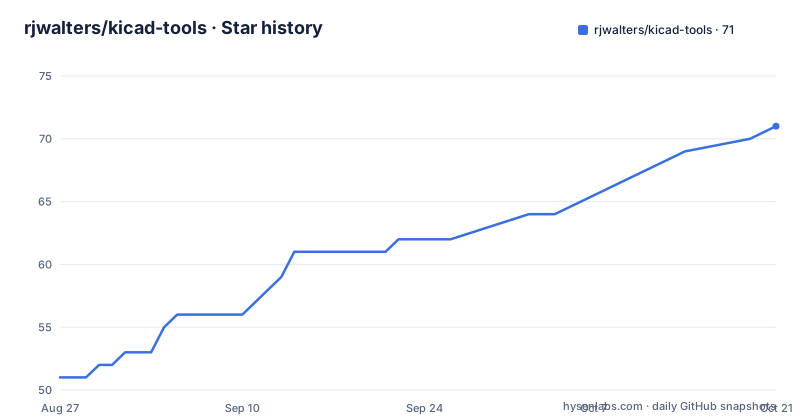
- rjwalters/kicad-tools71 ★ · +20
| Repository | 2026-08-27 | 2026-10-21 |
|---|---|---|
| rjwalters/kicad-tools | 51 | 71 |
20 Stars in the last 55 days, measured from the daily GitHub snapshot. Compare with other projects
Editorial analysis
No running KiCad instance is required
The premise is in the first paragraph: standalone Python tools that let an agent, whether a language model or an autonomous coding assistant, parse, analyse and manipulate KiCad schematic and PCB files programmatically, with every tool emitting machine-readable JSON and no running KiCad instance in sight. The stated reason is that traditional EDA tools require a GUI and manual interaction, so four gaps are being closed. Structured data access turns KiCad files into clean Python objects, machine-readable output makes the analysis and query commands usable from a script, programmatic modification removes the GUI from the edit path, and a purpose-built module gives an LLM somewhere to make layout decisions. The named use cases are an assistant that reviews PCB designs, DRC checks automated in CI, and experiments with LLM-driven routing. A live demo gallery at kicad-tools.org shows boards built end to end with renders, routing and manufacturing metrics, fabrication downloads and a browser PCB viewer.
Six install extras, and the one that fails loudly
Installation is a base install plus five named extras, and the names describe what they turn on:
# Base install (CPU only)
pip install kicad-tools

# With CUDA GPU acceleration (NVIDIA GPUs on Linux/Windows)
pip install kicad-tools[cuda]

# With Metal GPU acceleration (Apple Silicon Macs)
pip install kicad-tools[metal]

# With native C++ router backend
pip install kicad-tools[native]

# With CMA-ES placement optimization (kct optimize-placement / kct build --optimize-placement)
pip install kicad-tools[placement]

# Everything (all optional dependencies)
pip install kicad-tools[all]
The placement extra is the one with documented behaviour: it pulls in `cmaes` and, transitively, `scipy`, and without it `kct optimize-placement` and the placement step of `kct build --optimize-placement` exit with a clear message naming the extra. That is a deliberate choice, since a silent fallback would produce a worse board rather than an error. The `dev` and `all` extras already include it, so `uv sync --extra dev` is enough for development. Whether acceleration is actually active is checked with `kct calibrate --show-gpu`.
The kct command covers the everyday checks
The command line is a thin layer over the same functionality:
# List symbols in a schematic
kct symbols project.kicad_sch
kct symbols project.kicad_sch --format json

# Trace nets
kct nets project.kicad_sch --net VCC

# Generate bill of materials
kct bom project.kicad_sch --format csv --group

# Run ERC (requires kicad-cli)
kct erc project.kicad_sch --strict

# Run DRC with manufacturer rules
kct drc board.kicad_pcb --mfr jlcpcb
kct drc --compare  # Compare manufacturer rules
Two details are worth separating. `erc` is the one command that reaches outside the package, because it needs `kicad-cli` on the machine, and `--strict` is a separate switch rather than the default. The other is `--mfr`, which runs DRC against a manufacturer's rule set, with `--compare` used on its own to compare those rule sets without a board. The guidance in the README is to check each command's `--help` for the formats it supports, rather than assuming JSON everywhere.
The LLM loop is prompt, execute, repeat
The reasoning module splits the work in two: the model makes strategic decisions and the tools do the geometry. The loop is short enough to read in one screen. A `PCBReasoningAgent` is built from a board with `from_pcb`, then the agent hands over `get_prompt()` for the current state, the caller's own model returns a command, `agent.execute(command)` runs it and returns a result plus a diagnosis, and the loop continues until `is_complete()` is true, after which `agent.save()` writes the board out. Nothing in that loop assumes a particular provider: the README names OpenAI, Anthropic and local models. The command line offers the same thing in three modes, exporting state for an external model with `--export-state`, driving an interactive session with `--interactive`, and routing only the priority nets with `--auto-route`. Worked examples live in `examples/llm-routing/`.
The MCP server groups fifteen tools into six jobs
For assistants that speak the Model Context Protocol, the server is installed with the mcp extra and started with `kct mcp serve`. The configuration block for Claude Desktop points the server command at `python` with the argument `-m kicad_tools.mcp.server`, and the documented config path is inside the Claude Desktop application support directory. The tool list is grouped rather than flat. Analysis covers `analyze_board`, `get_drc_violations` and `measure_clearance`. Export covers `export_gerbers`, `export_bom` and `export_assembly`. Placement covers `placement_analyze` and `placement_suggestions`. Sessions cover `start_session`, `query_move`, `apply_move`, `commit` and `rollback`. Routing covers `route_net`, `route_net_auto` and `get_unrouted_nets`. Optimization covers `optimize_placement` and `evaluate_placement`. That session group is the interesting one, because it makes a placement change a transaction with a rollback rather than a write.
shapely is a core dependency for a stated reason
The dependency list is short and includes a comment that explains itself, which is rarer than it should be. Alongside rich, pyyaml, numpy and pydantic, and a conditional tomli for Python below 3.11, shapely is listed as a core dependency rather than an extra, with the reason written inline: it is load-bearing for the correctness-critical copper paths, specifically zone-fill clearance carving and the zone-versus-copper clearance DRC rules, and the issue is recorded as number 3824. The comment also answers the obvious objection about build burden, since shapely 2.x ships prebuilt manylinux, macOS and Windows wheels with vendored GEOS, and notes that a `geometry` extra is retained as a back-compatibility alias. The package requires Python 3.10 or newer and its classifiers stop at 3.13, and it is marked as a beta release for developers and manufacturing audiences.
Two version numbers and three quality gates
The tree carries a mismatch worth knowing before you script against it. pyproject.toml declares version 0.22.0, which matches the published tags, with v0.22.0 released on 2026-09-28, v0.20.0 on 2026-08-07 and v0.19.0 on 2026-07-21. The package.json at the top level declares 0.9.1, and that file is private, so it looks like a wrapper for the development scripts rather than a distribution manifest. The scripts in it are the quality gates: `check:ci` runs a format check, ruff and pytest, while `check:all` adds mypy over the source tree, and there are separate targets for coverage and for benchmarks. The Makefile covers the older pip-based flow with editable installs and ruff over src and tests, and its clean targets are more interesting than usual, restoring the tracked files under `boards/*/output/` and deleting the design output logs and generated `.kicad_pro` files.
Credentials are optional and the fallback is silent
The environment file is careful about what it does and does not do. It is a bring-your-own-key template for optional API credentials, and it says plainly that kicad-tools reads plain `os.environ` and does not load `.env` itself, so you need a shell, direnv or a dotenv runner to source it, with `.env` gitignored and real credentials never committed. Three variables enable the official JLCPCB open-platform API for the parts backend, recorded as issue 4118, and all three must be set and non-empty for that tier to activate. If any is missing, the fallback is silent: the anonymous scrape API and the offline jlcparts catalog are used instead, with keyless behaviour unchanged. One operational trap is called out, since the developer portal has an IP whitelisting feature, and a machine whose public IP is not whitelisted will have its requests rejected. An Octopart key is offered separately as an optional datasheet source.
Editorial conclusion
kicad-tools suits someone putting a KiCad project behind a script, a CI check or an agent, since the files are parsed into Python objects and the analysis commands emit JSON without a running KiCad. It does not replace the KiCad application, and one command, erc, still needs kicad-cli on the machine. Before building on it, note that the placement extra is separate and its absence produces a named error rather than a silent downgrade, that the JLCPCB credentials fall back silently to a keyless path, and that the repository carries two different version numbers, 0.22.0 in pyproject.toml and 0.9.1 in package.json.
Frequently asked questions
What is a KiCad tool in this project?
It is a standalone Python program that parses, analyses or manipulates KiCad schematic and PCB files programmatically, so an agent can work with a design without a GUI. Every tool emits machine-readable JSON and none of them requires a running KiCad instance.
Is KiCad still free?
The repository does not state KiCad's own licence. It states that kicad-tools is MIT licensed, that its tools work with no running KiCad instance at all, and that the one exception is the erc command, which requires kicad-cli to be installed on the machine.
How do I install kicad-tools with GPU acceleration?
Use the extras: the cuda extra for NVIDIA GPUs on Linux and Windows, the metal extra for Apple Silicon Macs, the native extra for the C++ router backend, the placement extra for CMA-ES optimisation, and all for everything. Then run kct calibrate --show-gpu to check whether acceleration is active.
What happens if I install kicad-tools without the placement extra?
kct optimize-placement and the placement step of kct build --optimize-placement exit with a clear message naming the missing extra, rather than quietly doing nothing. The extra pulls in cmaes and scipy, and the dev and all extras already include it, so uv sync --extra dev is enough for development.
Do I need a JLCPCB API key to use kicad-tools?
No, and the fallback is silent. All three of JLCPCB_APP_ID, JLCPCB_ACCESS_KEY and JLCPCB_SECRET_KEY must be set and non-empty to activate the official API tier; if any is missing, the anonymous scrape API and the offline jlcparts catalog are used with unchanged keyless behaviour. The portal's IP whitelisting can also reject requests.
Official sources
Add this badge to your README
If you maintain this project, the badge below links readers to this analysis and shows its maintenance status from the daily GitHub snapshot. Paste the markdown into your README; add ?metric=license or ?metric=stars to the image URL for a different field.

[](https://hysenlabs.com/projects/rjwalters-kicad-tools)Star history chart for your README
[](https://hysenlabs.com/projects/rjwalters-kicad-tools)