Vibe Workflow: a self-hostable node editor that asks you for a hosted API key
Free, open-source alternative to Weavy AI, Krea Nodes, Freepik Spaces & FloraFauna AI — node-based AI workflow builder for generative image & video pipelines
At a glance
- What is it?
- Vibe Workflow is an MIT node-based editor for generative image and video pipelines, structured as three workspaces: a Next.js client, a shared node-editor library and a FastAPI backend. It markets itself against four paid creative tools on a six-row comparison table, and it offers a commercial hosted version with API and embed support from the same author. The privacy claim and the API key requirement are both in the same document.
- Who is it for?
- Vibe Workflow is best evaluated as one piece of a stack rather than as a self-contained creative tool, because the piece it is and the piece it needs are different things. What you can host is the editor: the pipeline graph, the model nodes, the templates, the shared library other applications could embed.
- Can I use it commercially?
- Yes. MIT is a permissive licence: you can use, modify and sell software built on it, as long as you keep its copyright and licence notices.
- Is it still maintained?
- Yes. The repository last received commits 58 days ago.
- What is it written in?
- Mainly JavaScript, according to GitHub's language statistics.
Answers come from the project's GitHub data, last synced on November 14, 2026, and from our analysis. They are not legal advice.
Star history
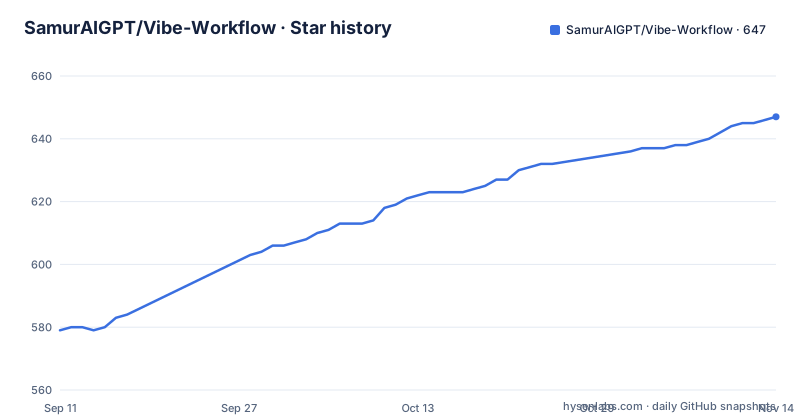
- SamurAIGPT/Vibe-Workflow647 ★ · +68
| Repository | 2026-09-11 | 2026-11-14 |
|---|---|---|
| SamurAIGPT/Vibe-Workflow | 579 | 647 |
68 Stars in the last 64 days, measured from the daily GitHub snapshot. Compare with other projects
Editorial analysis
No data leaves your infrastructure, and then the setup asks for a hosted key
Read the feature list and the configuration section in that order and you will find the tension immediately. One bullet says self-hosted and private, that you run entirely on your own infrastructure and that no data is sent to third-party platforms. Another bullet says image and video generation is integrated and powered by a named hosted service. The configuration section then tells you to sign up on that service's site, generate an API key, and put it in the backend's environment file. So the self-hosting claim applies to the editor and the pipeline definitions, not to the inference. That is a coherent product and it is how most of this category actually works, but the wording of the privacy bullet is written as though it covers everything, and a reader who took it literally would be wrong. The honest version of the pitch is that your workflows, your templates and your prompt history stay on your machine while the pixels go out to whoever is generating them, and you should decide whether that trade is acceptable before you invest in the graph.
A six-row table where the four alternatives lose every row
The comparison table is the centre of the pitch and it should be read as the marketing it is. Six rows, four competitors, and the open-source project takes a check on every row while the competitors take a cross, a partial or the word limited. The rows are open source, self-hostable, node-based editor, custom models, no subscription, and extendable through an API. Two things are worth noticing. One competitor is marked partial on having a node-based editor, which is a strange mark for a tool the rest of the document treats as an equivalent. And on custom models the four get limited, limited, no and limited, which is a claim about pricing tiers and model access that nobody in this document substantiates with a source. The author is not hiding the comparison, and there is a candid version of it hosted on the commercial domain, linked from the open-source readme, which describes its own scope against one of the competitors. Whether the table persuades you depends on whether you were already inclined to self-host.
The hosted sibling sits one tab above the open-source one
The first thing above the project description is a hosted version at the vendor's own domain, with two capabilities the open-source build does not lead with: an API for running workflows programmatically, and an embeddable widget so other products can host the node editor inside their own interface. Then there is a list of related projects by the same author, a catalogue of open-source alternatives, a self-hosted media studio described as the model backend for your pipelines, and an autonomous design agent meant to be embedded in your workflows. This is a commercial business with an MIT front end, which is a completely ordinary arrangement and the licence permits it. The part worth noting is the direction of the relationships. The open-source repository is the entry point and the documentation, and the paid product is where the API and the embed live, so anyone evaluating this for embedding inside a product is being funnelled toward a hosted contract. The four people the project names as its audience split cleanly along that line: developers are the audience for the API, and everyone else for the editor.
server is declared as an npm workspace, and it is a Python service
The repository is three workspaces and the manifest declares all three:
Vibe-Workflow/
├── client/              # Next.js frontend application
├── packages/
│   └── workflow-builder/ # Shared UI library — the core node editor
└── server/              # FastAPI backend
the shared packages directory, the client and the server. The client is a Next.js application and the packages directory holds the node editor as a shared UI library, which is the actual product. The server is a FastAPI application with its own requirements file, its own virtual environment and its own invocation of an ASGI server with reload and a host binding to all interfaces. There is no JavaScript in it. So the workspace list includes a directory that a JavaScript workspace tool has no work to do in, and the setup documentation reflects that honestly by treating the backend as a separate stack: create a virtual environment, install its requirements, run the server. It is a small inconsistency, and it is worth noticing in a project whose pitch is that you can extend it, because it is exactly the kind of boundary looseness that shows up when you try to add a node and find out which build system owns which directory.
Compose orders startup by health, and each service probes a different thing
The container setup is the part of this project that reads like it was written by somebody who has debugged one. Two services on a bridge network. The frontend declares a dependency on the backend with the condition that the backend is healthy, rather than merely started, which is the distinction that stops your browser from opening against a server that is not listening yet. Both services have health checks on a thirty-second interval with a ten-second timeout and three retries, and their start periods differ: thirty seconds for the frontend and ten for the backend, which matches the fact that a JavaScript bundle takes longer to become ready than a Python process. The two probes are also different in kind. The frontend uses a spider fetch against its own root, and the backend runs a one-line call through the Python standard library to open its health endpoint under the API prefix. Using the interpreter you already require rather than a command-line HTTP client is the kind of small decision that only matters when the image is minimal, and it suggests the images are.
The editor is a library, and the application is one consumer of it
The project structure is three directories and the interesting one is the package. The client is a frontend application, the server is a backend, and the shared package holds the node editor as a UI library described as the core of the product. The manifest reflects that split with separate build scripts for the application and for the library, and the workspace linking is what lets the client consume the library from source during development. This matters for a reason beyond tidiness. If the node editor is a library rather than a page, then it is the part someone else could embed, and that is precisely the capability the hosted version sells. So the architecture and the business model line up: the reusable artefact is the component, the application is one consumer of it, and an embeddable widget is the obvious next consumer. It also means a team that only wants the editor, with its own backend and its own model providers, has a defensible path, since the library is separable from the FastAPI service by construction.
Two runtimes, one workspace-scoped dev command and one ASGI command
The prerequisites are three: Node 20 or newer, Python 3.10 or newer, and npm 7 or newer specifically for workspace support, which dates the project's tooling assumptions even if the rest is current. Installation is a clone and one install at the root, which is the payoff of the workspace setup, since it installs the client and the editor together and links them. Then the two run commands are asymmetric in a useful way. The frontend starts through a workspace-scoped development script and is served on port 3000. The backend needs a virtual environment, a requirements install and then a direct invocation of the ASGI server with reload enabled and the host bound to all interfaces rather than loopback. That binding is the one thing to notice here, because a project whose feature list leads with privacy has its development backend listening on every interface of your machine by default. Docker avoids the question entirely, which is presumably why it is described as the easiest way to run the project.
A quarter of the stars are forks, and there are no releases
The repository numbers describe a self-hostable alternative rather than a dependency. There are roughly six hundred stars and a hundred and fifty-four forks, a fork ratio around a quarter, which is the signature of something people clone and run themselves rather than import. Two open issues against that is either a smooth experience or an unmonitored tracker. There are no published releases at all, so you install from a branch, and the manifest version reads 1.0.0, which is a version number with no tag behind it. The last push is dated September 2026. Taken with the hosted offering and the four-person audience list, the picture is consistent: this is a commercial product with a self-hostable core, and the repository you are reading is the funnel. That is a legitimate way to build and it is also the first thing to establish, because the answer to whether this project fits you depends on whether you need the open-source core or the hosted service.
Editorial conclusion
Vibe Workflow is best evaluated as one piece of a stack rather than as a self-contained creative tool, because the piece it is and the piece it needs are different things. What you can host is the editor: the pipeline graph, the model nodes, the templates, the shared library other applications could embed. What you cannot host, as shipped, is the generation, which runs through a hosted service and needs a key from that service's own site. That split is not hidden and it is not unusual for this category, but it does mean the privacy claim in the feature list and the configuration step in the setup section are describing different scopes, and you have to decide which one you were buying. Two other things to weigh. The comparison table scores four commercial tools on six rows and reads as advocacy rather than as analysis, and the author's own comparison page is hosted on the commercial domain and linked from the open-source repository. And the backend is listed as an npm workspace although it is a Python service, which is a small sign of loose boundaries in a project whose pitch is extensibility. Confirm three things before you commit: which model providers you can point the nodes at once you are inside the editor, whether the node editor library is usable on its own without the client, and whether the hosted generation cost model works for the volume you have in mind, since that is the cost the project was built to avoid.
Frequently asked questions
What is Vibe Workflow?
An MIT node-based visual editor for building generative image and video pipelines, structured as three workspaces: a Next.js client, a shared node-editor library that is the core of the product, and a FastAPI backend. The editor is inspired by Blender's node system and by ComfyUI, and you can add your own model nodes and external API calls.
Does Vibe Workflow need a third-party AI service?
Yes, for generation. The editor, the workflows and the templates are yours to host, but image and video generation is integrated through a named hosted service, and the setup instructions tell you to sign up there, generate a key and put it in the backend's environment file. So the self-hosting claim covers the pipeline layer, not the inference.
What does Vibe Workflow compare itself against?
Four paid creative tools, on six rows covering open source, self-hostability, the node editor, custom models, subscriptions and API access. The open-source project takes a check on every row while the others take a cross, a partial or the word limited, so it reads as advocacy rather than as analysis, and the author's own comparison page is hosted on the commercial domain.
What do I need to run Vibe Workflow?
Node 20 or newer, Python 3.10 or newer and npm 7 or newer for workspace support, or Docker 20 or newer with Compose. One install at the repository root installs the client and the editor together, then the two services start with different commands: a workspace-scoped development script on port 3000 and an ASGI server invocation on port 8000.
Is there a hosted version of Vibe Workflow?
Yes, at the vendor's own domain, and it is linked from the top of the open-source readme. It adds programmatic workflow execution through an API and an embeddable widget so a product can host the node editor inside its own interface. Both of those are the reason the open-source core and the paid service are best evaluated separately.
Official sources
Add this badge to your README
If you maintain this project, the badge below links readers to this analysis and shows its maintenance status from the daily GitHub snapshot. Paste the markdown into your README; add ?metric=license or ?metric=stars to the image URL for a different field.

[](https://hysenlabs.com/projects/samuraigpt-vibe-workflow)Star history chart for your README
[](https://hysenlabs.com/projects/samuraigpt-vibe-workflow)Was this useful?