RedAmon describes itself as zero human intervention and as overseen at every critical step
An AI-powered agentic red team framework that automates offensive security operations, from reconnaissance to exploitation to post-exploitation, with zero human intervention.
At a glance
- What is it?
- RedAmon is a Docker Compose platform that chains reconnaissance, exploitation, triage and an automated pull request into one pipeline, backed by Postgres, Neo4j and a third party vulnerability manager. Its own metadata and its own README disagree about how much a human is in the loop, and its visible documentation describes no authorization check, no dry run and no kill switch.
- Who is it for?
- RedAmon belongs on a shortlist if you run an authorised security assessment and want the findings turned into patches in the same pipeline, because the triage graph and the pull request step are the parts most toolchains stop short of. Before deploying it, settle three questions the visible documentation does not.
- Can I use it commercially?
- Yes. MIT is a permissive licence: you can use, modify and sell software built on it, as long as you keep its copyright and licence notices.
- Is it still maintained?
- Yes. The repository last received commits 3 days ago.
- What is it written in?
- Mainly Python, according to GitHub's language statistics.
Answers come from the project's GitHub data, last synced on November 22, 2026, and from our analysis. They are not legal advice.
Star history
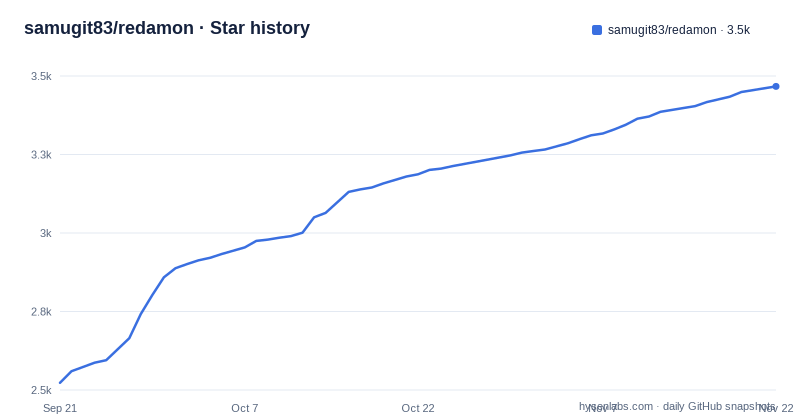
- samugit83/redamon3,467 ★ · +944
| Repository | 2026-09-21 | 2026-11-22 |
|---|---|---|
| samugit83/redamon | 2.5k | 3.5k |
944 Stars in the last 62 days, measured from the daily GitHub snapshot. Compare with other projects
Editorial analysis
The repository description and the README disagree about the human
The project blurb in the repository metadata describes an agentic red team framework that automates offensive security operations from reconnaissance to exploitation to post-exploitation, with zero human intervention.
The README says something else. Its opening line describes an autonomous framework that chains those phases into a single pipeline and then goes further by triaging findings, implementing code fixes and opening pull requests, and it ends that sentence with human oversight at every critical step.
Both cannot be the design. Either a person approves consequential actions, in which case the pipeline is supervised automation, or nothing does, in which case the README's sentence is the inaccurate one. Nothing in the visible material resolves it, and no approval gate, confirmation prompt or policy file is named anywhere.
What both descriptions agree on is the shape of the pipeline, which the README spells out as a chain: reconnaissance, then exploitation, then post-exploitation, then AI triage, then a CodeFix agent, then a GitHub pull request. It is that last pair of stages which distinguishes this from a scanner, since the system is expected to modify a codebase and propose a merge rather than hand you a report.
Reconnaissance tools that adjust their own scope as they discover things
The recon tier is described as launching multiple reconnaissance tools in parallel, each feeding results into a shared knowledge graph in real time. The stated behaviour is that tools spin up, adapt their scope based on live discoveries, and coordinate without manual intervention, and that the attack surface of subdomains, ports, endpoints and parameters materialises in minutes.
That third clause is the one to sit with. A tool set whose scope is adjusted from its own discoveries is a tool set that can leave the boundary you gave it. Scope in an assessment is a set of hosts and paths agreed in advance, and a discovery driven scope is a scope derived from the target's own behaviour, which an adversary controls. If a discovered host is out of contract, the pipeline that found it has already crossed the line by following the thread.
The graph is the second structural fact. Industry standard scanners are chained so each tool's output feeds the next, then merged into a single Neo4j knowledge graph with findings deduplicated and relationships made explicit, so the agent inherits a connected attack surface it can query in natural language. That design is what makes the later stages possible, and it is also what makes scope hard to bound later: once findings and relationships live in one graph, deciding what is in scope becomes a query rather than a flag.
Authorisation is a legal notice, and no technical control is described
The project is careful about permissions in the way open source projects usually are, which is to say in prose. The README carries a legal disclaimer stating that the tool is intended for authorised security testing, educational purposes and research only, that you must never use it to scan, probe or attack a system you do not own or have explicit written permission to test, that unauthorised access is illegal and punishable by law, and that using it means accepting full responsibility. A longer version lives in a separate disclaimer file at the repository root.
Set beside that text, the visible documentation describes no enforcement. There is no per-target allow list, no scope file, no dry run mode that enumerates without probing, no rate or depth ceiling, and no documented way to interrupt a scan already in flight. The strongest claim in the other direction is the human oversight sentence in the opening, which is a promise rather than a mechanism.
To be fair to the project, the operational documentation lives outside the README, in a wiki with pages on deploying to a server, on a benchmark scorecard and on parallel specialists. A control may well be described there. But an authorisation boundary that exists only in a wiki page is one a user has to go and find, and an assessor who does not find it will assume there is none.
The repository also records a legal identity for the tool's authors and a security policy, which is the right scaffolding for the question, but it is scaffolding rather than code.
The default install generates secrets, after a window with a default admin
The environment example file makes a strong claim: the install and update scripts generate strong random values for every secret into your real environment file on a fresh install, so a default deployment is secure out of the box, and you only set one by hand to override it.
The Compose file qualifies that claim in a comment about a third party service. A vulnerability manager container starts automatically with the standard up command, and on first run it auto-creates an administrative account with the credentials admin and admin, taking ten to fifteen minutes to sync its feed. Only afterwards does a separate install step with a gvm flag rotate that password to a strong value pinned in the environment file, and the comment notes that both sides read the same variable so they have to be kept in sync.
So the secure out of the box property holds from the moment the install script finishes, not from the moment the stack starts. Anyone who brings the stack up directly with Compose, which is the command in the file's own header, has a default administrative credential on an exposed service for as long as it takes to notice and rotate.
A second trap is documented in the same file. The Postgres and Neo4j passwords are baked into the data volumes at first initialisation, so changing them afterwards locks you out of a running database. The install script detects that and warns instead of rewriting, and the file tells you to rotate deliberately with SQL or by changing the Neo4j password, or to destroy the volume for a clean start.
Four keys with deliberately different blast radii
The environment file documents six credentials, and the interesting part is not the list but the asymmetry between them.
One is the web application's JWT signing key, generated from a hex random command. One is a master internal key for communication between the web app and the agent tier. One is a bearer token the agent presents. One is a separate key for the web app to talk to the recon orchestrator, passed in a dedicated header.
The fifth is the interesting one. A scanner key exists specifically so that scan containers receive a scoped token instead of the master internal key. The file states where that token is accepted: two read endpoints for user settings and for a project, plus the agent's language model routes. It states what it cannot do: it cannot mint administrators and it cannot read language model providers. That is least privilege written down as an acceptance list rather than asserted as a principle, and it is the kind of detail that is normally missing.
The sixth is the pair of database passwords, which the file treats differently from the rest because of the volume baking behaviour described above. So the file is not a template dump: each credential has a note explaining how it is generated, where it is valid, and what happens if you change it.
One database capped at a gigabyte, four CPUs and 512 processes
The Compose file sizes its own database rather than trusting the host. Postgres runs the alpine image of version 16 with a memory limit taken from an environment variable defaulting to one gibibyte, a process limit defaulting to 512 labelled as a fork bomb ceiling, and a CPU cap defaulting to four with a comment noting the host has more. The sizing is described as derived from host memory by the install script.
The database is also not published outward. Its port mapping is annotated as loopback only, with a comment explaining that the application tier reaches it over an internal bridge instead. That is the right default for a service holding credentials and findings.
The operational commands are printed in the file header, which is unusual and useful:
# Start:  docker compose up -d
# Stop:   docker compose down
# Logs:   docker compose logs -f
# Build:  docker compose --profile tools build
There are three Compose files rather than one, for the default stack, a development variant and a GPU variant, and a build profile for tools, so a deployment has to pick a file as well as a profile. A shell script at the root wraps install, up, update and the gvm rotation, and it is what actually decides which file to use.
The password rotation command is documented too, run inside the container as the service user with a user and new password argument, followed by setting the same value in the environment file and recreating the orchestrator.
Two test directories, a wiki directory, and two agent instruction files
The tree is organised by tier rather than by feature, and the names describe the pipeline: an agentic directory, a graph database directory, an MCP directory, a recon directory, a recon orchestrator directory, a recon settings directory, a scanners directory, a services directory, a skills directory and a web application directory.
Two of those deserve comment. A skills directory alongside an agentic directory means the agent's capabilities are files on disk rather than code paths, which is what makes them adjustable without a release. And an MCP directory means the agent has a tool interface defined separately from the services it drives.
The testing arrangement is less tidy. There is a tests directory and a separate testing directory, a conftest file at the repository root, a pytest configuration file at the root and a separate requirements file for test dependencies. Two directories with overlapping names is the kind of thing that makes a contributor's first pull request ambiguous about where a test belongs.
Two other root entries are unusual. A directory named after the wiki domain holds deployment documentation that the README links to as a file path, so part of the documentation lives inside the code repository under a name that looks like a link. And the root carries both a general agent instruction file and one named for a specific commercial assistant, alongside a version file, a changes log and a third party licences file.
Two release lines, and release notes about trusting the updater
The three most recent releases do not sit on one number line. The newest is 6.14.1 from September, followed in the list by 6.2.5 from July and 6.2.2 from July. Patch numbers that descend across a descending date order mean two lines are being maintained, or that the second component is not a simple increment, and either way a version comparison tells you less here than it usually would.
The release titles are more revealing than the numbers, because all three are about trust in the plumbing rather than about new attack capability. One says the update no longer refuses to pull after a scan, which means the updater previously refused to run while a scan held the workspace, and that lock is now gone. One is a set of fixes for a LAN websocket and Neo4j authentication. One is hardening of agent file downloads.
Those three titles together describe a system that downloads files on an agent's behalf, talks to a database with authentication, and updates itself while work is in progress. Each is a place where a mistake turns into a compromise rather than a failed job, and each got its own patch note.
The project's own coverage claims are worth reading with the same care. It reports solving 101 of 104 rows of a web security benchmark fully black-box, with raw sessions and walkthroughs published per row. Its own taxonomy audit scores 397 bug-bounty classes and reports 134 complete, 210 in the build backlog and 44 deliberately excluded, with a decision recorded for each. That is an unusually honest split, and it puts coverage at roughly a third of the taxonomy.
Editorial conclusion
RedAmon belongs on a shortlist if you run an authorised security assessment and want the findings turned into patches in the same pipeline, because the triage graph and the pull request step are the parts most toolchains stop short of. Before deploying it, settle three questions the visible documentation does not. Does anything in the pipeline check that a target is in scope, or is authorisation purely a legal notice you accept? Can you stop a running scan, and is there a mode that enumerates without touching anything? And what is the exposure window on a fresh install, given that the third party vulnerability manager comes up with a default administrative credential before the install step rotates it. The project's own coverage audit is the most useful document here and the most sobering: it scores 134 of 397 bug-bounty classes complete, with 210 in the backlog and 44 excluded on purpose.
Frequently asked questions
What does RedAmon do from start to finish?
The pipeline is reconnaissance, exploitation, post-exploitation, AI triage, a CodeFix agent and a GitHub pull request. A six phase recon engine maps the attack surface, an autonomous agent validates CVE exploitability, tests credential policies and maps lateral movement paths, every finding is recorded in a Neo4j graph, and a triage agent then deduplicates and ranks findings by exploitability before fixes are proposed.
Does RedAmon check that a target is authorised?
The README carries a legal disclaimer stating the tool is for authorised security testing, education and research, that you must never scan or attack a system you do not own or have explicit written permission to test, and that you accept full responsibility, with a longer version in a disclaimer file at the repository root. The visible documentation describes no per target allow list, no dry run and no way to interrupt a running scan.
How much of the bug bounty taxonomy does RedAmon cover?
By its own audit, which scores 397 web bug-bounty classes one line at a time and names the module behind each verdict: 134 complete, 210 in the build backlog and 44 deliberately excluded, with an explicit decision recorded for every class. Separately it reports solving 101 of 104 rows of the XBOW web-security benchmark fully black-box.
What does RedAmon need before it will start?
Docker Compose, since the documented start command brings up the Postgres 16 alpine image and the rest of the stack. The environment file also expects Postgres and Neo4j passwords, which the install script generates into a real environment file on a fresh install, and the third party vulnerability manager starts automatically and takes ten to fifteen minutes on first run to sync its feed.
Official sources
Where developers are discussing it
Posts on Hacker News, dev.to and Lobsters that link to this repository, found by our scan of those communities. 1 in the last 30 days; newest first.
- Beyond ARTEX: 45 Agentic Attack Frameworks, What They Hunt For, and How to Find Themdev.to · Nov 17, 2026 · 2 points · 0 comments
Add this badge to your README
If you maintain this project, the badge below links readers to this analysis and shows its maintenance status from the daily GitHub snapshot. Paste the markdown into your README; add ?metric=license or ?metric=stars to the image URL for a different field.

[](https://hysenlabs.com/projects/samugit83-redamon)Star history chart for your README
[](https://hysenlabs.com/projects/samugit83-redamon)Was this useful?