OpenUsage tracks AI plan limits from the macOS menu bar, with accounts you add in the app
Burning through your subscriptions too fast? Paying for stuff you never use? Stop guessing. OpenUsage is free and open source.
At a glance
- What is it?
- OpenUsage is a native Swift menu bar app for macOS 15 that tracks AI coding plan usage across eleven providers, from session and weekly limits to credits and balances. It installs as a Homebrew cask or a DMG, updates itself through Sparkle, and offers an openusage command that prints usage as JSON for scripts and agents.
- Who is it for?
- OpenUsage fits someone paying for several AI coding plans who wants to see remaining quota without opening five dashboards, and who is on a Mac on macOS 15 or later. It does not fit someone on Windows or Linux, since it requires macOS 15 or later.
- Can I use it commercially?
- Yes. MIT is a permissive licence: you can use, modify and sell software built on it, as long as you keep its copyright and licence notices.
- Is it still maintained?
- Yes. The repository received new commits within the last day.
- What is it written in?
- Mainly Swift, according to GitHub's language statistics.
Answers come from the project's GitHub data, last synced on November 14, 2026, and from our analysis. They are not legal advice.
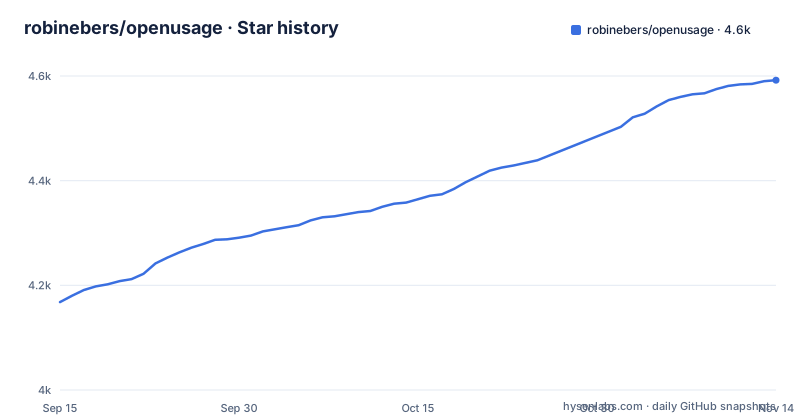
Star history
- robinebers/openusage4,592 ★ · +424
| Repository | 2026-09-15 | 2026-11-14 |
|---|---|---|
| robinebers/openusage | 4.2k | 4.6k |
424 Stars in the last 60 days, measured from the daily GitHub snapshot. Compare with other projects
Editorial analysis
Eleven providers, and only two need a key from you
The provider list covers Claude, ChatGPT, Cursor, Antigravity, Copilot, Devin, Grok, Ollama, OpenCode, OpenRouter and Z.ai, and each one contributes a different set of numbers rather than a single usage figure. Cursor accounts also show what Cursor charged for on-demand usage and the tokens it reported today, yesterday and in the last 30 days, with a breakdown for each range. The credential story is the part worth reading twice. You add each account in the app, and OpenUsage reads nothing that belongs to other tools: no Keychain items, auth files, logs, databases or environment variables. Claude, ChatGPT, Cursor, Antigravity, Copilot and Grok sign in with OAuth, Devin signs in on Windsurf's site, and Ollama, OpenCode, OpenRouter and Z.ai use API keys. OAuth tokens and API keys live in the app's own Keychain service.
macOS 15 and later, on both architectures
The requirement is stated once and plainly: macOS 15, Sequoia, or later, and a universal binary that runs natively on Apple silicon and Intel Macs. Distribution follows the same two paths as most Mac software. A Homebrew cask installs it with a single command:
brew install --cask openusageor you take the latest universal disk image from the releases page, open it and drag the app into Applications. Both routes end in the same updater: the app updates itself in place through signed and notarized Sparkle updates, with an optional beta channel for people who want builds earlier. It shows only the limits and dollar values that the provider's own API reports, except ChatGPT's credits, which also show their dollar value at 4¢ a credit.
The local API is loopback only, and a browser page can still read it
Other tools get usage through the openusage command, which prints the usage the app last fetched as JSON for scripts and agents, and the privacy behaviour is documented in docs/privacy.md.
The CLI reads the same five-minute cache as the menu bar
There is a command line entry point aimed at scripts and agents. You install the openusage command from Settings, and it prints the usage the app last fetched as JSON. The command is documented in docs/cli.md and refresh behaviour in docs/refreshing.md.
Two pins per provider, and empty metrics are hidden not padded
The menu bar strip is the part that stays on screen, so its limits are specific. The limits closest to running out show on their own, each named, up to the number you set, with any others as a count like +7. The panel is the fuller view: a header per provider above a card, with each limit as one line holding its label, a level bar, its amount and its reset, and resting the pointer on a bar shows where your pace lands at the reset. Clicking a value flips every row between used and left, and a reset between countdown and exact time, while right-clicking a header, a card, an account or a row opens its actions. A global shortcut toggles the panel from anywhere.
One module for the app and the CLI, with a four step provider contract
The architecture note in docs/architecture.md is worth reading before contributing a provider; the repository is a Swift package with Package.swift, Sources/ and Tests/ at the root. Repository conventions live in AGENTS.md, with separate documents for adding a provider and for debugging.
A tag decides which update channel a build lands in
Releases are published on GitHub with beta pre-releases alongside regular ones: the latest are v0.7.16 on 26 October 2026, v0.7.16-beta.1 on 18 October 2026 and v0.7.15 on 18 October 2026. The app updates itself through signed, notarized Sparkle updates with an optional beta channel, documented in docs/updates.md.
Editorial conclusion
OpenUsage fits someone paying for several AI coding plans who wants to see remaining quota without opening five dashboards, and who is on a Mac on macOS 15 or later. It does not fit someone on Windows or Linux, since it requires macOS 15 or later. Before installing, check which of your providers it supports and whether it needs an API key from you.
Frequently asked questions
What does OpenUsage track?
It tracks AI coding plan usage from the macOS menu bar: session and weekly limits, credits and balances, for eleven providers including Claude, ChatGPT, Copilot, Cursor, Devin, Grok, Ollama, OpenCode, Antigravity, OpenRouter and Z.ai. The menu bar shows the limits closest to running out, up to the number you set.
Which providers need an API key in OpenUsage?
Ollama, OpenCode, OpenRouter and Z.ai use API keys. Claude, ChatGPT, Cursor, Antigravity, Copilot and Grok sign in with OAuth, and Devin signs in on Windsurf's site, which shows a token to paste into the app. OpenUsage reads nothing that belongs to other tools and keeps OAuth tokens and API keys in its own Keychain service.
Can OpenUsage run on Windows or Linux?
The stated requirement is macOS 15, Sequoia, or later, as a universal binary for Apple silicon and Intel Macs. Installation is a Homebrew cask or a disk image dragged into Applications. Nothing in the documentation describes a Windows or Linux build of the app.
Does the OpenUsage CLI need the menu bar app to be running?
The README says you install the openusage command from Settings and that it prints the usage the app last fetched as JSON, for scripts and agents; docs/cli.md has the details.
Official sources
Add this badge to your README
If you maintain this project, the badge below links readers to this analysis and shows its maintenance status from the daily GitHub snapshot. Paste the markdown into your README; add ?metric=license or ?metric=stars to the image URL for a different field.

[](https://hysenlabs.com/projects/robinebers-openusage)Star history chart for your README
[](https://hysenlabs.com/projects/robinebers-openusage)Was this useful?