Talorys: a personal AI agent in your own Cloudflare account
Your personal AI agent in your own Cloudflare account. Chat, memory, tasks, notes and scheduled reminders, deployed with one command: npx create-talorys@latest. Free-tier friendly, single-user, no telemetry.
At a glance
- What is it?
- Talorys is a personal AI assistant that is deployed into the Cloudflare account you already have, with a single installer command, and it uses only free tier services: Pages for the interface, a Worker with no public URL, a SQLite Durable Object for the data and Workers AI for the model. The design decisions that matter are the ones about privacy, the absence of telemetry and the fact that the whole thing keeps working when the AI quota runs out.
- Who is it for?
- Talorys fits one person who wants an assistant with memory, tasks and reminders, and who wants the data to stay in an account they control, on free tier infrastructure, without registering for anything. It does not fit a team, because single-user is a design constraint rather than a missing feature, and it does not fit anyone who wants the AI to be optional in a rich way, because the conversational features depend on Workers AI.
- Can I use it commercially?
- Yes. MIT is a permissive licence: you can use, modify and sell software built on it, as long as you keep its copyright and licence notices.
- Is it still maintained?
- Yes. The repository last received commits 2 days ago.
- What is it written in?
- Mainly TypeScript, according to GitHub's language statistics.
Answers come from the project's GitHub data, last synced on November 6, 2026, and from our analysis. They are not legal advice.
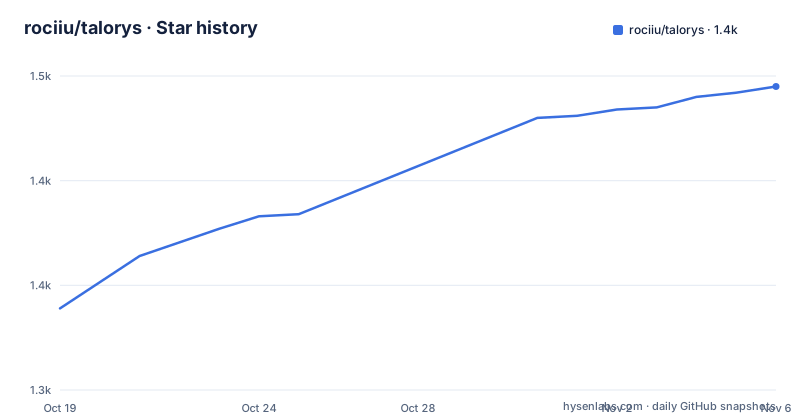
Star history
- rociiu/talorys1,445 ★ · +106
| Repository | 2026-10-19 | 2026-11-06 |
|---|---|---|
| rociiu/talorys | 1.3k | 1.4k |
106 Stars in the last 18 days, measured from the daily GitHub snapshot. Compare with other projects
Editorial analysis
One person, one account, one command
Talorys is a free, open-source personal AI assistant that runs entirely inside your own Cloudflare account. It chats with you, remembers what matters, manages tasks, notes and projects, and runs reminders and routines on a schedule, and the README is emphatic that none of this needs any server, database or account operated by the Talorys developers.
The framing in the header is the summary. Your personal AI agent, your own cloud. One person, one Cloudflare account, one command, one personal AI agent.
The installation is a single command.
npx create-talorys@latestOr it can be installed with Appflare, which deploys it as a single Worker.
The feature list is the substance. There is a private assistant with chat that streams responses, Markdown and tool activity indicators. There is memory, durable personal facts and preferences you can view, edit and delete, with only the most relevant memories sent to the model on each turn. There is semantic recall as an optional extra, which finds memories by meaning as well as by keyword, lists them newest first with their saved date, and lets the agent find tasks, notes and automations by meaning, off by default and switched on in Settings or with the --semantic flag at install time.
Then tasks, notes and projects with full CRUD in the interface and creation by chat, and automations covering one-time and recurring reminders, daily task digests and optional AI routines, delivered to an in-app notification centre. Push notifications cover the same events on the devices you enable them for, using standard Web Push, encrypted end to end, with the caveat that on iPhone and iPad you have to add the app to the Home Screen first.
Two design constraints are stated as features rather than limitations. It is single-user by design, with no signup, no accounts and no teams, and the installer sets the owner password. And it works without AI, because tasks, notes, memories and reminders keep working if Workers AI is unavailable or your free quota is used up.
Memory that notices when a fact stops being true
The memory feature has more depth than a list of saved preferences, and the part worth understanding is how it handles change.
The memory history feature covers facts that change over time. The README gives the example: when you say you sold your car, Talorys asks you whether the old one is now a past fact, and with the optional AI check a confident answer does it for you. Unclear conflicts also wait for your review.
That is a specific problem, and it is the problem that makes a personal memory system eventually wrong. A system that stores what you told it without ever revisiting it accumulates statements that were true once, and then the assistant starts being confidently incorrect about your life. Asking before overwriting, and asking only when the answer is not confident, keeps the human in the loop exactly where the ambiguity is.
The other half of the design is restraint. Only the most relevant memories are sent to the model on each turn, which is both a cost control and a privacy boundary, since the memories that never reach the model cannot leak through it.
The optional semantic recall sits on top of that. It finds things by meaning rather than by keyword, across memories, tasks, notes and automations, and it is off by default, with its own settings hidden until it is switched on.
Reminders that survive because they run on alarms
Automations are the part of the product where the Cloudflare architecture shows its value most clearly.
One-time and recurring reminders, daily task digests and optional AI routines are delivered to an in-app notification centre, and they run on Durable Object alarms, so nothing has to stay online.
That single sentence removes the usual failure mode. A personal assistant that runs reminders usually needs a machine awake, a process running, or a cron job on somebody's laptop. A Durable Object alarm is a scheduled callback on Cloudflare's side, so the reminder fires whether or not your laptop is open, and whether or not anything is running locally.
The data lives in the same place. The agent Durable Object holds SQLite for conversations, memories, tasks, notes, projects, automations, sessions, settings and usage, which means the entire state of the assistant is one SQLite database inside a Durable Object, and the storage is on the free plan.
For the model, the README names a specific one: @cf/zai-org/glm-4.7-flash, used for streaming and tool calling, through Workers AI, whose free plan gives a daily allocation.
The architecture: a Worker with no public URL
The diagram in the README is the clearest description of the security model, and it is worth reading slowly.
Browser ──HTTPS──▶ Cloudflare Pages (React app + /api Pages Function)
                         │  service binding (no public URL)
                         ▼
                   Private Worker (Hono router)
                         │  getAgentByName("personal-agent")
                         ▼
                   TalorysAgent — Cloudflare Agents SDK Durable Object
                     ├─ SQLite: conversations, memories, tasks, notes, projects,
                     │          automations, sessions, settings, usage
                     ├─ Workers AI: @cf/zai-org/glm-4.7-flash (streaming + tool calling)
                     └─ Alarms: reminders and recurring schedules
The browser only ever talks to your *.pages.dev site, and the /api requests run as a Pages Function that forwards them over a service binding to the agent Worker. The agent Worker is deployed with workers_dev set to false and preview_urls set to false, so it has no public URL at all. Authentication and authorisation happen in the Worker, not in the frontend, and chat responses stream as Server-Sent Events end to end.
That last point is the difference between a design and a diagram. A private Worker means there is no address to attack, and doing the auth in the Worker means the frontend is a static bundle with no secrets in it at all.
The services table then names what is used: Cloudflare Pages for the frontend and the Pages Function, Cloudflare Workers for the private API Worker, Durable Objects with SQLite for all the data and the scheduling alarms, and Workers AI for the chat model, with the first three on the free plan and the last on a daily allocation. What it does not provision is the list you would expect: no R2, no D1, no KV, no Vectorize, no AI Search, no Workflows and no paid service.
The installer does eight things and can be run twice
The deploy section lists what the installer actually does, and it is a well behaved list.
It checks Node.js at 22 or newer and uses its bundled Wrangler CLI, with any globally installed wrangler or cf detected but not required. It verifies your Cloudflare login or opens the authorisation page in your browser. It lets you choose an account and an agent name. It asks for an owner password with hidden input and a strength check, hashes it locally with PBKDF2-SHA256 and stores it only as a Cloudflare secret. It generates a 256-bit session secret, a Web Push key pair and unique resource names of the form talorys-<id>-agent and talorys-<id>-web. It deploys the private Worker with its SQLite Durable Object, stores the secrets and creates and deploys the Pages project with the service binding. It then verifies the live deployment, checking the frontend, the auth endpoint, the rejection of unauthenticated requests and the storage health, and it does so without running any AI inference. And it prints the real pages.dev URL that Cloudflare reported.
It also writes a talorys/ directory containing a talorys.json with the installation id, account id, resource names and URL, explicitly no secrets, plus the deployable artefacts, and the README says to keep it for updates.
The interrupted case is handled, and this is the part that makes an installer trustworthy. Running the same command again in the same place reconciles what already exists: no duplicate resources, no password re-prompt if the password is already configured, and no data is ever deleted.
There is a non-interactive path too, with the owner password in an environment variable and the account id as a flag, using a Cloudflare API token if you are not logged in. And a forgotten password is fixed from the talorys directory with the reset-password command, which replaces the password secret.
Least privilege, and a repository that tests real deployments
Two things close out the picture.
The first is permissions. Browser login uses Wrangler's standard OAuth flow, so there is no Global API Key involved, and if you use an API token instead it needs a short list: Workers Scripts Edit, Cloudflare Pages Edit, Workers AI Read, Account Settings Read, and optionally User Details Read, which is what shows your email. For a single user project that is a narrow list, and it is the list to check before you paste a token into a script.
The second is the repository, which is a monorepo with a workspace layout of packages/shared, apps/agent, apps/web and packages/create-talorys, requiring Node 22 or newer. The scripts are worth reading, because they describe how the project is tested. There is a dev script that brings up the agent, the Pages function and the web app together with concurrently, separate build and typecheck scripts that walk the workspaces, a lint script running biome, and a test script that runs the shared package, the agent, the web app and the installer in turn.
Two of the test entries are more interesting than the rest. The end-to-end tests use Playwright, and there is a smoke test that runs a real deployment, node tests/smoke/real-deploy.mjs, and a packaging test for the installer. A project that installs infrastructure into a live cloud account has no way to test itself honestly without deploying for real, and that is what those two scripts are for.
Editorial conclusion
Talorys fits one person who wants an assistant with memory, tasks and reminders, and who wants the data to stay in an account they control, on free tier infrastructure, without registering for anything. It does not fit a team, because single-user is a design constraint rather than a missing feature, and it does not fit anyone who wants the AI to be optional in a rich way, because the conversational features depend on Workers AI. Verify three things before you install it: that the model access is Workers AI and therefore on a daily free allocation, that the pages.dev hostname is acceptable to you, since the browser only ever talks to that site, and that you are comfortable that the password hash lives as a Cloudflare secret while the session secret and the Web Push key pair are generated by the installer, because those are the pieces you will need to reason about if you ever migrate the account.
Frequently asked questions
What does Talorys do and what does it need from me?
It is a personal AI assistant that chats with streaming responses, keeps durable personal memories you can view, edit and delete, manages tasks, notes and projects, and runs one-time and recurring reminders and routines on a schedule. It needs a Cloudflare account and one command, npx create-talorys@latest, and the installer sets an owner password, since it is single-user by design with no signup, accounts or teams.
Does Talorys send my data to the developers?
The README states that it runs entirely inside your own Cloudflare account with no server, database or account operated by the developers, and the project describes itself as free tier friendly, single-user and with no telemetry. The agent Worker is deployed with no public URL, and the browser only ever talks to your own pages.dev site.
What Cloudflare services does Talorys use and what does it avoid?
It uses Cloudflare Pages for the frontend and the Pages Function, Cloudflare Workers for the private API Worker, Durable Objects with SQLite for the data and the scheduling alarms, and Workers AI for the chat model. It does not provision R2, D1, KV, Vectorize, AI Search, Workflows or any paid service.
What happens if the AI quota runs out?
The project states that it works without AI, and that tasks, notes, memories and reminders keep working if Workers AI is unavailable or your free quota is used up. The installer even verifies the live deployment without running any AI inference.
How do I reset the owner password in Talorys?
From the talorys directory that the installer created, run npx create-talorys@latest reset-password, which replaces the password secret. The same directory holds talorys.json with the installation id, account id, resource names and URL, and it is the thing to keep for updates.
Official sources
Add this badge to your README
If you maintain this project, the badge below links readers to this analysis and shows its maintenance status from the daily GitHub snapshot. Paste the markdown into your README; add ?metric=license or ?metric=stars to the image URL for a different field.

[](https://hysenlabs.com/projects/rociiu-talorys)Star history chart for your README
[](https://hysenlabs.com/projects/rociiu-talorys)Was this useful?