Rockstar: one repository, three toolchains, and a build-first README
Home of the Rockstar programming language
At a glance
- What is it?
- The Rockstar language ships as its Starship interpreter, its CodeMirror editor package and a Jekyll website, all inside one repository. Everything runs through .NET 10, and the README documents building rather than running.
- Who is it for?
- Rockstar fits someone who already has the .NET 10 SDK and wants to read or extend the Starship interpreter, or who wants to poke at the language through codewithrockstar.com in a browser. It does not fit production work, or any team that needs a documented upgrade path.
- Can I use it commercially?
- Yes, with strict conditions. AGPL-3.0 is a network copyleft licence: if people use a modified version over a network, for example as a hosted service, you must offer them its source code under the same licence.
- Is it still maintained?
- Yes. The repository last received commits 11 days ago.
- What is it written in?
- Mainly JavaScript, according to GitHub's language statistics.
Answers come from the project's GitHub data, last synced on November 14, 2026, and from our analysis. They are not legal advice.
Star history
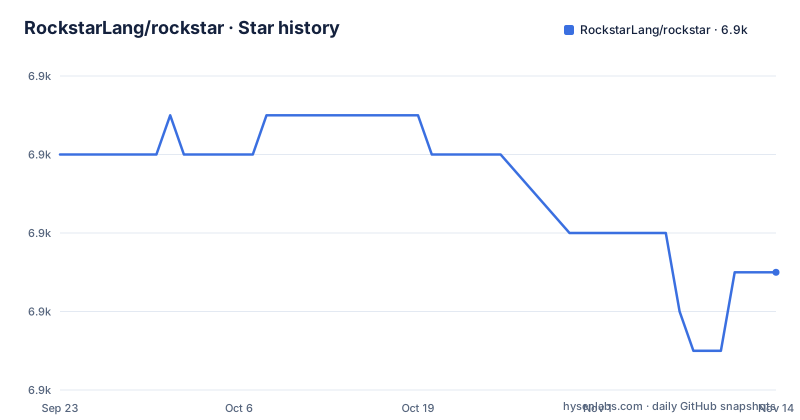
- RockstarLang/rockstar6,875 ★ · -3
| Repository | 2026-09-23 | 2026-11-14 |
|---|---|---|
| RockstarLang/rockstar | 6.9k | 6.9k |
-3 Stars in the last 52 days, measured from the daily GitHub snapshot. Compare with other projects
Editorial analysis
Starship, cm-lang-rockstar and a Jekyll site share one repository
Rockstar is an esoteric programming language whose syntax is inspired by the lyrics to 80s hard rock and heavy metal songs. What lives in this repository is not a package you install but three pieces with three toolchains. Starship is the interpreter, written in C# and .NET. cm-lang-rockstar is the CodeMirror editor that powers the Rockstar website. codewithrockstar.com is the site itself, built with Jekyll and hosted on GitHub Pages, and it carries the documentation and the examples. GitHub reports JavaScript as the repository's primary language. Anyone expecting one installable artifact will find a solution directory inside a multi-part project instead.
Building Starship starts with the .NET 9 SDK and the wasm-tools workload
Building the engine is a .NET 10 SDK job, and the sequence fits on one screen. The workload step is not decoration. The same engine has to compile for the browser so the site can embed it, and wasm-tools is what makes that target available on the same machine. Once the test run finishes you have a compiled Starship plus a pass or fail signal from the .NET test project. What none of these commands give you is a way to run a program: no step in the repository takes a Rockstar source file as an argument. The four actions here are clone, workload, build, test.
git clone https://github.com/RockstarLang/rockstar.git
cd rockstar
dotnet workload install wasm-tools
dotnet build ./Starship/Starship.sln
dotnet test ./Starship/
A Linux binary lands in binaries/rockstar, and gcc is the extra requirement
A native executable is a separate path, and it is documented for Linux only. The extra requirement is a working gcc. The publish command below writes into a directory named binaries, and the standalone executable ends up at binaries/rockstar. Notice the configuration flag: this path uses Release, while the website copy uses Debug. There is no equivalent local command for Windows or macOS in the repository. Those two platforms exist only as CI jobs, so a local cross-platform build means either reproducing the workflow steps by hand or running the Linux path under a compatibility layer.
git clone https://github.com/RockstarLang/rockstar.git
cd rockstar
dotnet publish ./Starship/Rockstar -o binaries -c Release
The website embeds the same engine compiled to WebAssembly
The interpreter running on codewithrockstar.com is not a second implementation. It is Starship compiled to run on web assembly and published straight into the site's wasm directory with the Debug configuration. That difference in configuration between the two paths is easy to miss, and it matters later, because the dev-mode loop depends on that Debug output existing at a predictable path under bin. The site itself is Jekyll on GitHub Pages, so what a visitor gets in the browser is a .NET build product dropped into a static site folder and wrapped in JavaScript.
dotnet build ./Starship/Starship.sln
dotnet publish ./Starship/Rockstar.Wasm -o codewithrockstar.com/wasm/ -c Debug
Five workflows build the binaries, cut the release and deploy the site
Releases come from five GitHub Actions workflows with deliberately narrow jobs. build-rockstar-2.0 runs on Linux, builds the parser and interpreter, runs the test suite, and uploads two artifacts: the Linux native binary and the WASM interpreter for the website. build-windows-binary and build-macos-binary cover the other two platforms separately. release-rockstar-engine creates the GitHub release from the latest binaries, which is the step that turns workflow artifacts into a downloadable tag. build-and-deploy-website downloads the WASM binary, builds the CodeMirror editor, builds the Jekyll site and deploys it to GitHub Pages. Nothing in that pipeline publishes to a package registry.
The dev-mode mklink loop was written on Windows and nowhere else
The fast local loop is described in the first person and with Windows commands, which is the first sign that contributor setup was never generalized. Two symbolic directory links get created inside the site folder: wasm points at the interpreter's debug browser build, and examples points at the test project's examples directory. Rebuilding the .NET solution then rebuilds the WASM output, which Jekyll sees as /wasm/** and treats as a trigger for a site rebuild. The payoff is that every Rockstar example belongs to both the Rockstar.Test suite and the site, so the published examples are the tested ones. The catch is that mklink and the backslash paths are Windows-only, with no documented substitute for macOS or Linux.
cd codewithrockstar.com
mklink /d wasm ..\Starship\Rockstar.Wasm\bin\Debug\net10.0-browser
mklink /d examples ..\Starship\Rockstar.Test\programs\examples
One AGPL-3.0 license covers the interpreter, the editor and the site
There is a single LICENSE file at the repository root, and the repository is AGPL-3.0. One license across all three directories means the C# interpreter, the CodeMirror language package and the Jekyll site carry the same terms, so lifting the editor package or the parser into something you distribute carries the copyleft obligations along with that code. That is the shape of the file layout, not legal advice. Recent releases are v2.0.31 on 2025-06-24, then v2.0.35 and v2.0.36 on 2026-11-02. The last push to the repository landed on 2026-11-02, the same day as v2.0.36.
No syntax reference, no sample program, and no run command anywhere
The documentation stops where the build starts. The README carries no syntax specification and no reference for the commands the built interpreter accepts. There is also no list of the error messages Starship produces, no upgrade or rollback procedure for moving between releases, and no local build command for Windows or macOS. The repository root carries build-rockstar-wasm-engine.ps1, a PowerShell script whose contents and usage are never explained. For a language whose entire premise is unusual syntax, that absence is the real evaluation cost: you can build the engine today, and learning the language itself means turning to the website docs and examples in /codewithrockstar.com.
Editorial conclusion
Rockstar fits someone who already has the .NET 10 SDK and wants to read or extend the Starship interpreter, or who wants to poke at the language through codewithrockstar.com in a browser. It does not fit production work, or any team that needs a documented upgrade path. Before committing, check the one thing the repository never states: how a built interpreter is pointed at a source file. The build sequence is written down to the target framework, and that single step is not.
Frequently asked questions
What do I need installed to build the Rockstar Starship interpreter?
The .NET 10 SDK. The documented sequence also runs dotnet workload install wasm-tools before building Starship.sln, and producing a native Linux binary additionally needs gcc.
How do I run a Rockstar program after building the interpreter?
The repository gives build, test and publish commands, but no run command or program flag. A published Linux binary lands at binaries/rockstar, and pointing it at a source file is not spelled out.
Can I try Rockstar in a browser without installing anything?
Through the website. codewithrockstar.com embeds the Starship engine compiled to WebAssembly, and the site also carries the documentation and the examples.
Does the Rockstar repository ship a prebuilt interpreter binary?
Through GitHub releases: the release-rockstar-engine workflow creates the GitHub release from the latest binaries the other workflows built. The latest listed release is v2.0.36, published 2026-11-02.
What license does the Rockstar repository use?
AGPL-3.0, with a single LICENSE file at the root, so the same terms apply to Starship, the CodeMirror editor package and the Jekyll website.
Official sources
Add this badge to your README
If you maintain this project, the badge below links readers to this analysis and shows its maintenance status from the daily GitHub snapshot. Paste the markdown into your README; add ?metric=license or ?metric=stars to the image URL for a different field.

[](https://hysenlabs.com/projects/rockstarlang-rockstar)Star history chart for your README
[](https://hysenlabs.com/projects/rockstarlang-rockstar)Was this useful?