Nextcloud Talk Desktop: A Wrapper with a Workaround for Multi-Account
Nextcloud Talk Desktop client. However, using portable zip distribution, you can have several Nextcloud Talk instances run simultaneously.
At a glance
- What is it?
- Nextcloud Talk Desktop is an Electron-based client for Nextcloud Talk. Its main limitation, no built-in multi-account support, is addressed by a portable ZIP trick that runs multiple instances.
- Who is it for?
- Adopt Nextcloud Talk Desktop if you use Nextcloud Server 27+ with Talk 17+ and want a dedicated desktop client for calls and chats. Do not adopt it if you need native multi-account support within a single app; the documented workaround of running multiple portable instances is clunky and not a substitute.
- Can I use it commercially?
- Yes, with strict conditions. AGPL-3.0 is a network copyleft licence: if people use a modified version over a network, for example as a hosted service, you must offer them its source code under the same licence.
- Is it still maintained?
- Yes. The repository last received commits 1 day ago.
- What is it written in?
- Mainly JavaScript, according to GitHub's language statistics.
Answers come from the project's GitHub data, last synced on November 13, 2026, and from our analysis. They are not legal advice.
Star history
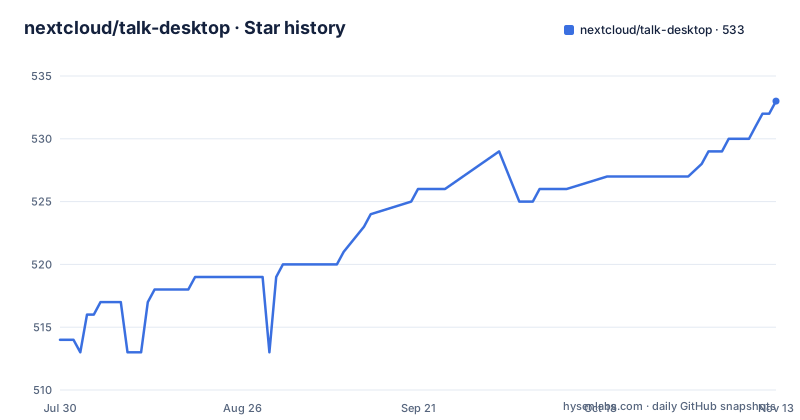
- nextcloud/talk-desktop533 ★ · +19
| Repository | 2026-07-30 | 2026-11-13 |
|---|---|---|
| nextcloud/talk-desktop | 514 | 533 |
19 Stars in the last 106 days, measured from the daily GitHub snapshot. Compare with other projects
Editorial analysis
What Problem Does This Client Solve?
Nextcloud Talk Desktop is the official desktop client for Nextcloud Talk, the self-hosted communication suite. It targets organizations and individuals who run their own Nextcloud server and want a dedicated application for Talk's chat, audio, and video features, instead of using a browser tab. The client is built with Electron, as indicated by the JavaScript primary language and the use of Electron-based packaging tools. It is for teams that already rely on Nextcloud for file sync and collaboration and need a persistent, notification-friendly interface for Talk. The project is not for users who want a standalone messenger; it requires a Nextcloud server and the Talk app to be installed.
How It Works: A Thin Shell around Talk
The desktop client is essentially a wrapper around the Nextcloud Talk web interface. The repository layout shows that it depends on the Nextcloud Talk source code, which is cloned from the spreed repository during development. This means the desktop app does not implement its own communication protocol; it loads the Talk frontend and provides native desktop features like a system tray and startup behavior. The README mentions a `--background` flag to start minimized to the tray, which is a typical Electron pattern. The client also exposes a CLI for configuration, allowing you to prefill accounts. This architecture means that feature updates are tied to the Talk version bundled with the client, not just the server version.
Getting It Running: Installation Options
Installation is straightforward, with multiple distribution formats per platform. For Linux x64, you can use a Flatpak single file, which is recommended, or a ZIP archive. The command for Flatpak is `flatpak install <path-to-flatpakref-file>`. For macOS, there is a universal DMG. For Windows, you have a non-admin one-click installer (recommended) or an MSI for managed environments. Package managers are also supported: `winget install Nextcloud.Talk` on Windows, and community packages via Homebrew (`brew install --cask nextcloud-talk`) and Chocolatey (`choco install nextcloud-talk`). After installation, you can use the CLI to configure accounts. For example, `./Nextcloud Talk config --accounts=cloud.company.tld` pre-fills the server address. The CLI runs a command and quits, so it is for setup, not daily use.
The Multi-Account Workaround: Portable ZIP Instances
The most notable feature, or lack thereof, is multi-account support. The README explicitly states that full multi-account is not currently supported, pointing to issue #7. Instead, the recommended workaround is to use the portable ZIP distribution and run multiple instances simultaneously. You rename the executable from `Nextcloud Talk` to a custom name, such as `Nextcloud Talk (Home).exe` and `Nextcloud Talk (Work).exe`, and place them in separate directories. Each instance then uses its own profile, allowing you to be logged into different servers at the same time. This is a hack, not a proper solution. It requires manual management of directories and executable names, and it does not provide a unified notification center or account switcher. For users who need to juggle multiple Nextcloud instances daily, this is a significant usability gap.
Limitations and Failure Modes
The primary limitation is the lack of native multi-account support, which forces the portable ZIP workaround. This workaround has its own issues: you must remember to rename the executable each time you update, and you lose the convenience of a single app icon in the dock or taskbar. Another limitation is the prerequisite: you need Nextcloud Server version 27 or higher and Talk version 17 or higher. If your server is older, the client will not work. The client is also tied to a specific Talk version; for example, v2.2.4 bundles Talk v24.0.4. This means that if your server runs a newer Talk version, the client may not support the latest features until a new release is published. The beta release v2.3.0-beta uses Talk v25.0.0-rc.1, but beta software is not for production.
Alternatives: Browser or Other Clients
The most direct alternative is to use Nextcloud Talk directly in a web browser. This requires no installation and always uses the latest Talk version from your server. The downside is that you lose desktop-specific features like the system tray and the `--background` startup flag. Another alternative is to use a third-party desktop client like Franz or Rambox, which aggregate multiple messaging services, but these are not official and may not support all Talk features. The key difference is that the official desktop client provides a native feel and tighter integration with the OS, while the browser is more flexible and always up-to-date. For users who only need Talk occasionally, the browser is simpler. For heavy users, the desktop client offers convenience, but the multi-account limitation may push them to the browser anyway.
Maintenance and Upgrade Cost
The project is actively maintained, with recent releases in August 2026 and a beta channel. Upgrades are manual: you download a new binary or package and replace the old one. For the portable ZIP multi-instance setup, each instance must be updated separately, and the rename step must be repeated. The development setup requires cloning the spreed repository and setting the `TALK_PATH` environment variable or editing the `.env` file, which is a non-trivial cost for contributors. The license is AGPL-3.0, which means if you modify and distribute the client, you must share your changes under the same license. This is not a concern for typical users who just install the binary, but it is relevant for organizations that might want to customize the client internally.
Editorial conclusion
Adopt Nextcloud Talk Desktop if you use Nextcloud Server 27+ with Talk 17+ and want a dedicated desktop client for calls and chats. Do not adopt it if you need native multi-account support within a single app; the documented workaround of running multiple portable instances is clunky and not a substitute. Before adopting, verify that your server and Talk versions meet the prerequisites, and check the latest release notes for the beta channel if you need recent Talk features. The project is actively maintained, but the multi-account gap is a real constraint that you must plan around.
Frequently asked questions
Can Nextcloud Talk Desktop run two accounts at the same time?
Not inside the application itself: full multi-account is tracked as unsupported in issue 7. The documented workaround uses the portable zip distribution, renaming the executable per instance and keeping each copy in its own directory.
Which server versions does Nextcloud Talk Desktop need?
Nextcloud Server 27 or higher, and Nextcloud Talk 17 or higher. The client itself is on its own 2.x line and publishes tags that name the matching Talk server release.
What platforms and installers does Nextcloud Talk Desktop ship for?
Linux x64 as a Flatpak single file or a ZIP archive, macOS Universal as a disc image, and Windows x64 as a non-admin one-click installer or an MSI for managed environments. winget packages and community Homebrew and Chocolatey packages are also listed.
How do I start Nextcloud Talk Desktop minimized at login?
Launch it with the --background flag, which starts the application minimized to the system tray with no window. It is the flag the project associates with running at startup.
How do I prefill an account in Nextcloud Talk Desktop?
Run the config command with --accounts and a comma-separated list in [user@]server form. The command applies the configuration and quits without launching the full application, so it can be scripted.
Which version of the Talk app does the Nextcloud Talk Desktop client bundle?
One specific version installed as an npm dependency, chosen when the installer is built. To develop against a different build, clone the Talk repository into ./spreed and point TALK_PATH at it.
Official sources
Add this badge to your README
If you maintain this project, the badge below links readers to this analysis and shows its maintenance status from the daily GitHub snapshot. Paste the markdown into your README; add ?metric=license or ?metric=stars to the image URL for a different field.

[](https://hysenlabs.com/projects/nextcloud-talk-desktop)Star history chart for your README
[](https://hysenlabs.com/projects/nextcloud-talk-desktop)Was this useful?