Rockxy, a macOS debug proxy whose source tree stops short of the app
Open-source native macOS HTTP debugging proxy — intercept HTTPS, inspect APIs, mock responses, debug WebSocket & GraphQL. Community-driven. For developers, by developers.
At a glance
- What is it?
- Rockxy is a Swift HTTP debugging proxy for macOS 14 and newer that intercepts HTTPS, mocks responses and inspects WebSocket and GraphQL traffic. The interesting parts are the two builds its licensing boundary creates and the fact that the one script in the tree runs a single test.
- Who is it for?
- Rockxy suits macOS developers who want HTTPS, WebSocket and GraphQL inspection from a Swift codebase they can read line by line, and it does not suit Windows or Linux work, since the app is native to macOS 14 and newer. Before building anything, read `LICENSING.md`: this tree is not the tree behind the signed app, and which one you end up running decides the terms you accepted.
- Can I use it commercially?
- Yes, with strict conditions. AGPL-3.0 is a network copyleft licence: if people use a modified version over a network, for example as a hosted service, you must offer them its source code under the same licence.
- Is it still maintained?
- Yes. The repository last received commits 3 days ago.
- What is it written in?
- Mainly Swift, according to GitHub's language statistics.
Answers come from the project's GitHub data, last synced on October 23, 2026, and from our analysis. They are not legal advice.
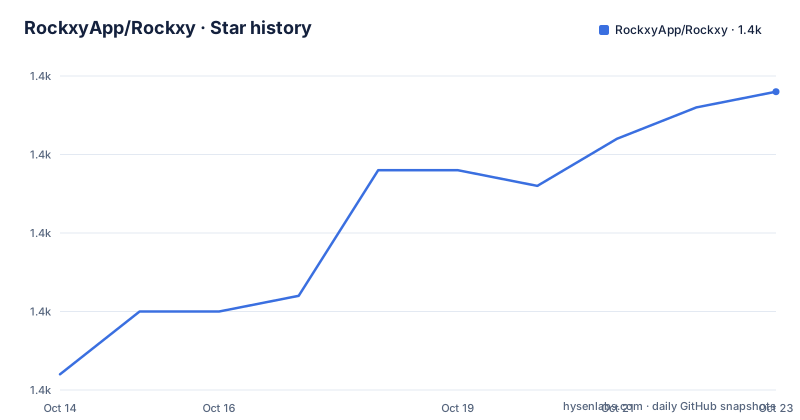
Star history
- RockxyApp/Rockxy1,439 ★ · +18
| Repository | 2026-10-14 | 2026-10-23 |
|---|---|---|
| RockxyApp/Rockxy | 1.4k | 1.4k |
18 Stars in the last 9 days, measured from the daily GitHub snapshot. Compare with other projects
Editorial analysis
Two builds behind one name, two sets of terms
The repository is the Community source edition of an app whose signed builds can enable paid Pro capabilities, and it puts that warning at the top rather than in a footnote: this tree is not the complete source tree used to build the official DMG, which is why `LICENSING.md` exists and why the file list has to be read as partial. Official signed downloads come from a separate downstream distribution, run in free Community mode by default, can enable paid Pro capabilities, and are licensed under the Rockxy Binary EULA when they include or present Binary EULA v1.0, while builds made solely from this repository are AGPL builds.
What is here is a working Xcode project. `Rockxy.xcodeproj` drives the app target, `RockxyHelperTool/` holds the privileged helper, `RockxyMCP/` is a component of its own, `Shared/` carries code across them, and `RockxyTests/` plus `RockxyUITests/` hold unit and UI coverage. `Configuration/` sits next to `legal/`, `signatures/` and `appcast.xml`, which is the shape of a signed distribution pipeline rather than of a script you can run. `SECURITY.md` and `THIRD_PARTY_NOTICES.md` are filed at the same level, and twenty translated README files sit next to README.md, which makes translation repair the largest category of contribution the project can accept.
Certificate rejection is where HTTPS capture breaks
Much of the visible engineering is not about parsing, it is about trust. Five fixes are listed for v0.38.4 (build 59) on 2026-09-14, behind v0.38.3 (build 58) on 2026-09-11 and v0.38.2 (build 57) on 2026-09-08, and four of the five are recovery work: HTTPS decryption now comes back after certificate rejection, after a trust change, after certificate rotation and after an app relaunch. Recovery is scoped to the app and connection that hit the problem, so one client falling back to a tunnel cannot drag unrelated traffic down with it, and tunnel data is preserved across that recovery so requests continue without dropped bytes.
One bullet is easier to miss: WebSocket sessions survive a reload even when the handshake produced no captured frames, which stops a fresh socket from being filed as an ordinary HTTP request in the list. Repository tags describe the mechanism without euphemism, including `man-in-the-middle`, `traffic-capture`, `charles-proxy-alternative` and `proxyman-alternative`. A local root certificate plus a system proxy setting is the whole interception story, which is also why trust handling eats so much of the fix list.
The only Makefile target runs one test case
The README invites you to inspect and build this source, and the tree hands you one script to run:
test-breakpoint:
	xcodebuild -project Rockxy.xcodeproj -scheme Rockxy -destination 'platform=macOS' -only-testing:RockxyTests/Breakpoint test
That target builds the app as a side effect of testing, then narrows the run to `RockxyTests/Breakpoint`. There is no install target, no archive step and no launch step anywhere in the file. Opening `Rockxy.xcodeproj` on macOS 14 or newer with Swift 5.9 is therefore the only build path written down, and a first build is a manual Xcode job. If you would rather not build, the project points at its own downloads and at the rockxy.io homepage, and those are the downstream binaries rather than a build of this tree.
Focus Sets and Noise Control shape the sidebar
The current branch spends its layout work on the sidebar and the workspace. Focus Sets are reusable scopes keyed by app, domain or path, so a selection can be recalled instead of rebuilt, and Noise Control hides matching domains or paths at the workspace level without stopping capture. That distinction matters: hiding a poller from the view keeps the record intact, while dropping the capture would lose it.
The workspace itself now uses native vertical and horizontal split views for the Context Dock and the bottom inspector, with full-height dividers, coordinated toolbar and footer separators, and automatic layout resizing. Put that next to the JSONPath and key/value filtering in the inspector and you get three separate ways to narrow a capture: hide a domain, park it in its own pane, or filter inside the payload you are already reading.
Review Data gates the AI Assistant model calls
One or more selected requests can be handed to an AI Assistant that begins with built-in local analysis and can escalate to Ollama or to whatever provider model you configured. Three details make that path defensible. The assistant asks for an explicit Review Data confirmation before it takes a request further, redaction is bounded rather than open-ended, and responses stream back with an evidence reveal and user-initiated handoffs instead of one undifferentiated block of prose.
The tension worth naming is that the project calls itself local-first while the assistant is built to reach a configured provider model. What stands between your traffic and that provider is the confirmation gate and the redaction bound, not the architecture, so both are worth reading before you select anything.
PAC routing sits beside SOCKS5 and auth policy
Upstream Proxy now carries free/core Automatic Proxy Configuration. A PAC URL can route to `DIRECT`, HTTP or HTTPS targets while the existing SOCKS5 and authentication policy boundaries stay exactly as they were, and keeping those three concerns separate rather than mutually exclusive is the part worth copying. Export takes the same order of thought: OpenAPI YAML and HTML output plus Gist publishing for selected traffic both run through redaction-aware payload building, so what leaves the machine passes the same filtering the inspector applies. Quick previews for selected payload text, JWTs for instance, sit beside the JSONPath and key/value filters.
Protobuf heuristics stay off the capture hot path
WebSocket binary frames are decoded by heuristics you ask for. Bounded, on-demand Protobuf wire-format reading runs when you select a frame, and the branch notes are explicit that no decoder work was added to the capture hot path. For a tool sitting between an app and a server that sentence is the interesting one, because a decoder that runs on every frame would tax the traffic it is only meant to observe.
Alongside it, AI and Web3 inspection adds protocol labels, inspector tabs and debug summaries for recognised model calls, JSON-RPC traffic and x402-style payment hints, so an API call that pays for something shows up as a protocol instead of as anonymous JSON. Repository tags such as `web3` and `traffic-capture` point the same way, and the Node.js Developer Setup arrives with a fuller localhost sample guide for driving that path.
Developer Setup Hub mirrors the client you select
The Developer Setup Hub is the least technical part of the branch and still the most opinionated. It covers runtimes, browsers, clients, devices, frameworks and environments, hands out target-specific snippets, and runs validation watchers that report whether the client you picked is the one actually running. The Node.js setup goes further and mirrors the selected client during validation.
There is a gap between that convenience and the project's own contribution path. The TIP block invites people to repair translations without Xcode, while the only scripted command in the whole tree shells out to xcodebuild, so a wording fix is the one change you can make without a working macOS toolchain. Anything larger described in `ROADMAP.md` is planning rather than shipped behaviour, with deeper protocol-aware rules, replay, comparison and safer redacted evidence sharing named as next targets.
Editorial conclusion
Rockxy suits macOS developers who want HTTPS, WebSocket and GraphQL inspection from a Swift codebase they can read line by line, and it does not suit Windows or Linux work, since the app is native to macOS 14 and newer. Before building anything, read `LICENSING.md`: this tree is not the tree behind the signed app, and which one you end up running decides the terms you accepted. Then run the single Makefile target once and check certificate recovery against the pinned clients you actually debug every day.
Frequently asked questions
Can I build Rockxy from source on my Mac?
The repository ships `Rockxy.xcodeproj` for macOS 14 or newer with Swift 5.9, but the top-level Makefile holds a single target that narrows xcodebuild to `RockxyTests/Breakpoint`, with no build, install or run script. Opening the project in Xcode is the only build path the project writes down.
Is the signed Rockxy app the same code as this repository?
Not exactly. Builds made solely from this repository are AGPL-3.0-or-later builds, while official signed downloads come from a separate downstream distribution that runs in free Community mode by default, can enable paid Pro capabilities, and is covered by the Rockxy Binary EULA when it is presented. `LICENSING.md` maps that boundary artifact by artifact.
Does Rockxy mock API responses and filter JSON payloads?
Mocking is part of the stated scope, which names intercepting HTTPS, inspecting APIs, mocking responses, and debugging WebSocket and GraphQL. Inspector tools add JSONPath and key/value filtering plus quick previews for selected payload text such as JWTs.
Can Rockxy inspect WebSocket and blockchain traffic?
WebSocket sessions survive a reload, including handshakes with no captured frames, and binary frames can be read with bounded, on-demand Protobuf wire-format heuristics kept out of the capture path. AI and Web3 inspection adds protocol labels, inspector tabs and debug summaries for recognised model calls, JSON-RPC traffic and x402-style payment hints.
Does the Rockxy AI Assistant send my captured traffic to a cloud model?
It starts with built-in local analysis, and Ollama or a configured provider model is an optional step on top of that. Before anything is handed over you get an explicit Review Data confirmation, bounded redaction, and streamed responses with an evidence reveal.
Official sources
Add this badge to your README
If you maintain this project, the badge below links readers to this analysis and shows its maintenance status from the daily GitHub snapshot. Paste the markdown into your README; add ?metric=license or ?metric=stars to the image URL for a different field.

[](https://hysenlabs.com/projects/rockxyapp-rockxy)Star history chart for your README
[](https://hysenlabs.com/projects/rockxyapp-rockxy)Was this useful?