TablePro vs TablePlus: an AGPL native Mac database client on a Rust driver core, installed with brew
Free and open source database client built natively for developers
At a glance
- What is it?
- TablePro is a Swift database client for macOS and iOS that talks to SQL and NoSQL engines through native Rust drivers, with AI chat and an MCP server built in. It is free under AGPLv3 with paid extras on the Mac, but it has no Windows build and its Linux app is not released.
- Who is it for?
- TablePro suits developers on macOS 13 or later, or iOS and iPadOS 18 or later, who work across several engines and want a native, open source client in place of TablePlus, DBeaver or an Electron tool. It is not an option on Windows, and Linux users have to wait for the GNOME app in linux/ to ship.
- Can I use it commercially?
- Yes, with strict conditions. AGPL-3.0 is a network copyleft licence: if people use a modified version over a network, for example as a hosted service, you must offer them its source code under the same licence.
- Is it still maintained?
- Yes. The repository received new commits within the last day.
- What is it written in?
- Mainly Swift, according to GitHub's language statistics.
Answers come from the project's GitHub data, last synced on November 14, 2026, and from our analysis. They are not legal advice.
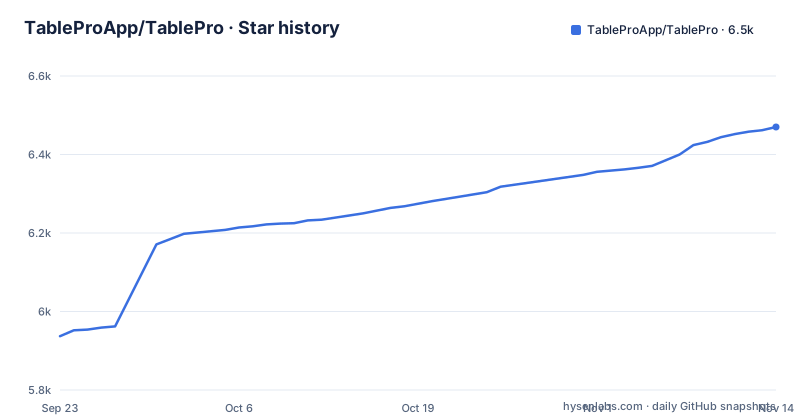
Star history
- TableProApp/TablePro6,470 ★ · +533
| Repository | 2026-09-23 | 2026-11-14 |
|---|---|---|
| TableProApp/TablePro | 5.9k | 6.5k |
533 Stars in the last 52 days, measured from the daily GitHub snapshot. Compare with other projects
Editorial analysis
No Electron and no JDBC: Swift apps over a Rust core of per-engine driver crates
TablePro's central bet is that a database client should be built with each platform's native frameworks, with no Electron shell, no JDBC layer and no JavaScript runtime. The repository shows how that is organized. Swift is the primary language, and the macOS and iOS apps live in apple/. Underneath sits a Rust workspace defined in Cargo.toml, with crates for ai, core, mcp, net, session, ssh and storage, plus an ffi crate whose name marks the boundary between the Rust core and the native front ends.
The drivers are separate crates under core/crates/drivers: cassandra, clickhouse, duckdb, mongodb, mssql, mysql, postgres, redis and sqlite. Built-in drivers ship with the app, and plugin drivers install on demand from the plugin registry, so not every engine is in the download. The plugin system also lets you write your own database driver in Swift.
The workspace targets Rust edition 2024 with a rust-version of 1.97. For a user, the practical point is the driver list. Check tablepro.app/databases for whether your engine is built in or a plugin, and what each one supports, before assuming parity across engines.
TablePro vs TablePlus and the three groups of Mac clients it positions against
The author puts it bluntly: TablePro is what they wanted TablePlus to be, native, fast and open source. The README sorts native macOS database clients into three groups and places TablePro in a fourth.
Single-database open source clients are the first group, with Sequel Ace for MySQL only and Postico for PostgreSQL only. If you work in one engine, those remain a direct choice. TablePlus is the second group: multi-database and native, but proprietary. The third group is multi-database tools that are not native: DBeaver runs on the JVM, and Beekeeper Studio and DBGate are Electron apps. The README credits them with being cross-platform, while calling them slow to start and heavy on memory.
The difference in approach is the trade TablePro makes. It gives up cross-platform reach today, since the Linux app is unreleased and Windows is not supported, in exchange for native frameworks on each platform and an open source license. A team that mixes Windows and macOS laptops gets nothing from that trade and will still need DBeaver or a similar cross-platform tool.
brew install --cask tablepro, or a signed download from GitHub Releases
On a Mac, the quickest route is the Homebrew cask:
brew install --cask tableproThis installs the TablePro app. The alternative is the latest build on the GitHub Releases page, which is also where the website's Download link points. The iPhone and iPad app is a separate install and needs no license.
Version numbers tell you where the project stands. Releases are still in the 0.x range, and the cadence is fast: v0.84.0-beta.2 was tagged on 2026-11-01, v0.84.0 on 2026-11-03, and v0.85.0-beta.1 later that same day. Beta tags and stable tags share the Releases page, so if you download by hand, check that the release you pick is not marked beta unless you want one. The last push to the repository was on 2026-11-01.
A 0.x version on a client that edits production data is a reason for caution, not avoidance. Data grid edits come with undo and redo, but test against a staging connection first when moving to a new release.
Building from apple/ needs Xcode 26 and an Xcode project that is not in git
Building the macOS and iOS apps requires Xcode 26 or later and XcodeGen. All commands run from apple/:
brew install xcodegen
cd apple
scripts/download-libs.sh
scripts/generate-project.sh
The first line installs XcodeGen, the next steps fetch libraries and generate the project. TablePro.xcodeproj is produced from project.yml and is not committed. Re-run scripts/generate-project.sh whenever you change project.yml or Configs/, or add a source file, or the new file will not be part of the build. That catches out contributors used to repositories with a checked-in project.
A Debug build without code signing runs like this:
xcodebuild \
  -project TablePro.xcodeproj \
  -scheme TablePro \
  -configuration Debug \
  -skipPackagePluginValidation \
  CODE_SIGNING_ALLOWED=NO \
  build
The app lands under ~/Library/Developer/Xcode/DerivedData/TablePro-*/Build/Products/Debug/TablePro.app. For a signed build you put your Apple team and a unique bundle identifier in apple/Configs/Secrets.xcconfig. Xcode 26 as a hard floor means an older Mac that cannot run it cannot build TablePro from source.
TablePro on Windows is a no, and the Linux GNOME app is not released
The platform table is short and explicit. macOS 13 and later is stable. iOS and iPadOS 18 and later are stable. Linux, targeting GNOME 50 or later, is in development in linux/ and not released yet. Windows is listed as No.
The repository does contain a windows/ directory at the top level, but that does not change the README's status line. Do not plan a Windows rollout around a directory name.
The Linux work is visible in the Rust workspace, which includes linux/crates/app and linux/crates/platform, and the Linux app builds with Meson and Cargo as described in linux/README.md rather than with the Xcode flow. A GNOME 50 floor also rules out distributions shipping older GNOME releases even once it is released. For now, anyone on Linux or Windows who wants a multi-database GUI has to use one of the cross-platform tools TablePro positions against, such as DBeaver, Beekeeper Studio or DBGate.
The MCP server lets Cursor, Raycast and Claude Desktop talk to your databases
AI features are part of the free app: chat, inline suggestions in the editor, and Explain/Optimize for queries. You bring your own API key and pick a provider, or run locally with Ollama. The Rust workspace has dedicated ai and mcp crates for this.
The MCP server is the part that changes your threat model. It lets Cursor, Raycast or Claude Desktop talk to your databases, and a URL scheme gives Raycast, Cursor and Claude Desktop another way in. That is convenient for asking an assistant to inspect a schema. It also means an external AI tool can reach whatever connection TablePro holds, including connections opened through SSH tunnels with key authentication.
The README does not say how the MCP server restricts which connections or statements an external tool may use. Before enabling it on a machine that holds production credentials, read the MCP section of docs.tablepro.app and decide which connections should stay out of reach. Choosing Ollama keeps prompts on your machine, while a hosted provider receives whatever context the AI features send.
AGPLv3 code, a trademark carve-out, and paid features only in the Mac app
The code is licensed under the GNU Affero General Public License v3.0, and the Cargo workspace declares AGPL-3.0-or-later. The TablePro name and icon are excluded from that license, and TRADEMARKS.md sets the rules for using them. A fork can reuse the code under AGPL terms but not the branding.
Everything in the feature list is free on every database, with no trial period or time limit: the SQL editor with autocomplete, multi-cursor and Vim mode, the data grid, SSH tunnels and SSL/TLS, query history with full-text search, AI and MCP, and the plugin system. A license adds extras to the Mac app only. The Starter plan adds iCloud Sync, Encrypted Export, Environment Variables, Linked Folders, Query Insights, Result Charts, Compare & Sync and Data Rewind. Team adds Team Catalog and Team Library on top.
The project asks anyone who uses TablePro at work to buy a license, which funds the next release, and prices sit on tablepro.app/pricing. If your team depends on syncing connections across Macs or comparing schemas, budget for Starter rather than assuming the free build covers it.
Editorial conclusion
TablePro suits developers on macOS 13 or later, or iOS and iPadOS 18 or later, who work across several engines and want a native, open source client in place of TablePlus, DBeaver or an Electron tool. It is not an option on Windows, and Linux users have to wait for the GNOME app in linux/ to ship. Before standardizing a team on it, confirm your engines on tablepro.app/databases, decide whether you need the licensed Mac features such as iCloud Sync and Compare & Sync, and check on docs.tablepro.app what the MCP server lets Cursor, Raycast or Claude Desktop do with a connection.
Frequently asked questions
What is a good TablePro alternative?
The TablePro README groups the alternatives on macOS: Sequel Ace (MySQL only) and Postico (PostgreSQL only) as single-database open source clients, TablePlus as a native but proprietary multi-database client, and DBeaver, Beekeeper Studio and DBGate as cross-platform tools built on the JVM or Electron.
What are some good alternatives to TablePlus, such as TablePro?
TablePro presents itself as a native, multi-database and open source alternative to TablePlus, licensed under AGPLv3. Other options it names are Sequel Ace, Postico, DBeaver, Beekeeper Studio and DBGate.
Does TablePro run on Windows?
No. TablePro is stable on macOS 13 and later and on iOS and iPadOS 18 and later, Windows is listed as not supported, and the Linux app for GNOME 50 and later is in development and not released.
How do I install TablePro on a Mac?
Run brew install --cask tablepro, or download the latest build from the TablePro GitHub Releases page. The iPhone and iPad app needs no license.
Official sources
Where developers are discussing it
Posts on Hacker News, dev.to and Lobsters that link to this repository, found by our scan of those communities. 1 in the last 30 days; newest first.
- Show HN: TablePro – open-source native database client for macOSHacker News · Oct 26, 2026 · 3 points · 4 comments
- TablePro: A native, open-source database client for macOSHacker News · Sep 12, 2026 · 6 points · 0 comments
Add this badge to your README
If you maintain this project, the badge below links readers to this analysis and shows its maintenance status from the daily GitHub snapshot. Paste the markdown into your README; add ?metric=license or ?metric=stars to the image URL for a different field.

[](https://hysenlabs.com/projects/tableproapp-tablepro)Star history chart for your README
[](https://hysenlabs.com/projects/tableproapp-tablepro)Was this useful?