Inside SkillKit: the adapter layer that puts one SKILL.md into 46 agent directories
Supercharge AI coding agents with portable skills. Install, translate & share skills across Claude Code, Cursor, Codex, Copilot & 40 more
At a glance
- What is it?
- SkillKit installs agent skills from 31 sources and renders them into whatever directory layout each coding agent scans, but its own install output counts 32 agents where the banner counts 46. Worth it only if you actually run more than one agent.
- Who is it for?
- SkillKit earns its place on a machine that really does run more than one coding agent, because hand-translating a single `SKILL.md` into `.mdc`, Markdown and four private directories is exactly the work it removes. Leave it out of a single-agent setup on a box without Node 18, where copying four files costs less than 418 packages.
- Can I use it commercially?
- Yes. Apache-2.0 is a permissive licence: you can use, modify and sell software built on it, as long as you keep its copyright and licence notices.
- Is it still maintained?
- Yes. The repository last received commits 159 days ago.
- What is it written in?
- Mainly TypeScript, according to GitHub's language statistics.
Answers come from the project's GitHub data, last synced on November 7, 2026, and from our analysis. They are not legal advice.
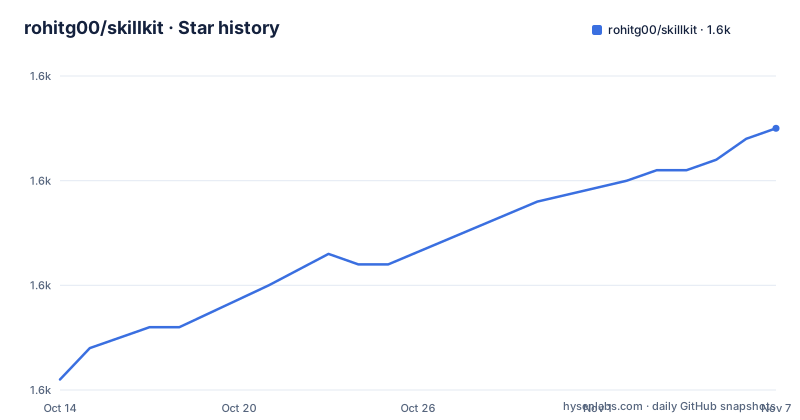
Star history
- rohitg00/skillkit1,575 ★ · +24
| Repository | 2026-10-14 | 2026-11-07 |
|---|---|---|
| rohitg00/skillkit | 1.6k | 1.6k |
24 Stars in the last 24 days, measured from the daily GitHub snapshot. Compare with other projects
Editorial analysis
Four directories, three file shapes, one duplicated skill
An agent skill is a folder of Markdown plus instructions, and every agent reads it from a private path. Claude Code loads `SKILL.md` from `.claude/skills/`. Cursor loads `.mdc` from `.cursor/skills/`. Copilot reads Markdown out of `.github/skills/`, Windsurf reads Markdown out of `.windsurf/skills/`, and the comparison table ends with 41 more rows it does not print.
SkillKit's premise is that nobody should rewrite that content four times. It treats a skill repository as a resolvable unit that can be cloned, scanned, and then rendered into whichever directory layout the target agent already scans. The payoff is one source of truth. The price is a resolver, an adapter table, and a Node dependency tree standing between you and a folder of text files.
Watch the size of the unit. `skillkit add anthropics/skills` is one command, but a recorded run installed 42 skills into Claude Code, so you are adopting a bundle rather than a single file.
The banner claims 46 agents, the terminal detects 32
Two different agent counts sit in the same README. The banner line reads "One skill. Every agent. 46 of them.", the tag row advertises 46 agents, and the package description repeats "46 coding agents". Then the recorded install prints `Detected 32 agents` and labels the write-everywhere option "32 agents, writes to every adapter". No part of the documentation reconciles the two figures, and nothing in the CLI output names which adapters sit outside the smaller count.
The gap only matters when you rely on the exhaustive option. Installing into the single detected agent, where the default picker lands you, hides the discrepancy entirely.
It stops being cosmetic the moment you pick "All supported agents", or when you edit a skill by hand and then run `skillkit sync` to push it to the rest. At that point the count decides how many directories get written, and the number printed in your terminal is the one that applies. Count directories after a sync before you trust the coverage.
First run: init, recommend, add, sync
Nothing has to be installed before the first command, because the quick start runs the CLI through npx.
npx skillkit init                     # detect agent, create dirs
skillkit recommend                    # stack-aware suggestions
skillkit add anthropics/skills        # install from marketplace
skillkit sync                         # deploy to agent config
Only the first line carries the npx prefix. Once the binary sits on your PATH the other three are plain calls, and a global install hands you the same four under either skillkit or sk. Run them in order and the agent picks up PDF processing, code review and auth patterns without touching a settings file.
The install itself is interactive:
npx skillkit add anthropics/skills

 ◇ Detected 32 agents
  │
  ◆ Install to
  │  ● Just Claude Code (detected)      claude-code
  │  ○ Select specific agents           space to toggle
  │  ○ All supported agents             32 agents, writes to every adapter
  └

  ◇ Cloning anthropics/skills
  ◇ Security scan: 42/42 skills pass
  ◇ Installed 42 skills to Claude Code
  │
  └ Done in 3.1s. Run `skillkit list` to see them.
The detected agent is pre-selected and the space bar toggles individual targets. Read the middle three lines as an ordering guarantee: cloning, then the scan, then the write, all inside 3.1s in that transcript. Sources are not limited to GitHub, since `skillkit add gitlab:team/skills`, `skillkit add ./my-local-skills` and `skillkit add https://gist.github.com/...` all resolve through the same command.
Translation takes one skill name and a target list
Convert a skill once for Claude and the conversion problem does not disappear, it multiplies. Cursor stores `.mdc` where Copilot and Windsurf store Markdown, so each target is its own render rather than a copy.
skillkit translate my-skill --to cursor
skillkit translate --all --to windsurf,codex
skillkit translate my-skill --to copilot --dry-run
Three forms earn their keep. A skill name plus one target converts a single file. `--all` with a comma separated target list converts the whole installed set, which is the one to run once `skillkit sync` has dropped a new skill into place. `--dry-run` prints what would be written and touches nothing, which is the cheap way to find out whether a field survives the trip.
What sits next to these commands is thinner than the commands themselves. No conversion table for those targets is published next to them, so the documentation never says what happens to frontmatter an agent cannot express, or whether a partially convertible skill fails loudly or silently drops the unknown field. If your skill depends on metadata rather than prose, read one `--dry-run` output before you let `skillkit sync` rewrite every adapter.
418 packages by default, 118 without the optionals
The default global install is heavy, and the project publishes its own cold install numbers on a fresh npm cache: `npm i -g skillkit` pulls 418 packages in 18s, `npm i -g skillkit --omit=optional` pulls 118 in 9s, and both rows report zero critical and zero high vulnerabilities. The badge row at the top of the page advertises the 118 package figure, which is the smaller of the two modes rather than the default one.
npm install -g skillkit       # npm
pnpm add -g skillkit          # pnpm
bun add -g skillkit           # bun
Four features sit behind that flag as optional packages. `skillkit ui` comes from `@skillkit/tui`, `skillkit serve` from `@skillkit/api`, `skillkit mesh` from `@skillkit/mesh`, and `skillkit message` from `@skillkit/messaging`. Install one later with `npm i -g @skillkit/tui`; when a command exists but its package does not, the CLI catches that and prints a one-line hint instead of a stack trace.
Node is the floor: the root package.json requires `>=18.0.0`. The npx path avoids installation altogether but caches the first call under `~/.npm/_npx/`, and the project's own advice is to move to a global install once you reach for `npx skillkit` more than twice, which removes the prompt-to-proceed and the refetch on every new version.
Two lockfiles beside one private workspace root
Upgrading means working inside a monorepo, and the root says how it is wired. The root package.json is `skillkit-monorepo`, marked private, carrying version 1.24.0, and it delegates every task to turbo through `turbo run build`, `turbo run test`, `turbo run typecheck` and `turbo run lint`. Unit tests run through vitest, end-to-end tests through `vitest run --config e2e/vitest.config.ts`, and the monorepo launches its own UI with `pnpm --filter skillkit exec bun skillkit ui`.
Then the lockfile mismatch. The tree carries `pnpm-lock.yaml` and `pnpm-workspace.yaml` next to a `package-lock.json` at the same level, while the documented install path is npm commands and the declared packageManager pins `[email protected]`. Two JavaScript lockfiles in one root means two answers to the same dependency question, and only the pnpm one agrees with the declared manager.
The last push was on 2026-06-02, exactly six weeks after v1.24.0 shipped on 2026-04-21, so the default branch carries work the published package does not contain.
SkillKit itself is under Apache-2.0, but its 31 sources are third-party, and nothing in the repository says how it treats a skill whose own terms differ from the tool's.
The scan prints a pass count and stops there
The only visible evidence of vetting is one line in the transcript: 42 of 42 skills pass. The project advertises 757 tests in its tag row and keeps both a `tests/` directory and an `e2e/` directory, which is where the real checking lives.
What the scan inspects is not described next to that output, so nobody outside the maintainers can say whether it parses frontmatter, matches a pattern list, or counts files. Treat the line as a smoke test rather than an audit.
The scope matters more than the pass rate. The scan runs against the repository you named, not against the two skills you actually want, so accepting a bundle means accepting 41 files you did not pick under a single green line.
The tree is also broader than a CLI. Beside `packages/` and `apps/` sit `clients/`, `registry/`, `schemas/`, `marketplace/` and `docs/`, a top-level `SOUL.md`, and a `skills-lock.json` that puts three lockfiles in one root next to `package-lock.json` and `pnpm-lock.yaml`.
Copying four files still wins on a single agent
The real alternative is the one the project opens with: rewrite the same skill for every agent, or commit to one. That path has no resolver, no adapter table and no dependency tree, and it cannot break when an adapter changes underneath you.
SkillKit wins where the manual route hurts: several agents on one machine, a skill that lives in a marketplace repository rather than a local folder, and a team that needs the installed set tracked instead of remembered. It loses on a laptop running exactly one agent, where editing `SKILL.md` directly beats routing the change through a translate step, and where the install cost buys nothing.
One gap is worth naming. `.github/skills/` and `.windsurf/skills/` both take Markdown, yet they are separate directories, and no flag in the command list names a single destination path, so a change to one copy has to travel through `skillkit sync` to reach the other.
Editorial conclusion
SkillKit earns its place on a machine that really does run more than one coding agent, because hand-translating a single `SKILL.md` into `.mdc`, Markdown and four private directories is exactly the work it removes. Leave it out of a single-agent setup on a box without Node 18, where copying four files costs less than 418 packages. Before trusting adapter coverage, run `skillkit list` after a sync and count the directories that changed, because 46 in the banner and 32 in the terminal are not the same number.
Frequently asked questions
How do I install SkillKit without a global install?
`npx skillkit add anthropics/skills` runs with nothing installed first, and the first call caches the package under `~/.npm/_npx/`. For a permanent install the project offers `npm install -g skillkit`, `pnpm add -g skillkit` and `bun add -g skillkit`, with both skillkit and sk accepted as the binary name.
How many coding agents does SkillKit support?
The banner, the tag row and the package description all claim 46 agents, while a recorded install detects 32 agents and offers 32 in the write-to-every-adapter option. Nothing in the documentation reconciles the two figures.
What Node version does SkillKit require?
The root package.json sets engines to `>=18.0.0`. For repository work the monorepo declares `[email protected]` as its package manager and runs its tasks through turbo and vitest.
Can I install SkillKit without the optional features?
Adding `--omit=optional` cuts the install from 418 packages in 18s to 118 packages in 9s in the project's own cold install table. The four optional pieces are `@skillkit/tui` for `skillkit ui`, `@skillkit/api` for `skillkit serve`, `@skillkit/mesh` for `skillkit mesh`, and `@skillkit/messaging` for `skillkit message`; a missing one produces a one-line hint, not a stack trace.
Does SkillKit check the skills it installs for anything risky?
The install output shows a security scan reporting 42 of 42 skills passing, after cloning and before writing. Nothing alongside that line says what the scan inspects or what happens to a skill that fails it.
Can SkillKit turn a Claude Code skill into a Cursor skill?
Yes, through `skillkit translate my-skill --to cursor`, with `--all` to convert the whole installed set to a comma separated target list and `--dry-run` to preview. Cursor keeps `.mdc` files while Copilot and Windsurf keep Markdown.
Official sources
Add this badge to your README
If you maintain this project, the badge below links readers to this analysis and shows its maintenance status from the daily GitHub snapshot. Paste the markdown into your README; add ?metric=license or ?metric=stars to the image URL for a different field.

[](https://hysenlabs.com/projects/rohitg00-skillkit)Star history chart for your README
[](https://hysenlabs.com/projects/rohitg00-skillkit)Was this useful?