grok-app states plainly that it is not an xAI product, and its eleven messaging bridges make an unattended local agent steerable from a phone
Project brief: Desktop workbench for Grok Build CLI, sessions, projects, media, automations (Tauri 2 unofficial).
At a glance
- What is it?
- grok-app is a Tauri desktop client for a command line coding agent, MIT licensed and actively shipping patch releases weekly. It bundles no model of its own; it is a window onto a CLI you install and sign in to separately. The feature list is large and includes an always-on desktop pet. The two sections worth reading carefully are the permission selector, which has an unattended mode, and the messaging bridge, which puts eleven chat platforms between you and an agent that can edit files on your disk.
- Who is it for?
- grok-app is worth trying if you already run that CLI and want a window onto it with file diffs, sessions, and scheduled automations, because the client is genuinely useful and the project is honest about what it is. Three things to check before you let it near a machine you care about.
- Can I use it commercially?
- Yes. MIT is a permissive licence: you can use, modify and sell software built on it, as long as you keep its copyright and licence notices.
- Is it still maintained?
- Yes. The repository last received commits 1 day ago.
- What is it written in?
- Mainly TypeScript, according to GitHub's language statistics.
Answers come from the project's GitHub data, last synced on November 15, 2026, and from our analysis. They are not legal advice.
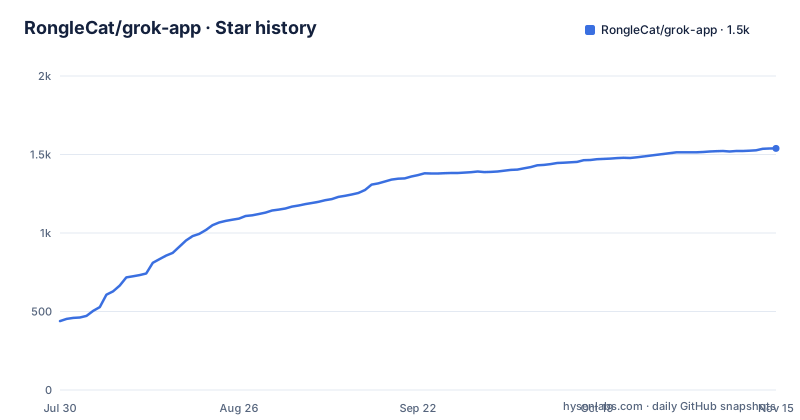
Star history
- RongleCat/grok-app1,539 ★ · +1,100
| Repository | 2026-07-30 | 2026-11-15 |
|---|---|---|
| RongleCat/grok-app | 439 | 1.5k |
1,100 Stars in the last 108 days, measured from the daily GitHub snapshot. Compare with other projects
Editorial analysis
It is not an official product and it does not bundle a model
The most important paragraph in this readme is a note, and it is near the top, before the features. The project states that it is an open-source desktop client and workbench for a local CLI, that it is not an official product of the vendor whose model the CLI talks to, and that the application does not bundle any proprietary model backend. Everything the interface does, the chat reasoning, the tool execution, the permission decisions, runs directly through the CLI you already have installed. The stated consequence is that full agent capability requires an installed and signed-in CLI, which means the app is a front end rather than a product, and that every capability claim in the readme is conditional on somebody else's binary being present and authenticated. There is one detail that shows the project thought about its own testability. The first-run wizard can help install the CLI, and there is an environment variable that puts the interface into a mock mode so that UI development can run without it. A mock seam behind a protocol boundary is the difference between a client that can be worked on without credentials and one that cannot.
The permission selector includes an unattended mode next to asking every time
The permission model is the feature to understand before anything else, and it is presented as four tiers in one selector: ask, which is the default, allow once, allow for the session, and an unattended mode named for the idea of not asking at all. Below that sit per-project defaults and a workspace sandbox. So the interface does not treat the question as binary; it gives you a gradient, and the gradient has a top end where the agent acts without asking. That is a reasonable design, because a tool that edits files and executes commands will be unusable if every step prompts, and it is also the exact configuration you do not want enabled by default on a machine with anything you would mind losing. The per-project defaults are the mitigation that makes the gradient defensible: the dangerous mode can be scoped to a throwaway project the way the ask mode can be the default everywhere else. Related to this is a folder trust system and workspace isolation, which together mean a workspace is a unit of trust rather than a directory you happened to open.
Eleven messaging platforms can resume and steer the agent on your desktop
The feature list calls this omnichannel remote messaging and enumerates the platforms: two Chinese workplace platforms and one personal one, Telegram, Discord, Slack, DingTalk, WeCom, QQ, Matrix, LINE, and Weibo. The point of the enumeration is not the count, it is what each bridge is allowed to do. The documentation says you connect a messaging app to monitor, resume, and steer your local desktop agent while away, and it names two commands for exactly that: one to switch project and one to resume a session. So this is not a notification channel that tells you the agent finished. It is a remote control for an agent that has file and command access, reachable from a phone, over platforms whose security properties and account hygiene are not yours to govern. Two adjacent surfaces widen it further. A token-gated mobile web mirror runs a lightweight browser interface, and the documentation notes compatibility with a tunnelling service for exposing it over the internet. A loopback REST interface exposes two named endpoints for listing sessions and posting a turn, for scripting and continuous integration.
Every build target shells out to bash, including the Windows one
The build scripts are one shell script with an argument, invoked eleven ways:
    "build": "bash scripts/build-local.sh host",
    "build:mac": "bash scripts/build-local.sh mac",
    "build:mac-arm": "bash scripts/build-local.sh mac-arm",
    "build:mac-intel": "bash scripts/build-local.sh mac-intel",
    "build:mac-all": "bash scripts/build-local.sh all-mac",
    "build:win": "bash scripts/build-local.sh win",
    "build:linux": "bash scripts/build-local.sh linux",
    "build:all": "bash scripts/build-local.sh all",
    "build:help": "bash scripts/build-local.sh help",
    "setup:cross": "bash scripts/setup-cross-compile.sh",
    "release:tag": "bash scripts/release-tag.sh",
Consolidating nine targets into one script is good practice; making all of them depend on a POSIX shell is a portability decision that the Windows target in particular makes visible. A Windows contributor or a Windows continuous integration runner needs a bash interpreter to produce the Windows build, even though the repository also ships a Windows batch installer at its root for end users, which is a different audience. Two other entries are worth naming. Cross-compilation setup is a separate script, so the matrix for producing binaries on one operating system for another is deliberate rather than accidental. And the release step is a shell script too, meaning tagging is not a two-click action on any platform without a shell. For an application distributed as signed desktop bundles for five targets, that is the kind of friction worth knowing about before you fork it.
The install hook refuses bad dependencies before anything is installed
There is a hook that runs before installation and the manifest gives it a dedicated script. It invokes a Node script named for checking dependency hygiene, with a flag that marks the pre-install pass, and the same check is available on demand as a separate script. So the project does not merely document dependency rules, it enforces them at the moment someone would otherwise install a tree that violates them. That is a stronger position than most, and it costs nothing at runtime. Two adjacent signals support it. There is an audit script that runs the package manager's own advisory check against production dependencies only, at a moderate severity threshold, which is a sensible place to put the line since development dependency advisories are noise. And the lint script runs with a maximum of zero warnings, so a warning is a failure rather than a note. There is a typecheck script that builds the type information without emitting, a test runner, and a chatcut plugin helper with a fetch variant. For a project shipping patch releases weekly, this is a coherent toolchain: strict lints, an enforced dependency policy, and a release cadence that suggests the checks are actually run.
Four README files for a project whose manifest says English-first
The documentation situation is tidier than it could be and then slightly untidy. There are four readme files at the root: the default one, an English variant, and Chinese and Russian variants, and the header offers a language switcher between English, Chinese, and Russian. The package description says the project is English-first, and the default readme is the English one, which would make a separate English-specific file redundant. That is the untidy part, and it is a small one, but it is the kind of duplication that appears when a repository is localised over time and nobody removes the file that is no longer needed. The application itself is said to ship fifteen interface languages, which is a genuinely large localisation effort for a desktop client and suggests the translations are maintained rather than machine-dumped. Underneath the readmes sits a directory for documentation, a changelog, contributing and conduct files, a security policy, and a file describing the project's own agent guidance. One other root entry is worth naming because it is unexpected in this stack: a configuration file for a component registry convention that is associated with web component libraries, sitting in a desktop shell.
Relay configuration has a non-destructive mode that protects the CLI's own settings
Installing a client for a CLI is exactly the situation where projects overwrite somebody's configuration, and this one has a specific answer for it. There are two relay modes. One is an independent configuration mode. The other is described as non-destructive and is said to protect existing configuration in the CLI's home directory. That single sentence is the difference between a client you can try and a client you have to back up first. The same feature area carries the provider list, with named presets for several relay providers including a general aggregator and two others, and a distinction between independent configuration and shared configuration that suggests the team thought carefully about where each setting should live. Keys are described as stored in the operating system's keychain rather than in a file, which is the right default on both platforms this app targets. There is also a quota bar and cost heatmap for the vendor's paid tier, plus local tracking for custom providers, which is an odd combination until you notice it is aimed at people who are metering their own relay spend.
A desktop pet and a Kanban board sit beside the permission model
Two features deserve a note because they say something about the intended user. The first is an always-on-top desktop companion, described as a pet, with live awareness of what the agent is doing, reactions, and notification bubbles. That is a status indicator wearing a costume, and it is a defensible one: an agent streaming a plan for twenty minutes needs a signal that persists across windows, and a small always-on-top window is a cheap way to get one. It is also the feature most likely to be mistaken for the project's purpose by someone who opens the repository. The second is the workbench surface itself. Sessions run concurrently with background streaming, an agent status board has three states corresponding to waiting on the user, working, and done, there is session forking from any assistant reply so a conversation can branch from where it went wrong, up to three reference sessions can be attached to a new one, and the app discovers linked git worktrees so a session can switch working directories. That is a coherent design for someone running many parallel threads, and it is why the permission tiers matter so much: the whole interface is built around having many agents active at once.
Editorial conclusion
grok-app is worth trying if you already run that CLI and want a window onto it with file diffs, sessions, and scheduled automations, because the client is genuinely useful and the project is honest about what it is. Three things to check before you let it near a machine you care about. Which permission tier you run under, because the selector includes an unattended mode alongside asking every time and allowing once, and a tool that can edit files and run commands should not start there. Whether you want eleven messaging platforms able to reach it, since a bridge means a message from a phone can resume and steer the agent on your desktop. And whether you have thought about the relay configuration, because installing a client for a CLI that already has its own settings is exactly where projects overwrite things. On the build side, note that every build target shells out to bash, including the Windows one, so building from Windows needs a shell.
Frequently asked questions
What is the Grok App used for?
It is a desktop client and workbench for a local command line coding agent, providing multi-project workspaces, streamed agent sessions, an in-app code editor with diff review, media preview, scheduled automations, and remote access. It is explicitly not an official product of the vendor and it does not bundle a model; everything runs through your installed CLI.
How do I install grok-app?
There is a Windows batch installer at the repository root for end users, and a build path for contributors that shells out to a single shell script with a target argument for the host, macOS on either architecture, Windows, Linux, or all of them at once. Every one of those targets invokes a POSIX shell, so building on Windows needs a shell available.
Does grok-app need an account or an API key?
Full agent capability requires the CLI to be installed and signed in, and the first-run wizard can help with installation. Keys you configure yourself are stored in the operating system's keychain rather than in a file, and there is an environment variable that puts the interface into a mock mode so the UI can be worked on without the CLI.
How do permissions work in grok-app?
There are four tiers in one selector: ask, which is the default, allow once, allow for the session, and an unattended mode that does not ask. Per-project defaults and a workspace sandbox sit below that, along with a folder trust system and workspace isolation, so a workspace is the unit of trust rather than a directory you happened to open.
Can I control grok-app from my phone?
Yes, through eleven messaging platform bridges that can monitor, resume, and steer the desktop agent, with one command to switch project and another to resume a session. There is also a token-gated mobile web mirror, a note about compatibility with a tunnelling service for internet access, and a loopback REST interface with endpoints for listing sessions and posting a turn.
Will grok-app overwrite my existing CLI configuration?
There are two relay modes and one of them is described as non-destructive, protecting existing configuration in the CLI's home directory, while the other is an independent configuration mode. Presets are provided for several relay providers, and the project ships presets for a general aggregator and two named relays alongside the vendor's own paid tier.
Official sources
Add this badge to your README
If you maintain this project, the badge below links readers to this analysis and shows its maintenance status from the daily GitHub snapshot. Paste the markdown into your README; add ?metric=license or ?metric=stars to the image URL for a different field.

[](https://hysenlabs.com/projects/ronglecat-grok-app)Star history chart for your README
[](https://hysenlabs.com/projects/ronglecat-grok-app)Was this useful?