asc picks table for a human and JSON for a pipe
Project brief: Fast, scriptable CLI for the App Store Connect API. Automate TestFlight, builds, submissions, signing, analytics, screenshots, subscriptions, and more. JSON-first, no interactive prompts.
At a glance
- What is it?
- A Go command line client for Apple's App Store Connect API that decides its own output format from where standard output is connected, ships three ways to authenticate including one that skips the system keychain, and publishes exactly what its telemetry does and does not send. The build strips symbols for releases because they need to be reproducible.
- Who is it for?
- asc fits a release engineer who wants TestFlight, submission and analytics work in a script rather than in a browser, and who will read the telemetry section before installing it into a corporate machine. It does not fit someone who needs the graphical workflows Apple's own tooling covers.
- Can I use it commercially?
- Yes. MIT is a permissive licence: you can use, modify and sell software built on it, as long as you keep its copyright and licence notices.
- Is it still maintained?
- Yes. The repository received new commits within the last day.
- What is it written in?
- Mainly Go, according to GitHub's language statistics.
Answers come from the project's GitHub data, last synced on November 14, 2026, and from our analysis. They are not legal advice.
Star history
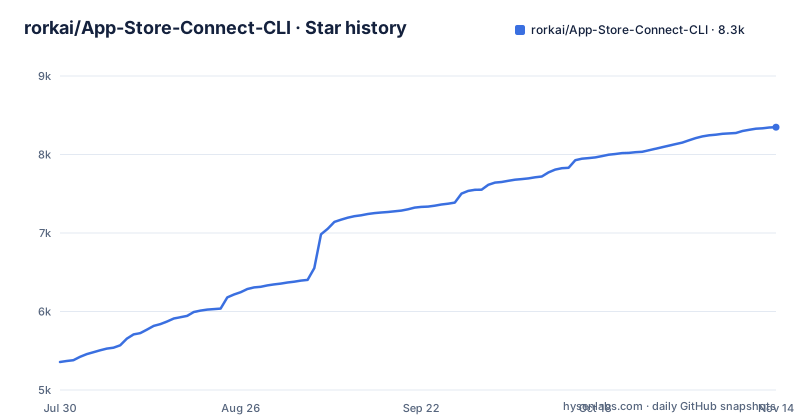
- rorkai/App-Store-Connect-CLI8,348 ★ · +2,991
| Repository | 2026-07-30 | 2026-11-14 |
|---|---|---|
| rorkai/App-Store-Connect-CLI | 5.4k | 8.3k |
2,991 Stars in the last 107 days, measured from the daily GitHub snapshot. Compare with other projects
Editorial analysis
The output format is chosen from where stdout points
The default is not a setting, it is a detection.
When standard output is an interactive terminal, commands render a table. When it is a pipe, a file, or a continuous integration job, they render JSON.
The install itself is one command on macOS and Linux:
brew install ascSo the same command gives you something readable when a person runs it and something parseable when a machine does, with no flag. That is a small design decision with a large effect on script portability, because a script that forgets a format flag keeps working while a human who forgets one still gets a table.
There are two overrides, and the precedence is stated. An environment variable sets your personal default for any command, and an explicit flag on the command wins over both. A pretty-printing option applies to the JSON output for when you want to paste it into an issue.
Three formats are available: json, table and markdown.
Three authentication paths, one of them skips the keychain
The authentication section has three variants and the difference is the kind of key you hold.
A team key needs a key identifier and an issuer identifier. An individual key has no issuer, so that flag is omitted and a key-type flag is passed instead. Keys are generated in Apple's own access page.
The third variant exists for machines that have no keychain: continuous integration, a headless shell, or a locked-down desktop. Passing a bypass flag stores the credential outside the system keychain, and the troubleshooting section repeats the same instruction twice over, once as an environment variable and once as a flag.
There is also a local scope, which writes credentials to a configuration file inside the repository rather than to your home directory. That is the variant to use for a per-project setup, and it is the one to be careful with in a repository that other people clone.
Validation is a separate pair of commands: one checks the active profile, the other is described as a health check.
The telemetry section lists what it never sends
Telemetry is on by default, and the readme spends more space on the exclusions than on the inclusions.
What is sent: the command version, the operating system and architecture, the registered command path, the duration, the runtime context, the invocation source, a bounded outcome class, and the HTTP status when a request fails. It may include a sanitized flag name.
What is not: raw arguments, standard error, error messages, flag values, response bodies, credentials, private keys, the Apple account, team or issuer identifiers, app or bundle identifiers, usernames, hostnames, repository names, and file paths.
Local events include a random installation identifier, which lets events from one installation be grouped over time, and the readme is explicit that it is not derived from an Apple account or a machine identifier.
The README shows asc telemetry status for reviewing it. For a tool whose users hold signing credentials, that list is the part of the readme to read twice.
A skill pack pinned to one reviewed commit
The project ships agent skills in a separate repository, and the install command is described in unusual detail.
The command checks out one specific reviewed commit and copies its twenty-five skills into the standard global skills directory. It verifies the complete pack and every installed file before succeeding. It preserves unrelated skills and unrelated lock entries. And it pins the twenty-five entries belonging to this tool to the same commit, so an external check cannot update them from a branch that moves.
If any replacement fails, the pack is rolled back.
The last paragraph is about what the command does not do: only git is required, and it does not execute a JavaScript runtime, a package runner, an npm package, or repository scripts.
That is a security posture you can check, which is unusual for an installer. Most install commands would run a package's own scripts, and this one deliberately does not.
Release builds are stripped for reproducibility
The build file explains its own trade-offs in comments, and the release one is the interesting half.
Development builds stay unstripped for debuggability. Release builds strip the symbol and debug tables and trim filesystem paths, and the comment gives two reasons: smaller binaries and reproducibility.
Trimming paths is the part that matters for the stated goal. An absolute path baked into a binary differs per machine, so two builds of the same commit produce different bytes. Removing them means the artefact can be compared, and the build injects version, commit and date into the binary through linker flags.
There is a subtlety in that too: the local build metadata is deliberately kept stable so unchanged builds can reuse the compiler's link cache, while the release workflow sets the real build timestamp.
Tool versions are pinned as variables, including a linter timeout raised to fifteen minutes with a comment explaining that a cold hosted runner can need more than ten for the full module.
Test isolation is defended against your home directory
One comment block in the build file explains the test setup, and the reasoning is specific.
It opens with the rule that tests must not depend on the invoking shell.
Apple service health without credentials
There is a troubleshooting section for Apple's side of the connection, which is a category most CLI tools omit.
One command checks the developer services without needing credentials at all. You can narrow it to one named service, poll on an interval only when you ask it to, and filter to a concise incident view, with the note that the summary counts still cover every service that matched.
That is the right shape for a release tool. When a submission fails at 2am, the first question is whether Apple's status is the reason, and a tool that answers it without credentials is answering it at the moment you need it.
The rest of the troubleshooting section follows the same pattern: one command per symptom, in the order you would hit them. Check which binary is actually on your path, confirm the version, validate the active credential profile, and only then look at Apple's services.
Windows support is tracked in a discussion
The install section handles three platforms and is candid about the state of one of them.
The recommended route on macOS and Linux is the package manager, with an install script as the alternative. On Windows the short package-manager command is annotated as pending, once the package is accepted, with an exact form given as the fallback for scripting.
And then the reason: the package is tracked in a numbered discussion on the project. Until it appears in the package manager's search, the readme says Windows users can download the release binaries from the releases page instead.
Two more details close the section. Released binaries are self-contained and need no language runtime installed, while source builds use whatever toolchain version the module file declares.
So a Windows user today has a release binary to download and a package-manager command to use once it lands, and the readme is explicit about which is which.
Editorial conclusion
asc fits a release engineer who wants TestFlight, submission and analytics work in a script rather than in a browser, and who will read the telemetry section before installing it into a corporate machine. It does not fit someone who needs the graphical workflows Apple's own tooling covers. Before adopting, read the authentication section and pick the credential path that matches your environment, and review or change telemetry with asc telemetry status if your policy requires it.
Frequently asked questions
What is App Store Connect used for?
In this tool's context it is the API behind the Apple developer portal, and the CLI automates the release workflows around it: builds, TestFlight, submissions, signing, analytics, screenshots and subscriptions, across iOS, macOS, tvOS and visionOS, from a terminal, an editor, or a pipeline.
How do I install asc?
The recommended route is the macOS and Linux package manager, with an install script as the alternative. On Windows the short package-manager command is annotated as pending acceptance of the package, with an exact package-identifier form given as the scripting fallback, and release binaries offered in the meantime.
How do I authenticate asc in CI?
Use the bypass variant of the login command, which stores the credential outside the system keychain, and pass the key identifier, the issuer identifier for a team key, and the path to the private key file. You can also set the matching environment variable, or scope credentials to the repository with a local flag so they land in a configuration file inside the project.
What telemetry does asc send?
It sends pseudonymous command-level usage data by default: the command version, operating system and architecture, the registered command path, duration, runtime context, invocation source, a bounded outcome class, and the HTTP status on failure, possibly with a sanitized flag name. It explicitly excludes arguments, error text, flag values, credentials, keys, account and team identifiers, app identifiers, hostnames, repository names and file paths.
Official sources
Add this badge to your README
If you maintain this project, the badge below links readers to this analysis and shows its maintenance status from the daily GitHub snapshot. Paste the markdown into your README; add ?metric=license or ?metric=stars to the image URL for a different field.

[](https://hysenlabs.com/projects/rorkai-app-store-connect-cli)Star history chart for your README
[](https://hysenlabs.com/projects/rorkai-app-store-connect-cli)Was this useful?