Atlantis runs terraform plan and apply from a webhook, and the README stops there
Terraform Pull Request Automation. Atlantis Terraform Pull Request Automation Resources What is Atlantis?
At a glance
- What is it?
- Atlantis is a self-hosted Go application that listens for Terraform pull request events via webhooks, runs plan, import, and apply remotely, and comments the output back on the pull request. The interesting details are in the tree rather than the README: the image pins its Conftest version at build time, the compose file is development-only, and the newest release is still 0.x.
- Who is it for?
- Atlantis fits teams that already run Terraform through pull requests and can accept a self-hosted service whose behavior is configured by flags documented off this page rather than in the README. It does not fit teams that need a supported Windows path, an explicit authorization model, or a configuration reference they can read in one place, because none of those appear here.
- Can I use it commercially?
- Yes. Apache-2.0 is a permissive licence: you can use, modify and sell software built on it, as long as you keep its copyright and licence notices.
- Is it still maintained?
- Yes. The repository received new commits within the last day.
- What is it written in?
- Mainly Go, according to GitHub's language statistics.
Answers come from the project's GitHub data, last synced on November 13, 2026, and from our analysis. They are not legal advice.
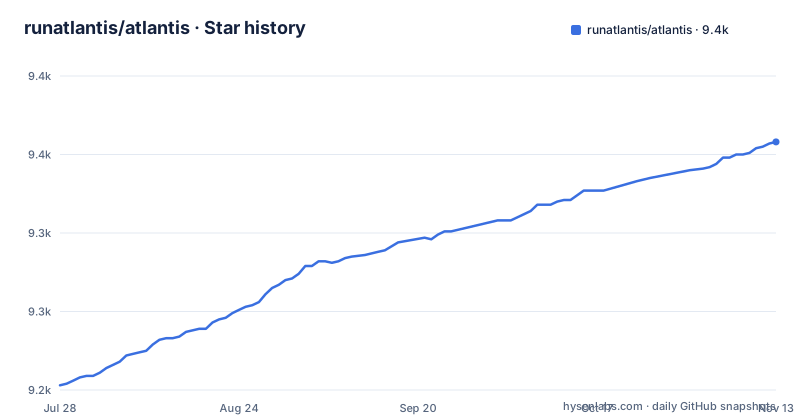
Star history
- runatlantis/atlantis9,358 ★ · +155
| Repository | 2026-07-28 | 2026-11-13 |
|---|---|---|
| runatlantis/atlantis | 9.2k | 9.4k |
155 Stars in the last 108 days, measured from the daily GitHub snapshot. Compare with other projects
Editorial analysis
There is no install command, only a release page and a Dockerfile
The README contains no install command and no quickstart shell block. What it offers instead is a set of destinations: a getting started guide at www.runatlantis.io/guide, full documentation at www.runatlantis.io/docs, the latest release at github.com/runatlantis/atlantis/releases/latest, a Slack channel for help and one for contributors, and CONTRIBUTING.md.
So the first thing an evaluator has to accept is that the README is a signpost. The installable artifacts live elsewhere: the GitHub release page for the Go binary, and a Dockerfile plus a docker-entrypoint.sh at the repository root for building the container yourself.
That default has a cost. Every configuration question, every flag, every provider setup detail lives on the documentation site rather than in the repository you cloned, which means a reviewer without network access to that site has a binary, a Dockerfile, and a handful of links. The operational knowledge is real, but it is not in the README, and the repository itself confirms this by carrying the whole documentation source under `runatlantis.io/` and `docs/`.
Terraform 1.16.3, OpenTofu 1.12.6, and Conftest 0.70.0 are chosen at image build time
Tool versions in the container are build arguments; the Conftest default is declared at the top of the Dockerfile:
ARG DEFAULT_CONFTEST_VERSION=0.70.1Conftest 0.70.1 is an executable in the image that the README never mentions, since the documented commands are plan, import, and apply. Anyone auditing what runs on their runners should count it alongside Terraform.
The compose file tunnels port 4141 through ngrok and mounts your .ssh directory
The compose file opens with a comment that removes any ambiguity about its purpose: this file is only used for Atlantis local development. It is not a deployment template, and the contents make that concrete.
  redis:
    image: redis:8.6-alpine@sha256:ac2da09bc822f325a9f68f533120b86fa39c1b8db46b3aa7c1bbea7fdfd4fcba
    restart: always
    ports:
      - 6379:6379
    command: redis-server --save 20 1 --loglevel warning --requirepass test123
Redis is published on the host, and its password is the literal string test123 in the command line. The Atlantis service mounts two host paths:
    volumes:
      - ${HOME}/.ssh:/.ssh:ro
      - ${PWD}:/atlantis/src:ro
Read-only is not the same as harmless, because a read-only SSH directory handed to a container that runs Terraform against real infrastructure is exactly the credential set Atlantis needs to clone repos. There is also an ngrok service whose command is `http atlantis:4141`, so a development run expects your webhook endpoint to be reachable from the internet. Copying any of this into a production environment would be a mistake, and the file tells you so if you read its first line.
One binary carries Gitea, GitHub, and Azure DevOps clients plus a websocket
The Go module header is minimal:
module github.com/runatlantis/atlantis

go 1.27.1
The dependency list is where the provider story shows. Direct requirements include code.gitea.io/sdk/gitea, google/go-github/v88 with bradleyfalzon/ghinstallation/v2 for GitHub App authentication, gofri/go-github-ratelimit/v2, and drmaxgit/go-azuredevops with golang-jwt/jwt/v5 for Azure DevOps. HashiCorp libraries appear too, including go-getter/v2, hc-install, hcl/v2, go-version, and terraform-config-inspect, alongside opentofu/tofudl and gorilla/websocket.
The consequence is that one executable handles several very different webhook worlds, and each world arrives with its own payload shape, its own rate limits, and its own token exchange. That breadth is the reason a single self-hosted binary can sit behind GitHub, Gitea, and Azure DevOps without you running separate services, and it is also the reason the binary is not small.
For an evaluator, the practical question is which of those clients your organization actually needs, because every one of them is compiled in whether you use it or not, and each carries its own authentication assumptions.
Two major versions of the statsd client are in go.mod at the same time
Among the direct requirements are cactus/go-statsd-client/v5 at v5.0.0 and cactus/go-statsd-client/v6 at v6.0.0. Both majors of the same metrics client are declared in one module, side by side.
This is a small entry that says something about how the project absorbs upstream changes. A library that ships a new major is usually adopted behind a compatibility layer or replaced outright, and here the older major is still pinned explicitly rather than being resolved indirectly. That is a deliberate trade: it keeps an existing metrics path working while the newer client is taken up, at the cost of shipping two versions of the same code in the build graph.
The practical consequence for anyone auditing dependencies is that scanning the module list will surface the metrics library twice and you have to remember that it is one upstream project rather than two unrelated ones. It is also a useful signal about upgrade discipline in a pre-1.0 codebase: version bumps get taken one major at a time and coexist rather than replace.
Configuration lives on a VitePress site built from this repository, not in the README
The documentation is part of the repository, which is the useful part of this arrangement. The root package manifest is small and Apache-licensed, and its scripts are all about the docs site and end-to-end tests:
    "website:dev": "vitepress dev --host localhost --port 8080 runatlantis.io",
    "website:build": "vitepress build runatlantis.io",
    "e2e": "playwright test"
The docs source under `runatlantis.io/` is therefore what www.runatlantis.io/docs is built from, and it is versioned in the same commit history as the code. That is a real advantage over projects whose docs drift, and it means a reviewer can read the configuration reference in the same checkout as the binary.
The catch is that reading it is work. The site is a VitePress application with Mermaid diagrams, Vue components, and Playwright tests behind it, so the documentation is not plain text you can skim from a terminal, and the README offers no table of contents into it. Teams that want to audit flags will end up rendering the site or grepping the source, and the links in the README are what they get to start from.
A webhook can lead to terraform apply, and the README never names who may trigger it
Here is the security picture the README leaves out. Atlantis is a self-hosted application that listens for Terraform pull request events via webhooks, and it runs `terraform plan`, `import`, and `apply` remotely, commenting the output back on the pull request. Every authorization question about that flow is absent from the four paragraphs of the README.
Nothing in it says who can cause a plan to run, who can cause an apply to run, whether apply requires a separate approver, whether the acting user is authenticated separately from the webhook sender, or what permissions the webhook identity itself carries in your version control system. Those answers determine the entire risk profile, and a reader who stops at the README will not find them.
They are not missing from the project, only from the front page. The repository carries a SECURITY.md, an ADOPTERS.md listing organizations running it, and the documentation site linked from the Resources section. The consequence for an adopter is a required reading list that the README does not give you, and for a reviewer it is a question you must ask rather than one you can answer from this page.
Three releases in five weeks, all under 1.0, means your flags are not settled
The release names are the clearest signal about maturity. v0.48.1 landed on 2026-10-07, v0.48.2 on 2026-10-21, and v0.49.0 on 2026-10-25. That is two patches and then a minor within three weeks, with the project still carrying a zero in front of the version.
For an operator the consequences are concrete. Pre-1.0 signals that interfaces can change between minor versions, and in a tool configured through flags, that means a flag you depend on can be renamed or have its default changed when you bump the image. The quick succession of releases also suggests a fast response cycle, which is good news for correctness and bad news for change control.
So pin an exact release rather than tracking the latest tag, read RELEASE.md before upgrading, and assume your deployment notes need rewriting after each minor. The project is clearly moving, with its last push on 2026-11-02, but nothing in the versioning suggests you can ride the latest tag without re-reading your configuration each time.
Editorial conclusion
Atlantis fits teams that already run Terraform through pull requests and can accept a self-hosted service whose behavior is configured by flags documented off this page rather than in the README. It does not fit teams that need a supported Windows path, an explicit authorization model, or a configuration reference they can read in one place, because none of those appear here. Before deploying, read the guide and docs at runatlantis.io, read SECURITY.md and ADOPTERS.md for the parts the README omits, check which tool versions your image was built with since those are build arguments rather than per-run settings, and pin a release number knowing that v0.49.0 is still pre-1.0.
Frequently asked questions
What does Atlantis actually do?
It is a self-hosted golang application that listens for Terraform pull request events via webhooks, runs `terraform plan`, `import`, and `apply` remotely, and comments the output back on the pull request. The stated reasons to use it are making Terraform changes visible to your whole team, letting non-operations engineers collaborate on Terraform, and standardizing your Terraform workflows.
How do I install Atlantis?
The README contains no install command. It points to the getting started guide at www.runatlantis.io/guide, the docs at www.runatlantis.io/docs, and the latest release at github.com/runatlantis/atlantis/releases/latest. The repository root also carries a Dockerfile and a docker-entrypoint.sh for building the container yourself.
Which tool versions are baked into the Atlantis image?
Tool versions are fixed when the image is built. The Dockerfile sets DEFAULT_CONFTEST_VERSION=0.70.1 as a build argument.
Can I use the docker-compose.yml in Atlantis to deploy?
No, its first line states that the file is only used for Atlantis local development. It publishes Redis on the host with the password test123 in the command line, mounts ${HOME}/.ssh into the Atlantis container read-only, and includes an ngrok service that exposes the service on atlantis:4141.
Which version control systems does Atlantis support?
The dependency list includes the Gitea SDK, google/go-github with GitHub App authentication libraries, and go-azuredevops with JWT support, so GitHub, Gitea, and Azure DevOps clients are all compiled into the binary. The module is github.com/runatlantis/atlantis and declares go 1.27.3.
Official sources
Add this badge to your README
If you maintain this project, the badge below links readers to this analysis and shows its maintenance status from the daily GitHub snapshot. Paste the markdown into your README; add ?metric=license or ?metric=stars to the image URL for a different field.

[](https://hysenlabs.com/projects/runatlantis-atlantis)Star history chart for your README
[](https://hysenlabs.com/projects/runatlantis-atlantis)Was this useful?