LaunchNext's signing only started at 2.4.2, and its author says it may not last
Bring your Launchpad back in MacOS26+ ,highly customizable, powerful, free.
At a glance
- What is it?
- A macOS Tahoe replacement for the Launchpad interface Apple removed, built as a GPL-3 derivative of an earlier project of the same purpose. It restores your old layout by reading the system Launchpad database, ships a Finder context menu and a wallpaper module as separate targets, and lists its supported languages three different ways.
- Who is it for?
- LaunchNext suits someone on macOS 26 who wants back the folder and drag-and-drop workflow Apple removed and who is willing to install from a third-party release. It does not suit anyone who needs a stable signing story, because the maintainer says the paid developer membership that makes the builds notarised may not be renewed, and unsigned builds are what came before.
- Can I use it commercially?
- Yes, with conditions. GPL-3.0 is a copyleft licence: if you distribute software that includes it, you must release that software's source code under the same licence. Running it internally without distributing it does not trigger that obligation.
- Is it still maintained?
- Yes. The repository last received commits 2 days ago.
- What is it written in?
- Mainly Swift, according to GitHub's language statistics.
Answers come from the project's GitHub data, last synced on November 15, 2026, and from our analysis. They are not legal advice.
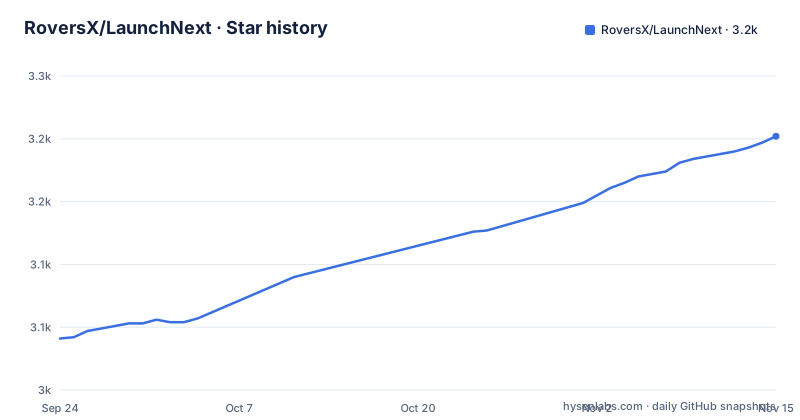
Star history
- RoversX/LaunchNext3,202 ★ · +161
| Repository | 2026-09-24 | 2026-11-15 |
|---|---|---|
| RoversX/LaunchNext | 3k | 3.2k |
161 Stars in the last 52 days, measured from the daily GitHub snapshot. Compare with other projects
Editorial analysis
It reads the Launchpad database that Tahoe no longer shows
The import feature is the most interesting thing in this project, and it works by reading a file the operating system still keeps.
The claim is one-click import from the old system Launchpad, done by reading the native Launchpad SQLite database directly and using it to recreate your existing folders, app positions, and layout. The path is given explicitly, built from the per-user directory lookup and the dock's launchpad folder, ending in a database file.
So on a system where Apple removed the interface, the data behind it is still on disk and still readable. The application is not reconstructing your layout from a backup; it is reading the live database and rendering it through its own interface.
That has an obvious consequence. The import is a one-time event, not a link. Once you have imported, the layout lives in the application's own store file, in the application's support directory, and if the underlying database changes afterwards nothing tells you, because there is no ongoing sync.
The readme is clear that the app also scans all installed applications on first launch, so the database import is about your arrangement of them rather than about discovering them.
Signing began at 2.4.2 and the author may drop it
This is the sentence in the readme that should change how you think about installing it.
It says that after a great deal of effort, starting with version 2.4.2, releases are signed and notarised by Apple. It then says the author is trying this out for now, that the membership only lasts a year, that keeping it active is not cheap, and that if it is not renewed then future releases will go back to unsigned or ad-hoc builds, which the author adds may not be a bad idea.
So notarisation is three days old at the time of this writing, and the author is telling you in advance that it may be temporary.
That is unusual candour and it changes the calculation. A notarised build is one you can install without disabling a security check. An ad-hoc signed one is not, and there is a documented workaround for it elsewhere in the same document, which is the subject of the next section.
The membership cost is also disclosed a few lines earlier, in the reason that has since been struck through: about ninety-nine dollars a year, framed as something the author could not afford before 2.4.2.
So the practical guidance is to prefer the newest release, and to notice the version number rather than assuming every release you have seen was signed.
A struck-through reason leaves the quarantine workaround behind
The readme has an edit in it, and the edit is instructive.
There is a warning that if macOS blocks the app, you should run a command in the terminal. The command removes the quarantine attribute recursively from the installed application. Then there is a line labelled with the word why, and the reason that used to sit there is struck through: the author could not afford Apple's developer certificate, so macOS blocks unsigned apps.
The reason is gone because 2.4.2 is signed, which is why the reason is struck through. But the instruction, the command and the warning were not removed. So the current document tells a reader on 2.4.2 or later to run a step that is no longer necessary, for a reason that is visibly crossed out, and then adds that the command should only be used on apps you trust.
That last warning is the part to keep. The command strips a quarantine flag from an application bundle on your disk, which is exactly the step you should not perform reflexively, and the readme does say so.
The consequence for a reader is mild but real: the most alarming instruction in the document is now unnecessary, and the only signal that it is unnecessary is a strikethrough earlier in the same paragraph.
Two update paths and two render engines
Two independent decisions in this readme deserve to be read together rather than separately.
The first is updates. The application includes its own updater, and there is also a Homebrew cask, and the readme says the cask is mainly for installation and manual upgrades. So there are two mechanisms that can both decide to replace the installed application, and nothing in the document says how they avoid overwriting each other.
The second is rendering. Two engines are available in the settings: a legacy one, and a newer one described as using Core Animation. Most features behave the same in both, but not all. Dragging apps directly to the Dock is listed as available in the newer engine only, and the folder content features, paged and vertical scroll layouts, are attributed to the same engine.
So the engine choice is a feature choice, not a performance choice, and the readme does not tell you which one is the default.
Display mode is a separate axis again: a compact floating window with rounded corners, or full screen, with optional menu bar hiding that also makes the operating system hide the Dock. The application can keep separate settings for the two modes, which is a small detail that suggests the author has actually used it on a laptop and a desktop.
Three lists of supported languages, and one locale with no readme
Count the languages three ways and you get three answers.
The header of the readme offers thirteen translated versions, in a single row of links: English, two forms of Chinese, Japanese, Korean, French, Spanish, German, Russian, Hindi, Vietnamese, Italian and Czech.
The feature list, further down, names eight: English, two forms of Chinese, Japanese, French, Spanish, German and Russian, followed by and more.
The repository tree contains fourteen localisation directories, covering those thirteen plus Brazilian Portuguese.
So Brazilian Portuguese is localised in the application and has no translated readme, and the feature list's list is two thirds the length of the header's with no explanation of what was dropped.
None of this matters if you read English, and all of it matters if you are deciding whether a project is maintained in your language, since the three lists give three different impressions of the project's reach.
The localisation layout is otherwise the conventional one: one directory per language containing the app's localised strings, plus a separate directory holding the translated readmes, so the docs and the strings are versioned independently.
Building from source needs a local signing identity and one specific destination
The source build instructions are unusually precise, and two of the details are there because a paid account is not.
First, signing. The instructions say a paid developer membership is not required to build or contribute. Instead you select the target, open the signing settings, set the team to none, and choose the local signing certificate, with the hardened runtime left enabled. It adds that the editor may mark the project file as modified after those local changes, and that signing-only changes must not go into a pull request.
That last instruction is the interesting one: it is the project's own rule about keeping its build file clean, written by someone who has made the mistake.
Second, the run destination. To launch the app you must select the specific machine destination rather than the generic one, because the generic destination is for builds and archives and cannot launch for debugging. There is a build-only shortcut for when you do not want to run it.
The command line route offers two forms: a plain release build, and a universal build that compiles for both architectures at once with architecture cleaning disabled. The project file and the scheme are named explicitly in both, so neither depends on a workspace default.
The requirements are short: a recent major version of the operating system or later, either processor architecture, and the matching version of the development tool needed only for source builds. The command line forms are named explicitly:
xcodebuild -project LaunchNext.xcodeproj -scheme LaunchNext -configuration ReleaseFour targets, and a list of what the new system took away
The project file describes four modules rather than one application, and the split explains what the app does beyond showing icons.
There is the main application, a module for the Finder context menu, a module for the wallpaper, and a test target. So the context menu items the feature list advertises, showing in Finder, copying an app path, renaming a folder and configured uninstall actions, live in their own module, which is how they can be installed and updated independently of the main window.
There is also an updater scripts directory at the repository root, alongside a documentation directory, an archive directory and a scripts directory. That is a lot of top-level directories for an app that to a user is one window, which is the usual shape of a project that has grown rather than been designed around a feature list.
The feature list itself is the longer part of this readme, and the fifteen items are mostly about interaction rather than about capability: fuzzy search, keyboard navigation, hiding icon labels, adjustable icon sizes, folder management, hot corners and gestures with four and five finger options, context menus, markdown release notes in the update tab, and backup, controller and voice support improvements.
Then there is a separate list headed by what was lost in the new system, five items marked with a cross: no custom app organisation, no user-created folders, no drag-and-drop customisation, no visual app management, and forced categorical grouping. Listing what you got back and what you could never do anyway is a clearer pitch than a feature list alone, and it is unusual to see.
Editorial conclusion
LaunchNext suits someone on macOS 26 who wants back the folder and drag-and-drop workflow Apple removed and who is willing to install from a third-party release. It does not suit anyone who needs a stable signing story, because the maintainer says the paid developer membership that makes the builds notarised may not be renewed, and unsigned builds are what came before. Before you install, check three things: which release you are taking, since notarisation only exists from 2.4.2; how you will update, since the app has its own updater and there is also a package manager cask; and whether you need the legacy or the newer render engine, because a few features including dragging apps to the Dock exist only in the newer one.
Frequently asked questions
Why did Apple remove Launchpad, and what does LaunchNext do about it?
The repository does not explain Apple's decision; it states that the new macOS version removed Launchpad and characterises it as harder to use and as not using the graphics hardware. LaunchNext is a third-party replacement, built on an earlier GPL project of the same purpose, with a one-click importer that reads the system Launchpad database directly to recreate existing folders, app positions and layout.
What are the LaunchNext requirements and how do I install it?
The latest macOS version or later, on either Apple Silicon or Intel, with the matching version of the development tool needed only for source builds. Installation is through a Homebrew cask from the maintainer's own tap, and releases starting from version 2.4.2 are signed and notarised by Apple. The application also includes its own updater.
Is LaunchNext free and open source?
Yes, and it is GPL version 3, following the licence chosen by the project it is built on, which is credited by name and asked for stars in the readme. The maintainer discloses that paid Apple developer signing began at 2.4.2, costs about ninety-nine dollars a year, and may not be renewed, in which case future releases would return to unsigned or ad-hoc builds.
Does LaunchNext send my data anywhere?
The readme does not describe any network behaviour, so it cannot be answered from this repository with confidence. It does say where data is stored locally, in a store file inside the application's support directory, and that the importer reads the system Launchpad database from disk. It also includes an in-app updater, which by its nature contacts a release server.
Official sources
Add this badge to your README
If you maintain this project, the badge below links readers to this analysis and shows its maintenance status from the daily GitHub snapshot. Paste the markdown into your README; add ?metric=license or ?metric=stars to the image URL for a different field.

[](https://hysenlabs.com/projects/roversx-launchnext)Star history chart for your README
[](https://hysenlabs.com/projects/roversx-launchnext)Was this useful?