It fixes a settings coupling with an accessibility permission
Invert scroll direction for physical scroll wheels while maintaining "Natural" scrolling for trackpads on MacOS
At a glance
- What is it?
- UnnaturalScrollWheels is a small macOS app whose entire reason to exist is that macOS ties the mouse and trackpad scrolling directions to one switch. The way it breaks that link is by taking the accessibility permission, intercepting scroll events and rewriting their deltas. The rest of the repository is five directories, a cask whose name is spelled differently from the app, and a download link that points outside the repository.
- Who is it for?
- This is a small tool for a small, verifiable annoyance, and the annoyance is real: the operating system couples two settings that users expect to be separate. Before you install it, understand what you are granting.
- Can I use it commercially?
- Yes, with conditions. GPL-3.0 is a copyleft licence: if you distribute software that includes it, you must release that software's source code under the same licence. Running it internally without distributing it does not trigger that obligation.
- Is it still maintained?
- Yes. The repository last received commits 104 days ago.
- What is it written in?
- Mainly Swift, according to GitHub's language statistics.
Answers come from the project's GitHub data, last synced on November 14, 2026, and from our analysis. They are not legal advice.
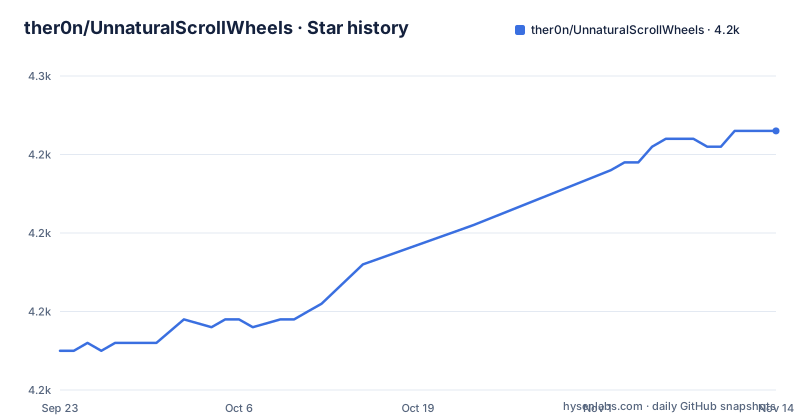
Star history
- ther0n/UnnaturalScrollWheels4,243 ★ · +28
| Repository | 2026-09-23 | 2026-11-14 |
|---|---|---|
| ther0n/UnnaturalScrollWheels | 4.2k | 4.2k |
28 Stars in the last 52 days, measured from the daily GitHub snapshot. Compare with other projects
Editorial analysis
The permission is the mechanism, not a warning label
The installation section says the app requires accessibility permissions to Control your computer, and explains why in one sentence: it is required to intercept scroll events, invert them and modify their deltas to disable acceleration and apply the settings.
That is three functions in one mechanism. Inversion is the visible behaviour. Delta rewriting is what removes scroll acceleration, and it is the part a user may not have asked for at all.
Because interception is mandatory rather than optional, there is no reduced-permission mode to fall back on. Either the app can see scroll events, in which case it can read the scroll direction and size of every scroll the system delivers, or it cannot and does nothing. The tree also carries an `AutoLauncher` directory.
The bug being fixed is a coupling in the settings panel
The stated problem is not that scrolling feels wrong. It is that macOS links two switches that live in two different panels: toggling Scroll direction: Natural under Mouse settings also changes it under Trackpad settings, even though the two are presented separately.
The README points at a Stack Exchange thread asking how to separate mouse and trackpad settings, and adds a dated note that most or all of the solutions there no longer work reliably, if at all, in Catalina. That sentence does a lot of work, since it is what justifies a separate application rather than a defaults write or a helper script.
It also dates the page. The compatibility note names Catalina, while the release that added support for a much newer macOS is version 1.4.0, titled with macOS Tahoe support and dated 2026-04-03. Whatever the behaviour was on Catalina is not evidence about the current system, and the repository offers no newer evidence either way.
The download link walks out of the repository
The manual install step is a numbered instruction that begins by telling you to download the latest disk image from the releases page. The link behind those words is a relative path, `/../../releases`, rather than a full address. It resolves when the README is rendered inside the repository and it breaks anywhere else the text is copied, which is exactly the case for anyone reading a packaged copy of the documentation.
The rest of the step is the standard drag-and-install routine: mount the image, copy the application bundle into the applications folder, open it like any other application.
Two things are absent from that routine. There is no note about code signing or notarisation, which is the part a user on a current macOS will hit first when a downloaded application is refused. And there is no build-from-source instruction anywhere in the README, even though the project is GPL-3.0 and ships an Xcode project in the tree. A licence that lets you read and modify the source does not tell you how to build it.
The cask is named in lower case, the application is not
The Homebrew route is one line:
brew install --cask unnaturalscrollwheelsThe cask slug is entirely lower case while the application and the Xcode project use CamelCase, so the string you type and the bundle you see are not the same string. That is normal for casks, and it is the kind of detail worth writing down once, because searching the README for the application name does not find the command.
More interesting is what the two install paths imply. A cask means Homebrew owns the upgrade path: a new release appears as a cask bump. A manually copied application means you own it, and the README says nothing about how to notice a new version or replace the bundle.
What neither path covers is removal. There is no uninstall section, no note about revoking the accessibility permission, and no mention of the login item, so the interesting half of removing this software is left to the reader.
Hiding the menu bar icon hides the settings with it
The usage section documents a small usability problem and its workaround in one paragraph. Once the app has been hidden from the menu bar, the preferences window is no longer reachable from anywhere visible, which is the sort of thing that makes people reinstall the same app twice.
The fix is to open the application again, which brings back both the preferences window and the menu bar icon, temporarily.
That is a deliberate design choice for an app whose only persistent presence would otherwise be an icon, and the reason it is documented at all is that the confusion is expected rather than exceptional.
A release named dev sits between two numbered ones
The release list has three entries and they do not share a naming scheme. Version 1.4.2 is dated 2026-08-03, version 1.4.0 is dated 2026-04-03 and carries its own note in the title, macOS Tahoe Support, and the third is named `dev` with the title Development Release, dated 2025-12-02.
A release identifier that is not a version is a useful signal for anyone automating an upgrade check, since there is nothing to compare against a semantic version. Only 1.4.0 carries a note in its release title.
There is no 1.4.1 in the list. The branch itself was pushed on 2026-08-03, the same day as the newest release, and the repository is not archived.
What the four directories do not tell you
The tree is small: a GitHub directory, a gitignore, the `AutoLauncher` directory, a licence, the README, a screenshots directory, the Xcode project and the application sources. There is no configuration file or package manifest at the top level.
The README does not state a minimum macOS version, does not say which devices it distinguishes, and does not say what happens with two mice attached at once or with an external trackpad. It does not explain what the settings window contains, only that opening the app shows it.
None of that makes the project wrong. It is a utility that does one thing, and the description on the repository says exactly that: invert scroll direction for physical scroll wheels while maintaining natural scrolling for trackpads. The gap is simply that everything a careful reader would want to check before installing an app with a control-your-computer permission is left to the person installing it.
Editorial conclusion
This is a small tool for a small, verifiable annoyance, and the annoyance is real: the operating system couples two settings that users expect to be separate. Before you install it, understand what you are granting. The app asks for the permission to control your computer, needs it to work at all, and uses it to intercept and rewrite scroll events on every scroll, which is a broader capability than the visible effect suggests. Also decide how you want updates, because the Homebrew cask and a manually copied app have different owners and the README does not compare them.
Frequently asked questions
Can I turn off natural scrolling for mouse only?
That is the problem this application exists for. macOS links the two directions, so changing Scroll direction: Natural under Mouse settings also changes it under Trackpad settings, and the app inverts physical wheel direction without touching the trackpad.
Is a scroll reverser safe?
This repository does not make a safety claim. What it states is that the app requires the accessibility permission to Control your computer in order to intercept scroll events, invert them and modify their deltas, and that the permission is required rather than optional.
Does UnnaturalScrollWheels disable scroll acceleration?
Yes, as a side effect. Modifying the deltas of intercepted scroll events is listed as one of the three things the app does, alongside intercepting and inverting them.
What alternatives to UnnaturalScrollWheels exist?
The repository names no alternative application. It links a Stack Exchange thread about separating mouse and trackpad settings instead, and notes there that most or all of the solutions described no longer work reliably, if at all, in Catalina.
How do I install UnnaturalScrollWheels without Homebrew?
Download the latest disk image from the releases page, mount it, copy the application into your applications folder and open it. The Homebrew alternative is one cask command, and the app needs accessibility permissions before it will do anything.
Official sources
Add this badge to your README
If you maintain this project, the badge below links readers to this analysis and shows its maintenance status from the daily GitHub snapshot. Paste the markdown into your README; add ?metric=license or ?metric=stars to the image URL for a different field.

[](https://hysenlabs.com/projects/ther0n-unnaturalscrollwheels)Star history chart for your README
[](https://hysenlabs.com/projects/ther0n-unnaturalscrollwheels)Was this useful?