QOwnNotes: a plain-text notepad that borrows your server's file sync
QOwnNotes is a plain-text file notepad and todo-list manager with Markdown support and Nextcloud / ownCloud integration.
At a glance
- What is it?
- QOwnNotes keeps every note as a plain-text Markdown file and lets Nextcloud, ownCloud, Syncthing or Dropbox move those files between machines. That design fits people who already run a server or another file sync tool.
- Who is it for?
- QOwnNotes earns its place on a machine that already runs Nextcloud or ownCloud, and it loses the moment you take that server away: version restore, trash restore and web to-do lists all depend on the QOwnNotes Nextcloud app (or QOwnNotesAPI on legacy servers) and the Tasks backend. People after a phone-only setup should read the Markor and WebDAV route instead.
- Can I use it commercially?
- Yes, with conditions. GPL-2.0 is a copyleft licence: if you distribute software that includes it, you must release that software's source code under the same licence. Running it internally without distributing it does not trigger that obligation.
- Is it still maintained?
- Yes. The repository received new commits within the last day.
- What is it written in?
- Mainly C++, according to GitHub's language statistics.
Answers come from the project's GitHub data, last synced on November 13, 2026, and from our analysis. They are not legal advice.
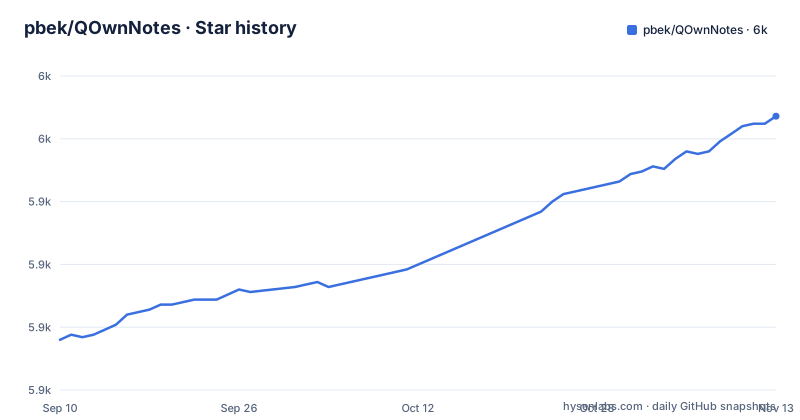
Star history
- pbek/QOwnNotes5,959 ★ · +89
| Repository | 2026-09-10 | 2026-11-13 |
|---|---|---|
| pbek/QOwnNotes | 5.9k | 6k |
89 Stars in the last 64 days, measured from the daily GitHub snapshot. Compare with other projects
Editorial analysis
Every note is a file, and the server only moves files
QOwnNotes stores each note as a plain text Markdown file, and sync is whatever file sync the machine already runs. With Nextcloud or ownCloud that is their Notes app and their file sync; the README also names Syncthing and Dropbox as substitutes, so a server is a convenience rather than a requirement for storage. That choice is what lets you keep the Markdown files you already have: you can use your existing text or markdown files, and an import is not needed most of the time. Multiple note folders are supported, so one vault can hold several directory trees. Note titles are not stored separately. A note takes its name from the first line of its text.
Two server apps decide what the desktop client can do
Restoring an older version of a note and restoring a trashed note both go through the QOwnNotes Nextcloud app on a Nextcloud server, with QOwnNotesAPI still supported for legacy Nextcloud and ownCloud servers. Without it the desktop client writes and edits notes and stops there. The split is the same for to-do lists: managing them in the web interface or on a phone needs the Tasks backend installed on the server, so the desktop todo list manager and the mobile task view are separate features resting on separate server apps. Deletion is the one part that works with nothing installed, and even that is a choice between local trash and system trash modes. Set the server side up first if you are moving an existing vault in, because the QOwnNotes Nextcloud app (or QOwnNotesAPI on a legacy server) is what makes history and trash recovery available at all.
Building from source runs through the justfile
Packaged builds are the normal route, and the project sends you to its own installation page and a Snap listing for them, plus a hosted web app for browser-only use. When you do build from source, the repository justfile is the entry point, and its default recipe only prints the recipe list.
just --listThe nix-build recipe builds the application through Nix, with KDE integration on Linux (qownnotes-qt6-kde) or plain Qt6 on macOS (qownnotes-qt6).
nix build '.?submodules=1#{{ nixBuildPackage }}'The same file drives the translation cycle, which is the part a user touches far more often than a packager does.
lrelease src/QOwnNotes.pro
./scripts/download_translations.sh
crowdin upload
Build configuration forks live in build-systems/, and CI definitions sit in appveyor/, gitlab-ci/, travis/ and ubuntu-launchpad/ beside the Snap recipe in snap/ and the OBS packaging in obs/. Aliases keep the commands short: test is src-test, fix-linting and linter-fix both run clang-format, and download-translations is translations-download. The licence is GPL-2.0, which is what governs a fork or a repackaged build of this source. On releases, the list shows v26.11.2 on 2026-11-01, a continuous build on 2026-11-02 and v26.11.3 on 2026-11-02, and the last push to main matches that date, so the upgrade question is how much churn a calendar-versioned release brings you rather than whether work is still landing.
The justfile itself flags the aarch64 build as broken
The same file shows how Linux-centric the automation is. Its transfer directory variable checks for `$HOME/NextcloudPrivate/Transfer` first and falls back to `$HOME/Nextcloud/Transfer`, and the two build directory variables are `build-QOwnNotes` and `build-tests-QOwnNotes`. The Nix build recipe picks a KDE-integrated package on Linux and plain Qt6 on macOS. The file also imports a shared recipe file, `.shared/common.just`; the justfile is not the whole build story.
Search is sub-string, and the filename follows your first line
The feature list gives you sub-string searching of notes with matches highlighted inside the note text. The naming rule is the other thing to understand before importing anything: a note gets its name from the first line of its text.
An edit from another program ends in a diff dialog
Two writers on one file is the normal state of affairs here, because the mobile apps, Syncthing and the desktop client all touch the same plain text. QOwnNotes watches note files for outside changes and reloads either the open note or the note list. What happens to the conflict is narrower: the documented behaviour is that the differences between the current note and the externally changed note are shown in a dialog. Custom keyboard shortcuts are configurable, including global shortcuts on Wayland, which is what you want on a desktop where the file is being rewritten underneath the window.
The checking tools are separate programs you install yourself
The editor layer is the most modular part. Spellchecking is built in, while LanguageTool, Harper and Markdown LSP are optional, and the project names the tools it expects instead of shipping them: Marksman for completions and diagnostics, Rumdl for linting. A clean setup therefore keeps the note as a text file and points separate programs at it. Note linking follows the wiki convention with `[[Note]]` syntax, auto-completion, heading anchors, aliases, backlinks and refactoring, which is the feature that changes how you write most compared with a bare Markdown editor. The preview renders inline images, folds headings, and you can hide the formatting syntax while typing. Scripting extends it further, with scripts installable from the project script repository, and the built-in AI support expects providers such as OpenAI and Groq through script integration. A built-in MCP server lets external agents search and fetch notes, which is the one item on this list that puts a network service and your note text in the same conversation, so it deserves a look before you switch it on.
Markor, neutriNotes and WebDAV sidestep the Notes app entirely
QOwnNotes is not the only way to reach notes living in a Nextcloud folder. On Android the project offers its own app as the default and lists MyOwnNotes for ownCloud and Notes for Nextcloud from F-Droid, plus CloudNotes for iOS. Further down the same list it describes a different approach: sync the note files with a tool such as Synchronize Ultimate or FolderSync and edit them in neutriNotes or Markor, and on iOS use Notebooks over WebDAV. That route never loads the server Notes app and never installs the QOwnNotes Nextcloud app or QOwnNotesAPI, so version history and trash recovery are simply not in the picture. QOwnNotes earns its keep when you want the desktop Markdown editor, the todo manager and server-side version restore in one application. Markor and Notebooks win when you want a file editor and nothing else. The hosted web app and the Tor hidden service the project publishes cover the browser-only case.
Editorial conclusion
QOwnNotes earns its place on a machine that already runs Nextcloud or ownCloud, and it loses the moment you take that server away: version restore, trash restore and web to-do lists all depend on the QOwnNotes Nextcloud app (or QOwnNotesAPI on legacy servers) and the Tasks backend. People after a phone-only setup should read the Markor and WebDAV route instead. Before importing an existing vault, open one note and confirm that naming notes from their first line behaves the way you want.
Frequently asked questions
How do you install QOwnNotes on Linux, macOS or Windows?
The project points at its own installation page for packaged builds and publishes a Snap listing, plus a hosted web app for browser-only use. Building from source goes through the repository justfile, where the default recipe is just --list and the nix-build recipe builds qownnotes-qt6-kde on Linux or qownnotes-qt6 on macOS.
Is QOwnNotes safe to keep private notes in?
Notes stay as plain text files on your disk and are synced through your own Nextcloud or ownCloud instance, and the repository is GPL-2.0 with a PRIVACY.md at its root. The built-in AI support works with providers such as OpenAI and Groq through script integration, and the built-in MCP server lets external AI agents search and fetch notes.
Is QOwnNotes a good choice for a Markdown notepad?
It suits people who already keep notes as files and run their own server, since the desktop client, the mobile apps and the server-side version history are designed as one set. It will not suit someone starting from nothing, because task handling and history restore each need an app installed on the server first.
What alternatives to QOwnNotes work on the same note files?
The project lists MyOwnNotes for ownCloud and Notes for Nextcloud on Android, CloudNotes for iOS, and a route that skips the Notes app by syncing note files with Synchronize Ultimate or FolderSync and editing them in neutriNotes or Markor, or using Notebooks over WebDAV on iOS.
Official sources
Add this badge to your README
If you maintain this project, the badge below links readers to this analysis and shows its maintenance status from the daily GitHub snapshot. Paste the markdown into your README; add ?metric=license or ?metric=stars to the image URL for a different field.

[](https://hysenlabs.com/projects/pbek-qownnotes)Star history chart for your README
[](https://hysenlabs.com/projects/pbek-qownnotes)Was this useful?