RQ: one worker command, a scheduler you start yourself, and a Redis 5 floor
Simple job queues for Python
At a glance
- What is it?
- RQ is a Python library that pushes function calls onto Redis or Valkey and runs them in worker processes. The mechanics that decide whether your jobs actually run are the queue names on the worker command line, the separate scheduler process, and a server version requirement stated as Redis 5 or Valkey 7.2.
- Who is it for?
- RQ fits small to mid-sized Python applications that want background work without a broker service beyond a Redis or Valkey server, and that are content to run at least two processes, a worker and, if they schedule anything, a scheduler. It is a poor fit if you cannot upgrade a Redis 4 deployment, since the library requires Redis 5 or Valkey 7.2, or if you rely on the repository's Dockerfile to schedule your jobs, because its entrypoint runs rq worker with no scheduler.
- Can I use it commercially?
- Check first. The repository uses a licence we do not classify automatically, so read its LICENSE file before any commercial use.
- Is it still maintained?
- Yes. The repository received new commits within the last day.
- What is it written in?
- Mainly Python, according to GitHub's language statistics.
Answers come from the project's GitHub data, last synced on November 14, 2026, and from our analysis. They are not legal advice.
Star history
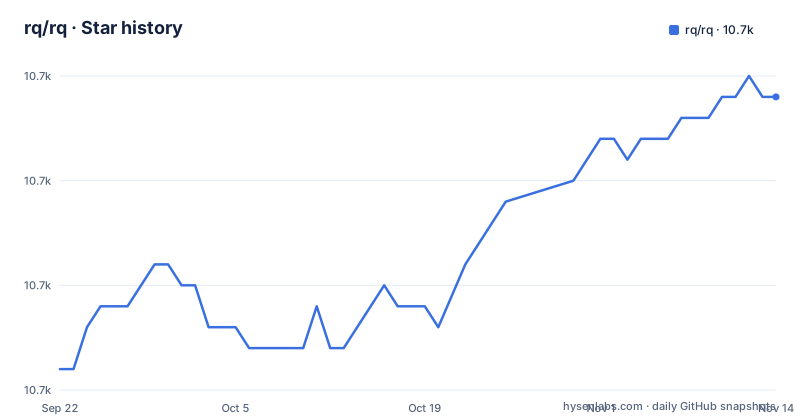
- rq/rq10,704 ★ · +13
| Repository | 2026-09-22 | 2026-11-14 |
|---|---|---|
| rq/rq | 10.7k | 10.7k |
13 Stars in the last 53 days, measured from the daily GitHub snapshot. Compare with other projects
Editorial analysis
Redis 5 or Valkey 7.2 is a floor, not a suggestion
The stated requirement is explicit and it is the first constraint you hit:
RQ requires Redis >= 5 or Valkey >= 7.2.
The dependency list pins the Python client separately:
dependencies = [ "click>=5", "croniter", "redis>=5.0.1" ]Three things sit in that list and each has a job. redis is the Python client library, and its 5.0.1 floor applies to the client package, separate from the server requirement. croniter is the parser behind the cron expressions you register, so the scheduling feature has its own dependency rather than reusing something. click builds the command line behind the rq command.
The consequence for a reader is about your existing infrastructure. An application on a Redis older than 5 has to upgrade the server before using the library. On the Python side pyproject.toml sets requires-python to >=3.10 and the classifiers run from 3.10 through 3.15, so the interpreter floor is a second hard gate before the server one.
A bare rq worker only listens on default, so named queues need the name
Priority in RQ comes from two mechanisms, and both depend on how the worker was started.
The first is position within one queue:
job = queue.enqueue(count_words_at_url, 'https://stamps.id', at_front=True)The second is separate named queues:
high_priority_queue = Queue('high', connection=Redis())
low_priority_queue = Queue('low', connection=Redis())

# This job will be picked up before jobs in the low priority queue
# even if it was enqueued later
high_priority_queue.enqueue(urgent_task)
low_priority_queue.enqueue(non_urgent_task)
The worker is what ties the two together, because the names have to be given to it:
$ rq worker high lowThat starts a worker listening to both queues and processing high first. The failure mode for a reader is specific: a worker started with no queue names listens only on default, which is the queue name printed in the worker banner. Jobs enqueued into Queue('high', ...) then sit in Redis with nothing consuming them, and nothing in the enqueue call raises an error, because the enqueue succeeded. Either pass the names on the command line or run one worker per queue, which is also how you scale each queue independently.
RateLimit caps concurrent jobs on a key and says nothing about speed
Concurrency-based rate limits arrived in 2.11.0, and the shape is one line:
from rq import RateLimit

queue.enqueue(generate_report, rate_limit=RateLimit(key='reports', concurrency=2))
Jobs sharing the key reports are limited to two running at a time. That is the whole mechanism, and the distinction matters when you are choosing between this and a retry with an interval. A concurrency limit bounds simultaneous work; it does not express jobs per second or per minute, and it does not add a delay between runs. Two report generators running at once and two report generators queued one after the other are the same thing to this setting.
The practical consequence is about how it interacts with your worker count. Since the ceiling is on concurrent execution of jobs sharing a key, raising it above the number of workers you run changes nothing, and a queue drained by a single worker never reaches the limit at all. If you wanted a throttle, you need something that expresses time, and the interval lists on Retry and Repeat are the part of RQ that carry time.
The published image runs rq worker and starts no scheduler
The Dockerfile is six lines and the last one decides what the image does:
FROM python:3.10

WORKDIR /root

COPY . /tmp/rq

RUN pip install /tmp/rq

RUN rm -r /tmp/rq

ENTRYPOINT ["rq", "worker"]
The image copies the tree to /tmp/rq, installs it with pip, deletes the source, and hands control to a worker. Three consequences follow. First, no scheduler is started, so the interval and cron registrations the library supports since 2.5 do nothing until you override the entrypoint with `rq cron` and a configuration file. A container that looks healthy and runs no scheduled jobs is the expected behaviour of this image as written. Second, the base is python:3.10, the floor the package declares, so the image is not exercising the 3.11 to 3.15 range its classifiers claim to support. Third, WORKDIR is /root while the package is installed from a removed temporary path, so any relative path your job code relies on has to exist under /root or be absolute.
Cron schedules live in a Python file that a separate process executes
Scheduling since 2.5 works by registering callables in a Python file and running a second process that reads it. The registrations look like this:
from rq import cron
from myapp import send_newsletter, backup_database

# Database backup every day at 3:00 AM
cron.register(
    backup_database,
    queue_name='maintenance',
    cron='0 3 * * *'
)
The interval form takes seconds instead of an expression, so a cleanup every thirty minutes is interval=1800 and a report every six hours is interval=21600, each with its own queue_name. The file is then run by its own command:
$ rq cron cron_config.pyThe design has consequences worth stating. Your schedule is code, so changing a time is a code change and a redeploy rather than a configuration edit, and the registration file is imported and executed, meaning anything at module level in it runs in the scheduler process. The scheduler is also not the worker, so an application with scheduled jobs needs two long-running processes, and the queue_name in each registration decides which worker has to be running for that job to be picked up.
Retries without an interval requeue immediately, repeats wait for success
Retry and Repeat are separate parameters with separate defaults.
# Retry up to 3 times, failed job will be requeued immediately
queue.enqueue(say_hello, retry=Retry(max=3))

# Retry up to 3 times, with configurable intervals between retries
queue.enqueue(say_hello, retry=Retry(max=3, interval=[10, 30, 60]))
Retry(max=3) with no interval requeues the moment it fails, so a job pointed at a service that is down retries three times in immediate succession and then stops. The interval list is what spaces the attempts, and the length of that list lines up with the number of retries.
Repeat behaves differently, and the comment on the first example is the important part:
# Repeat job 3 times after successful execution, with 30 second intervals
queue.enqueue(my_function, repeat=Repeat(times=3, interval=30))

# Repeat job 3 times with different intervals between runs
queue.enqueue(my_function, repeat=Repeat(times=3, interval=[5, 10, 15]))
Repeats follow a successful execution, so a job that fails and exhausts its retries does not repeat, and a job with no retry policy at all fails once and stops. That is the pairing to remember when you want a task retried until it succeeds versus run again on a schedule after it worked.
Unique jobs are opt-in and keyed on a job_id you write yourself
Duplicate suppression takes a key you supply and a flag you opt into:
job = queue.enqueue(send_email, user_id, job_id='welcome-42', unique=True)Two properties follow. The uniqueness is not on by default, you opt in with unique=True. And the deduplication key is the job_id string you pass.
Notifications follow the same pattern of opt-in behaviour, with per-status webhooks instead of a callback function:
from rq import Webhook

queue.enqueue(
    say_hello,
    webhooks=[
        Webhook('https://example.com/finished', job_status='finished'),
        Webhook('https://example.com/failed', job_status='failed', method='POST'),
    ],
)
Each webhook carries a job_status, and the method is selectable, so a finished notification and a failed notification go to different endpoints. The same mechanism is accepted by cron.register, which is how a scheduled run reports itself to a monitoring endpoint without a wrapper function.
The Makefile releases with python setup.py while pyproject declares hatchling
The build backend and the release target disagree, and it is visible in two files.
pyproject.toml sets the backend explicitly:
[build-system]
build-backend = "hatchling.build"
requires = [ "hatchling" ]
The Makefile releases through setup.py instead:
force_release: clean
	git push --tags
	python setup.py sdist bdist_wheel
	twine upload dist/*
There is no setup.py among the repository's top-level entries, so the command the release path runs is not a file that ships with the project, and do not treat `make force_release` as a path you can copy. The release target in front of it asserts that the highest tag points at HEAD, built from `git tag | sort -nr | head -n1` and `git sha`, so the tag check and the build step are separate concerns.
Testing is also containerised rather than local:
test:
	docker build -f tests/Dockerfile . -t rqtest && docker run -it --rm rqtest
That builds a separate image from tests/Dockerfile and runs it interactively, and lint is a single ruff invocation over the rq and tests directories. Expect to have Docker available before running the suite.
Editorial conclusion
RQ fits small to mid-sized Python applications that want background work without a broker service beyond a Redis or Valkey server, and that are content to run at least two processes, a worker and, if they schedule anything, a scheduler. It is a poor fit if you cannot upgrade a Redis 4 deployment, since the library requires Redis 5 or Valkey 7.2, or if you rely on the repository's Dockerfile to schedule your jobs, because its entrypoint runs rq worker with no scheduler. Before deploying, check three things: that the workers are started with the same queue names your code enqueues into, since a bare worker only listens on default; that your Python is 3.10 or newer and your server meets the stated floor; and that retries carry an interval list, because a Retry without one requeues immediately. The latest release is v3.0 (2026-10-28), followed by v2.12 (2026-08-30) and v2.11 (2026-08-17), and the last push was on 2026-11-02.
Frequently asked questions
what does rq stand for
RQ stands for Redis Queue. It is described as a simple Python library for queueing jobs and processing them in the background with workers, backed by Redis or Valkey.
What does RQ mean in messages?
In this repository RQ is not an abbreviation used in chat at all. It is a job queue library that installs an rq console command and includes a Dockerfile whose entrypoint is rq worker.
what does rq mean
It means the Redis Queue library, and it comes with version requirements attached: RQ requires Redis >= 5 or Valkey >= 7.2, and the package declares requires-python >=3.10 with classifiers running from Python 3.10 to 3.15.
Official sources
Add this badge to your README
If you maintain this project, the badge below links readers to this analysis and shows its maintenance status from the daily GitHub snapshot. Paste the markdown into your README; add ?metric=license or ?metric=stars to the image URL for a different field.

[](https://hysenlabs.com/projects/rq-rq)Star history chart for your README
[](https://hysenlabs.com/projects/rq-rq)Was this useful?