TouchSocket: one .NET API over TCP, HTTP, MQTT, RPC and industrial protocols
TouchSocket is an integrated .NET networking framework that includes modules for socket, TCP, UDP, SSL, named pipes, HTTP, WebSocket, RPC, and more. It offers a one-stop solution for TCP packet issues and enables quick implementation of custom data message parsing using protocol templates.
At a glance
- What is it?
- TouchSocket is an Apache-2.0 licensed C# networking framework that puts TCP, UDP, WebSocket, HTTP, MQTT, Modbus, RPC, MCP and more behind a single ConnectAsync, SendAsync and Received surface, with protocol templates for data adapters, a plugin system, a memory pool and source generators. The open TouchSocket.* packages are free for commercial use, while a TouchSocketPro.* line is sold separately.
- Who is it for?
- Adopt TouchSocket if you are building a .NET service that speaks more than one protocol, or one custom framed protocol, and you want to stop writing framing and reconnection code for each transport, since the adapter templates and the plugin system are where the effort is. Do not adopt it for a single simple TCP client or an HTTP API, where the built-in framework and the BCL already do the job with less to learn.
- Can I use it commercially?
- Yes. Apache-2.0 is a permissive licence: you can use, modify and sell software built on it, as long as you keep its copyright and licence notices.
- Is it still maintained?
- Yes. The repository last received commits 14 days ago.
- What is it written in?
- Mainly C#, according to GitHub's language statistics.
Answers come from the project's GitHub data, last synced on November 7, 2026, and from our analysis. They are not legal advice.
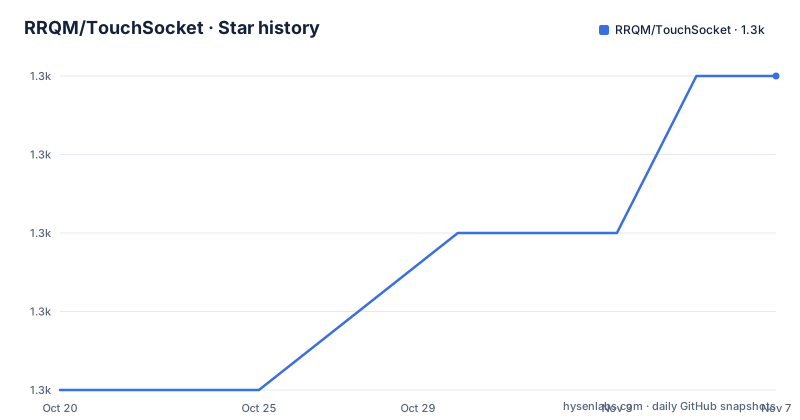
Star history
- RRQM/TouchSocket1,289 ★ · +4
| Repository | 2026-10-20 | 2026-11-07 |
|---|---|---|
| RRQM/TouchSocket | 1.3k | 1.3k |
4 Stars in the last 18 days, measured from the daily GitHub snapshot. Compare with other projects
Editorial analysis
One API surface over many transports
TouchSocket is an integrated .NET networking framework that includes modules for socket, TCP, UDP, SSL, named pipes, HTTP, WebSocket, RPC and more, and the README describes it as offering a one-stop solution for TCP packet issues and enabling quick implementation of custom data message parsing using protocol templates.
The thirty-second overview in the README is the clearest statement of the design. It is an integrated .NET networking framework covering TCP, UDP, WebSocket, HTTP, MQTT, Modbus, RPC, MCP and more, shipping with a memory pool, a data-adapter pipeline, a plugin system, DI and Hosting integration, and source generators. And the pitch is a unified API: whether you are building a TCP server, an industrial device gateway, or an AI tool based on MCP, TouchSocket provides a unified API to get there quickly.
The unified API row is the heart of it. TCP, UDP, WebSocket, NamedPipe and SerialPort all use `ConnectAsync`, `SendAsync` and `Received`. That is a smaller promise than it first looks, because a TCP socket and a serial port have almost nothing in common at the protocol level, and the unification is at the client and server lifecycle rather than at the wire format. What you gain is that reconnection, heartbeats, SSL and logging are configured the same way for every transport, and that swapping a TCP transport for a named pipe does not rewrite your application logic.
The target user is a .NET developer with a service that has to talk to several kinds of peer: a device gateway speaking Modbus, a web service speaking HTTP, an internal service speaking RPC, and a messaging bus speaking MQTT. The alternative to adopting the framework is exactly that, four codebases with four sets of reconnection handling.
The primary language is C#, the licence is Apache-2.0, the homepage is touchsocket.net, and the last push to the `master` branch was on 2026-10-11 with the repository not archived. The documentation links a documentation home, a getting started page, an API reference and a video course.
Data adapters: the answer to TCP packet problems
Most of the difficulty in socket programming is not the socket. It is that a stream of bytes has no messages in it, and every protocol has its own idea of where a message begins and ends.
TouchSocket's answer is the data adapter, and the capability table describes it as fixed-header, fixed-length, terminator, HTTP and WebSocket templates, hot-swappable, with automatic sticky and fragmented packet handling.
That list covers the shapes almost every binary protocol uses. A fixed header carries a length field, so the adapter reads the header and then exactly that many bytes. A fixed length means every message is the same size, which is what a lot of sensor protocols do. A terminator means a delimiter ends the message, which is what line based protocols use. HTTP and WebSocket have their own framing, and the framework already knows it.
Sticky and fragmented packet handling is the part that is hardest to get right by hand, and it is where most of the bugs in a socket application live. A sticky packet is several messages arriving in one read, and a fragmented packet is one message split across several reads. A naive implementation handles the happy path and corrupts data in both cases. An adapter that handles them automatically removes an entire category of intermittent bug.
Hot-swappable is the part that makes the templates worth having. Swapping the adapter changes the framing without changing the rest of the application, so a device that changes its protocol version, or a service that has to speak two dialects of the same protocol, is a configuration change rather than a rewrite.
The framing templates are also the fastest way to add a protocol the framework does not ship. You describe where the message boundaries are, and the connection, the plugin chain and the handler code stay the same. For a team that maintains several private protocols, that is the part of the framework that pays for itself.
The plugin system is where the behaviour lives
The plugin system is described as covering reconnection, heartbeat, SSL, authentication and logging via `.ConfigurePlugins()` across the full communication lifecycle, and it is the extension mechanism for everything that is not framing.
The quick start shows how small the surface is:
client.ConfigurePlugins(a => a.UseReconnection<TcpClient>());That one line attaches automatic reconnection to a client, and the same pattern applies to the other behaviours. The plugin runs inside the connection's lifecycle, which is why the phrase across the full communication lifecycle matters: a plugin is not a wrapper you call, it is part of the connection state machine, and that is what lets reconnection and heartbeat interact correctly rather than fighting each other.
The other consequence is that the same configuration works for every transport. A heartbeat plugin is a heartbeat plugin whether the peer is reached over TCP, a named pipe or a serial port, and a reconnection policy is written once.
The source generators are the related piece. The capability table lists them as AOT-friendly generation for RPC proxies, serialization, dependency properties and plugin raises. Generation rather than reflection matters for two reasons. It keeps the library compatible with Native AOT and trimming, which matters for serverless and container workloads, and it moves the cost of building an RPC proxy or a serializer to build time rather than to the first request.
The dependency injection adapters, `TouchSocket.Core.DependencyInjection` and `TouchSocket.Core.Autofac`, and the `TouchSocket.Hosting` package for the generic host, complete the picture. This is a framework that expects to live inside a modern .NET application with the host and the container, not to be used as a standalone socket helper.
The memory pool and the copy argument
The performance section makes one argument, and it is the argument about copies.
The comparison table puts traditional IOCP with a fixed buffer on one side, where received data must be copied again, with extra overhead under load, and TouchSocket IOCP on the other, where receives go directly into a memory-pool block, with zero extra copies and a significant gain at scale. The stress test figure given is 100k messages of 64KB, with up to roughly ten times the throughput of traditional implementations, and a separate figure for named pipes, where simple send and receive reaches 6.5 Gb/s, about three times faster than TCP, with negligible garbage collection.
The mechanism is straightforward once stated. A `ByteBlock` is rented from the memory pool, the receive writes into that block, and the block returns to the pool when the handler is done with it. The alternative, a fixed buffer plus a copy into a per-request array, allocates and copies on every message.
Those numbers are the project's own stress test results, and the README is specific about the shape of the test, 100k messages of 64KB, which is the right level of detail to want. What it does not tell you is the latency distribution or the behaviour with a slow handler, and those are the numbers that decide whether a design works for a given workload. A pool of blocks also has a cost: the blocks stay resident, so the memory footprint of the pool is part of your process budget.
The named-pipe figure is the more interesting one for many .NET developers, because on Windows a named pipe between processes on one machine is often faster than a loopback socket, and the framework treats it as a first-class transport rather than an afterthought.
The open packages and the commercial line
The package table is long, and it is the clearest picture of what the framework covers. The core package `TouchSocket.Core` holds the memory pool, ByteBlock, the adapter base, IOC, logging, plugins and serialization. `TouchSocket` is the transport package with TCP, UDP, SSL, KCP, NAT, a waiting client, and sticky and fragment handling. Around those sit `TouchSocket.NamedPipe`, `TouchSocket.SerialPorts`, `TouchSocket.AspNetCore`, `TouchSocket.Hosting`, `TouchSocket.Http`, `TouchSocket.WebApi` with Swagger, and `TouchSocket.SocketIo` for the Socket.IO client at versions 3 and 4.
The RPC family is `TouchSocket.Rpc` for registration, dispatch, execution and invocation, `TouchSocket.Dmtp` for the DMTP protocol with RPC, file transfer, channels, routing and Redis, and `TouchSocket.JsonRpc` and `TouchSocket.XmlRpc`.
The industrial and IoT group is where the framework's niche is clearest: `TouchSocket.Modbus` as an RTU, ASCII and TCP master, `TouchSocket.Mqtt` as server and client, `TouchSocket.Semi` for the HSMS and SECS-II semiconductor protocols, `TouchSocket.CoAP` over UDP, and `TouchSocket.Redis` as a client with an in-memory compatible server.
And the AI package, `TouchSocket.Mcp`, is an MCP server and client over stdio and Streamable HTTP, which is what the README means by an AI tool based on MCP.
The licensing splits the catalogue in two. All NuGet packages starting with `TouchSocket.` are fully open-source and free for personal and commercial use, and the `TouchSocketPro.` line requires a commercial license. The `TouchSocket.*` packages are also licensed under Apache License 2.0 as a whole, and the `TouchSocketPro.*` line is commercially licensed.
That means the boundary for a commercial user is a package list, not a feature list. If the capability you need is in the open line, there is no licence question at all.
The quick start: a server, a client and one plugin
Installing the framework is a single package reference:
dotnet add package TouchSocketA minimal TCP server is short enough to take in at a glance. You create a `TcpService`, assign a `Received` handler that returns a completed task, and start the service on a port:
var service = new TcpService();
service.Received = (client, e) =>
{
    Console.WriteLine($"Received: {e.Memory.Span.ToString(Encoding.UTF8)}");
    return EasyTask.CompletedTask;
};
await service.StartAsync(7789);
The client mirrors it, connecting to an address and sending a string:
var client = new TcpClient();
client.Received = (c, e) =>
{
    Console.WriteLine(e.Memory.Span.ToString());
    return EasyTask.CompletedTask;
};
await client.ConnectAsync("127.0.0.1:7789");
await client.SendAsync("Hello");
The `Received` signature is where the memory model shows through. The handler receives a `Span` over the received memory, and returns a task, so a handler that needs to do asynchronous work simply returns a task that continues later, and the framework will not recycle the block until the task completes.
Automatic reconnection is then one line, shown earlier as `client.ConfigurePlugins(a => a.UseReconnection<TcpClient>())`.
Multi-targeting is the other thing to know before you start. The capability table lists .NET Framework 4.6.2, .NET Standard 2.0, and .NET 6, 8 and 10, which means the same package works in a long-lived on-premises service and in a current cloud workload, and that a library you build on top of it can target the same range. The examples directory covers the same ground, with sample projects for Adapter, Avalonia, Core, Dmtp, Hosting, Http, JsonRpc, Mcp, Modbus, Mqtt, MqttRpc, NamedPipe, NatService, PlcBridges, Redis, Rpc, Semi, Serial, Ssh and SSL certificates.
Where TouchSocket is the wrong tool
There are three cases where this framework is more than you need, and the first is the most common.
The first is a single transport with a simple protocol. If you are writing one TCP client that reads length-prefixed frames from a device, the framework's value is the adapter template, and the cost is learning the plugin model, the data adapter configuration and the package layout. .NET's own `Socket` and `NetworkStream` with a `BinaryReader` is a hundred lines and no new concepts.
The second is when your protocol is HTTP and nothing else. `TouchSocket.Http` and `TouchSocket.WebApi` exist and are well built, but ASP.NET Core's Kestrel is a full framework with routing, middleware, auth and hosting, and the reason to leave it is usually not the socket layer.
The third is a hard real-time or embedded requirement where you need to control the socket directly, or a platform the multi-target list does not cover.
There is also a versioning question to raise, and it is factual. The repository's release list shows a single tag, v4.0.6 from 2021-04-06, while the branch has been pushed as recently as 2026-10-11. The NuGet badge and the API reference on the documentation site are the current source of truth, and the tag list in the repository is not.
The alternative approach, for comparison, is composing the pieces yourself: `System.Net.Sockets` for the transport, `System.IO.Pipelines` for the framing, `Microsoft.Extensions.Hosting` for the lifecycle, and a Polly or resilience library for reconnection. The difference in approach is that the hand-built version is a set of components you own and can read line by line, while the framework version is a set of components you configure through a DSL whose behaviour you learn once and reuse across twenty protocols. The hand-built route is cheaper to start and more expensive to grow into, and the framework route is the opposite, which is why the decision depends on how many protocols you are going to speak.
Editorial conclusion
Adopt TouchSocket if you are building a .NET service that speaks more than one protocol, or one custom framed protocol, and you want to stop writing framing and reconnection code for each transport, since the adapter templates and the plugin system are where the effort is. Do not adopt it for a single simple TCP client or an HTTP API, where the built-in framework and the BCL already do the job with less to learn. Verify three things first: that the target runtime is in the supported multi-target list, which runs from .NET Framework 4.6.2 through .NET 10, that the protocol you need is in the open `TouchSocket.*` line rather than the commercially licensed `TouchSocketPro.*` line, and that the version you resolve from NuGet is the one whose documentation you are reading, because the only tag in the repository history is from 2021 while the branch has moved a long way since.
Frequently asked questions
What does the TouchSocket framework cover?
It covers TCP, UDP, WebSocket, HTTP, MQTT, Modbus, RPC, MCP and more, with all of them using ConnectAsync, SendAsync and Received. It ships a memory pool, a data-adapter pipeline, a plugin system, DI and Hosting integration and source generators.
How do data adapters solve TCP packet problems in TouchSocket?
The data adapter provides fixed-header, fixed-length, terminator, HTTP and WebSocket templates, and the templates are hot-swappable. The adapter handles sticky and fragmented packets automatically, which is the class of bug where several messages arrive in one read or one message is split across reads.
How do I enable automatic reconnection in TouchSocket?
With a plugin on the client, for example `client.ConfigurePlugins(a => a.UseReconnection<TcpClient>())`. The plugin system covers reconnection, heartbeat, SSL, authentication and logging across the connection lifecycle, and the same configuration applies to every transport.
Is TouchSocket free for commercial use?
All NuGet packages starting with TouchSocket. are fully open-source and free for personal and commercial use, and the project as a whole is licensed under the Apache License 2.0. The TouchSocketPro. line is commercially licensed and sold separately.
Which runtimes does TouchSocket target?
The capability table lists .NET Framework 4.6.2, .NET Standard 2.0 and .NET 6, 8 and 10, so the same package works in long-lived on-premises services and current cloud workloads. It is installed with `dotnet add package TouchSocket`.
Official sources
Add this badge to your README
If you maintain this project, the badge below links readers to this analysis and shows its maintenance status from the daily GitHub snapshot. Paste the markdown into your README; add ?metric=license or ?metric=stars to the image URL for a different field.

[](https://hysenlabs.com/projects/rrqm-touchsocket)Star history chart for your README
[](https://hysenlabs.com/projects/rrqm-touchsocket)Was this useful?