BotSharp is a .NET agent framework with 37 plugins, and its quick start clones a different organization
Project brief: AI Multi-Agent Framework in .NET. Out-of-the-box machine learning algorithms allow ordinary programmers to develop artificial intelligence applications faster and easier.
At a glance
- What is it?
- SciSharp/BotSharp is an Apache 2.0 C# framework for building chat and agent applications, with a core kernel of 11 modules and 37 plugins split across storage, LLM, messaging, RAG, vision, tool, and UI categories. The quick start in the README points at another GitHub organization, and the admin UI it calls built in lives in its own repository.
- Who is it for?
- BotSharp suits a .NET team that wants message channels, LLM providers, and tool handlers to be swappable rather than hard-coded, and the plugin split is real enough to be worth that choice. What the documentation does not settle is the adoption surface.
- Can I use it commercially?
- Yes. Apache-2.0 is a permissive licence: you can use, modify and sell software built on it, as long as you keep its copyright and licence notices.
- Is it still maintained?
- Yes. The repository last received commits 2 days ago.
- What is it written in?
- Mainly C#, according to GitHub's language statistics.
Answers come from the project's GitHub data, last synced on November 15, 2026, and from our analysis. They are not legal advice.
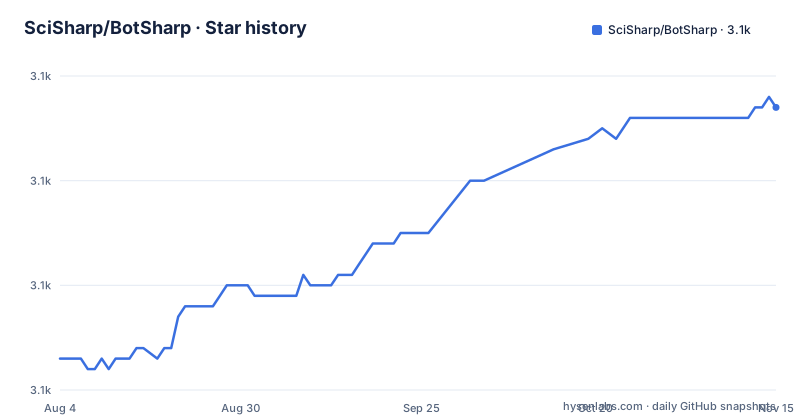
Star history
- SciSharp/BotSharp3,117 ★ · +24
| Repository | 2026-08-04 | 2026-11-15 |
|---|---|---|
| SciSharp/BotSharp | 3.1k | 3.1k |
24 Stars in the last 103 days, measured from the daily GitHub snapshot. Compare with other projects
Editorial analysis
The quick start clones a dotnetcore path, and the license badge points at a third one
The repository is `SciSharp/BotSharp`. The first line of the quick start is not:
PS D:\> git clone https://github.com/dotnetcore/BotSharp
PS D:\> cd BotSharp
# For Windows
PS D:\BotSharp\> dotnet run --project .\src\WebStarter\WebStarter.csproj -p SolutionName=BotSharp
# For Linux
$ dotnet run --project ./src/WebStarter/WebStarter.csproj -p SolutionName=BotSharp
Two organizations appear in that snippet and the README: `dotnetcore` for the clone, and `Oceania2018` for the license badge, which renders from `raw.githubusercontent.com/Oceania2018/BotSharp/master/LICENSE`. Everything else in the file, from the NuGet package link to the CI badge, points at `SciSharp`. So the project has been moved between organizations at least twice, and the two most-copied lines were not updated.
A third-party path shows up as well. The LiteDB storage plugin is not linked inside this repository; it points at a branch on a fork, `GreenShadeZhang/BotSharp` on `dev_litedb`, so one of the four storage backends is documented by reference to somebody else's clone.
The Linux and Windows forms of the run command differ only in path separators, which is the one thing in this block that is not surprising.
The SvelteKit admin UI is called built-in, then cloned from a second repository
The feature list advertises a built-in BotSharp UI written in SvelteKit. The quick start then treats it as a separate project:
PS D:\> git clone https://github.com/SciSharp/BotSharp-UI
PS D:\> cd BotSharp-UI
PS D:\> npm install
PS D:\> npm run dev
So the front end is a Node project in another repository, and the phrase built-in describes the experience rather than the packaging. There is also a `BotSharp.Plugin.ChatbotUI` in the plugin inventory, which is the in-repository chat surface, and the two are not the same thing.
After starting both halves the README says to open `http://localhost:5015/`. That port belongs to the SvelteKit dev server, since the backend command shown above passes only `-p SolutionName=BotSharp` and names no port at all, so nothing in the documented flow states where the .NET service listens or how the UI is told to reach it.
There is also a hosted demo link carrying a `wt.mc_id` tracking parameter, alongside a Discord invite and a QQ group link, so community entry points are marketing-tracked while the local path is not fully specified.
Eleven LLM plugins sit behind six model names in the feature list
The feature line names ChatGPT 3.5, 4o and o1, Gemini 2, LLaMA 3, Claude Sonnet 3.5, DeepSeek V3, and HuggingFace. The LLM plugin section carries eleven entries: `BotSharp.Plugin.Planner`, `AzureOpenAI`, `OpenAI`, `AnthropicAI`, `DeepSeekAI`, `GoogleAI`, `MetaAI`, `HuggingFace`, `LlamaSharp`, `SemanticKernel`, and `SparkDesk`.
Three of those eleven are not represented in the feature sentence. `SemanticKernel` is a whole orchestration library rather than a model endpoint, `SparkDesk` is a provider the README never names in prose, and `LlamaSharp` is a local runtime binding. `Planner` is not a provider either; it sits in the same list as the vendors, which tells you the category is really the LLM extension point rather than a set of model choices.
The named models are also a generation behind. Claude Sonnet 3.5, Gemini 2, and LLaMA 3 are what the feature line advertises, while the repository was last pushed on 2026-09-29. Anyone picking a provider from that list is picking from a snapshot of the prose, not from the plugin surface.
Release tags are named after features, and the newest one predates the last push by a year
The three most recent releases are `r5.2-image-composition` on 2025-10-17, `r5.1-utility-improment` on 2025-06-27, and `r5.0-mcp` on 2025-04-05.
Two things follow from those three names. The version is not a bare number; each tag carries the feature it shipped, which is why `r5.0-mcp` and `r5.2-image-composition` cannot be compared as semver without reading them. And `utility-improment` is a misspelling of improvement, baked into a published tag, which is the kind of detail that outlives a rename.
The more useful observation is the gap. The newest tag is dated 2025-10-17, while the master branch was last pushed on 2026-09-29. Almost a year of commits sits on the branch without a corresponding release, so a consumer pinning to the newest tag is pinning to code that predates everything in the branch, including whatever the image composition release was building towards.
For a framework whose plugins are versioned in the same repository, that gap is the practical cost of consuming by tag instead of by commit.
The repository root holds two solution files and an interface outside any project
The top level of the tree is `BotSharp.sln`, `PizzaBot.sln`, `Directory.Build.props`, `Directory.Packages.props`, `IFunctionExecutor.cs`, `CONTRIBUTING.md`, `README.md`, plus `src/`, `tests/`, `docs/`, `dockerfiles/`, `arts/`, `.github/`, `.vscode/`, `.editorconfig`, `.dockerignore`, and `.readthedocs.yaml`.
Three of those deserve comment. `PizzaBot.sln` is a sample solution sitting at the repository root rather than under an examples directory, so a clone presents two entry points before you have read anything. The quick start documents neither: it runs `WebStarter.csproj` directly, which is a third way in and matches neither solution file by name.
`IFunctionExecutor.cs` is the odd one. A single interface source file at the root of a multi-project repository sits outside every project directory, which means it is either compiled by one project through an explicit include or it is a leftover. `Directory.Packages.props` alongside `Directory.Build.props` indicates central package management, so versions are declared once for the whole tree.
Documentation has its own home: `docs/` plus `.readthedocs.yaml` build the site at botsharp.readthedocs.io, which means the long-form reference lives outside the README the search results point at.
The roadmap ticks Code Interpreter and Database Assistant, but the plugins have other names
The roadmap has MCP, Realtime, Database Assistant, Code Interpreter, Conversation Management, Multi-Agent Routing, and Knowledge Base checked, with A2A, Computer Use, and Browser Use left open.
Cross it against the plugin inventory and the naming stops lining up. There is no `BotSharp.Plugin.CodeInterpreter`; the closest entry is `BotSharp.Plugin.PythonInterpreter`. There is no `BotSharp.Plugin.DatabaseAssistant`; the closest is `BotSharp.Plugin.SqlDriver`. Both roadmap items are ticked, and both are satisfied by plugins whose names say nothing about assistants.
Browser Use is unchecked while `BotSharp.Plugin.WebDriver` sits in the tools list as a built-in plugin, so the capability exists in the inventory and not in the roadmap. Computer Use is unchecked and nothing in the plugin list claims it.
Reading the roadmap as a feature index therefore misleads in both directions. The plugin names are the dependable half, since a missing plugin cannot be enabled by a ticked box, and the roadmap is the half that tells you what the author considers finished.
SqlDriver, PythonInterpreter, and WebDriver hand an agent execution with no described permission model
The tools category is the largest in the inventory at twelve plugins, and three of them are execution surfaces rather than data handlers. `BotSharp.Plugin.SqlDriver` runs against a database, `BotSharp.Plugin.PythonInterpreter` runs Python, and `BotSharp.Plugin.WebDriver` drives a browser. The rest are narrower: `HttpHandler`, `FileHandler`, `ExcelHandler`, `ChartHandler`, `ImageHandler`, `AudioHandler`, `EmailHandler`, `Dashboard`, and `RoutingSpeeder`.
The core module list does include Authentication, but it sits alongside Hooking, Caching, and Templating as a platform concern, and no section of the README connects it to authorizing an individual tool call. The messaging section is equally quiet on the subject: it describes how an agent reaches Facebook Messenger, Slack, Telegram, WeChat, Twilio, and a chat hub, with nothing about what a connected agent is permitted to do once a request arrives.
That gap is the part to weigh before adopting this in a system with real data behind it. Multi-agent routing and a planner are ticked on the roadmap, so agents are expected to select tools and hand work to each other, and the framework provides the storage, memory, and routing to do it. What it does not provide, anywhere in the documentation, is a place to declare which agent may touch which resource.
The README's answer for custom providers stops mid-word
The README carries its own FAQ, and the general questions there are complete: BotSharp is described as an open source .NET machine learning framework, it runs on .NET 6 and later across Windows, Linux, and macOS, and the Apache 2.0 license permits use in personal and commercial projects.
The provider section is not complete. Under the question about configuring a custom LLM provider, the answer begins `Create a plugin that implem` and stops there. The line that would tell you which interface to implement is the one missing, so the guidance reduces to the plugin names themselves, which is where the interface definitions in the kernel have to be read from instead.
That gap sits next to the other markers of how this file is maintained. It opens with a quotation declaring that conversation as a platform is the future, credited to nobody. The vision category holds exactly one plugin, `BotSharp.Plugin.PaddleSharp`, which is the entire computer vision story, and the README's opening paragraph claims computer vision as a core technology. The gap between the marketing paragraph and the one-plugin list is the clearest measure of what is built.
Editorial conclusion
BotSharp suits a .NET team that wants message channels, LLM providers, and tool handlers to be swappable rather than hard-coded, and the plugin split is real enough to be worth that choice. What the documentation does not settle is the adoption surface. Three of the 37 plugins hand an agent execution, a database session, or a browser, and no permission model for tool calls is described anywhere. Read the plugin inventory against the roadmap before assuming a feature exists, because Code Interpreter and Database Assistant are ticked while the matching plugins are named PythonInterpreter and SqlDriver. Pin your build to a commit rather than to a release, since the newest tag predates the last push by about a year.
Frequently asked questions
What is BotSharp and what is it written in?
BotSharp is an open source .NET framework in C# for building AI bot and agent platforms, licensed under Apache 2.0. It runs on .NET 6 and later and works on Windows, Linux, and macOS, with a core kernel of 11 modules and 37 plugins across storage, LLM, messaging, RAG, vision, tools, and UI categories.
Which LLM providers can BotSharp plugins cover?
The LLM plugin list has eleven entries including BotSharp.Plugin.AzureOpenAI, OpenAI, AnthropicAI, DeepSeekAI, GoogleAI, MetaAI, HuggingFace, LlamaSharp, SemanticKernel, SparkDesk, and Planner. The feature list names fewer: ChatGPT 3.5, 4o and o1, Gemini 2, LLaMA 3, Claude Sonnet 3.5, DeepSeek V3, and HuggingFace.
Is the BotSharp UI included in the BotSharp repository?
No. The feature list calls it built-in, but the quick start clones https://github.com/SciSharp/BotSharp-UI as a separate project, runs npm install and npm run dev in it, and then opens http://localhost:5015/. The repository itself does contain BotSharp.Plugin.ChatbotUI, which is a different surface.
What .NET version does BotSharp require?
The README states that BotSharp runs on .NET Core, which it calls fully cross-platform, and supports .NET 6 and later on Windows, Linux, and macOS. The quick start runs the WebStarter project with dotnet run and passes -p SolutionName=BotSharp, and no port is given for the backend service.
Does BotSharp have a code interpreter or a browser tool?
The roadmap ticks Code Interpreter and leaves Browser Use open, but the plugin inventory has no CodeInterpreter entry. The nearest matches are BotSharp.Plugin.PythonInterpreter for execution, BotSharp.Plugin.SqlDriver for the ticked Database Assistant item, and BotSharp.Plugin.WebDriver for browser work.
Official sources
Add this badge to your README
If you maintain this project, the badge below links readers to this analysis and shows its maintenance status from the daily GitHub snapshot. Paste the markdown into your README; add ?metric=license or ?metric=stars to the image URL for a different field.

[](https://hysenlabs.com/projects/scisharp-botsharp)Star history chart for your README
[](https://hysenlabs.com/projects/scisharp-botsharp)Was this useful?