RSS-Bridge's 447 bridges, 64M ceiling, and master-branch zip
The RSS feed for websites missing it
At a glance
- What is it?
- RSS-Bridge is a PHP application that turns sites without feeds into feeds, and the server configs it ships are stricter than the feature count suggests. The shared hosting path installs the master branch, the documented PHP-FPM pool respawns workers to work around memory leaks, and every request runs inside a 64M, 15 second budget.
- Who is it for?
- RSS-Bridge fits someone who needs a feed for one specific site today and can run a small PHP service, or who wants to write a bridge in CSS selectors or XPath and have it served beside the others. It does not fit an unattended dependency where a site changing its markup must not break your reader, because nothing in the documented setup watches a bridge after it starts working.
- Can I use it commercially?
- Yes. Unlicense is a permissive licence: you can use, modify and sell software built on it, as long as you keep its copyright and licence notices.
- Is it still maintained?
- Yes. The repository last received commits 1 day ago.
- What is it written in?
- Mainly PHP, according to GitHub's language statistics.
Answers come from the project's GitHub data, last synced on November 13, 2026, and from our analysis. They are not legal advice.
Star history
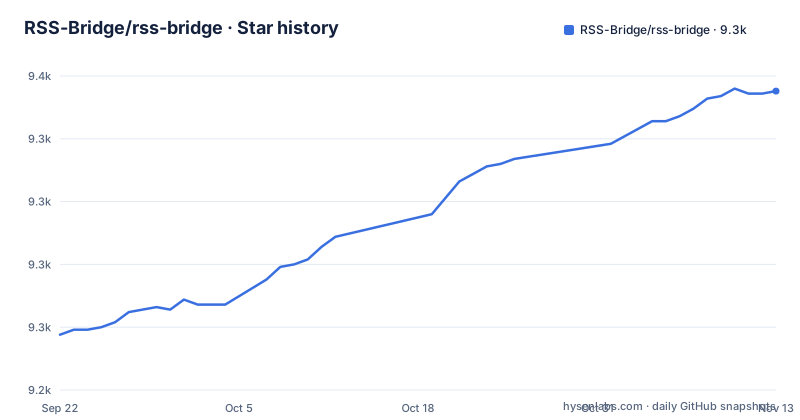
- RSS-Bridge/rss-bridge9,344 ★ · +97
| Repository | 2026-09-22 | 2026-11-13 |
|---|---|---|
| RSS-Bridge/rss-bridge | 9.2k | 9.3k |
97 Stars in the last 52 days, measured from the daily GitHub snapshot. Compare with other projects
Editorial analysis
447 bridges, of which the front page names a handful
The scale of the project is stated once, in the heading over the bridge list: a subset of bridges, 15/447. What follows is a mix of two different kinds of thing. Some entries scrape generically, CssSelectorBridge to scrape out a feed using CSS selectors and XPathBridge to scrape out a feed using XPath expressions, which means you can point the project at an arbitrary site without waiting for a dedicated bridge. Others are single-site adapters for named services, MastodonBridge for statuses from a Mastodon (ActivityPub) instance, TelegramBridge for posts from a public channel, RedditBridge for posts from a user or subredit with filtering options, RumbleBridge, SoundcloudBridge, TwitchBridge, and TikTokBridge. Three more reshape feeds you already have: FeedMergeBridge combines multiple feeds into one, FeedReducerBridge reduces a noisy feed by some percentage, and FilterBridge excludes or includes items by keyword. The consequence of the ratio is discovery: the README names only a fraction of the bridges, so the hosted instance or the bridges/ directory is where to find the rest.
The shared hosting zip is master, not a release
Two documented paths install two different pieces of code. For traditional shared web hosting the instruction is that RSS-Bridge can basically be unzipped into a web folder and should be working instantly, with the latest zip linked as the master branch archive at github.com/RSS-Bridge/rss-bridge/archive/refs/heads/master.zip, given as 2MB. For Composer the instruction is to install the latest release:
cd /var/www
composer create-project -v --no-dev --no-scripts rss-bridge/rss-bridge
The gap between them is the whole of your version control. The default branch was last pushed on 2026-11-02, while the most recent tagged releases are dated 2025-08-05, 2025-06-03, and 2025-01-26, so the unzipped copy can be months of unreleased commits ahead of the packaged one. Note also the two Composer flags: no-dev and no-scripts, which mean a packaged install arrives without development dependencies and without running the package's own scripts.
Every request runs inside 64M and 15 seconds
The PHP settings that actually bound a bridge are four lines:
; /etc/php/8.2/fpm/conf.d/30-rss-bridge.ini

max_execution_time = 15
memory_limit = 64M
A bridge is a scraper that fetches a page it does not control, parses it, and often follows redirects to reach it, and both of those steps are network bound rather than CPU bound. Fifteen seconds is short for a slow origin or a long redirect chain, and 64M is short for a feed with large entries, an inline image, or a bridge that holds several pages at once.
The pool respawns workers because memory leaks are expected
The FPM pool configuration states the workaround in its own comment:
; /etc/php/8.2/fpm/pool.d/rss-bridge.conf

[rss-bridge]

user = rss-bridge
group = rss-bridge

listen = /run/php/rss-bridge.sock

listen.owner = www-data
listen.group = www-data

; Create 10 workers standing by to serve requests
pm = static
pm.max_children = 10

; Respawn worker after 500 requests (workaround for memory leaks etc.)
pm.max_requests = 500
Two things follow. The pool is static with pm.max_children = 10, so concurrency is capped at ten simultaneous requests rather than scaled to load, and the instructions were tested on a fresh Debian 12 VM from Digital Ocean specified as 1vcpu-512mb-10gb at 5 USD per month, which is less memory than ten workers at a 64M limit could reach. And a worker is destroyed every 500 requests because leaks are treated as normal rather than fixed, so long-lived scraping through a single pool is the case the configuration is designed around. Nothing here describes what a request in flight loses when its worker is recycled.
Config edits need a restart, and the volume mount is the only live part
Three separate install sections repeat the same warning in bold: you must restart container for custom changes to take effect, and each one points at docker-entrypoint.sh for the details. The container is created with your configuration directory mapped in and nothing else:
# Create container
docker create --name=rss-bridge --publish 3000:80 --volume $(pwd)/config:/config rssbridge/rss-bridge
You can put a custom config.ini.php and your own bridges into ./config, and then you restart the container. There is no reload, no health endpoint, and no signal handling described for the PHP side, so the file you are editing is live on disk and inert in memory until `docker start rss-bridge` runs again. The compose file says the same thing in a different shape, with the latest tag and the same volume:
version: '2'
services:
  rss-bridge:
    image: rssbridge/rss-bridge:latest
    volumes:
      - ./config:/config
    ports:
      - 3000:80
    restart: unless-stopped
On a bare metal install the equivalent step is restarting php-fpm and nginx after linting both configurations.
The nginx server block matches exactly one path to php-fpm
The nginx file opens like this, and the shape of it explains the Caddy variant that follows it:
# /etc/nginx/sites-enabled/rss-bridge.conf

server {
    listen 80;

    # TODO: change to your own server name
    server_name example.com;

    access_log /var/log/nginx/rss-bridge.access.log;
    error_log /var/log/nginx/rss-bridge.error.log;
    log_not_found off;
The comments inside are the design. No root folder is set at the server level on purpose, static content is served from its own location with an alias to /var/www/rss-bridge/static/, and one exact match on / is handed to php-fpm through snippets/fastcgi-php.conf with the comment that it should only pass off when the location is exactly the root. Because almost nothing else is routed, the Caddy configuration has to state the leftover case explicitly:
example.com {
    root * /var/www/rss-bridge

    handle /static/* {
        file_server
    }

    handle / {
        php_fastcgi unix//run/php/rss-bridge.sock
    }

    handle {
        respond 404
    }
}
The catch for anyone adding a path of their own is that the entry point is index.php behind an exact root match, so a bridge URL that resolves to a different file path has no route and returns 404 by design.
PHP 7.4 is the floor while the walkthrough installs 8.2
The stated requirement is minimum PHP 7.4, and the server instructions install php8.2-fpm with php-mbstring, php-simplexml, php-curl, and php-intl. Those two facts coexist without comment. A minimum of 7.4 means every file has to parse on a runtime several releases behind the one in the tutorial, which constrains syntax and standard library use across all 447 bridges, and the repository carries a phpcompatibility.xml ruleset for the checker alongside phpcs.xml and phpunit.xml, so the constraint is enforced somewhere even though no policy document states which versions are actually supported or tested. The top-level tree also holds two cache directories, cache/ and caches/, plus separate directories for bridges/, formats/, lib/, middlewares/, templates/, static/, config/, contrib/, actions/, bin/, docs/, and tests/. Anyone planning to mount or clear state by hand should check which of the two cache directories is in use.
The container runs nginx inside it and patches a browser-named library
The image starts from a Debian slim base and installs a full web server rather than only PHP:
FROM debian:12-slim AS rssbridgeThe apt list includes nginx and php-fpm alongside php-curl, php-intl, php-mbstring, php-memcached, php-sqlite3, php-xml, and php-zip, with comments noting that php-json, php-opcache, php-openssl, and php-zlib are already enabled by default with PHP 8.2 in Debian 12. Then curl and patchelf are added for a purpose stated in the file: downloading and patching libcurl-impersonate, pinned with
curlimpersonate_version=1.2.5 && \and fetched as a per-architecture archive for aarch64, armv7l, and x86_64, each with its own sha512 sum. That library is the project's own acknowledgement that some sites do not answer an ordinary client. The other consequence is structural: with nginx inside the image, the host serves nothing, port 3000 maps to 80, and the bare metal guide's nginx and Caddy paths are alternatives to the container rather than layers in front of it.
Editorial conclusion
RSS-Bridge fits someone who needs a feed for one specific site today and can run a small PHP service, or who wants to write a bridge in CSS selectors or XPath and have it served beside the others. It does not fit an unattended dependency where a site changing its markup must not break your reader, because nothing in the documented setup watches a bridge after it starts working. Before deploying, confirm the bridge you need already exists on the hosted instance, read config.default.ini.php before copying it to config.ini.php, and decide whether installing master as a zip suits something you intend to keep running.
Frequently asked questions
What is RSS-Bridge?
RSS-Bridge is a PHP web application that generates web feeds for websites that do not have one, from a catalogue of 447 bridges. It requires minimum PHP 7.4, runs an officially hosted instance at rss-bridge.org/bridge01/, and takes developer discussion on the IRC channel #rssbridge at libera.chat.
How do I use RSS-Bridge?
Install it and request a feed for one of its bridges. On traditional shared hosting the project can basically be unzipped into a web folder, using the master branch zip linked from the README. On a Debian 12 server the tutorial installs nginx and php-fpm, clones the repository, and copies config.default.ini.php to config.ini.php as an optional step.
Is RSS-Bridge a better fit than RSSHub?
The README's opening sections do not compare RSS-Bridge with RSSHub. What RSS-Bridge states about itself is narrower: a PHP web application generating RSS and Atom feeds for websites that do not have one, with 447 bridges, of which the front page names a subset including generic scrapers built on CSS selectors and XPath.
What does RSS stand for in RSS-Bridge?
The closest thing to a definition in the repository is the label in the Dockerfile, which calls RSS-Bridge a PHP project capable of generating RSS and Atom feeds for websites that don't have one, and the repository description, which reads the RSS feed for websites missing it.
What is an example of a feed produced by RSS-Bridge?
Any of the 447 bridges turns a specific page into a feed. Named examples include TelegramBridge, which fetches posts from a public channel, MastodonBridge, which fetches statuses from a Mastodon (ActivityPub) instance, and YouTubeCommunityTabBridge, which fetches posts from a channel's Posts tab. A generic case is CssSelectorBridge, which scrapes out a feed using CSS selectors from a site that has no dedicated bridge.
Official sources
Add this badge to your README
If you maintain this project, the badge below links readers to this analysis and shows its maintenance status from the daily GitHub snapshot. Paste the markdown into your README; add ?metric=license or ?metric=stars to the image URL for a different field.

[](https://hysenlabs.com/projects/rss-bridge-rss-bridge)Star history chart for your README
[](https://hysenlabs.com/projects/rss-bridge-rss-bridge)Was this useful?