iSpotify for Windows and Linux: Local Music Search and Playback
Local-first desktop music search, playlist, download, and playback app for Windows and Linux
At a glance
- What is it?
- iSpotify is a PySide6 desktop application for searching, downloading, organizing, and playing music on Windows and Linux. It is aimed at users who want local library control, although downloads depend on externally accessible media and some features require cookies or an authorized Discord runtime.
- Who is it for?
- iSpotify fits users who want a local desktop library with search, MP3 downloads, playlists, and offline playback. It does not fit users who need a documented server-backed catalog, a fully self-contained source build with Discord account login, or assurance that every media download will work without platform authentication.
- Can I use it commercially?
- Yes. MIT is a permissive licence: you can use, modify and sell software built on it, as long as you keep its copyright and licence notices.
- Is it still maintained?
- Yes. The repository last received commits 11 days ago.
- What is it written in?
- Mainly Python, according to GitHub's language statistics.
Answers come from the project's GitHub data, last synced on October 23, 2026, and from our analysis. They are not legal advice.
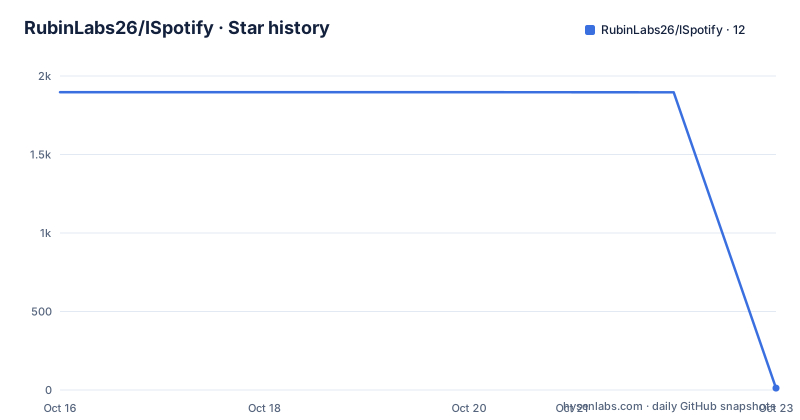
Star history
- RubinLabs26/ISpotify12 ★ · -1,885
| Repository | 2026-10-16 | 2026-10-23 |
|---|---|---|
| RubinLabs26/ISpotify | 1.9k | 12 |
-1,885 Stars in the last 7 days, measured from the daily GitHub snapshot. Compare with other projects
Editorial analysis
iSpotify's Local-First Music Workflow
iSpotify addresses a specific desktop gap: bringing music search, downloading, library organization, and playback into one application that stores its working data on the user's computer. It targets Windows 10/11 and Linux users, particularly people who want a local MP3 library rather than a web-only listening service. The application has no iSpotify account, project-operated server, analytics, or telemetry according to the README.
The feature set spans several stages of a music workflow. Users can search for songs and playlists, inspect playlist tracks, select multiple items for download, and then search or sort the resulting local library. Playlists, favorites, and recently played items are part of the desktop experience. Playback covers sequential MP3 playback, previous and next controls, seeking, volume, and automatic pause when headphones disconnect.
This is not a full streaming-service replacement in the documentation. The README describes discovery and downloads through the application's media layer, but it does not claim a complete licensed catalog or an offline copy of a commercial streaming subscription. The local-first claim refers to where application data and processing occur, not to a guarantee that every online source will be accessible.
Search, Download, and Library Architecture
The repository identifies PySide6 as the cross-platform desktop interface and yt-dlp as the media discovery and extraction component. This points to a local desktop flow in which the interface sends search or extraction requests, receives media information, and manages the resulting files. The README lists `yt-dlp[default]` in `requirements.txt`, while the build instructions also recommend Deno or Node.js for YouTube JavaScript challenges.
Downloads are represented as MP3 files and use a queue that survives restarts. The feature table documents live progress information, speed, ETA, and retry guidance. The Linux installer adds aria2 for resumable downloads, while the application documentation states that search, extraction, downloading, playback, and library management run on the local computer. This arrangement separates network-dependent acquisition from local organization and playback, but it also means that source availability and platform restrictions remain external dependencies.
Cookies are an explicit part of some download paths. Settings accepts a Netscape cookie file or a Cookie-Editor JSON export because YouTube may request sign-in or bot verification. The README advises treating an exported cookie file like a password and not sharing or committing it. The repository also includes `.env.example` entries for a local Discord bot configuration, but the application documentation distinguishes optional Discord authorization from ordinary playback and downloading.
Windows and Linux Installation Choices
iSpotify provides packaged options rather than requiring every user to build the Python application. The README lists an installer and portable executable for Windows 10/11, a DEB package for Debian or Ubuntu, a portable x86-64 Linux build, and a universal installer. The current stable release named in the README is `v19.5.1`, with checksums published beside standalone executables.
The installer supports a compatibility-only mode. The command below performs installation; add the documented `--check` option to inspect compatibility without installing.
curl -fsSL https://raw.githubusercontent.com/RubinLabs26/ISpotify/main/packaging/install-linux.sh | bashThat command is the documented installer invocation. To inspect compatibility before installation, the README specifies `--check`. Other documented options include `--repo`, `--standalone`, `--force`, `--yes`, and `--uninstall`. The installer detects `apt`, `dnf`, `yum`, `pacman`, `zypper`, `apk`, `xbps`, or `emerge`. On supported systems it can add a signed APT or pacman repository; other compatible glibc systems receive a portable user installation.
The portable Linux build has a stated platform boundary: x86-64 and glibc 2.36 or newer. Windows users can choose between the installer and portable executable, while Debian and Ubuntu users can use the listed DEB package.
Building iSpotify From a Source Checkout
Source installation is documented for Python 3.10 or newer. The following sequence creates a virtual environment, installs the repository requirements, and starts the application through `main.py`. The commands are copied from the README.
git clone https://github.com/RubinLabs26/ISpotify.git
cd ISpotify
python -m venv .venv
python -m pip install -r requirements.txt
python main.py
The dependency file pins major package ranges rather than exact versions: `PySide6>=6.12.0,<7.0.0`, `yt-dlp[default]>=2026.8.19`, `requests>=2.34.2,<3.0.0`, `imageio-ffmpeg>=0.6.0,<1.0.0`, and `keyring>=25.7.0,<26.0`. `imageio-ffmpeg` supplies an FFmpeg fallback when FFmpeg is not available on `PATH`. The README recommends Deno or Node.js for YouTube JavaScript challenges, so a source user may need that additional runtime for some media operations.
A successful first launch should present the desktop interface described in the screenshots, with local library and search areas. The documentation does not provide a scripted sample library or a reproducible first download, so the first real use depends on the user's network access and the media source being queried.
Cookies, Discord, and Local Data Boundaries
iSpotify does not require an account for its core library and playback features. Discord integration is optional. If the Discord desktop app is running, the application can publish listening status and the current track. Browser users can select `Connect Discord account` in Settings and authorize through Discord's official login page. The README says the application does not ask for a Discord password, bot token, or raw user token.
There is an important source-build limitation here. Official release packages include the Discord Social SDK runtime, but Discord's distribution terms prevent the repository from publishing that proprietary library. Therefore, source checkouts run without account login unless an authorized SDK runtime is supplied locally. This means Discord connectivity is not equivalent across every installation path.
Downloads, application data, library records, playlists, cookies, and credentials stay in operating-system user-data storage according to the README. The keyring component handles credentials. Interrupted Linux package downloads are kept in `~/.cache/ispotify/downloads` so aria2 can resume them. Cookie exports are sensitive because they can represent authenticated access, even though they are not iSpotify credentials.
Playback Features and Practical Failure Modes
The playback scope is concrete but focused on local MP3 files. The application supports sequential playback from the library, previous and next navigation, seeking, volume control, and automatic pause when headphones disconnect. Background update checks are also described as quiet, which suits a desktop music application that may remain open while the user works.
The largest practical limitation is that downloading is not guaranteed to be self-sufficient. YouTube can require sign-in or bot verification, so a user may need to import cookies. Source builds may also lack the Discord runtime required for account authorization. The documentation does not describe a fallback for every failed extraction, nor does it promise that all search results are downloadable.
The local-first design also has a boundary around catalog ownership. iSpotify can manage files that it downloads and organize them into a local library, but the README does not state that it grants rights to distribute those files. Users who need a guaranteed, licensed catalog should not treat the application as a substitute for a service that grants explicit access to its catalog.
A further distinction is operational. The application stores cookies and credentials locally, so a compromised user account or unsafe handling of a cookie export can affect authentication material. The README's security instruction is direct: treat the export as a password and never share or commit it.
iSpotify Versus a Server-Backed Music Service
iSpotify's main alternative is a server-backed music application that supplies its catalog, account state, recommendations, and playback access through a managed service. The difference is architectural. iSpotify performs search, extraction, downloading, playback, and library management on the user's computer, with no project-operated server described in the README. A server-backed service instead delegates catalog and account operations to an operator.
That difference favors users who want local MP3 files, playlists, favorites, and desktop control. It also transfers more responsibility to the user. The user must handle platform cookies, manage downloaded files, choose packages or build the source tree, and accept that media extraction may depend on `yt-dlp`, YouTube challenges, and changing online behavior.
The Discord feature is not a replacement for a core music service. It publishes listening activity when the desktop app or browser authorization path is available. Source builds without the authorized Discord Social SDK runtime cannot use account login, so Discord support is an optional integration rather than the foundation of the library.
Maintenance, Licensing, and Adoption Boundaries
The repository is not archived. Its last push was on 2026-10-12, and the README names `v19.5.1` as the current stable release. The recent release history includes `v19.5.0` and a continuous build. This is evidence of recent repository activity, but the README does not provide a long-term support policy or a compatibility promise for each dependency range.
The project uses the MIT license. That license identifies the repository's licensing basis, but users remain responsible for understanding whether their intended use of downloaded media is permitted by applicable content rights and other rules. The documentation does not make a legal claim about media usage, and the MIT license should not be read as granting rights to third-party music.
Adoption is most appropriate for someone who wants a local desktop library, accepts network-dependent search and download behavior, and is comfortable supplying cookies when a platform requests authentication. It is less suitable for someone who needs a guaranteed catalog, a server-operated account model, or identical Discord behavior across source and packaged installations. Before adoption, verify platform support, glibc requirements, cookie handling, FFmpeg availability, and the exact package or source path. The last push was on 2026-10-12.
Editorial conclusion
iSpotify fits users who want a local desktop library with search, MP3 downloads, playlists, and offline playback. It does not fit users who need a documented server-backed catalog, a fully self-contained source build with Discord account login, or assurance that every media download will work without platform authentication. Verify your platform, the available package format, your need for YouTube cookies, and whether the optional Discord runtime is acceptable before adopting it. The repository's last push was on 2026-10-12.
Frequently asked questions
Do I need an iSpotify account to use the application?
No. The README states that no iSpotify account is required. Discord authorization is optional and only enables listening activity.
Where does iSpotify store its library and application data?
Downloads and application data are stored in operating-system user-data folders. On Linux, interrupted package downloads are kept in `~/.cache/ispotify/downloads` so aria2 can resume them.
Why might a download ask for YouTube cookies?
YouTube may require sign-in or bot verification. iSpotify accepts a Netscape cookie file or a Cookie-Editor JSON export in Settings, and the README says to treat the export like a password.
Can I use Discord account login from a source checkout?
Not by default. Official release packages include the Discord Social SDK runtime, but source checkouts run without account login unless an authorized SDK runtime is supplied locally.
What are the requirements for the portable Linux build?
The README specifies x86-64 architecture and glibc 2.36 or newer. The build also uses `imageio-ffmpeg` as a fallback when FFmpeg is not available on `PATH`.
Official sources
Add this badge to your README
If you maintain this project, the badge below links readers to this analysis and shows its maintenance status from the daily GitHub snapshot. Paste the markdown into your README; add ?metric=license or ?metric=stars to the image URL for a different field.

[](https://hysenlabs.com/projects/rubinlabs26-ispotify)Star history chart for your README
[](https://hysenlabs.com/projects/rubinlabs26-ispotify)Was this useful?